
Have you ever wondered what makes your WordPress site secure when users log in? It’s all about the hash used to authenticate passwords.
Understanding which hash to use can feel like cracking a code. But don’t worry, you’re in the right place to decode it. Imagine having a lock that only the right key can open. In the digital world, that’s what password hashes do for your WordPress site.
They ensure that only authorized users can access your content, keeping intruders at bay. Choosing the right hash is crucial for your site’s security and integrity. If you’re keen to ensure your WordPress site is as secure as it can be, you’ll want to know the ins and outs of password hashing. This article will guide you through the process, helping you make informed choices for your site’s security. Stick around, and you’ll feel empowered to protect your site like a pro.

Credit: make.wordpress.org
Understanding WordPress User Authentication
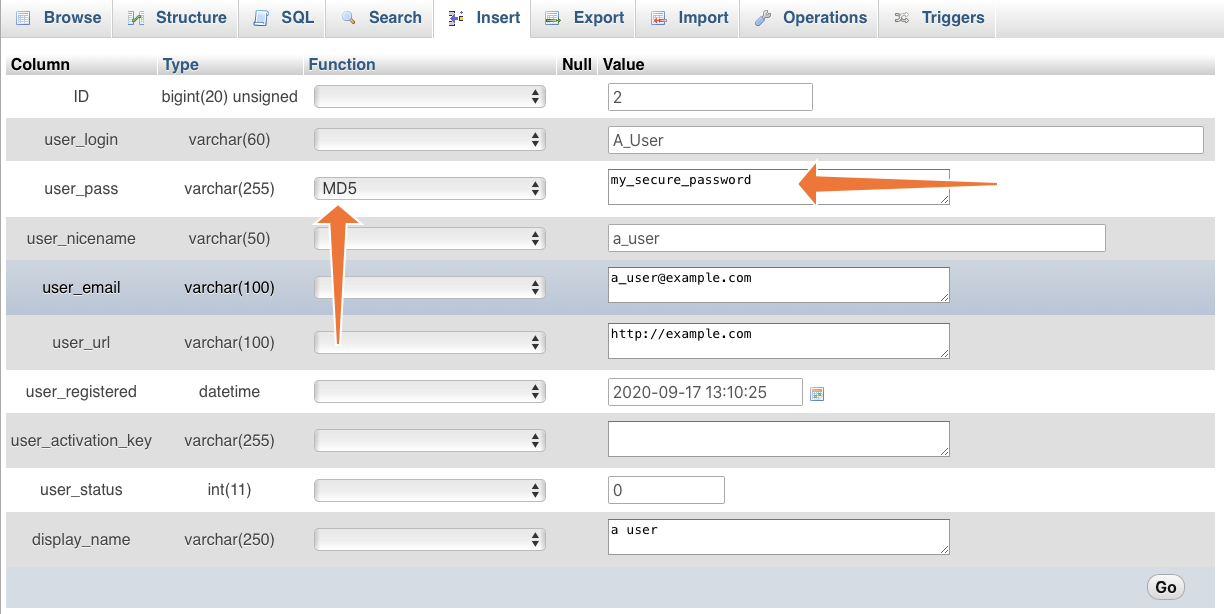
WordPress uses a special way to keep passwords safe. It uses a hashing method. This method changes the password into a code. The code is hard to read. Hackers find it tough to crack the code. WordPress often uses MD5 or bcrypt for hashing. MD5 is older but fast. Bcrypt is newer and much safer. Bcrypt adds a salt. Salt is a random string added to the password. It makes it harder for hackers. WordPress checks passwords using these hashes. It compares the stored hash with the entered password hash. If they match, the user is allowed. This keeps user accounts safe.
Importance Of Password Hashing
Password hashing keeps user data safe. It turns passwords into random strings. These strings are called hashes. Hackers find it hard to crack hashes. Without hashes, passwords are easy to steal. Hashing adds an extra layer of security. Users need this protection. WordPress uses strong algorithms for hashing. Algorithms like Bcrypt and Argon2 are popular. They make passwords tough to break. Always use strong hashes for safety.
Password safety is important for WordPress sites. Weak passwords lead to hacks. Strong hashes help prevent this. Choose the right hash for your site. Protect your users. Make sure their data is secure. WordPress offers good hashing options. Use them wisely.
Common Hashing Algorithms
MD5 is a popular hashing method. It is fast and easy to use. But, it has many weaknesses. It can be easily cracked. Hackers can find MD5 passwords quickly. This makes it unsafe for protecting passwords. Using MD5 is not a good idea for security.
SHA-1 is another hashing option. It is stronger than MD5. Still, it has its own problems. SHA-1 is not very safe now. Experts say it can be broken. It is better than MD5. But, not the best choice for secure passwords.
SHA-256 is a strong hashing method. It is much safer than MD5 and SHA-1. SHA-256 is hard to break. It keeps passwords safe. Many experts recommend using SHA-256. It is a good choice for security.
WordPress Default Hashing Method
WordPress uses bcrypt to secure passwords. It is a strong method. It helps keep user data safe. Bcrypt creates a unique hash for each password. This makes it harder to guess. Hackers find it tough to break in. Bcrypt is slow. This is a good thing. It stops fast attacks. Its strength lies in its unique salting process. Each password gets a different salt. This adds another layer of security.
Bcrypt has many cool features. It uses a technique called salting. Salting adds random bits to passwords. This makes them stronger. Another feature is its work factor. The work factor can be adjusted. This makes bcrypt future-proof. As computers get faster, bcrypt can stay strong. Bcrypt’s design helps protect against brute-force attacks. This makes it a trusted choice for WordPress.
Customizing Password Hashing In WordPress
Password security is very important. Default settings might not be enough. Hackers find ways to break weak passwords. Custom hashing adds more safety. It makes passwords harder to crack. Helps keep user data safe. Customizing hashing can be a smart choice. It protects sites from attacks. Enhances user trust and security.
- Learn about WordPress password hashing.
- Choose a strong hashing algorithm.
- Update your WordPress functions.php file.
- Test the new hashing method.
- Ensure compatibility with plugins.
- Monitor and update regularly.

Credit: developer.wordpress.org
Best Practices For Securing User Passwords
Salting makes passwords much safer. It adds a random string to each password before hashing. This unique salt means even if two users have the same password, their hashes are different. Salts protect against rainbow table attacks. Hackers can’t use precomputed tables to guess passwords. It also makes it harder to crack many passwords at once. Always use a unique salt for every password.
Hashing algorithms should be updated often. New methods come as technology improves. Old algorithms may become weak over time. Using strong, modern algorithms helps keep passwords safe. A secure hashing function like bcrypt is recommended. It adjusts hashing difficulty to stay strong. Regular updates prevent hackers from easily breaking through. Always choose the best option available for security.
Future Of Password Hashing In WordPress
Password hashing helps keep data safe. New technologies bring new ways to hash passwords. One such method is Argon2. It uses less memory and is faster. Another is Bcrypt. It has been safe for years. Security is very important for WordPress. So, using strong hashes is a must.
Many people think quantum computers will change hashing. These computers are very fast. They may crack old hashes quickly. So, new algorithms are needed. Experts predict better hashes will come soon. WordPress will need to adapt. Keeping user data safe is key. This means using the best hash available.
Credit: www.cpanel.net
Frequently Asked Questions
What Hash Algorithm Does WordPress Use For Passwords?
WordPress uses the bcrypt hashing algorithm for password authentication. Bcrypt is a secure and adaptive hash function. It is designed to be computationally intensive to resist brute-force attacks. WordPress implemented bcrypt starting with version 2. 5, ensuring enhanced security for user passwords.
How Does WordPress Verify User Passwords?
WordPress verifies user passwords by comparing the stored hash with the input password. When a user logs in, WordPress hashes the input password using bcrypt. It then checks if this hash matches the stored hash. If they match, access is granted, ensuring secure authentication.
Can You Change The WordPress Password Hash?
Yes, you can change the WordPress password hash by updating the hashing algorithm. Developers can customize this through plugins or code modifications. However, it’s crucial to use a secure, well-vetted algorithm. Any changes should be thoroughly tested to avoid compromising password security.
Is Bcrypt The Most Secure Hash For WordPress?
Bcrypt is one of the most secure hashing algorithms for WordPress. It is designed to be slow and resource-intensive. This makes it difficult for attackers to crack passwords through brute-force methods. Bcrypt’s adaptability to increasing hardware capabilities also ensures continued effectiveness.
Conclusion
Choosing the right hash is crucial for WordPress security. Use strong hashes to protect user passwords effectively. These hashes keep user data safe from hackers. WordPress recommends using bcrypt for strong protection. It offers a high level of security. Always keep your WordPress updated.
Updates improve security features regularly. Secure passwords and user data build trust. Your website’s reputation depends on it. With the right practices, protect your site efficiently. Keep learning about the latest security trends. This ensures your WordPress site remains secure and trustworthy.
Make security a priority for peace of mind.


