
Imagine you’re browsing your WordPress blog, organizing posts, when you stumble upon an intriguing option: “Make This Post Sticky.” What does that even mean, and why should you care?
If you’re looking to captivate your audience and ensure your most important content doesn’t get lost in the shuffle, understanding the sticky post feature is essential. This simple yet powerful tool can transform how your readers interact with your content, keeping key posts front and center.
Curious about how making a post sticky can boost your blog’s visibility and engagement? Stay with us, and you’ll discover how to leverage this feature to enhance your blog’s effectiveness. Whether you’re a beginner or a seasoned blogger, understanding this feature could be the game-changer your site needs.
Credit: rankmath.com
Understanding Sticky Posts
Sticky posts are special posts in WordPress. They stay at the top of your blog. Even if new posts come, sticky posts remain first. They are like a spotlight on important news. Readers see them first.
Sticky posts help highlight important information. They grab attention. They ensure everyone sees the key news. Sticky posts are useful for announcements. They make sure updates are not missed. They keep the focus on what matters.
Benefits Of Using Sticky Posts
Sticky posts stay at the top of your blog. This makes them easy to find. Readers see important posts first. Visibility is crucial for any blog. Sticky posts help with that. They make sure your key content is never missed.
Users like finding what they need quickly. Sticky posts help with this. They keep important content in sight. Readers engage more when content is easy to find. Engagement is important for a successful blog. Sticky posts make it easy for users to connect with your content.
How To Make A Post Sticky
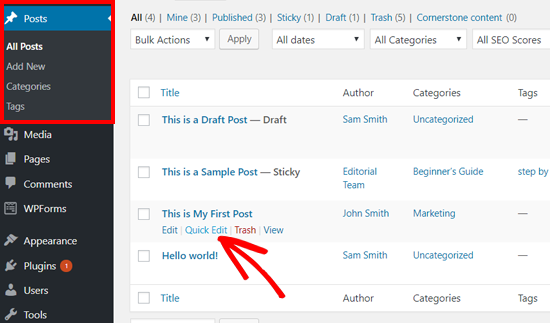
Open your WordPress dashboard. Click on Posts and find the post you want. Edit this post. On the right, find the Settings box. Look for the option called Visibility. Click on Edit next to it. Check the box that says Stick this post to the front page. Save your changes. Now, this post will stay at the top. Easy and quick!
Plugins can make sticky posts easier. First, go to Plugins in your dashboard. Click on Add New. Search for a plugin like Sticky Posts. Install and activate it. Now, follow the plugin instructions. It helps manage sticky posts. Some plugins offer more features. Explore the options and choose what suits you.
Credit: www.hostinger.com
Best Practices For Sticky Posts
Sticky posts stay at the top of your blog. They grab the reader’s attention. Use them for important announcements or special events. This helps keep your audience informed. Sticky posts are also good for highlighting popular topics. Readers will see them first. They should not be overused. Otherwise, the blog can look cluttered. Choose posts that are engaging and relevant. This keeps the reader interested and coming back.
Select content that is timely and important. Choose posts that solve common problems. Posts that share useful tips work well too. Highlight content that represents your brand. This builds trust with readers. Ensure the post is clear and easy to understand. Simple language helps readers follow along. Keep the message short and to the point. This makes sure readers do not lose interest. Sticky posts should add value to your blog. They should not just take up space.
Common Issues And Solutions
Making a post sticky in WordPress highlights it at the top of your blog. This feature ensures important content remains visible to readers. Sticky posts can be managed easily in the post settings, offering better visibility for key announcements or updates.
Sticky Post Not Showing
Sometimes, sticky posts do not appear on your blog. This can be frustrating. Check if the post is marked as sticky. Go to your post settings. Ensure the sticky option is selected. Clear your website cache. Cached data can hide changes. Disable plugins one by one. Some plugins might interfere. Update your theme. Old themes can cause problems. If nothing works, contact your hosting provider. They might help.
Reverting Sticky Posts
Making a post sticky is easy. Reverting it is simple too. Access your post settings. Find the sticky option. Uncheck the box to make it normal. Save your changes after unchecking. Your post will return to its usual spot. If it still appears sticky, clear your cache. Double-check your settings. Restart your browser. Sometimes, a fresh start helps. If issues persist, reach out for support.
Credit: www.wpbeginner.com
Alternatives To Sticky Posts
“Make This Post Sticky” keeps a post at the top of WordPress pages. Alternatives include featured posts, pinned content, or using widgets to highlight important information. These options offer flexibility in managing key content without relying solely on sticky posts.
Featured Posts
Featured posts highlight important content on a blog. They are usually at the top. This helps readers find them quickly. Bloggers choose which posts to feature. These posts are often about popular topics. They can also be special announcements. Featured posts attract attention easily. They are a great way to showcase key articles.
Pinned Content
Pinned content stays at the top of a page. It is like a sticky note. It reminds readers about important information. This method is used in forums and social media. Pinned content helps keep essential details visible. It ensures everyone sees them first. Bloggers use this for announcements or updates. It makes sure the message is clear and seen. It is a simple way to keep key info in focus.
Frequently Asked Questions
What Does “make This Post Sticky” Mean In WordPress?
In WordPress, making a post sticky means it remains at the top of the blog page. Regardless of the post’s date, it won’t move down as new content is added. This feature is useful for highlighting important announcements or featured articles.
How Do You Make A Post Sticky?
To make a post sticky, go to your WordPress dashboard. Edit the desired post, locate the “Visibility” option, and check “Stick to the front page. ” Save your changes, and the post will remain at the top.
Why Use Sticky Posts In WordPress?
Sticky posts are useful for drawing attention to important content. They ensure featured articles or announcements stay visible. This feature helps in promoting content you want visitors to see first, enhancing user engagement.
Can Multiple Posts Be Sticky At Once?
Yes, multiple posts can be made sticky simultaneously. Each sticky post will appear at the top of the blog page. This allows you to feature several important posts, ensuring they remain easily accessible to your readers.
Conclusion
Making a post sticky on WordPress keeps it at the top. This feature helps highlight important content for visitors. Sticky posts ensure readers see key information first. It’s simple to use and improves site navigation. By prioritizing content, you enhance user experience.
This can increase engagement and retention. Consider which posts deserve this attention. Use it wisely for the best results. Keep your site organized and user-friendly. Sticky posts are a useful tool in your WordPress toolkit. Try it out and see how it benefits your site!


