
Have you ever visited a website and found it easy to navigate? Chances are, that website had well-organized menus.
If you’re using WordPress, understanding menus is crucial for enhancing your site’s usability. But what exactly are WordPress menus, and why should you care about them? Imagine your website as a restaurant. Menus are like the signposts that guide your visitors to the right dish or, in this case, the right content.
They help your audience find what they’re looking for with ease and efficiency. A well-structured menu can keep your visitors engaged, leading them to explore more pages and increasing the time they spend on your site. This, in turn, can boost your site’s performance in search engines. Are you ready to transform your WordPress site into a user-friendly experience? Let’s dive into the essentials of WordPress menus and learn how you can use them to captivate your audience.
WordPress Menus Basics
WordPress menus help organize your website. They are easy to use. Menus make it simple for visitors to find pages. You can create custom menus. Change them anytime. Add items like pages, posts, and categories. Drag and drop them to rearrange. Keep menus neat and tidy. This improves user experience. Good menus help visitors stay longer. They also help search engines understand your site. Search engines like Google. This can improve your site ranking.
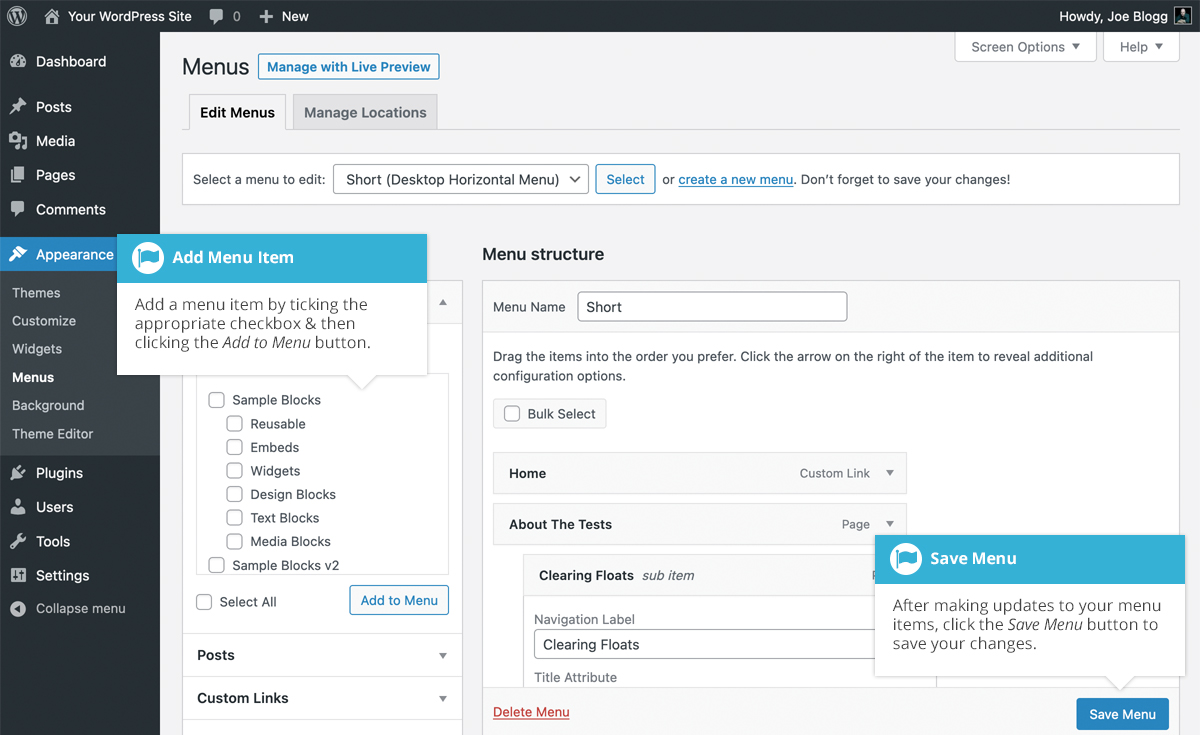
Menus are found under the Appearance tab. Click on Menus to start. You can name your menu. Add items using checkboxes. Save changes with a click. Preview your menu. See how it looks. Make adjustments if needed. Keep the menu simple. Avoid clutter. Focus on important pages. This helps users find what they need. A clear menu is key to a great website.
Creating A New Menu
To create a new menu, start in the WordPress dashboard. Look for the Appearance section on the left side. Click on Menus. This will open the menu editor. Here, you can start building your menu. It is easy and simple.
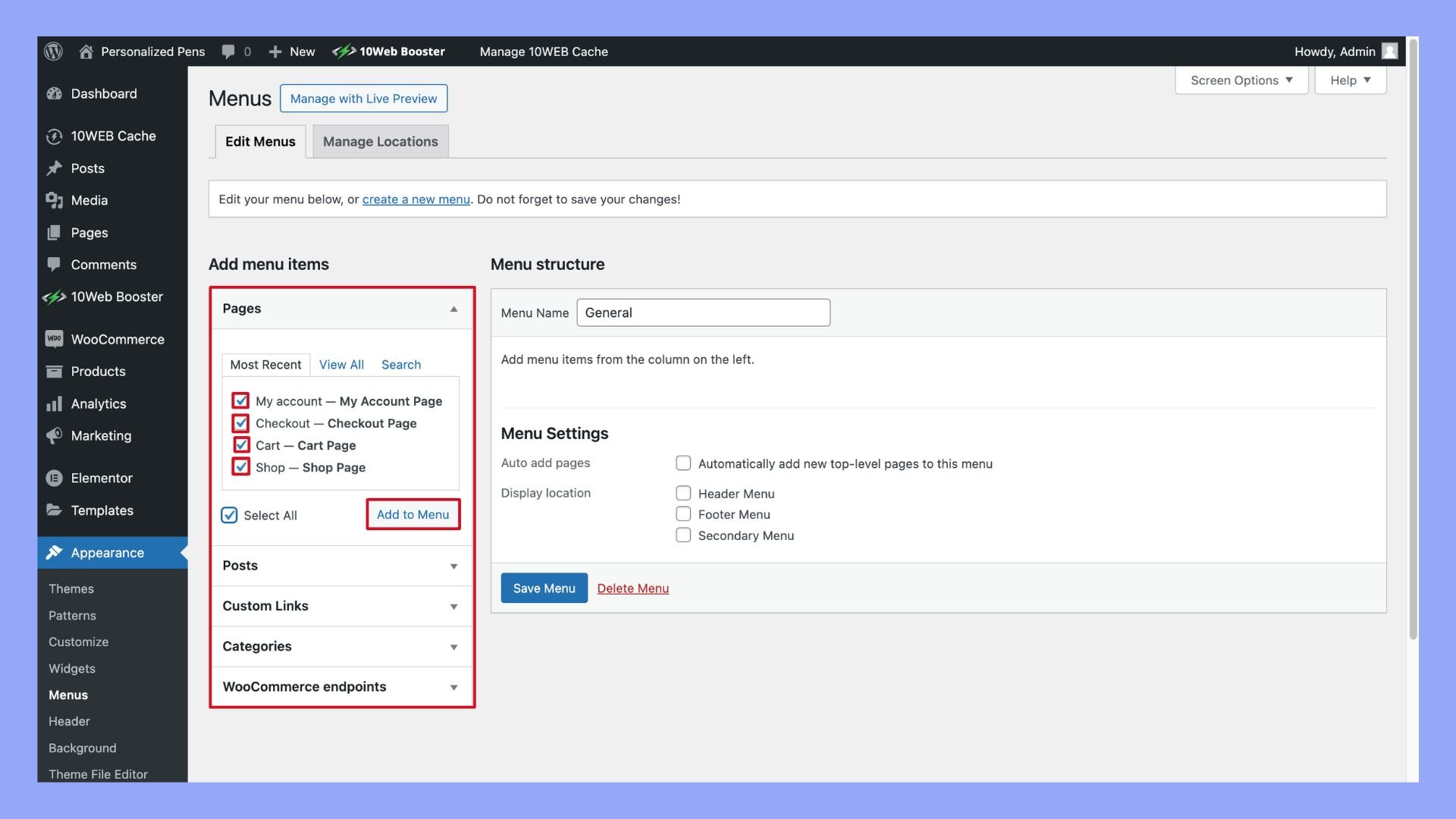
After opening the editor, you can add items. Look for Pages, Posts, or Custom Links. Choose what you want. Add it to your menu list. Items will appear on your website for visitors to see. You can also rearrange the items. Drag and drop them in place.
Customizing Menu Items
Drag and drop to change menu order. It is simple and quick. Move items up or down in the list. See the changes instantly. Arrange them by importance or preference. This helps users find content easily.
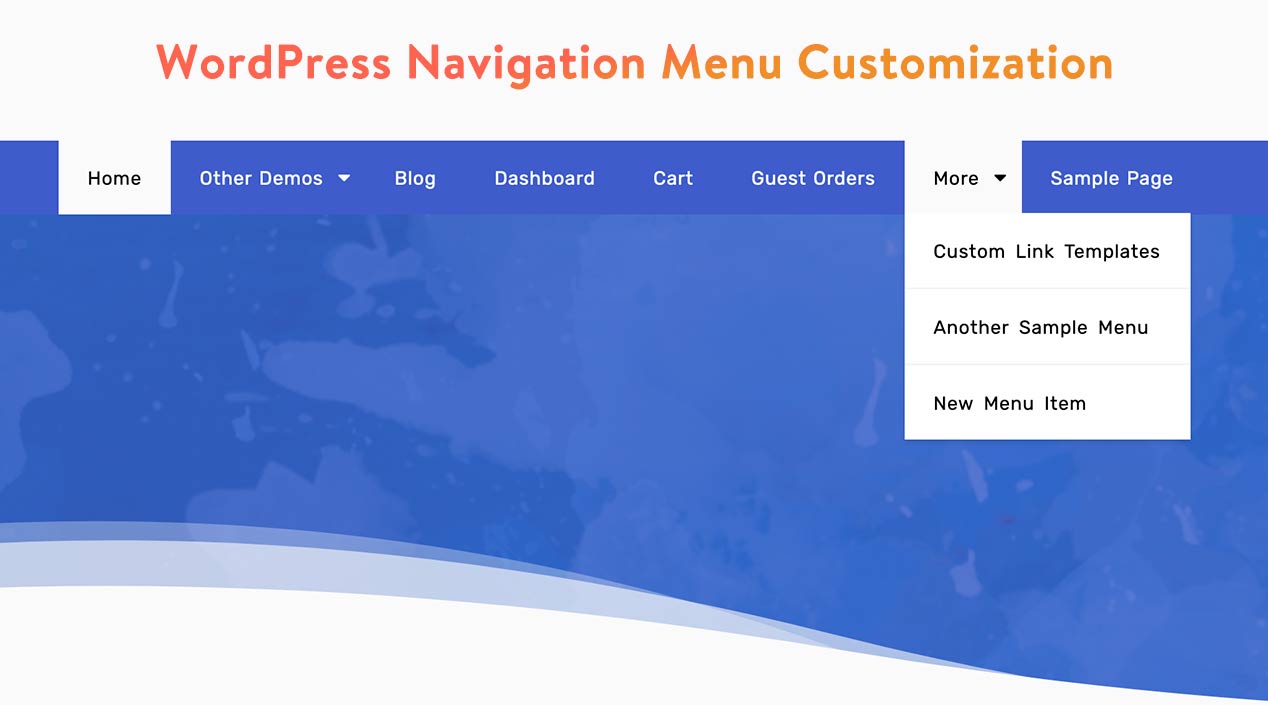
Submenus organize related links. They appear under main items. Submenus make navigation tidy. To add a submenu, drag an item slightly to the right. It becomes a child of the main menu item. This creates a dropdown list.
Change item names to be clear. Click the arrow next to the item. Type a new label in the box. Clear labels help users understand. Use simple words for easy reading. Make sure labels match the linked content.
Credit: easywpguide.com
Menu Locations
Menus in WordPress let you organize your site’s main navigation. Different themes have different menu locations. For example, a theme may support a top menu, a footer menu, or both. You can assign a menu to one or more of these locations.
Go to the WordPress dashboard and click on Appearance. Then select Menus. Here, you can choose which menu goes where. Select the menu you want to use. Then check the box next to the location you want. Click the Save Menu button when you are done.
Theme locations are spots where you can place a menu. Each theme has different locations. Some themes have only one. Others have many. It’s important to know what your theme supports. You can check this under the Menu settings in your dashboard. Choose wisely to make your site easy to navigate.
Advanced Menu Features
WordPress menus organize site navigation, enhancing user experience. Advanced menu features allow for dropdowns and custom links. These features improve site structure and accessibility.
Using Custom Links
Custom links let you add unique URLs to your menu. This feature helps direct visitors to specific pages. You can link to external sites or special landing pages. Enter the URL and label for the link. The label is what users see. This process is simple and quick. It gives flexibility to your menu design. Custom links can improve navigation. Make sure links are clear and easy to understand. This ensures users know where they are going. Always check the links to avoid errors. Broken links can confuse users.
Adding Css Classes
CSS classes let you style menu items easily. Adding CSS classes is simple. It helps change the look of your menu. You can make items bold or colorful. This feature enhances design. It also helps highlight important items. To add a class, go to menu settings. Enter the class name in the box. Ensure classes match your theme’s styles. This keeps your menu looking good. Use CSS classes wisely. Too many styles can clutter your menu. Keep it neat and easy to read.
Credit: www.wpdownloadmanager.com
Plugins For Menu Enhancement
Plugins can make WordPress menus better. Some plugins are very popular. They help users make menus look nice. They also add new features. One famous plugin is Max Mega Menu. It lets users create big menus. These menus can show many links. Another plugin is UberMenu. It offers many design options. It is easy to use. There is also WP Mobile Menu. It helps create menus for phones. This plugin is simple and effective. Many people like it.
Menu plugins can do more than just look good. They add special functions. Some plugins let users add icons to menu items. Others allow for custom styling. This means users can change colors and fonts. Some plugins support different languages. This helps make websites friendly for everyone. Custom links can be added too. This makes navigating websites easy. Menu plugins are helpful tools.
Troubleshooting Menu Issues
Menus in WordPress help users navigate websites easily. These menus are customizable, allowing you to add pages, categories, or links. Troubleshooting menu issues often involves checking settings, themes, or plugins for conflicts, ensuring your navigation remains smooth and user-friendly.
Common Problems
Sometimes menus might not show up in WordPress. This can be frustrating. One common issue is a broken link. This happens if a page link is wrong. Another problem is the menu might be missing. This usually happens if it is not assigned. Assign it in the theme settings. Sometimes, the menu displays the wrong order. Fix this by arranging items in the menu settings.
Fixing Display Errors
Menus can look strange on some devices. Responsive design is key here. Ensure your theme supports it. Check the menu alignment. Sometimes it shifts to the side. You can fix this with CSS. Always clear your browser cache. This helps see the latest changes.
Credit: 10web.io
Frequently Asked Questions
What Are WordPress Menus Used For?
WordPress menus help navigate your website by organizing links to pages, posts, and categories. They enhance user experience and site organization. Menus make it easier for visitors to find content quickly.
How Do I Create A Menu In WordPress?
To create a menu, go to your WordPress dashboard, click on “Appearance,” and select “Menus. ” Add pages, posts, and custom links to your menu. Save your menu and assign it to a location for it to display on your site.
Can I Customize WordPress Menus?
Yes, WordPress allows you to customize menus by adding or rearranging items. You can also create dropdowns for better organization. Many themes support styling options, giving you flexibility in design.
How Do I Add Pages To A WordPress Menu?
In your WordPress dashboard, navigate to “Appearance” and select “Menus. ” From there, you can choose pages to add to your menu. Simply select the pages you want and click “Add to Menu. “
Conclusion
Menus play a key role in WordPress websites. They guide visitors. Easy navigation boosts user experience. Menus help organize content effectively. They make websites look neat and professional. Setting up menus is simple. Even for beginners. Customize them to suit your needs.
Use them to highlight important pages. Keep them concise. Clear menus enhance user satisfaction. They encourage visitors to explore more. An effective menu structure can increase engagement. So, take time to plan them well. Your website will benefit greatly.


