
Are you diving into the world of WordPress and feeling a bit overwhelmed by all the jargon? You’re not alone.
One term you might stumble upon is “class for posts. ” But what does it mean, and why should it matter to you? Understanding the class for posts in WordPress can be a game-changer for your site’s design and functionality.
It can make your posts not just look better but also engage your audience more effectively. We’ll break down what the class for posts is, why it’s crucial for your WordPress site, and how you can leverage it to enhance your blog or website. Stick with us, and by the end, you’ll have a clear roadmap to making your WordPress posts stand out like never before.
WordPress Post Classes
WordPress post classes help style your blog. They give each post a special look. These classes use CSS. CSS means Cascading Style Sheets. It controls how things look on the web. Post classes change the appearance of posts. They make them look nice. You can also add your own styles. This makes your site unique.
WordPress has some default post classes. These include class names like “post”, “entry”, and “sticky”. Each class has a different use. The “post” class is for regular posts. The “entry” class is for the main content. The “sticky” class highlights important posts. You can use these classes to make your site look better. Easy and simple!
Credit: dribbble.com
Customizing Post Classes
Post classes help style your content. You can add custom classes to posts. This makes them unique. To add a class, use WordPress filters. These filters are like magic tools. You can do this in the theme’s functions file. It’s easy and fun. Just add a small code snippet. It helps change the look of your posts. Make sure to test changes. This ensures your site looks good. Use simple names for classes. This helps you remember them.
Sometimes, default classes don’t fit. You might want to remove them. Use WordPress functions for this. They are handy helpers. First, find the classes you don’t like. Then, write a small code to remove them. This will clean up your post styles. Your posts can look neat and tidy. Always check your work. This ensures everything works well. Customizing is easy and fun. Enjoy making your site better!
Using Post Classes In Themes
Themes use post classes to make posts look nice. They help add style to each post. You can change colors, fonts, and sizes with these classes. Designers use them to make posts look unique. They add personality to your blog. Easy to use for all themes. Just add the class name in your CSS file. Then your posts will get styled. This makes your blog look more fun and cool.
Conditional logic decides which classes to use. It checks post type and status. If a post is new, it gets one class. If a post is old, it gets another. This way, posts can have different looks. You can use logic in your theme files. This helps make your blog more dynamic. Users see different styles based on post conditions.

Credit: metabox.io
Post Classes And Seo
Post classes in WordPress help improve SEO. They add extra HTML classes to each post. These classes make your site easier for search engines to understand. Search engines find content faster with these classes. They help in organizing and categorizing your posts better.
Use the right classes for better SEO. Classes can show the post type and status. They help in highlighting important content. Custom classes can also be added for more specific needs. This can enhance your site’s visibility in search results.
- Use descriptive classes for posts.
- Ensure classes are unique for each post.
- Keep class names short and simple.
- Regularly update classes for new posts.
- Ensure all classes are SEO-friendly.
Troubleshooting Post Classes
Discover the purpose of WordPress post classes to enhance your site’s design and functionality. These CSS classes automatically style posts based on categories, tags, or other attributes. Troubleshooting post classes ensures your WordPress theme displays posts correctly, improving user experience and site aesthetics.
Common Issues
Post classes in WordPress can sometimes act strangely. Missing classes might cause layout issues. Extra classes could clutter your code. These problems often come from theme conflicts or plugin interference.
Check if your theme supports post classes. Some themes override default settings. This might remove or add classes. Review theme documentation for details.
Debugging Tips
Inspect your page using browser tools. Right-click on the element and choose “Inspect”. Look at the post class section. It shows active classes.
Deactivate plugins one by one. This helps find any plugin causing issues. Re-enable plugins after testing. Update your theme regularly. Outdated themes might not support new features.
Use a child theme for changes. It prevents losing edits during updates. Back up your site before troubleshooting. This ensures you can restore if needed.
Advanced Techniques
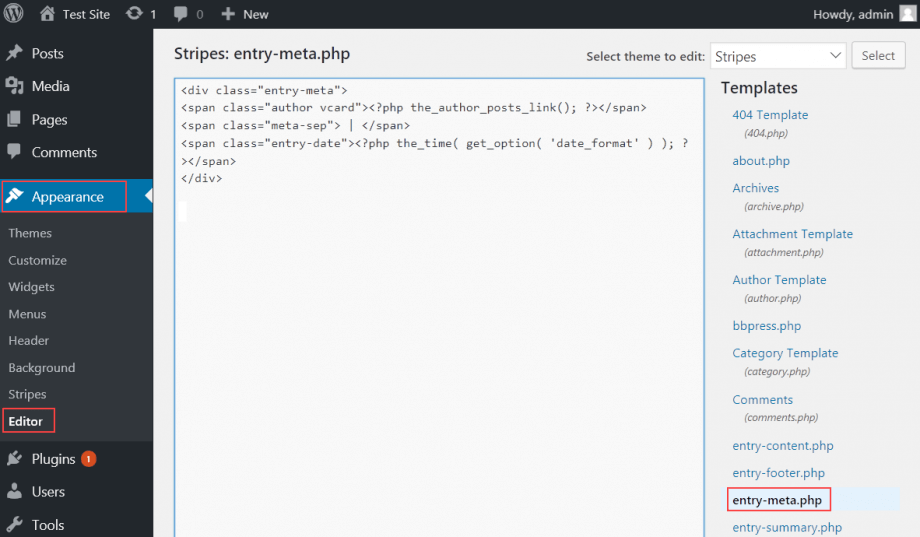
WordPress lets you add dynamic classes to your posts. This makes your site look good. Use code to change classes. This is helpful for different types of posts. For example, add a class to highlight new posts. This helps users find them easily. Customize your site’s style with these classes. Your site will be unique and stand out.
Plugins can add extra features to WordPress. They can also add special classes to posts. This makes your site more fun to use. Some plugins change how posts look. Others add new tools for users. Always pick trusted plugins. They keep your site safe and smooth. Check plugin reviews before adding them. This helps avoid problems later.
Credit: www.hostpapa.com
Frequently Asked Questions
What Is The Class For Posts In WordPress?
In WordPress, the class for posts is typically `post`. It’s used for styling and functionality. This class helps in targeting posts with CSS or JavaScript. It’s crucial for customizing the appearance and behavior of posts on your WordPress site.
How Do I Find WordPress Post Classes?
To find WordPress post classes, inspect your site using browser developer tools. Right-click on a post and choose “Inspect. ” You’ll see the classes assigned to each post in the HTML structure. This helps in identifying the `post` class for customization.
Why Are WordPress Post Classes Important?
WordPress post classes are important for styling and functionality. They allow you to target specific posts with CSS and JavaScript. This customization enhances the user experience and design of your WordPress site, making it more visually appealing and functional.
Can I Customize WordPress Post Classes?
Yes, you can customize WordPress post classes using CSS or plugins. By targeting the `post` class, you can change the appearance and behavior. This allows for personalized styling and functionality, improving your site’s aesthetics and user engagement.
Conclusion
Understanding WordPress post classes simplifies your web design process. They guide how elements appear on your site. Customizing these classes enhances user experience. Better design means more engagement. More engagement boosts your site’s success. Remember, even small tweaks can make a big difference.
Experiment with different classes. See what works best for your needs. Keep learning and adapting. Your website will thank you. Happy designing!


