
Do you ever wonder about the impact of visuals on your WordPress site? The feature image on WordPress is a powerful tool that can transform the way your audience interacts with your content.
Imagine scrolling through a blog and having a captivating image grab your attention before you even read a single word. That’s the magic of a well-chosen feature image. Not only does it make your content more attractive, but it also plays a crucial role in SEO, helping your site stand out in search results.
Curious about how you can harness this tool to boost engagement and drive more traffic to your site? Stay with us as we delve into the ins and outs of the feature image on WordPress, revealing how it can be a game-changer for your online presence.
Role Of Feature Image
A feature image grabs attention fast. It sits at the top of a post. This image is the first thing people see. It pulls readers in. A good image can make your post stand out. It often shows what the post is about. Visuals are strong. They tell stories without words. Feature images are like book covers. They tease the content inside.
They set the mood for the post. Bright images make a post feel happy. Dark images make it feel serious. Readers decide to click or scroll based on the image. Websites use feature images to keep things organized. It helps with branding too. It makes your posts look more professional. Choose images wisely. They matter a lot.
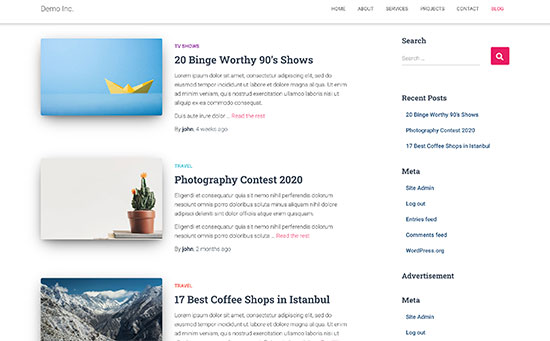
Credit: www.wpbeginner.com
Visual Appeal
Feature images catch the eye. They stand out on a webpage. Large and colorful, they grab attention. Visitors notice them first. They make people curious. They want to know more. This boosts clicks and visits. Images speak louder than words. They tell a story quickly. They make content more engaging. Readers stay longer. They explore deeper. A strong feature image is key. It turns visitors into readers.
Beautiful images make a page look better. They add style and color. They create harmony with text. Images create mood. They set the tone. They make content feel alive. Aesthetic appeal draws people in. It helps brand identity. It makes a site memorable. People return to sites they like. Good images help with this. They make a site look professional. They show care in design.
Impact On Seo
Adding a feature image on WordPress can boost your site’s SEO. This image can be optimized to make your website load faster. Use the right image size and format for better performance. Compress images to reduce file size. Choose relevant and descriptive file names. This helps search engines understand the image. Use alt text to describe the image content. This improves accessibility and helps in search rankings.
A feature image can improve your site’s search rankings. It grabs attention and increases click rates. A well-chosen image makes your post more engaging. Use high-quality images that relate to your content. This helps to keep visitors on your page longer. Longer visits can lead to better search rankings. Make sure your image is relevant to your post topic. This ensures your content is seen by the right audience.
Social Media Sharing
Feature images grab attention on social media. They help posts stand out. People notice bright and clear pictures. More clicks happen because of good images. They make people curious. A good image tells a story. It shows what the post is about. This is why images matter so much. They lead to more clicks and shares.
Images can boost click-through rates. They make people want to learn more. A strong image can be the reason someone clicks. It serves as a first impression. If it’s nice, people will be interested. They might click to read the full content.
Make content easy to share with images. People like to share fun or useful things. If a post has a great image, people will share it more. This helps the post reach more people. Images make content more engaging. They make the content memorable and interesting.
Brand Identity
The feature image on WordPress helps keep your brand’s look the same. When visitors see the same style, they remember your brand. This makes your site look smart and well-organized.
A strong feature image supports your brand message. It shows what your brand stands for. The image tells a story. It lets visitors know your brand’s purpose.
Use images that match your brand’s colors and theme. This helps visitors understand your brand better. They see the image and feel your brand’s vibe.
Credit: www.youtube.com
User Experience
Feature images help users find their way. They act as clear signposts. People see them first. They help guide the eye. Users know where to click next. They make browsing easy.
Images are like maps. They show users where to go. Users follow them without thinking. They help users move through content smoothly. They make sites feel friendly.
Images break up text. They give eyes a rest. Long paragraphs can be tiring. Images make them less daunting. Users feel less overwhelmed. They make reading easier.
Best Practices
The feature image is the first thing people see. It should be clear and catchy. Choose an image that fits the blog’s topic. This helps readers know what to expect. The image should be of high quality. Blurry images make the blog look bad. Use colors that match the blog’s theme. This makes the blog look neat and organized. Avoid using too much text on the image. Keep it simple and clean.
Quality and relevance are key for a good feature image. Always use images that are clear and sharp. This gives a good impression to readers. Pick images that relate to the blog content. This keeps readers interested. The image should tell a story or give a hint about the blog. This makes readers curious to read more. Avoid using random images that don’t match the topic. This confuses readers.

Credit: www.youtube.com
Frequently Asked Questions
What Is The Feature Image In WordPress?
The feature image in WordPress is a prominent image representing a post or page. It visually highlights content and enhances engagement. Feature images often appear at the top of a post and in thumbnails. They help convey the theme of the content and attract reader attention.
How To Set A Feature Image In WordPress?
To set a feature image in WordPress, navigate to the post or page editor. Locate the “Featured Image” box, usually on the right side. Click “Set Featured Image,” select or upload your desired image, and click “Set Featured Image” again.
Update or publish your post to save changes.
Why Use Feature Images In WordPress?
Using feature images in WordPress enhances visual appeal and attracts readers. They provide a quick visual summary of your content. Feature images improve user engagement and can boost click-through rates. They also help in establishing a consistent aesthetic across your website.
Can Feature Images Affect Seo?
Yes, feature images can impact SEO positively. They increase user engagement, which can improve rankings. Properly optimized images with alt tags and descriptive filenames boost search visibility. Feature images also enhance social sharing, leading to more traffic and potential backlinks.
Conclusion
Feature images in WordPress enhance your posts. They catch the reader’s eye. This boosts engagement and attracts more views. Simple to add and manage. They offer a visual identity to your content. Choose images that reflect your topic well. This ensures consistency and improves user experience.
Properly sized images load faster. This enhances your site’s performance. Remember, the right image can make a big difference. It highlights your message and connects with your audience. So, take time to select meaningful images. Your readers will appreciate it.


