
Have you ever wondered why your WordPress site sometimes seems to slow down or why certain data doesn’t update as quickly as you’d like? The secret might lie in something called “transient options” in your database.
Understanding these can be a game-changer for optimizing your website’s performance. Imagine having a tool that can not only speed up your site but also make managing temporary data a breeze. Intrigued? You should be. We’ll dive into what transient options are, why they matter, and how mastering them could give your WordPress site the edge it needs to keep visitors engaged and coming back for more.
Get ready to unlock the potential of your database and revolutionize how your site handles data.
Credit: themeisle.com
Transient Options Basics
Transient options are temporary data stored in the WordPress database. They save information that you need for a short time. This helps make your site faster. Transients are great for caching data. They can store API responses or expensive queries. Each transient has a name and time limit. After the time limit, the transient disappears. This keeps your database clean. Transients are useful for reducing server load. They make sure your website runs smoothly.
Transients use a simple process. First, data gets stored with a unique name. Then, you set how long the data should stay. WordPress checks the time limit when you access data. If the time is up, WordPress removes the data. This process repeats for each transient. Keeping data short-term helps speed up your site. Transients reduce the need for repeated database calls. This saves resources and improves site performance.

Credit: wpengine.com
Benefits Of Using Transients
Transients help make WordPress faster. They store temporary data. This means your site does not need to fetch data all the time. It helps in speeding up page loads. A faster website keeps visitors happy. Search engines also like fast websites. Better speed can improve your site ranking.
Transients lower the load on your database. Less load means less work for your server. This can save resources. It also helps in handling more visitors at once. Your site can handle traffic spikes better. This is important during sales or events. Transients make your site more stable.
Setting Up Transients
Transients store temporary data in WordPress. This data is stored with a name, value, and expiration time. Create transients using the set_transient() function. The function takes three arguments. Use this function to save data temporarily. This helps reduce database load.
Use the get_transient() function to retrieve transients. This function needs the transient’s name. If the transient exists, it returns the value. If not, it returns false. This helps check if the data is still valid.
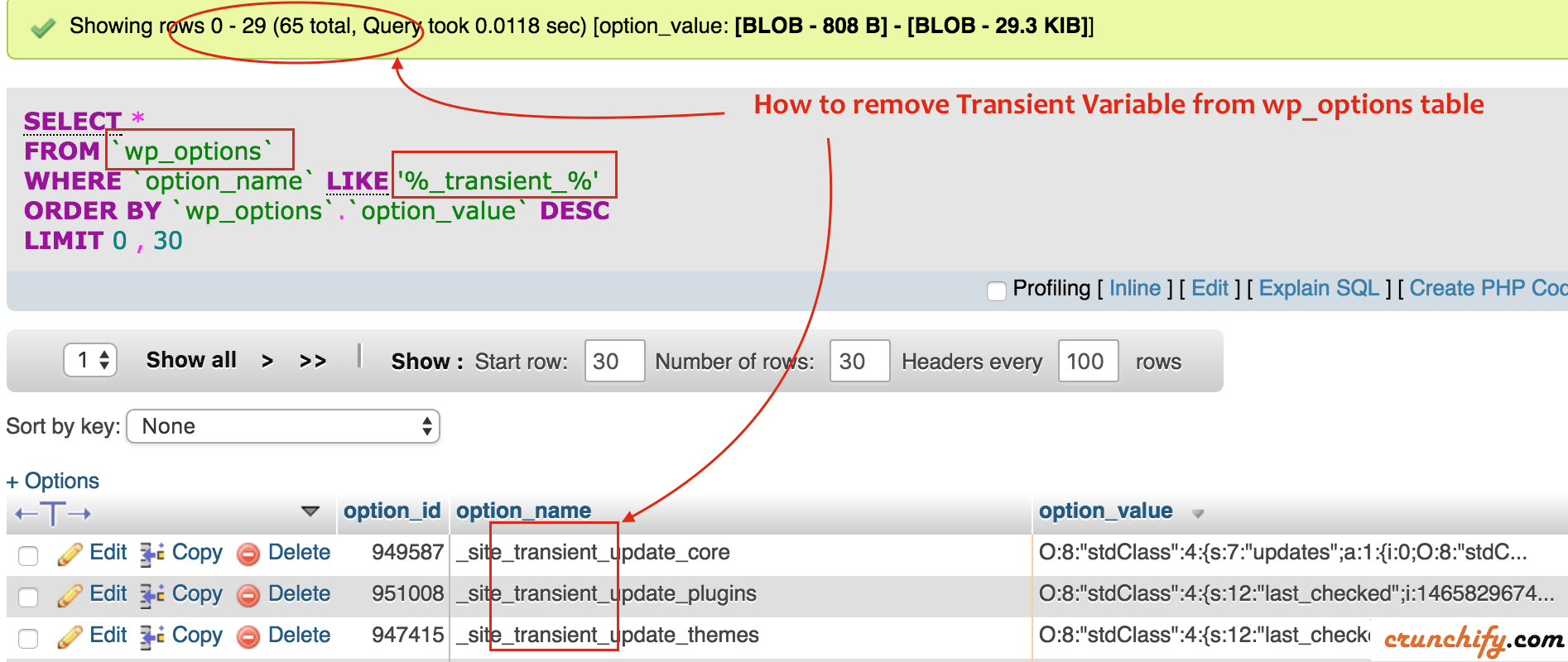
The delete_transient() function removes transients. Specify the transient’s name to delete it. This cleans up expired data from the database. Use it when data is no longer needed. It ensures a tidy database.
Use Cases For Transients
Transients help in caching API calls. This makes your website faster. Websites can store API data for a short time. This reduces the need to call the API often. It saves time and resources. Users get a quick response. Websites work smoothly.
Temporary data is stored using transients. It is useful for limited-time offers. Your site can store data for minutes or hours. After that, data disappears. No need to keep it forever. Saves space and keeps the site tidy.
Transients improve the user experience. They help load pages quickly. Visitors enjoy smooth browsing. Users stay longer. Happy users come back often. Fast websites keep users engaged. Everyone likes a fast website.
Managing Transients
Transients in WordPress are temporary data stored in the database. Expiration defines how long they exist. After this, they are cleaned up. Cleaning helps keep the database tidy. It removes expired transients. This saves space. WordPress handles this task automatically. But sometimes, manual cleanup is needed. This ensures expired data doesn’t stay too long. Plugins can assist with cleanup. They can be set up to delete old transients regularly. This process keeps the site fast and efficient.
Expired transients can slow down your website. They take up space in the database. Regular checks are important. This keeps your site running smoothly. Plugins can help in managing expired transients. They can find and remove them. This can be done automatically or manually. Cleaning expired transients improves site speed. It’s a simple way to maintain your WordPress site.
Common Pitfalls
Managing transient options in a WordPress database can lead to common pitfalls. Unused or expired transients can clutter the database, slowing down performance. Regularly clean and monitor these options to maintain a smooth-running site.
Overusing Transients
Transients store temporary data in the database. They help speed up your site. But using too many can slow things down. Each transient takes space. Too many can fill your database. This makes your site run slow.
Transients are great for short-term storage. Avoid using them for long-term data. They are meant to be temporary. It’s wise to use them sparingly. Save only what you need. This keeps your database clean and fast.
Ignoring Expiry Times
Expiry times tell your database when to clear a transient. Without them, old data stays forever. This can clutter your database. Old transients use space and slow your site. Always set expiry times. This ensures your database stays tidy.
Think about how long you need the data. Set a sensible time limit. Clear out unneeded data. This helps keep your site running smoothly. A clean database is a fast database.
Tools And Plugins
Many plugins help manage transients in WordPress. Some plugins are very popular. They make managing transients easy. Transients Manager is a well-known plugin. It allows you to view and delete transients quickly. Another useful plugin is WP Optimize. It cleans your database and manages transients. These plugins help keep your site running smoothly.
WP-CLI is a command line tool for WordPress. It helps in managing transients efficiently. You can use simple commands to delete transients. This saves you time and effort. It is a powerful tool for developers. WP-CLI is handy for those who know coding. It makes transient management fast and easy.
Credit: crunchify.com
Frequently Asked Questions
What Are Transient Options In WordPress?
Transient options are temporary data stored in your WordPress database. They help speed up your website by caching data for a specific time. This reduces the need to repeatedly fetch data from the database, improving performance. Transients automatically expire after their set time, ensuring your site stays fresh.
How Do Transients Improve Website Performance?
Transients improve performance by reducing database queries. They store temporary data, allowing quick access without repeatedly querying the database. This speeds up page load times and enhances user experience. By caching data for a set period, they help optimize server resources and manage traffic efficiently.
Can Transient Options Be Deleted Manually?
Yes, you can manually delete transient options. Use a plugin or custom code to clear expired transients. This helps free up database space and maintain optimal performance. Regularly clearing expired transients ensures your website runs smoothly without unnecessary database clutter.
How Long Do Transients Last In WordPress?
Transients have a set expiration time in WordPress. Their lifespan varies based on the developer’s settings. Typically, they expire in seconds, minutes, or hours. Once expired, they automatically delete, ensuring your site remains updated. You can customize expiration times to suit your website’s needs.
Conclusion
Transient options in WordPress databases play a crucial role. They store temporary data for a specific time. This feature helps improve website speed and performance. Understanding their function can enhance your site’s efficiency. Regularly managing these options prevents database clutter.
This keeps your WordPress site running smoothly. Keep an eye on expiration times to avoid issues. Using plugins can simplify transient management. Ensure your site remains fast and responsive. Consider learning more about database optimization. This knowledge benefits your site’s performance and user experience.
Keep exploring and improving your WordPress skills.


