
Have you ever stumbled upon a website and wondered, “What WordPress plugin is this site using?” You’re not alone.
With countless plugins available, discovering the right ones can feel like searching for a needle in a haystack. But what if you could unveil the secrets behind any site’s plugins, enhancing your own website with proven tools? Imagine the possibilities: boosted performance, sleek design, and optimized user experience.
This curiosity could be your game-changer. Let’s unlock the hidden potential of your site and reveal the plugins that can transform your digital presence. Keep reading, and we’ll guide you on this intriguing journey.
Identifying WordPress Plugins
There are several ways to find out what WordPress plugins a site uses. One simple way is to check the page source. Right-click on the web page, then select “View Page Source.” Look for lines that say “wp-content/plugins.” These lines often reveal plugin names. Another method is using online tools. Websites like “WhatRuns” help identify plugins. Install their browser extension. Visit the site you want to check. The tool lists the plugins in use.
Various tools can aid in identifying WordPress plugins. BuiltWith is a popular tool. It analyzes sites and shows plugin details. Wappalyzer is another tool. It provides information about plugins and other technologies. Both tools offer free and paid versions. They are easy to use. Just enter the website’s URL. Then, the tool provides the needed information. These tools save time and effort.
Using Browser Extensions
Discovering the WordPress plugins used by a site becomes simple with browser extensions. These tools reveal plugin names directly in your browser. Enhance your web browsing experience by unlocking insights into website functionalities effortlessly.
Popular Extensions
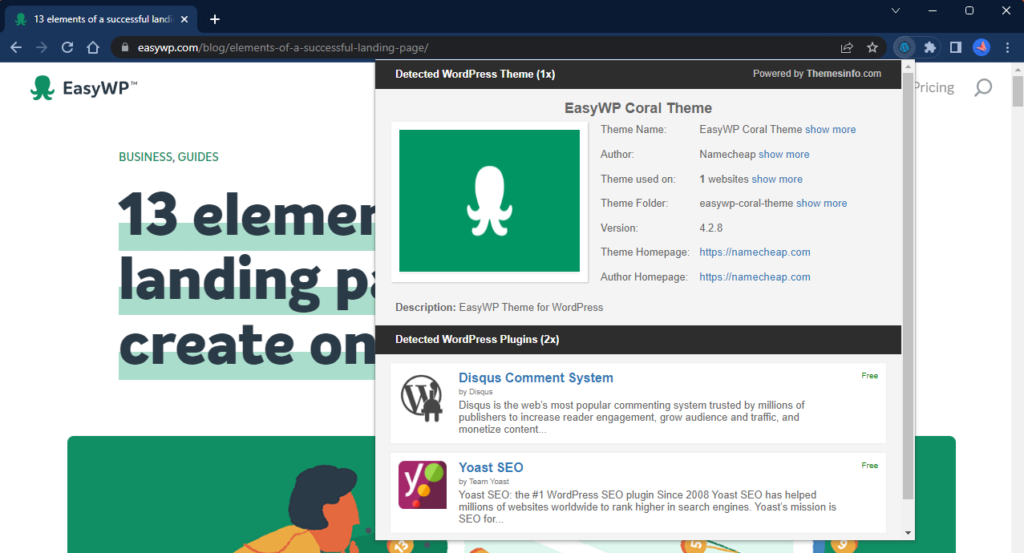
Many people use browser extensions to find out what WordPress plugins a site uses. These tools can be very helpful. Some popular extensions include Wappalyzer and BuiltWith. They are easy to use and can save you time. Simply add them to your browser. Then visit any website and click the extension icon. It will show a list of plugins and other technologies used on the site.
How They Work
Browser extensions work by scanning the website’s code. They look for clues about the plugins and other tools being used. Once they find these clues, they display the information for you. This makes it easy to know what plugins a site uses. Using these tools can help you learn more about web technologies. They are simple and quick to use.
Inspecting Source Code
Exploring a website’s source code reveals which WordPress plugins are in use. Tools like browser developer options help identify plugin names. This method enhances understanding of site functionality without direct access.
Finding Plugin References
Source code holds many clues about plugins. Right-click on the page and choose “View Page Source”. Look for words like “wp-content/plugins”. This tells us which plugins might be there. Plugin names often show up in file paths. Keep an eye out for those.
Analyzing Code Structure
Code structure can reveal plugin details. Check HTML and CSS files. Notice unique class names or IDs. These can belong to plugins. JavaScript files may also reference plugin scripts. Knowing these can help identify plugins.

Credit: stackcrawler.com
Online Plugin Detectors
Many sites use plugin detector tools to find out what WordPress plugins are active. These tools scan the site’s code and list the plugins used. One popular tool is Wappalyzer. It shows plugins and technologies used. Another tool is BuiltWith. This tool offers detailed insights into the plugins. WhatRuns is also useful. It not only detects plugins but also shows frameworks and libraries.
Finding plugins is easy with these services. Enter the website URL. The tool analyzes the site. It then displays a list of plugins used. These services are usually free. Some offer extra features for a fee. You can learn about the plugin version and more. This helps in understanding the site’s features.
Manual Detection Techniques
Plugin directories hold important files. Each directory has a name. The name often shows the plugin’s purpose. Look for folders in wp-content/plugins. Each folder is a plugin. Read the folder names. They can give clues about the plugin.
Plugin files tell more details. Check files like readme.txt. Readme files explain the plugin. They tell what it does. Look for other files with names that stand out. Files often have names like plugin-name.php. These files are important. They can show how the plugin works.
Credit: fluentforms.com
Challenges And Limitations
Some plugins are hard to find. They might be hidden on purpose. This makes it tricky to identify them. Websites may use custom codes to hide plugins. Such codes block plugin detectors. These hidden plugins can offer unique features. But they also make website analysis tough.
Legal and Ethical Considerations are also important. Spying on plugins can be wrong. It might break rules or laws. Always ask for permission before checking. Respect the website owner’s privacy. This keeps everyone safe and happy.
Tips For Accurate Identification
Finding the right plugin can be tricky. Use online tools to scan websites. They show all plugins being used. Check reviews and user feedback on forums. This will help in confirming the plugin’s identity. Compare screenshots and features from official sites. Look for similar icons or buttons. Sometimes, plugins have unique designs. Ask experts in online groups if unsure. They can provide insights.
Plugins change often. Visit official sites regularly. They share news about updates. Follow blogs about WordPress. They talk about new and popular plugins. Join newsletters from plugin developers. These give direct info on updates. Check forums for user discussions. People share experiences with new versions. Keep track of changes for accuracy.
Credit: www.easywp.com
Frequently Asked Questions
How To Identify WordPress Plugins On A Site?
To identify WordPress plugins on a site, use browser extensions like Wappalyzer or BuiltWith. These tools analyze website components and list detected plugins. Alternatively, view the page source for plugin-related code or check for plugin footprints in website URLs or file paths.
Are There Online Tools For Detecting WordPress Plugins?
Yes, several online tools can detect WordPress plugins. Tools like WPThemeDetector or WhatRuns can provide plugin information. Simply enter the website URL, and these tools analyze and display detected plugins, themes, and other technologies used on the site.
Can You Find WordPress Plugins Manually?
Yes, you can find WordPress plugins manually. Check the page source for plugin-related code or search URLs for plugin-specific paths. Sometimes, plugin names appear in file directories, offering clues. This method requires some technical knowledge and may not always reveal all plugins.
Are WordPress Plugin Detectors Accurate?
WordPress plugin detectors are generally accurate but not foolproof. They rely on visible data and may miss hidden or custom-coded plugins. Some plugins might be obscured by security settings, making detection difficult. For comprehensive results, use multiple detection methods and tools.
Conclusion
Discovering the right WordPress plugin can enhance your site’s performance. With the right tools, your website can stand out. Understanding what plugins a site uses can help you choose better options. It’s essential to know which plugins are beneficial for your goals.
Use online tools to identify plugins quickly. This way, you gain insights and improve your website effortlessly. Make informed decisions, and your site visitors will appreciate it. Keep exploring and testing different plugins. Your website will benefit from continuous improvement.
Happy blogging!


