
Are you diving into the world of WordPress and finding yourself tangled in its roles and capabilities? You’re not alone.
Understanding the differences between an editor and an admin can feel like navigating a maze. But don’t worry—this guide is here to clear the fog and empower you with knowledge. Imagine having the perfect control over your website, knowing exactly who can do what.
This isn’t just about getting things done; it’s about ensuring smooth operations and security for your site. Keep reading, and you’ll discover how mastering these roles can transform your WordPress experience and give you peace of mind.
Roles In WordPress
In WordPress, different user roles allow you to manage your site. The most common roles are Admin and Editor. Each role has its own set of permissions. These permissions decide what a user can do on the site.
User roles help keep your site secure. They make sure users have the right access. This helps prevent mistakes or security issues. It’s important to assign the correct role to each user. This ensures your site runs smoothly and safely.

Credit: www.greengeeks.com
Editor Role
An Editor can manage and publish posts. They can also edit pages. Editors can approve comments and manage them. They can view private posts and even edit them. Editors have the power to manage categories and tags. They can also manage links. They help keep the content clean and organized.
Editors cannot change the site’s settings. They cannot install plugins or themes. They do not have access to user management. Editors cannot delete the site or change its structure. They have no control over the site’s security. Editors focus only on content, not on technical parts. This keeps their role clear and simple.
Admin Role
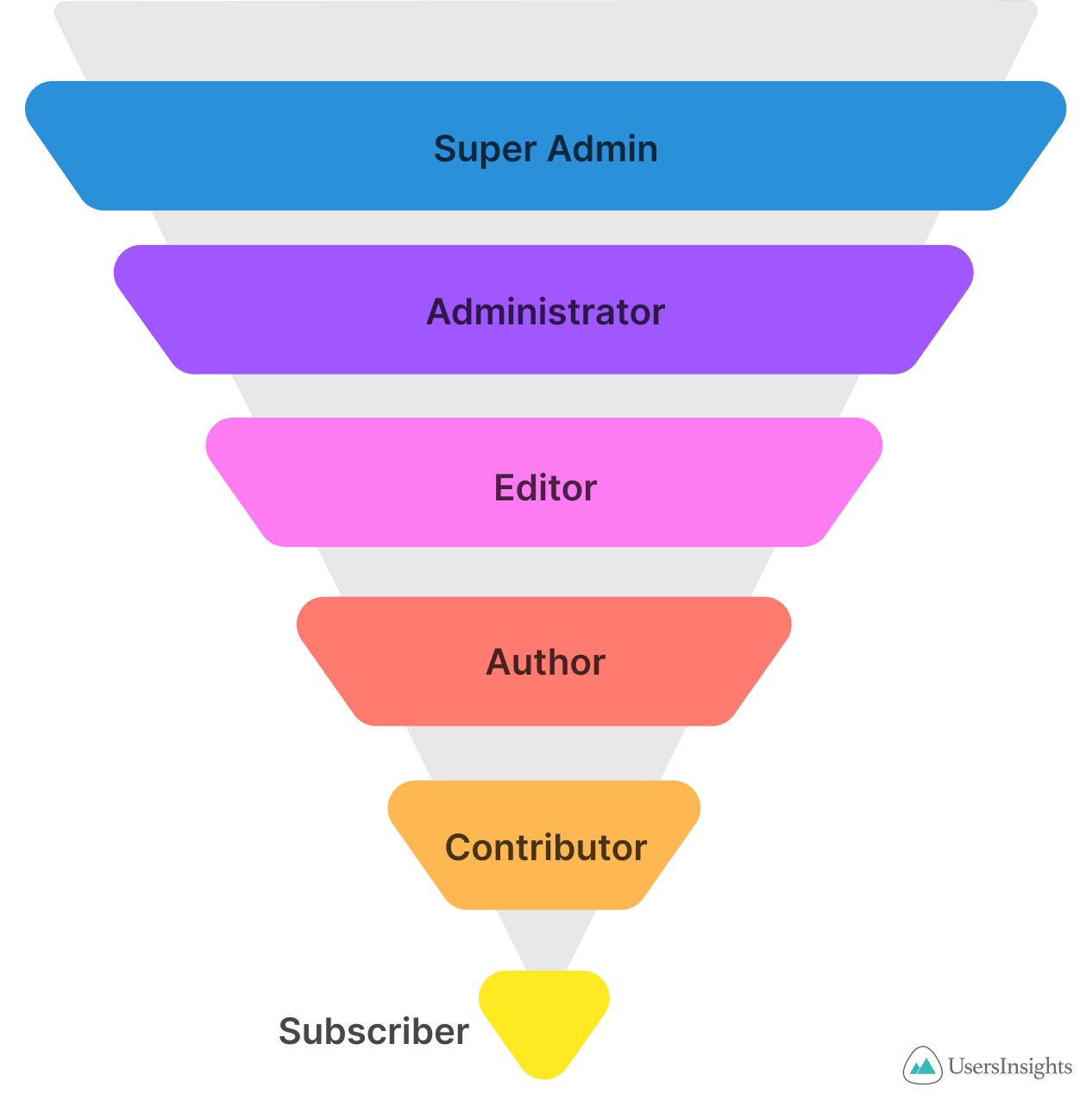
WordPress roles vary in access and control. Admins manage the site, settings, and users. Editors focus on content, editing, and publishing posts.
Capabilities Of An Admin
Admins hold the most powerful role in WordPress. They can do almost anything on the site. Admins can add new users and change settings. They can also install and remove plugins. If something goes wrong, an admin can fix it. They can also change themes. This role is very important for site control.
Limitations Of An Admin
Even though admins have many powers, they can’t control everything. They need to be careful with their actions. Mistakes can break the site. Admins also have to trust other users. They should not share their password. Sharing passwords can be risky. Admins should always backup data. Backups help if something bad happens. Safety is a big concern.
Credit: usersinsights.com
Key Differences
Editors in WordPress can publish and manage posts, but lack full control over site settings. Admins hold the highest authority, managing users, site settings, and themes. Each role has specific tasks, ensuring the site’s smooth operation.
Access Levels
Editors have access to most of the content areas. They can edit, publish, and delete posts. Admins have more power. They control the entire site. Admins can change settings and manage users. Editors can’t do that.
Content Management
Editors focus on content. They make sure posts are clear and correct. Admins manage site-wide tasks. They handle updates and security. Editors keep the content fresh. Admins keep the site safe and running.
Site Customization
Admins can change the site’s look. They install themes and plugins. Editors cannot do this. Editors work within the site’s design. Admins build and change the design. Editors keep the content in line with the design.
Choosing The Right Role
Choosing between an Editor and an Admin role in WordPress is crucial. An Editor can manage posts and pages. But they can’t change site settings. Admins have full control over the site. They can install plugins and change themes. Your choice depends on what your site needs.
Assessing Your Needs
Think about what tasks you need to do. Do you need to change site settings? Then, choose the Admin role. Only need to edit content? The Editor role is enough. Remember, each role has different powers. Choose wisely.
Security Considerations
Security is very important for your website. Admins can change everything on the site. This means more risk if someone hacks their account. It’s safer to give the Editor role if full control isn’t needed. Keep your site secure by choosing the right roles.
Credit: www.contentrefined.com
Role Management Best Practices
Assign roles to make tasks easy. Editors can write and edit posts. Admins have more power. They can change website settings. Choose the right role for each person. This keeps your site safe. It also makes work simple. Editors focus on content. Admins handle site updates. Be careful when giving admin roles.
Watch user actions to keep the site secure. Track changes made by editors. This helps find mistakes. Admins can see all actions. They can fix issues fast. Use plugins to monitor activity. This helps in keeping the site safe. Regular checks are important. Ensure everyone follows the rules.
Frequently Asked Questions
What Is An Editor Role In WordPress?
An Editor in WordPress manages content and media. They can edit, publish, and delete posts and pages. Editors can also manage comments and categories. However, they cannot change site settings or manage themes. Their primary focus is on content-related tasks, ensuring everything is accurate and up-to-date.
What Does An Admin Do In WordPress?
An Admin in WordPress has full site control. They can manage users, themes, and plugins. Admins can also adjust site settings and access all content. This role is crucial for maintaining the site’s overall functionality and security. They ensure everything runs smoothly and efficiently.
Can Editors Change WordPress Site Settings?
Editors cannot change WordPress site settings. Their role is limited to managing content. Only Admins have the capability to alter site settings and configurations. Editors focus on creating, editing, and publishing content. They ensure content quality and consistency across the site.
Can Admins Manage User Roles In WordPress?
Admins can manage user roles in WordPress. They have the authority to add, edit, or delete users. Admins can assign different roles and capabilities to users. This helps maintain site security and efficiency. Managing user roles ensures that each user has appropriate access.
Conclusion
Understanding the roles of Editor and Admin in WordPress is crucial. Editors manage content. They edit, publish, and organize posts. Admins have more control. They manage users, themes, and settings. Choosing the right role boosts site efficiency. Assign tasks based on abilities and trust.
This ensures smooth operations. Remember, clear role definitions enhance productivity. Use WordPress roles wisely for better site management. Both roles are important. They ensure your WordPress site runs smoothly. Make informed decisions for your site’s success. Proper role management is key.
Happy blogging!


