
Imagine having the power to shape and refine content with ease, ensuring every word resonates with your audience. This is exactly what an editor role on WordPress offers you.
If you’re managing a website or blog, understanding this role is essential. Why? Because it’s the secret ingredient that can transform your content from ordinary to extraordinary. You’ll discover how an editor can streamline your workflow, enhance the quality of your posts, and ultimately boost your site’s success.
Keep reading to uncover the full potential of an editor role on WordPress and how it can revolutionize your content strategy.
Editor Role Overview
The editor role on WordPress is important. Editors manage content on a website. They can add, edit, and delete posts. They also handle pages and media files. This role does not include technical tasks. Editors focus on content quality. They ensure posts are error-free. They guide writers to improve their work. Editors also oversee comments. They keep community interactions clean and friendly. This helps the website grow and stay relevant.
Access to settings is limited for editors. They cannot change website themes. They do not install plugins. Content management is their main job. This keeps the website organized. Editors make sure content is fresh. They schedule posts for publication. This maintains a consistent flow of information. Editors help in building a strong online presence.
Content Management
Editors make text look nice. They fix mistakes in writing. They also use tools to make text bold or italic. Editors help to use headings and lists. This makes reading easy. They break text into short parts. This helps readers understand better.
Editors check work before it goes live. They make sure it is ready. They click a button to publish. This makes the content show on the site. Editors set a date and time for posts. This helps to plan posts for the future.
Editors save work as drafts. This keeps it safe until ready. They can come back and make changes. Editors also check if drafts are complete. They keep track of all drafts in one place. This makes it easy to find and edit later.
User Collaboration
Editors have the power to assign roles on WordPress. They choose who can do what. This helps in managing the blog smoothly. Giving the right role ensures everyone knows their job. Proper role assignment keeps things organized.
Editors work closely with authors. They share ideas and thoughts. This helps create better content. Authors look up to editors for advice. Together, they make stories clearer and more interesting. Good coordination leads to success.
Every story needs a review. Editors check the submissions carefully. They look for mistakes in the text. They ensure the content is clear. Editors make sure the story fits the blog’s style. They add changes if needed. This makes the content ready for readers.

Credit: kinsta.com
Seo Optimization
Keywords are important for search engines. They help people find your site. Use keywords in titles. Include them in headings. Add them in paragraphs. Keep them natural. Avoid stuffing keywords. Balance is key. Aim for clarity. Make content simple. Keep sentences short.
Meta tags are short descriptions. They show up in search results. Use clear language. Make it easy to understand. Include important keywords. Keep it under 160 characters. This helps people click your site. Good descriptions attract visitors. They boost your site’s visibility.
Readability is crucial. Use simple words. Short sentences work best. Break long text into paragraphs. This helps readers. Use bullet points. They make lists clear. Bold important terms. Keep it easy to scan. Engage your readers. Make them stay longer. Happy readers return.
Site Maintenance
Editors must ensure themes and plugins are up-to-date. Updates fix bugs and add new features. Regular updates keep the site smooth. Always check compatibility before updating. Backup data to avoid loss.
Site speed matters for users. Editors monitor loading times often. Slow sites lose visitors. Tools help check performance. Page errors must be fixed fast. Good performance means happy users.
Security keeps data safe. Editors use strong passwords. Regularly update security plugins. Watch for hacking attempts. Keep backups to prevent data loss. Safe sites build trust. Security is key for online safety.
Quality Assurance
Editing is a big task. Editors check for spelling and grammar mistakes. A single error can change a meaning. They also check if sentences make sense. Each sentence needs to be clear. Editors make sure all the sentences are easy to read.
Consistency is very important. Editors check if terms are used the same way. If a word is spelled differently, it can confuse readers. They also make sure the style is the same. This means the way sentences look. Every post should feel the same.
Each blog has rules. Editors know these rules well. They check if all posts follow the rules. This means using the right words. Also, the right tone is important. They ensure the content is correct. This keeps the blog professional and trusted.
Analytics And Reporting
Editors on WordPress can track user actions. Click rates and comments are important. They show how users connect with content. Editors check these numbers every day. This helps them know what works. Good tracking means better posts in the future.
Seeing how many people visit is key. Editors look at these numbers. Daily visits show user interest. Patterns tell what readers like best. More visits usually mean good content. Editors use this data to plan. They aim to keep readers coming back.
Editors share findings with the team. Reports include likes, shares, and comments. This info guides future posts. Teams use reports for better decisions. They aim for more engagement. Insights help improve quality. Good reports lead to success. Editors keep everyone informed.
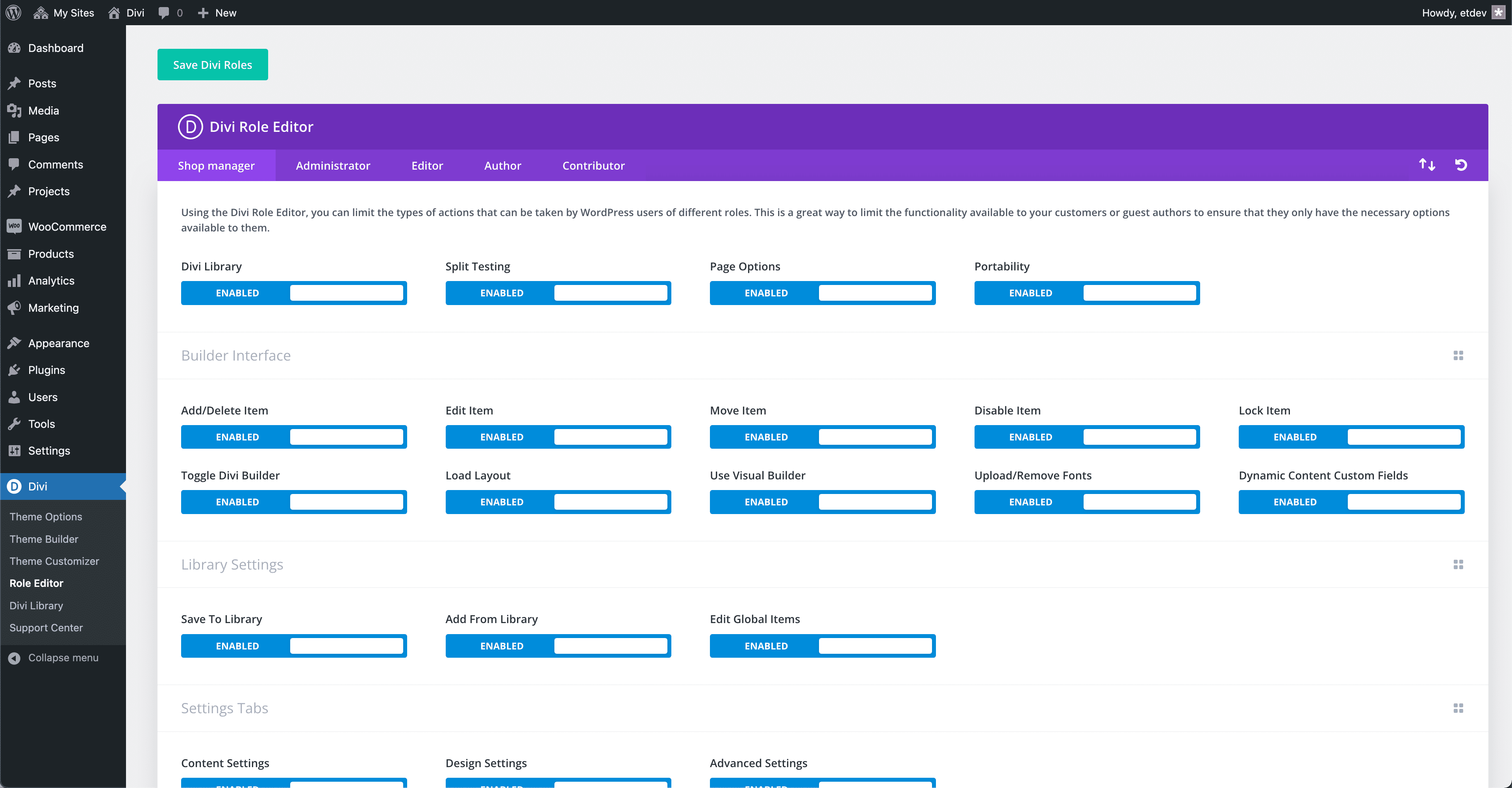
Credit: www.elegantthemes.com
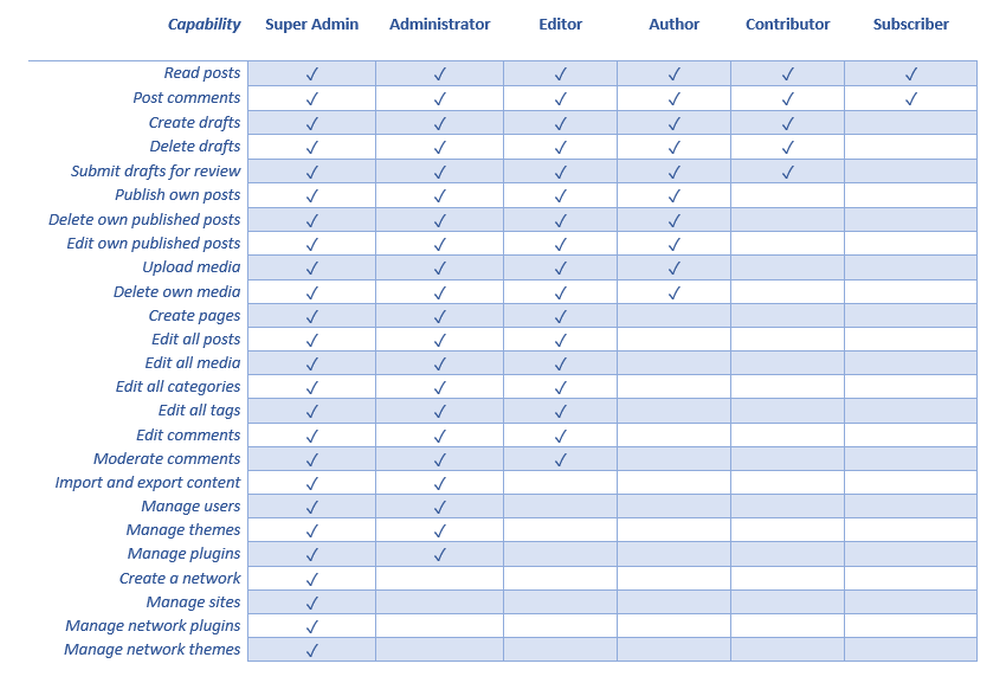
Credit: usersinsights.com
Frequently Asked Questions
What Is The Editor Role In WordPress?
The Editor role in WordPress allows users to manage content. Editors can publish, edit, and delete any posts or pages. They can also moderate comments, manage categories, and upload files. This role is ideal for users who need comprehensive content control without full administrative access.
Can Editors Manage Plugins In WordPress?
Editors cannot manage plugins in WordPress. This capability is reserved for Administrators. Editors focus on content-related tasks such as editing posts and managing categories. If you need someone to handle plugins, consider assigning them an Administrator role for expanded access.
How To Assign Editor Role In WordPress?
To assign the Editor role, navigate to the WordPress dashboard. Click on “Users” and select “Add New” or “Edit” an existing user. From the role dropdown menu, choose “Editor” and save changes. This grants the user editing privileges without full administrative control.
Can Editors Delete Pages In WordPress?
Yes, Editors can delete pages in WordPress. They have the authority to manage all content, including deleting posts and pages. This makes the Editor role suitable for users who need to maintain or modify website content regularly without requiring full administrative privileges.
Conclusion
An editor role in WordPress is crucial. They manage and update content. Editors ensure quality and consistency across posts. They can add, edit, and delete content. This role keeps the website fresh and engaging. Editors work with authors and contributors.
They maintain the site’s voice and style. This position requires attention to detail. It fosters collaboration within the team. Understanding the editor’s role helps improve content management. Bloggers and site owners benefit greatly. A well-managed site attracts more visitors. So, consider the editor’s role carefully.
It’s vital for successful WordPress management.


