
Imagine having the power to truly understand what your audience thinks about your content. With the “What’s Your Reaction WordPress Plugin,” you can do just that.
This tool doesn’t just sit quietly on your site; it actively engages your readers, giving them an easy way to express their thoughts and feelings. Are you ready to transform passive visitors into active participants? By the end of this article, you’ll discover how this plugin can boost your engagement rates and provide valuable insights into your audience’s preferences.
Your website’s success might just hinge on understanding these reactions. Curious to learn more? Let’s dive in and explore how this simple plugin can make a big difference for you.
Overview Of What’s Your Reaction Plugin
This plugin helps users express their feelings about posts. It adds reaction buttons below articles. Users can click on their favorite reaction. Authors get feedback instantly. Reactions are easy to use. The interface is simple and clean. It works with most themes. Setup is quick and easy. No coding needed.
The plugin shows emojis or text reactions. You can choose which one suits your site. Many options are available. You can customize colors and styles. Keep your site look unique. User engagement increases with reactions. More clicks mean more interaction. This plugin helps users feel connected. They can share their mood easily. Authors understand their audience better.
Key Features
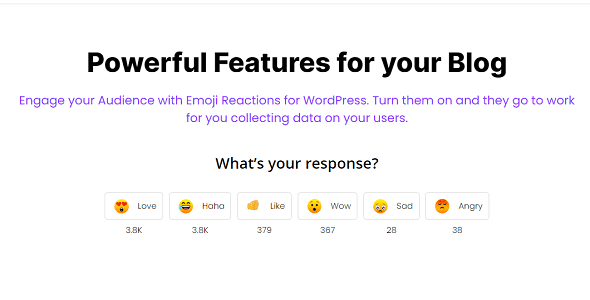
Emoji Reactions let users show their feelings with colorful icons. They can click a smiley or a heart to express their mood. This makes the website more fun.
Custom Reaction Options allow site owners to pick which icons to use. Choose from many emojis. Make the site unique with special reactions.
User Engagement Tracking helps track how people react. See which posts get more clicks. Understand what users like the most.
Responsive Design means the plugin looks good on all devices. It works on phones, tablets, and computers. The design adjusts to fit any screen.
Installation Process
Ensure your WordPress version is up to date. Check the plugin’s compatibility with other plugins. Compatibility issues can affect functionality. Read user reviews for insights on compatibility.
Download the plugin from the WordPress repository. Navigate to your dashboard. Click on “Plugins” and then “Add New”. Upload the plugin file. Click “Install Now” to begin installation. Wait for the installation process to finish. Once done, click “Activate”. The plugin is now ready for use.
After activation, go to the settings page. Adjust the configuration settings as needed. Enable options that suit your site’s needs. Save changes to apply settings. Test the plugin to ensure it works. Adjust settings if needed for better performance.
Customization Options
Explore diverse customization options with the ‘Whats Your Reaction’ WordPress Plugin. Personalize reaction types and tailor the design to fit seamlessly with your website’s theme, enhancing user engagement and interaction.
Design And Style Settings
This plugin offers many design settings. You can change colors and fonts. Bold text or italicize words. Make it look just right. Your site will look unique. Stand out from others.
Integration With Themes
It works well with many themes. No need to worry. Everything fits nicely. Seamless experience for your visitors. Adjusts to different layouts. No extra work needed.
Advanced Customization
Advanced users can enjoy more options. Add custom codes easily. Change every detail you wish. Full control over the plugin. Make it truly yours. Perfect for tech-savvy users.
Benefits For Bloggers
The “Whats Your Reaction” plugin helps make blogs more fun. Readers can click to show their feelings. This makes them want to read more. More clicks mean more interaction. Bloggers love this because it keeps readers on their site longer.
Getting feedback is easy with this plugin. Readers can share thoughts with just a click. Bloggers can see what readers like or dislike. This helps in improving content. Knowing what readers want makes blogs better.
Readers enjoy blogs that feel personal. The plugin lets them feel involved. Seeing reactions makes the blog lively. Fun and easy to use. It turns readers into happy users.

Credit: www.facebook.com
User Engagement Strategies
Use the plugin to get more reactions on your posts. Ask readers how they feel about your content. This can be fun and makes your site lively. People like to share their thoughts. Give them a way to do it. Use different reaction options, like happy or sad. This can help your site feel more friendly.
Look at the reaction data to learn what people like. Check which posts get the most happy or sad reactions. This helps you know what content works best. Use this information to make better posts. Seeing patterns in reactions is key. It tells you what your audience loves.
Use the data to adjust your content. Make more of what your readers enjoy. Cut down on what they don’t like. This keeps your audience happy. Happy readers come back for more. Tailor your posts to fit their tastes. Keep your content fresh and engaging.
Troubleshooting Common Issues
Plugins sometimes don’t work well together. Conflicts can cause problems. Check for updates. Updates might fix issues. Disable other plugins. See if the problem goes away. This helps find the troublemakers. Always backup your site first.
Sometimes things don’t look right. Display problems can be annoying. Check if the theme supports the plugin. If not, try another theme. Themes affect how plugins show up. Clearing cache might help. Cache can cause old info to stick around. That can mess things up.
Too many plugins can slow your site. Performance optimization is key. Deactivate plugins you don’t use. Less plugins mean faster site. Use tools like Google PageSpeed. They show what’s slowing down your site. Optimize images too. Big pictures take longer to load.
Credit: themeraja.com
Future Updates And Features
The plugin will get new features soon. These features will make it better. Users will enjoy the changes. It will be easier to use. It will also look nicer.
Users can give their feedback. The team will listen to them. They will add ideas from users. This makes the plugin better. It helps meet user needs.
Always stay updated with the latest version. Updates bring new features. They also fix bugs. This keeps the plugin running well. Check often for new updates.

Credit: starfishtherapies.wordpress.com
Frequently Asked Questions
What Is The Whats Your Reaction Plugin?
The Whats Your Reaction plugin is a tool for WordPress websites. It allows users to add interactive reaction buttons to posts. This feature enhances user engagement by letting visitors express their emotions with ease. The plugin is customizable, making it easy to match your site’s design.
How Does The Plugin Improve Engagement?
The plugin boosts engagement by enabling users to react quickly to content. Visitors can choose from various emotions, providing instant feedback. This interaction encourages more frequent visits and content sharing. By understanding audience preferences, site owners can tailor content more effectively.
Is Whats Your Reaction Easy To Install?
Yes, installing Whats Your Reaction is straightforward. Simply download the plugin from the WordPress repository. Then, upload it to your site and activate it. The user-friendly interface guides you through setup. Customization options are intuitive, ensuring a seamless integration with your site.
Can I Customize Reaction Options?
Yes, customization is a key feature of the plugin. You can select from a range of reaction icons to suit your site’s theme. Adjusting colors and styles is simple. This flexibility allows you to maintain brand consistency while enhancing user interaction.
Conclusion
The “Whats Your Reaction” WordPress plugin offers a simple way to engage readers. Users share feelings, which boosts interaction. Easy to install and customize, it suits any blog. This plugin helps understand audience preferences better. Bloggers gain insights into reader emotions and interests.
It encourages more visits and participation. Your blog becomes more interactive and lively. A valuable tool for bloggers aiming to connect with their audience. Try it to enhance reader engagement and feedback. Simple, effective, and user-friendly. Perfect for improving blog interaction and understanding readers.


