
Are you curious about the different user roles in WordPress and how they can impact your website’s management? Understanding these roles is crucial for anyone looking to create, manage, or contribute to a WordPress site.
By grasping the differences, you ensure that your website operates smoothly and securely. Imagine the peace of mind knowing that each user has just the right amount of access to get their job done without compromising your site’s integrity. In this guide, we’ll break down each user role in a simple, straightforward manner.
You’ll discover how to leverage these roles to enhance productivity and maintain control over your site. Dive in, and empower yourself with the knowledge to make informed decisions for your WordPress journey!
Credit: www.wpbeginner.com
WordPress User Roles Overview
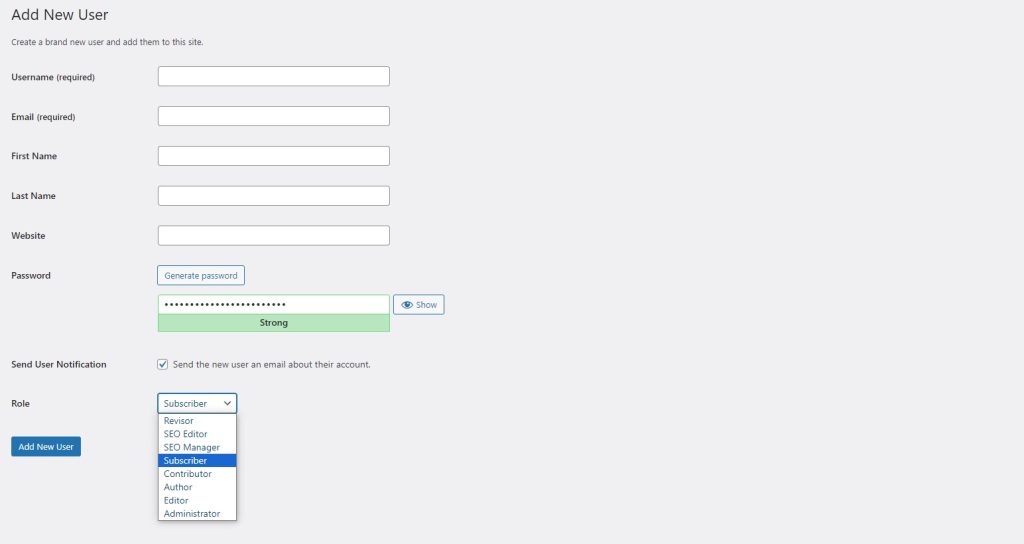
WordPress offers different user roles. Each role has its own permissions. The main roles are Administrator, Editor, Author, Contributor, and Subscriber.
Administrators have full control. They can change settings and add users. Editors can manage and publish all posts. Authors can publish their own posts. Contributors can write posts but need approval. Subscribers can only read content.
Each role helps manage your website. Assign roles based on tasks. This keeps the site secure and organized.
Credit: www.greengeeks.com
Administrator Capabilities
Administrators have the highest control on a WordPress site. They can change the website’s theme. This role allows them to activate or deactivate plugins. They can also modify settings. This includes time zone and site language.
They can add or remove users too. They can even delete content if needed. With this role, you manage the entire site. It’s like being the boss of a website.
Administrators can set permissions for other users. They decide who can edit posts. They control who can publish content. They can also limit actions of other roles. For example, a user might only read posts.
This helps in organizing tasks. It ensures safety by limiting access. Only trusted users get higher permissions. This keeps the site secure and well-organized.
Editor Functions
Editors have important tasks. They can create and edit posts. They can also manage other people’s posts. This means they can change or fix content. Editors can make sure everything looks good. They help keep the content clear and correct.
Editors can publish posts. They can schedule posts to go live later. They have the power to remove posts too. This is a big job. Publishing makes content visible to everyone. Editors check and approve content before it goes live. This keeps the site professional and organized.
Author Responsibilities
WordPress user roles define different responsibilities for authors. Authors can write, edit, and publish their own posts. They cannot edit others’ work or change site settings.
Post Management
Authors can write and edit their posts. They can also delete their own posts. Authors manage the formatting and style of posts. Authors can add images and links. They ensure the posts are readable and engaging. Authors need to check for errors. They use tools for better post quality.
Content Ownership
Authors have ownership of their content. They can change the text anytime. Authors are responsible for their original ideas. They must avoid copying from others. Authors decide the tone and voice of their posts. They keep their unique style. Authors can share their content widely. They can also restrict who sees it.
Contributor Limitations
Contributors can write posts. They save these posts as drafts. But they cannot publish them. This role has no publishing rights. Someone else must approve their drafts. Contributors wait for editors or admins. They do not have access to certain features. This limits their control.
Contributors help create content. They focus on writing. They do not worry about other tasks. Their main job is to write drafts. They cannot add media files. This role is for beginners. It helps them learn.
Subscriber Role
Subscribers can leave comments on posts. They cannot edit or delete comments. Only authors can do that. Subscribers can engage with content. They can share their opinions. Comments can start discussions. This helps the community grow. It makes the site interactive. Subscribers have a small but important role.
Subscribers have limited profile access. They can view their own profile. They can edit basic details. Like name and email. Password can be changed too. They cannot view other profiles. Only admin can see all profiles. Subscribers have the most restricted access. This keeps the site secure. Subscriber role is simple and safe.
Custom User Roles
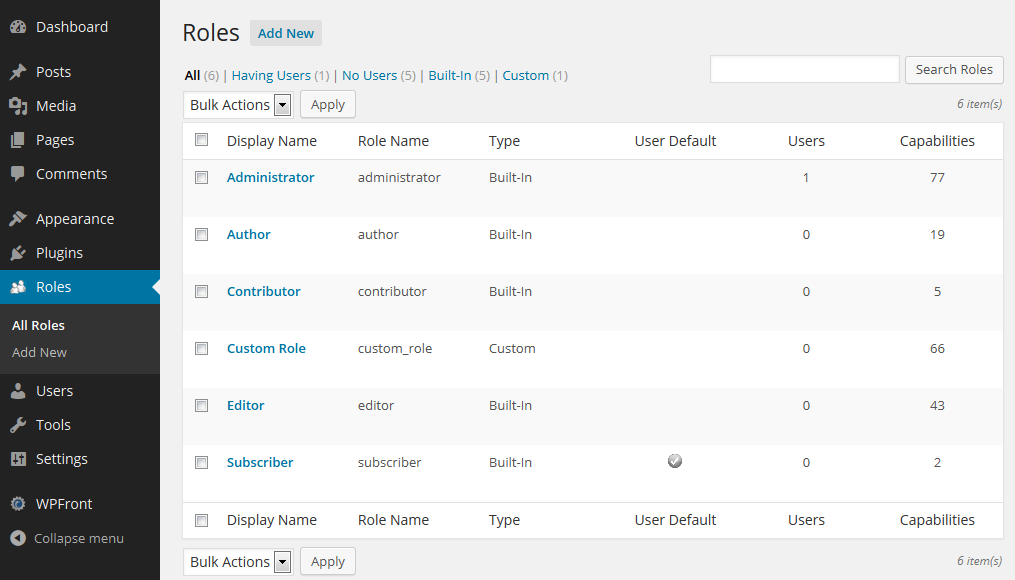
Create a new user role easily. Use a plugin to help. Name the role. Set its base capabilities. Make it unique and specific.
Adjust what each role can do. Grant or deny actions. Let roles publish posts. Or stop them from deleting. Tailor roles to your needs. Keep site management simple.
Credit: www.bigcloudy.com
Choosing The Right Role
Every WordPress site has different needs. Knowing what your site needs is key. Some sites need lots of editors. Others need just one admin. Think about your content. Does it change often? How many people work on it? These questions help choose the right role. A good role fit makes a site run smooth. It keeps tasks clear. Roles should match the site’s purpose.
Security is very important. Too many admins can be risky. Admins have full control. They can change anything. Limit admin roles to trusted users. Editors can change content but not settings. Authors only write and publish their posts. Subscribers can only read. Fewer admins mean fewer risks. Keep roles simple. Protect your site from mistakes.
Frequently Asked Questions
What Are WordPress User Roles?
WordPress user roles define what a user can and cannot do on the site. They include Administrator, Editor, Author, Contributor, and Subscriber. Each role has specific permissions and capabilities. Understanding these roles helps in managing a WordPress site efficiently, ensuring users have appropriate access.
How Does An Administrator Role Function?
The Administrator role has the highest level of access in WordPress. Administrators can manage site settings, install plugins, and add users. They can also edit content, change themes, and manage other users’ permissions. This role is usually reserved for site owners or trusted individuals.
What Can An Editor Do In WordPress?
Editors manage and publish content on a WordPress site. They can edit, delete, and publish posts, even those created by others. Editors can also manage categories and moderate comments. However, they cannot change site settings or install plugins, making their role focused on content management.
Can A Contributor Publish Posts?
Contributors can write and edit their own posts but cannot publish them. They submit their work for review by an Editor or Administrator. This role is ideal for guest writers or new team members. Contributors also cannot upload files or media, ensuring content control remains with higher roles.
Conclusion
Understanding WordPress user roles empowers site management. Choose roles wisely. Assign roles based on trust and responsibility. Admins have full control, while editors manage content. Authors create content, but can’t publish without approval. Contributors submit drafts for review. Subscribers access limited features.
Proper role assignment ensures site security and efficiency. Review roles regularly for safety and functionality. Clear distinctions help maintain site order. Simplifies management and enhances collaboration. Each role serves a purpose. This knowledge strengthens your WordPress skills. Happy site managing!


