
Have you ever wondered why your WordPress posts don’t go live exactly when you expect them to? You’re not alone.
The mystery often lies in the time zone settings. Understanding what time zone WordPress uses to publish your content can make all the difference in reaching your audience at the perfect moment. Imagine the potential boost in engagement and visibility when your posts align precisely with your readers’ active hours.
We’ll unravel the time zone conundrum, helping you optimize your publishing schedule effortlessly. Stay with us, and get ready to transform how you connect with your audience through perfectly timed content.
Understanding Time Zones
Time zones are crucial for web publishing. They help websites show the right time for posts. Without time zones, readers might get confused. Posts could appear at odd hours. This affects user experience. Many platforms like WordPress use time zones. They ensure content is timely and relevant. Global audiences need accurate timing. Time zones help in achieving that. Properly set time zones improve engagement. Readers get content at expected times. This is important for maintaining trust.
The world has many time zones. Each region follows its own zone. This means different times for different places. WordPress allows you to choose your time zone. This helps in scheduling posts. Your audience sees them at the right time. Global time zones vary greatly. Some countries have unique offsets. Others follow standard zones. It’s important to set the right one. This ensures your content reaches everyone correctly. A well-set time zone avoids confusion.
WordPress Time Zone Settings
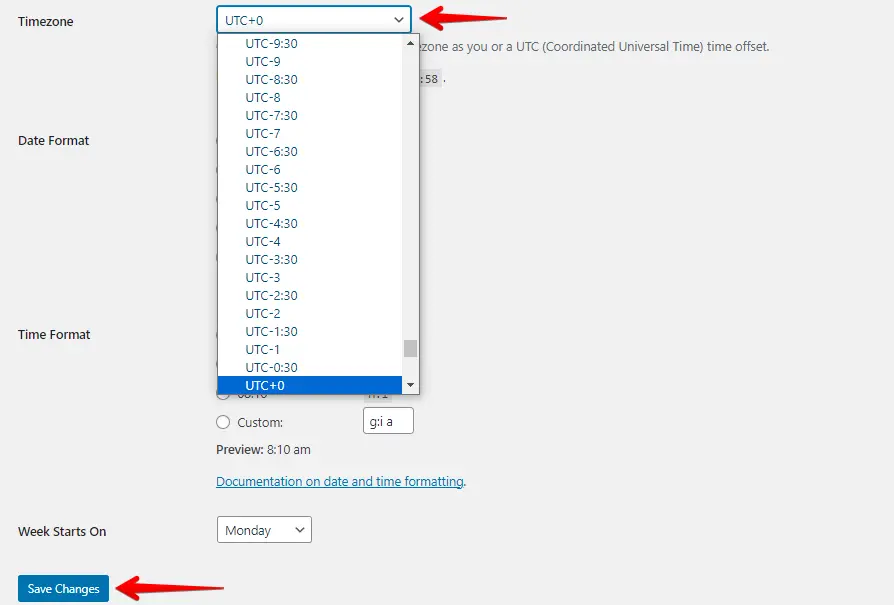
WordPress has a default time zone setting. This setting affects post scheduling. Posts are published based on this time. It helps users plan content in advance. The default is UTC. Users can change it. Adjusting it ensures correct post timing. This setting is found under General Settings. It’s easy to modify. Users should check it regularly. Correct settings prevent errors. It is crucial for global users. They publish posts at different times. The right setting helps in reaching audiences.
Users can customize their time zone. This is done via the settings page. Choosing a local time zone is important. It ensures posts appear at the right time. Users select their region from a list. This affects the publishing schedule. Time zones differ worldwide. Local preferences help in managing posts. Custom settings fit user needs. They improve scheduling accuracy. Correct choices keep content timely. This is vital for international bloggers. Everyone sees the post at the correct time. Thus, it enhances user experience.
Impact On Scheduled Posts
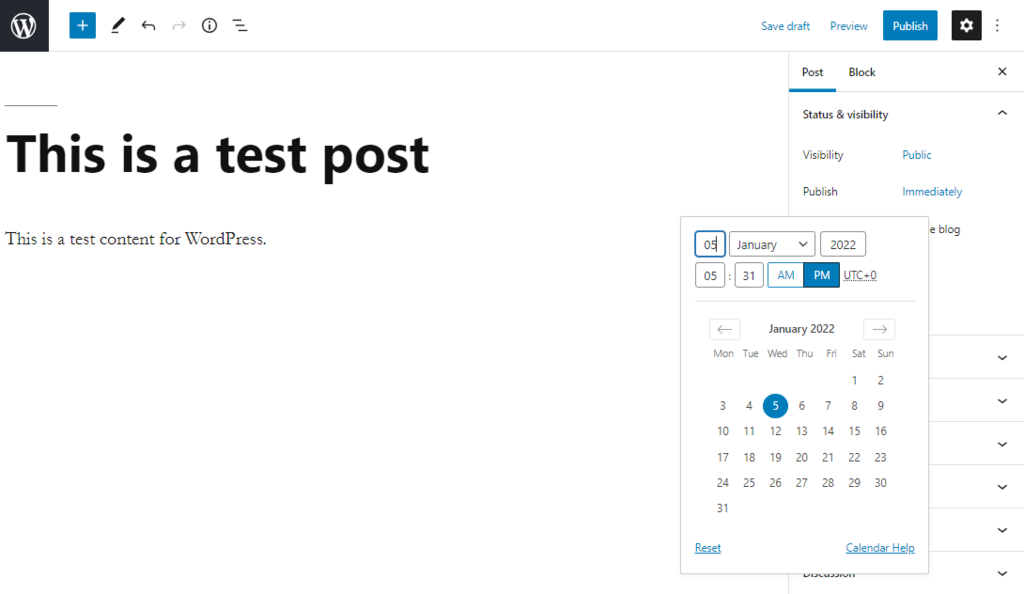
Time zones play a big role in scheduling posts. WordPress uses the time zone set in its settings. If your time zone is wrong, your post may publish at the wrong time. This can confuse readers. They may miss your content. Make sure to set the correct time zone. It helps to keep your schedule on track.
Sometimes posts don’t publish as planned. This can be due to wrong time zone settings. Also, server issues can cause delays. Check your server settings. Ensure your WordPress settings match your local time. This helps avoid these issues.
Credit: github.com
Optimizing Publishing Time
WordPress uses UTC time zone for publishing posts. This can confuse some users. It’s important to know when your audience is most active. Publishing at the right time can boost engagement. Consider your audience’s location. Time zones differ. They affect when people see your content.
Best Practices For Global Audiences
Think about your audience’s local time. Post during their peak hours. Use tools to schedule posts. Plan your content calendar wisely. Check analytics for best times. Adjust your posting schedule as needed. This helps reach more people worldwide.
Tools For Time Zone Management
Several tools can help manage time zones. WordPress has built-in scheduling features. You can choose your own time zone. Use plugins for better control. Tools like Buffer and Hootsuite offer advanced scheduling options. They provide insights on audience activity. These tools make it easier to plan and post.
Troubleshooting Time Zone Issues
WordPress publishes posts using the site’s set time zone, which can be adjusted in settings. Troubleshooting involves ensuring this setting matches your desired time zone. Correct settings prevent scheduling errors and maintain consistent post timing.
Identifying Common Problems
Many users find their posts appear at unexpected times. This often confuses them. Wrong time zones cause this issue. Incorrect settings in WordPress lead to mismatched publishing times. Sometimes, servers use different time zones. This affects post schedules. Users must understand their WordPress settings. Check them regularly. Ensure alignment with local time. This helps in avoiding conflicts.
Steps To Resolve Time Zone Conflicts
Start by checking your WordPress time settings. Find them in the settings menu. Adjust the time zone to match your location. Next, review your server settings. Ensure they align with your WordPress settings. Some servers use UTC time. Change this if needed. Test your settings by scheduling a post. See if it publishes correctly. Keep monitoring for any errors. Adjust if necessary. Regular checks help maintain accuracy.
Credit: www.hostinger.com
Credit: wp-staging.com
Frequently Asked Questions
What Time Zone Does WordPress Default To?
WordPress defaults to Coordinated Universal Time (UTC). You can change this setting in the WordPress dashboard. Simply go to Settings > General and select your preferred time zone from the dropdown menu.
How Can I Change WordPress Time Zone Settings?
To change your WordPress time zone, navigate to Settings > General. In the Time Zone section, select your desired time zone. This adjustment will affect post scheduling and other time-related functions in your WordPress site.
Does WordPress Automatically Adjust For Daylight Saving Time?
WordPress does not automatically adjust for daylight saving time. You must manually select a time zone that accounts for daylight saving. Choose a city-based time zone to ensure automatic adjustments during daylight saving transitions.
Why Is WordPress Showing Wrong Publish Time?
Incorrect publish time may be due to wrong time zone settings. Verify your settings in WordPress under Settings > General. Adjust to the correct time zone to fix the issue.
Conclusion
Understanding WordPress time zones is crucial for scheduling posts. It helps maintain consistency in publishing. Ensure your WordPress settings match your local time. This prevents confusion and missed post timings. Always double-check your settings after updates. Time zones might change without notice.
Keep an eye on daylight saving changes too. Adjustments might be necessary. A correct time zone setting improves post accuracy. Your audience will appreciate timely content. By managing your settings well, you enhance your blog’s professionalism. Remember, the right time zone setting supports a reliable blogging schedule.
Happy blogging!


