
Ever wondered who does what on your WordPress site? Understanding WordPress roles is like having a secret map to your website’s success.
Whether you’re building a personal blog or running a multi-author site, knowing each role can save you time and headaches. Imagine having the power to control who sees what, who can post content, and who manages your site’s settings with just a few clicks.
Sounds good, right? Dive in to discover how mastering WordPress roles can transform your site management, boost your productivity, and keep your content safe. Ready to unlock the full potential of your WordPress site? Let’s explore how each role can work for you!
Credit: wpfront.com
WordPress Roles Overview
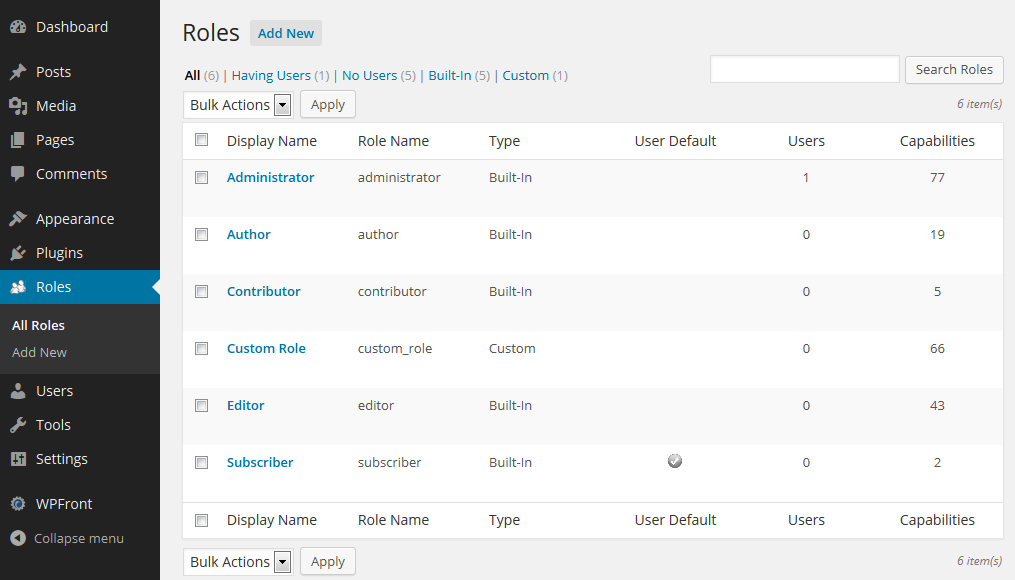
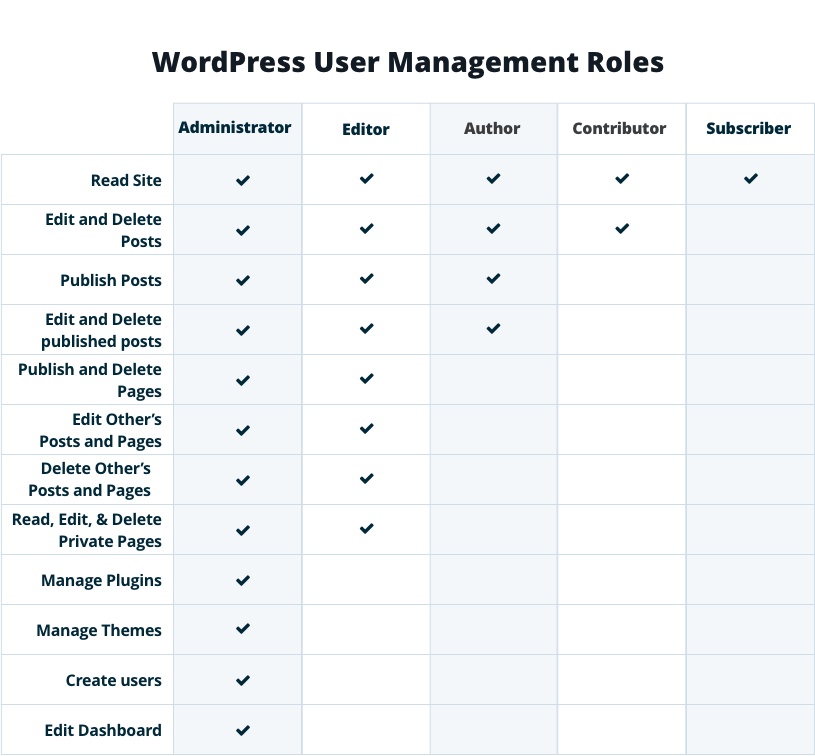
WordPress has different roles. Each role has its own powers. Administrator is the top role. They can do anything on the site. Editor can change posts and pages. They help make content better. Author writes posts. They can only edit their own work. Contributor can write but not publish. They need approval from editors or admins. Subscriber is the most basic role. They can only read and comment. Each role has a job. This helps keep the site running well.
Administrator Role
Administrators have the most control. They can manage plugins and themes. They can change settings. They can create or delete users. They can edit content. They hold all the keys. They can even change the site name.
Administrators can upgrade WordPress. They handle updates. They keep the site safe. They manage the site’s health. They can also export data. This role is very important. It requires trust and skills.
Assign the administrator role to trusted people. They should know WordPress. They should understand the site. They must be responsible. They should handle sensitive tasks. They need to protect the site.
Choose someone who can solve problems. Pick someone with good judgment. They should keep things running smoothly. They need to care for the site. They should support other users. Always choose wisely.
Editor Role
The Editor role in WordPress is essential for managing content. Editors can add, edit, and delete posts. They have the power to manage categories and tags. Their role ensures that content is accurate and up-to-date.
Editors also manage comments on posts. They can approve, delete, or mark comments as spam. This helps keep the conversation clean and respectful.
Editors work with authors and contributors. They make sure the content follows the site’s guidelines. They help maintain the overall quality of the blog.
Editors play a big part in shaping the content strategy. They decide what topics to cover. Their choices guide the blog’s direction and focus.
They also look at how content performs. This helps them plan future posts. Their insights are valuable for attracting and engaging readers.
By managing content well, editors help build a strong brand. This leads to trust and loyalty from the audience.
Credit: wpengine.com
Author Role
WordPress offers various roles, including Author. Authors can write, edit, and publish their own posts. They manage content but can’t alter site settings or other users’ posts.
Content Creation Abilities
Authors can write and edit their own posts. They can also add pictures to their content. But they cannot change other people’s posts. Authors can make their posts look nice. They can use bold words and different colors.
Limitations And Benefits
Authors cannot change the site’s settings. This keeps the site safe. They also cannot approve comments. This is the job of the editor. Authors can focus on their writing. They have fewer tasks to worry about. This can make them more creative.
Contributor Role
Contributors can write and edit their own posts. They cannot publish them. This keeps the site safe and well-managed. Contributors need to focus on quality. They can add media but can’t upload files. They should use existing media in the library. Contributors must use simple and clear words. This helps readers understand easily.
After writing, contributors must submit their work. An editor will review it. If there are mistakes, they need fixing. Only after approval, the post can be published. Contributors should be patient. Editors may take time to review. Feedback is important. It helps improve future posts. Good communication with editors is key.
Subscriber Role
The subscriber role in WordPress is quite basic. Subscribers can read posts and leave comments. They don’t have editing rights. Their access is limited. Subscribers cannot create or publish posts. They are the simplest user type.
Subscribers are good for sites with exclusive content. They can view pages after logging in. Interaction is mostly through comments. They can’t change settings. Subscribers make a site interactive without giving too much control. The role is ideal for readers or basic community members.
Subscriber roles fit well for membership sites. They suit blogs with limited access content. Subscribers work for newsletters. They are perfect for sites with exclusive articles. They help manage a large audience. Subscribers keep content safe and controlled.
Custom Roles
Custom roles in WordPress allow website owners to define specific permissions for users. This helps manage tasks like editing posts or moderating comments efficiently. Adjusting roles ensures users have the right access without compromising security.
Creating Custom Roles
Custom roles help manage tasks in WordPress. You can make roles fit your needs. This keeps your site safe and organized. Assign roles to users. Each role has special tasks. This makes work clear for everyone.
Best Practices
Use clear names for roles. This helps users understand their tasks. Keep roles simple. Too many roles can confuse people. Check roles often. Make sure they still fit your needs. Limit permissions to what is needed. This protects your site from mistakes.
Credit: visualcomposer.com
Role Management Plugins
User Role Editor is a famous plugin. It lets you change role permissions. Another popular tool is Members. It helps you manage roles and permissions. These plugins make role management easy.
Plugins can improve role abilities. Capabilities can be added or removed. This helps in customizing roles. Each role can have unique tasks. Plugins like Advanced Access Manager offer more control. It aids in refining roles.
Frequently Asked Questions
What Are The Default Roles In WordPress?
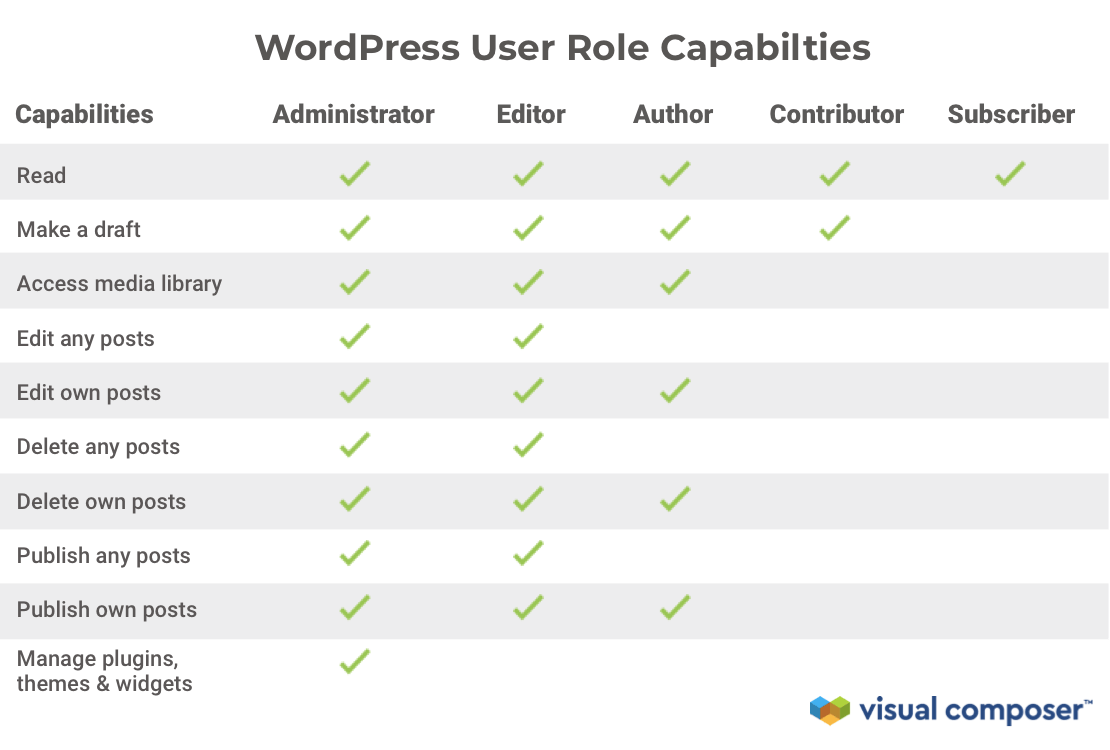
WordPress comes with five default roles: Administrator, Editor, Author, Contributor, and Subscriber. Each role has distinct capabilities. The Administrator can manage the entire site. Editors manage posts and pages. Authors can write and publish their posts. Contributors write posts but can’t publish them.
Subscribers can only manage their profiles.
How Can I Change User Roles In WordPress?
To change user roles in WordPress, go to the dashboard, select “Users,” and click on “All Users. ” Choose a user, then click “Edit” to modify their role. Select the desired role from the dropdown menu and update the user.
This process helps manage permissions efficiently.
What Permissions Do Editors Have In WordPress?
Editors in WordPress can publish, edit, and delete any posts and pages. They can moderate comments, manage categories, and access media files. They don’t have site management capabilities like installing plugins. Editors play a crucial role in content management, ensuring consistency and quality across the website.
Can Contributors Publish Posts In WordPress?
No, Contributors cannot publish posts directly in WordPress. They can write and edit their posts but require an Editor or Administrator to review and publish them. This role is ideal for guest writers or those who contribute occasionally, ensuring content is vetted before going live.
Conclusion
WordPress roles are vital for managing your website efficiently. Each role has specific duties. Understanding these roles helps in assigning tasks correctly. From admins to contributors, roles ensure smooth operations. Proper role allocation boosts productivity and security. It minimizes errors and enhances website management.
Keep learning about role capabilities. This knowledge aids in optimizing your WordPress site effectively. Assign roles thoughtfully for a successful online presence. Stay updated with role changes in WordPress updates. This ensures your site remains secure and well-managed. Happy WordPressing!


