
Are you trying to make your WordPress website look stunning with a perfect background image? Choosing the right size can be a game-changer for your site’s appearance and performance.
Imagine your visitors landing on your page and being captivated by a beautifully displayed background. It not only enhances the aesthetic appeal but also keeps your site loading smoothly. You’ll discover the ideal dimensions for WordPress background images, ensuring your site not only looks great but also functions optimally.
Stick around to learn the secrets to a visually striking and efficient website that keeps your audience coming back for more.
Credit: wpexperts.io
Importance Of Background Image Size
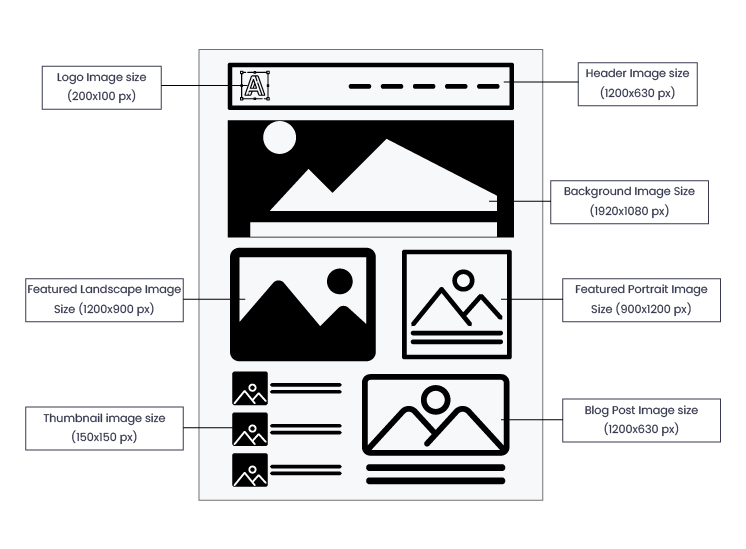
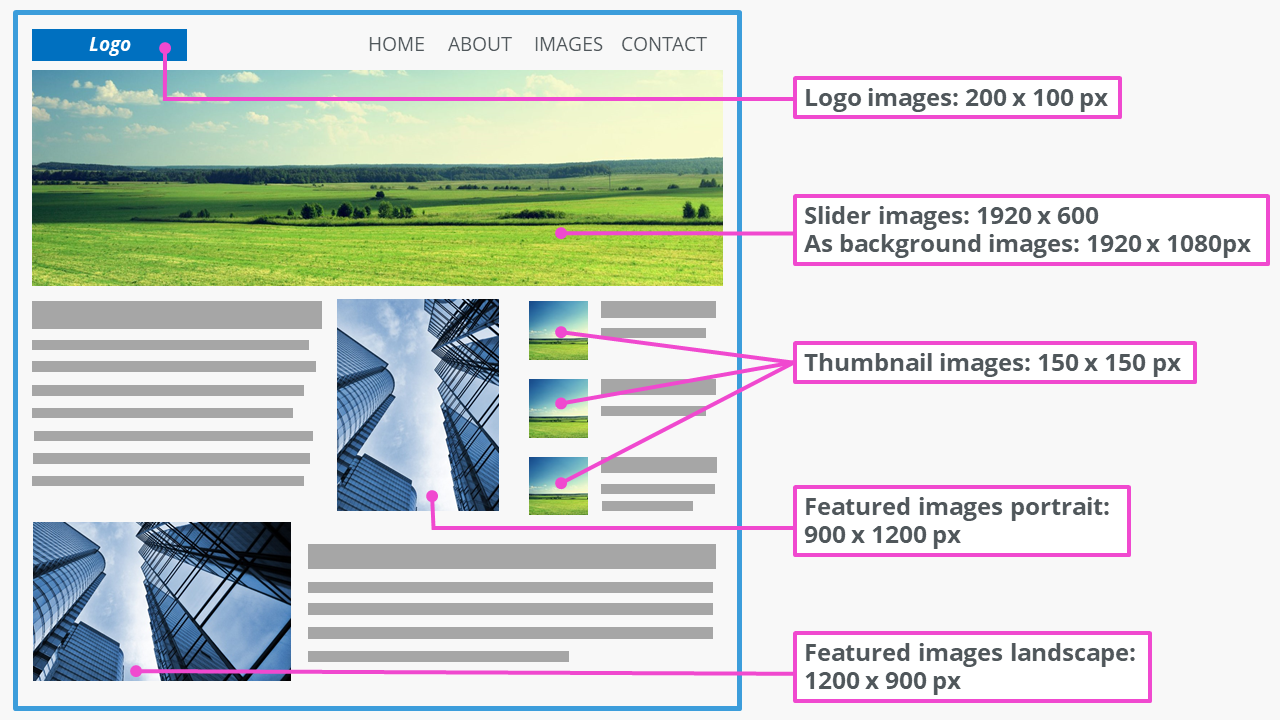
A good background image makes your website look better. Big images can slow down your site. Small images may not look clear. Find a size that fits well and keeps your site fast. Most people use 1920×1080 pixels for background images. This size works on many screens. Image size matters for loading speed. Slow sites lose visitors. Fast sites keep them happy. Using the right size is key.
Quality matters too. High-quality images look sharp. Low-quality images look blurry. Choose images that are clear and bright. Balance size and quality for best results. Optimize images for faster loading. Use tools to make images smaller without losing quality. A well-chosen image enhances the user experience and keeps your site looking fresh and professional.
Credit: www.ionos.com
Common Image Dimensions
A full screen background should fit all screens. A common size is 1920×1080 pixels. This size works well for most screens. If the image is too small, it may stretch. This can make the image blurry. Always choose a high-quality image.
Headers are important for the first impression. A typical size is 1920×500 pixels. This size covers the top part of the page. Images should be clear and eye-catching. This makes the header look professional.
The content area needs a balanced background. A common size is 1200×800 pixels. This size ensures the background does not distract. Text should be easy to read. Choose a simple pattern or solid color for best results.
Responsive Design Considerations
Mobile devices have different screen sizes. Background images should fit well. A good size is 640×360 pixels. This size works for small screens. It keeps the image clear. Not blurry or stretched. It loads faster. Saves data for users. Make sure images are compressed. This helps the site load quickly.
Retina displays show images twice as sharp. Use higher resolution images. 1280×720 pixels is ideal. This makes the image crisp. Users see details clearly. Avoid pixelation. Optimize these images for web. They should load fast. Keep the file size small. This helps with page speed. Speed is important for user experience.
File Format And Compression
JPEG files are great for photos. They offer smaller file sizes. This helps your site load faster. But they lose some quality. PNG files keep all their quality. Best for images with text or logos. They are larger in size. This may slow your site down. Choose wisely based on your needs.
Speed is key for websites. Large images can slow things down. Compress images to make them smaller. Use tools to help. Small files mean faster loading times. Faster sites are better for users. Better for search engines too. Speed affects rankings. Always test image size before uploading.
Tools For Resizing Images
Many tools help resize images online. These tools are quick and easy. Canva is one popular tool. It helps with resizing and editing. PicResize is another option. It offers simple steps to change size. Adobe Spark is known for its features. Resize photos and add effects with it. All these tools are free to use. They make images fit better on websites.
Plugins help with image resizing in WordPress. Smush is a favorite choice. It compresses images without losing quality. EWWW Image Optimizer also works well. It helps make images load faster. ShortPixel is another plugin. It offers many resizing options. These plugins are easy to install. They save time and effort. Use them to keep your site running smoothly.
Testing And Adjustments
Choosing the right size for a WordPress background image is crucial. A recommended size is 1920 pixels wide. This ensures clarity across devices. Adjusting and testing different sizes can help maintain site speed and image quality.
Previewing On Different Devices
Check your background image on phones, tablets, and computers. Each device shows images differently. A good image looks clear and fits well on all screens. This is important for users to see your site properly. Try different sizes to find the best fit. Sometimes, smaller images work better on phones. Bigger images are clearer on computers. Use tools to see how your site looks. This helps in making sure everything is perfect.
Making Necessary Adjustments
Sometimes, images need small changes to look right. You might need to crop or resize. This helps the image fit the screen well. Try adjusting the brightness and contrast too. This makes the image stand out more. If text is hard to read, adjust the image. Make it lighter or darker. Keep testing until everything looks good. This way, your site will look great for everyone.
Best Practices For Background Images
Choosing the right image size is important. Big images may slow down your site. Small images may look blurry. Aim for a balance. High-quality images should not be too large. Compress images to save space. This helps your site load faster. Use image formats like JPEG or PNG. They offer good quality with smaller sizes. Avoid using heavy images.
Consistency is key for a neat site. Background images should match across different pages. This creates a uniform look. Use similar colors and styles. Keep image sizes consistent. This avoids sudden changes. It helps users navigate easily. Consistent images create harmony. They make your site look professional. Users feel more comfortable.

Credit: wordpress.com
Frequently Asked Questions
What Is The Ideal Background Image Size For WordPress?
The ideal size depends on your theme and device. Generally, 1920×1080 pixels is recommended for desktops. This ensures quality without affecting load speed. Mobile-friendly images can be smaller, around 800×600 pixels. Always optimize your images to improve performance and ensure a responsive design for various screen sizes.
How Do I Optimize Background Images For WordPress?
Use image compression tools to reduce file size without losing quality. Plugins like Smush and ShortPixel can automate this process. Ensure images are responsive to fit different devices. Properly optimized images improve loading times and enhance user experience, making your site more SEO-friendly.
Can Large Images Slow Down My WordPress Site?
Yes, large images can significantly slow down your site. They increase page load times, affecting user experience and SEO rankings. Compress images and use lazy loading to mitigate this issue. Prioritize optimization to keep your site fast and efficient, enhancing overall performance and visitor satisfaction.
Are There Specific Formats For WordPress Images?
JPEG and PNG are commonly used formats. JPEGs are ideal for photographs and offer good compression. PNGs work well for graphics with transparency. Always choose the format that best suits your image type and optimize it for fast loading. Correct formats improve visual appeal and site performance.
Conclusion
Choosing the right background image size for WordPress is crucial. It impacts load time and user experience. Aim for an image size around 1920×1080 pixels. This size fits most screens nicely. It also balances quality and performance. Compress images to reduce file size.
Use formats like JPEG or PNG. Test your site speed after adding images. Always consider mobile users. Responsive design matters. Remember, a good image enhances your site’s appeal. It attracts visitors and keeps them engaged. Stay mindful of your site’s overall design and functionality.
Your background image is just one piece of the puzzle.


