
Imagine having the power to control every aspect of your WordPress site, ensuring it runs smoothly and securely. Understanding what permissions are needed for WordPress is crucial for both beginners and seasoned site owners.
If you’ve ever felt confused or overwhelmed by the technical jargon surrounding WordPress permissions, you’re not alone. This article is here to demystify these terms and show you exactly what you need to know. By the time you finish reading, you’ll have a clear grasp on setting the right permissions, safeguarding your site from vulnerabilities, and optimizing its performance.
Get ready to take charge and feel confident in managing your WordPress site, as we guide you through this essential aspect of web management.
Credit: kinsta.com
User Roles And Capabilities
Administrators have the most control. They can change everything on the website. They can add new users and delete old ones. They can install plugins and themes. They can also change settings. This role has full access.
Editors can manage posts. They can edit posts by others. They can also publish and delete them. Editors cannot change site settings. They have less power than administrators.
Authors can write and publish their own posts. They cannot edit posts by others. They can upload files. Authors can only change their own content.
Contributors can write posts. They cannot publish them. They need approval from editors or administrators. Contributors cannot upload files. They have the least power.
Subscribers can read posts. They have no editing power. They can comment on posts. Subscribers can manage their own profile. They have limited access.
File Permissions
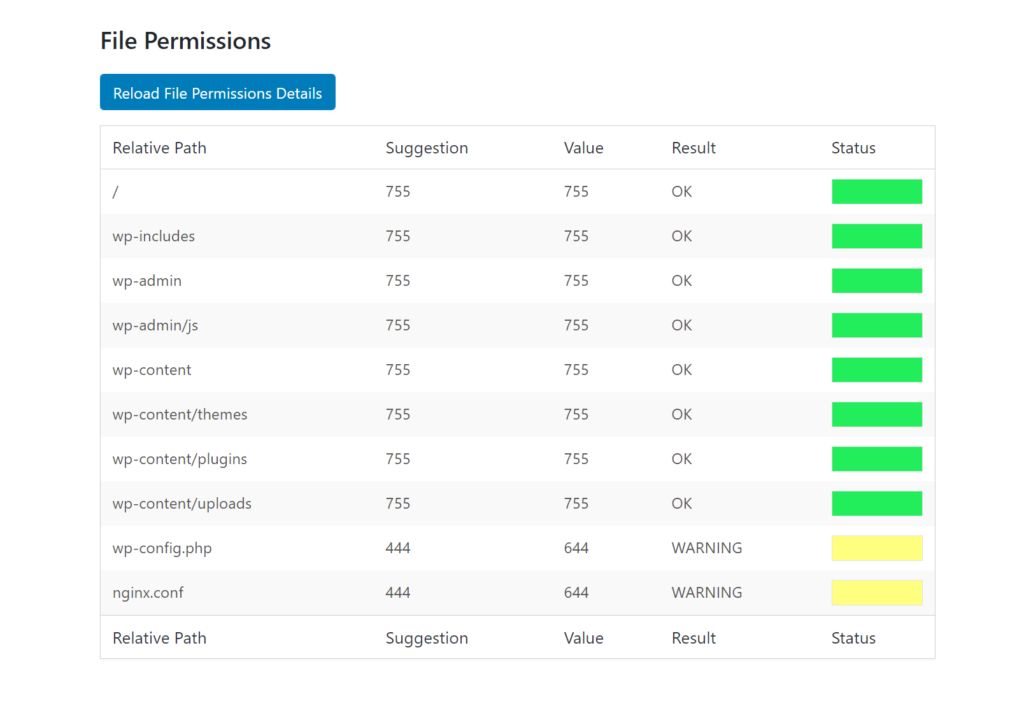
WordPress uses a special file structure. This structure helps it work well. Every file has its place. It is important to know where each file goes. This helps keep your site running smoothly. Files in WordPress are usually inside the wp-content, wp-admin, and wp-includes folders.
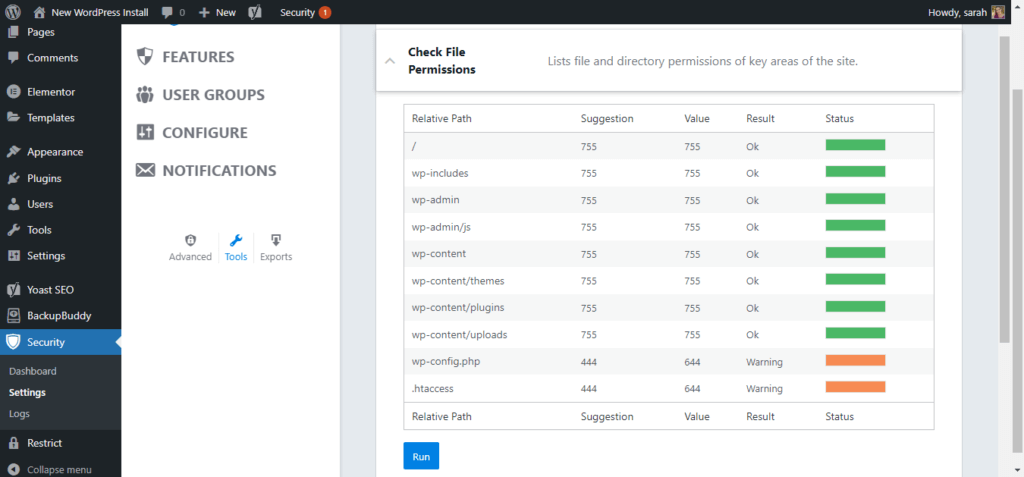
Permissions decide who can see or change files. You must set these rights carefully. The best settings are often 755 for folders and 644 for files. This keeps your site safe. Always check these numbers to avoid problems.
Sometimes, files do not open. Or changes do not save. Often, this is a permissions issue. Check your settings if things go wrong. Wrong settings can stop plugins or themes from working. Fix them to make your site work again.
Poor permissions can invite trouble. Hackers can access your site. They can change files and cause harm. Always use the right settings to stay safe. Regular checks help keep threats away. Protect your site by being careful with permissions.
Plugin And Theme Permissions
Plugins need special permissions to work. Admins control these permissions. They decide which plugins can change the site. Some plugins need more access. Limited access keeps the site safe. Too much access can be risky. Regular checks help manage plugins better. Always review plugin permissions. Update permissions if needed. This keeps the site secure.
Themes change the look of your site. Editing themes can be fun. But it needs care. Only trusted users should edit themes. This stops mistakes. It also keeps the site looking nice. Restrict theme access to the right people. This helps maintain the site’s design. Always check who can edit themes. This prevents unwanted changes.
Security is very important. Strong permissions protect the site. They stop bad people from changing things. Regular updates keep security tight. Always update plugins and themes. This fixes any holes. Backup your site often. This saves your data. If something goes wrong, you can restore it easily. Security checks should be routine. They keep your site safe.
Credit: solidwp.com
Database Permissions
Different users need different access levels. Some users only need to read data. Others may need to write or delete data. Giving the right access is very important. It helps keep the database safe.
Keeping data safe is very important. Only trusted users should have full access. Use strong passwords to protect data. Always update passwords often. This stops bad people from getting in. A safe database is a happy database.
Backup data regularly. This helps if something goes wrong. Some users should have restore permissions. They can bring back data if needed. This is like a magic button. It saves time and keeps data safe. Always have a plan for backups.
Customizing Permissions
Plugins make it easy to set custom roles. You can add or remove permissions. This helps in managing what users can do. Many plugins offer a simple interface. You can click to change settings. This way, you don’t need coding skills. Always choose a trusted plugin. Read reviews before installing one. It keeps your site safe.
Coding allows you to create unique permissions. You can use PHP in WordPress. This gives you more control. Code helps in fine-tuning user roles. You can add specific tasks. For example, allowing only some users to publish posts. But coding can be tricky. It needs some programming knowledge. Always back up your site before making changes.
Always review your permissions regularly. Make sure users have only the access they need. This keeps your site secure. Avoid giving too many permissions to one user. It can cause issues. Regularly update your plugins and themes. They should be from trusted sources. This reduces security risks. Always monitor for any unusual activity on your site.
Credit: solidwp.com
Troubleshooting Permission Issues
Common Errors and Solutions often appear when permissions go wrong. Files may not open. This can stop your site from working. Check your file permissions first. Make sure they are set correctly. A common fix is setting files to 644 and directories to 755. These settings work for most sites. Incorrect settings can cause errors. Change them back to see if it helps.
Tools for Diagnosing Problems can help find errors quickly. Use FTP clients like FileZilla. They show file permissions. It’s easy to check and change them. Hosting panels like cPanel also help. They have file managers. These tools are simple and effective.
Restoring Default Settings might solve some issues. Default settings are often correct. Resetting them can fix problems. Make sure you know what settings to use. This avoids more issues. Always back up before changing anything. It keeps your data safe.
Frequently Asked Questions
What Are The Default File Permissions For WordPress?
The default file permissions for WordPress are typically set to 644 for files and 755 for directories. These settings ensure that files are readable and writable by the owner but only readable by others, while directories are accessible for navigation.
Proper permissions help maintain security and functionality.
How To Change WordPress File Permissions?
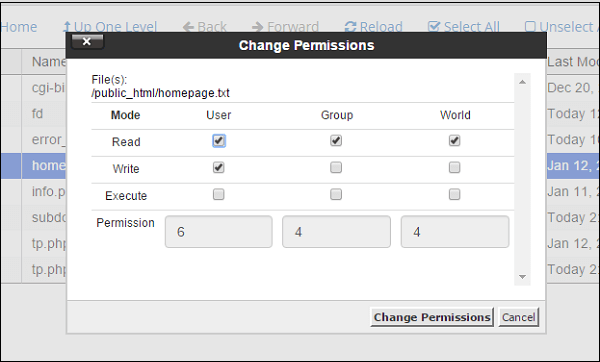
To change WordPress file permissions, access your site via FTP or a file manager. Select the file or directory, right-click, and choose “Change Permissions” or “File Attributes. ” Adjust the numeric value to the desired permission setting, like 644 or 755.
Always ensure permissions are set securely to avoid vulnerabilities.
Why Are WordPress Permissions Important?
WordPress permissions are crucial for security and functionality. Correct permissions prevent unauthorized access and modifications, safeguarding your site from malicious attacks. They ensure files are accessible as needed while protecting sensitive data. Proper permissions help maintain the balance between usability and security, ensuring a smooth and safe website operation.
Can Incorrect Permissions Affect WordPress Security?
Yes, incorrect permissions can severely affect WordPress security. If permissions are too lenient, unauthorized users may gain access, modify files, or inject malicious code. Conversely, overly restrictive permissions can cause functionality issues, preventing necessary access. Properly configured permissions are essential to prevent security breaches and ensure smooth operation.
Conclusion
Understanding WordPress permissions is crucial for website security. Proper permissions protect data and ensure smooth functioning. Always check and adjust permissions regularly. This helps prevent unauthorized access and potential issues. Use tools and plugins for easier management. They simplify the process and save time.
Stay informed about updates and best practices. This keeps your site secure and efficient. Remember, small steps in managing permissions go a long way. Your site’s security depends on it. Make it a priority and enjoy peace of mind with WordPress.


