
Have you ever found yourself scratching your head, wondering, “What exactly is my WordPress address?” You’re not alone.
Many people, especially those new to WordPress, find this term a bit puzzling. But don’t worry, it’s simpler than you think, and unlocking this knowledge can open up a world of possibilities for your website. Imagine having complete control over how your site is accessed and perceived online.
Understanding your WordPress address is crucial for this. It’s not just a technical term; it’s a key to your digital identity. By the end of this article, you’ll have a clear grasp of what your WordPress address is and why it matters. You’ll feel empowered to make tweaks that can enhance your site’s performance and user experience. Stay with me, because what comes next will not only clear up any confusion but also equip you with practical steps to take your WordPress site to the next level. Let’s dive in and simplify the complex world of WordPress addresses together.
WordPress Address Basics
The WordPress address is a key part of your website. It helps people find your site online. This address is also known as the URL. You see it in the browser bar. It shows where your site lives on the internet. The WordPress address can be changed in the settings. It should be correct to avoid problems. An incorrect address can cause errors. It can stop your site from loading. Always check your address if you have issues. It keeps your site running smoothly.
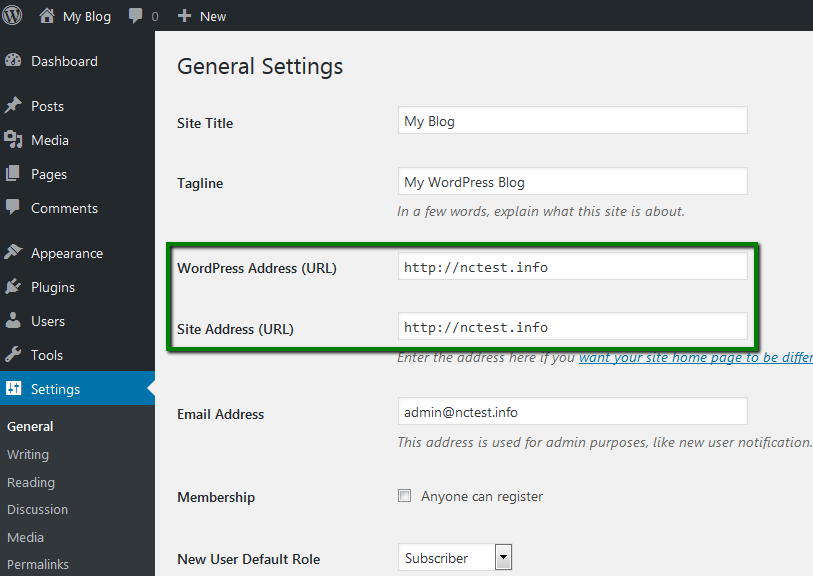
Changing your address is easy. Go to your WordPress dashboard. Find the settings menu. Look for the general settings. Here, you will see two boxes. One is for the WordPress address. The other is for the site address. Make sure both are correct. This ensures your site works well.
Credit: www.namecheap.com
Importance Of WordPress Address
The WordPress Address is crucial. It tells the internet where your site lives. This address must be correct. If not, your site might not work. Pages won’t load. Visitors may get lost.
Always set the correct URL. Go to your WordPress settings. Check the “WordPress Address” field. Make sure it matches your site’s domain. Double-check the spelling. One mistake can break links.
Many face issues with the address. Pages show errors. Images may not load. The site can be slow. These problems often link to a wrong address.
Locating Your WordPress Address
Finding your WordPress address is easy. First, log in to your WordPress dashboard. Look on the left side. You will see a menu. This menu helps you find settings.
Settings Section
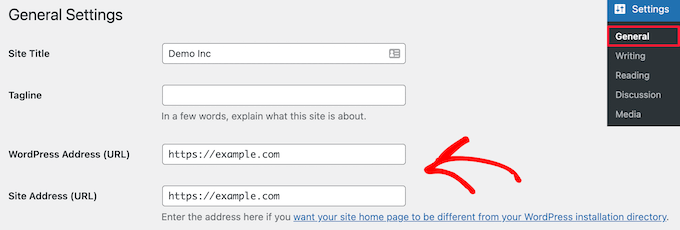
Click on the Settings option in the menu. A new page will open. Here, you will find your WordPress Address. It is often written as a URL. This address is important. It is where your site lives on the internet.
Credit: www.wpbeginner.com
Difference Between WordPress And Site Address
The WordPress Address is where your WordPress files live. This is the URL where your site is installed. It helps in managing your WordPress dashboard and making changes to your site. On the other hand, the Site Address is what your visitors see. This is the URL they type in their browser to visit your site.
Both addresses can be the same, but not always. If they are different, you must know the reason why. Using separate addresses can help in certain setups. It might be needed for security or site structure reasons. Always ensure both addresses are set correctly in your settings.
Changing Your WordPress Address
Open your WordPress admin dashboard. Find the Settings menu. Click on General. Look for the fields labeled WordPress Address (URL) and Site Address (URL). Enter the new address. Scroll down and press Save Changes. You might need to log in again.
Access your website files. Find the wp-config.php file. This file is in the root directory. Open the file to edit. Add these lines: define('WP_HOME','newurl'); and define('WP_SITEURL','newurl');. Replace newurl with your new address. Save the file and exit.
Log into phpMyAdmin. Select your website’s database. Find the table named wp_options. Locate the rows for siteurl and home. Edit these rows. Change the URL to your new address. Save the changes. Check your website to ensure it works.
Potential Issues With WordPress Address
Changes in your WordPress address can cause broken links. These links point to pages that do not exist. This confuses visitors and search engines. A simple typo in the URL can lead to a 404 error. This error tells the user the page is missing. To avoid this, check links after making changes.
Updating your WordPress address might cause theme and plugin conflicts. Some themes rely on specific URLs. If the URL changes, the theme might break. Plugins can also stop working if they depend on the old address. Always test your site after any address change. This ensures themes and plugins work well together.
Best Practices For Managing WordPress Address
Managing your WordPress address involves understanding its role in site functionality and visibility. Proper configuration ensures seamless access and improves website performance. Regular updates and checks are crucial to maintain security and reliability.
Regular Backups
Backing up your WordPress site is crucial. It protects against data loss. Regular backups ensure you can restore your site quickly. Use tools like UpdraftPlus for easy backups. Store backups in multiple locations. This adds an extra layer of safety. Consider scheduling backups. Automated backups save time and effort. Keep your site secure and reliable.
Consistent Monitoring
Monitoring your site helps keep it running smoothly. Watch for unexpected changes. This can prevent problems early. Tools like Google Analytics offer helpful insights. Check your site’s performance often. Fast loading speeds improve user experience. Be aware of security threats. Regular scans can detect vulnerabilities. A well-monitored site is a healthy site.

Credit: wpmarmite.com
Frequently Asked Questions
What Is My WordPress Address?
Your WordPress address is the URL where your site is accessible online. It’s crucial for visitors to find your site. You can check or modify it in your WordPress admin dashboard under Settings > General. Ensure it’s correct to avoid access issues and improve your site’s SEO performance.
How Do I Find My WordPress Url?
To find your WordPress URL, log into your admin dashboard. Go to Settings > General, and you’ll see it listed as “WordPress Address (URL). ” This URL is essential for site accessibility. Make sure it’s updated if you change your domain or hosting setup.
Can I Change My WordPress Address?
Yes, you can change your WordPress address in the admin dashboard. Navigate to Settings > General and update the “WordPress Address (URL)” field. Ensure your new URL is correct to prevent site access problems. Always back up your site before making changes to avoid data loss.
Why Is My WordPress Url Important?
Your WordPress URL is crucial for site identification and accessibility. It helps search engines and users find your site easily. A correct URL improves your site’s SEO and ensures visitors reach the right content. Keeping your URL updated is vital for maintaining your site’s online presence.
Conclusion
Understanding your WordPress address is vital. It helps manage your site better. Remember, your site’s address is unique. Keep it safe and updated. Regular checks ensure everything runs smoothly. Explore settings to find your address easily. Use WordPress guides for support.
Always double-check your entries. Mistakes can cause issues. Your WordPress address is the key to your online presence. Protect it wisely. Engaging with it improves your site’s performance. Share your experiences with others. They might help you too. Happy managing your WordPress site!


