
Are you struggling with the mysterious world of file permissions in WordPress? You’re not alone.
Navigating the permissions for your. htaccess file can feel like decoding an enigma. But here’s the thing: getting it right is crucial for your website’s security and performance. The. htaccess file plays a vital role in controlling how your website behaves, from SEO optimizations to security protocols.
If the permissions are too loose, you risk exposing your site to vulnerabilities. Too strict, and you might find parts of your website malfunctioning. In this guide, we’ll unravel the secrets behind setting the correct permissions for your. htaccess file in WordPress. Stick around to learn how to protect your site while ensuring it runs smoothly—because your website deserves the best.
Understanding .htaccess File
.htaccess is a hidden file in WordPress. It helps control website settings. This file is very important. It manages how your site behaves. It can block bad visitors. It can also redirect pages.
The .htaccess file plays a big part in WordPress. It helps with security. It keeps your site safe from bad people. It also helps with SEO. It makes sure search engines find your pages easily.
.htaccess does many tasks. It controls permalinks. It makes URLs clean and neat. This helps search engines. It can also block IP addresses. This keeps your site safe. It can redirect old pages to new ones. This helps users find what they need.
Importance Of File Permissions
File permissions are like keys to your home. They protect your website. If permissions are wrong, bad people can enter. They can break things or steal information. Setting correct permissions keeps your site safe. It stops hackers from causing harm. Keeping permissions strict is very important.
Correct permissions help guard against attacks. They block unauthorized access. Only certain people can change files. This way, your site stays secure. Changing permissions is like locking doors. It protects the inside. Use permissions wisely to keep your site safe.
Permissions affect how well your site works. Incorrect settings can break your site. Your site might not load properly. Visitors may see errors. Proper settings make sure everything works smoothly. They help keep your site running fast. Without correct permissions, your site could face problems.
Recommended Permissions For .htaccess
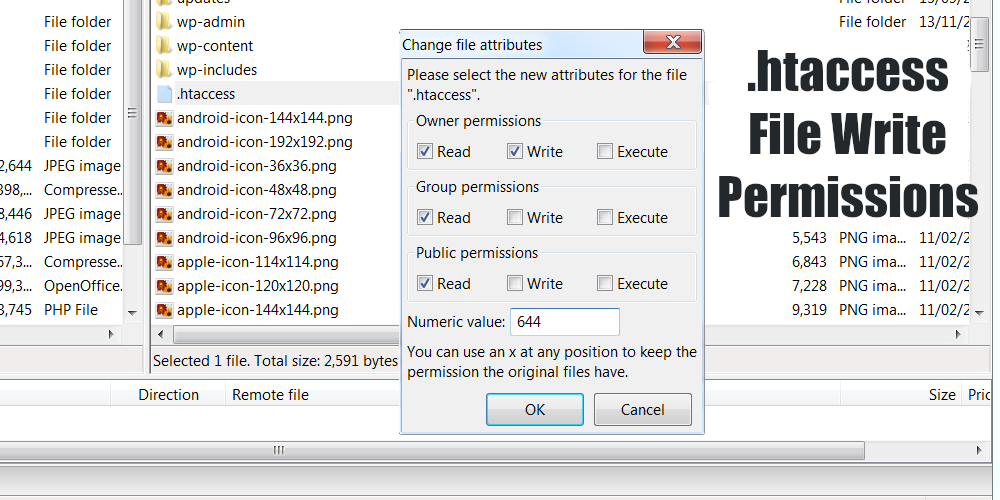
.htaccess should have safe permissions. The best setting is 644. This means the owner can read and write. Others can only read. It keeps the file safe from changes. Changing settings can cause issues. Keep permissions correct to avoid problems.
Linux servers often use 644 permissions. This is common and safe. Windows servers might use different settings. Always check your server type. Adjust settings accordingly. Correct permissions protect your site. Never set permissions to 777. This is risky. It allows anyone to edit files. Your site can be hacked easily.
| Server Type | Recommended Permissions |
|---|---|
| Linux | 644 |
| Windows | Varies |
Linux servers use 644 often. Windows settings can be different. Always check before changing. Correct permissions keep your site safe.
Credit: www.wpzoom.com
How To Change .htaccess Permissions
FTP Clients help manage files on servers. First, open your FTP client. Connect to your website server. Look for the .htaccess file in the root folder. Right-click on the file. Select “File Permissions” or “Change Permissions”. You will see a number like 644. Change the number to 644 for safe permissions. Always make sure the file can be read and written. Do not set too high permissions. High permissions can be risky.
Log into your cPanel account. Find the File Manager tool. Click to open it. Navigate to your website’s root folder. Locate the .htaccess file. Right-click on the file. Choose “Permissions” or “Change Permissions” option. You might see numbers like 644. Make sure it stays as 644. This setting is safe and protects your site. Never give full permissions to the file. That can allow others to make changes.
Common Errors And Fixes
Sometimes, you might see a “permission denied” error. This means your .htaccess file does not have the correct permissions. The best permission setting is 644. This allows the owner to read and write. Others can only read. Always check these settings if you have access issues.
An internal server error can make your site stop working. This often happens if the .htaccess file is broken. First, rename it to see if the error goes away. If it does, the file has a problem. Create a new .htaccess file. Make sure it has the right code and permissions. This should fix the error.
Credit: seo-gold.com
Best Practices For .htaccess Security
Backing up your .htaccess file is very important. Always keep a copy of the original file. This helps if anything goes wrong. Save backups in a safe place. Make sure they are easy to find.
Watch for changes in the .htaccess file. New changes can be risky. Use tools to help track these changes. Alerts can show when something is wrong. Always check who made the change. It is best to limit who can edit this file.
Troubleshooting Permission Problems
Setting the correct permissions for the. htaccess file in WordPress is crucial for security. Typically, permissions should be set to 644. This allows the owner to read and write, while others can only read, preventing unauthorized changes.
Identifying Permission Conflicts
Htaccess file issues can mess up your website. Wrong permissions cause errors. Check the permission settings first. Common settings are 644 or 755. These numbers mean read, write, and execute. Low numbers might block access. High numbers might allow unwanted changes. Look for permission errors in the server logs. See if there are any 403 errors. These mean access denied.
Restoring Default Settings
Resetting permissions can fix many issues. Change the file to default settings. Use 644 for files. Use 755 for folders. These settings are safe and common. They allow users to read files. They prevent unwanted changes. Use FTP or control panel to adjust settings. Be careful not to grant too many rights. Always backup before changing anything. Mistakes can cause big problems.

Credit: www.bluehost.com
Frequently Asked Questions
What Is The Ideal .htaccess File Permission?
The ideal permission for a. htaccess file in WordPress is 644. This setting allows the owner to read and write. Group and others can read but not write. It ensures the file is secure while still accessible to the server.
This helps prevent unauthorized modifications.
Can .htaccess Permissions Affect Site Security?
Yes,. htaccess permissions directly impact site security. Incorrect settings can expose your site to vulnerabilities. Setting permissions to 644 helps secure the file. It restricts unauthorized users from altering your. htaccess file. Always review and adjust permissions for enhanced security.
How Do You Change .htaccess Permissions?
You can change. htaccess permissions using an FTP client or cPanel. Navigate to the. htaccess file and right-click it. Select “File Permissions” and set the numeric value to 644. Save changes to apply the new permissions. Always back up files before making changes.
Why Is .htaccess Important For WordPress?
. htaccess is crucial for WordPress as it manages server configurations. It helps control URL redirects, security settings, and caching. Properly configured, it enhances site performance and security. Incorrect configurations can lead to errors. Regularly review and update your. htaccess file.
Conclusion
Choosing the right permissions for your. htaccess file is crucial. It ensures your WordPress site remains secure. Set permissions to 644 or 640 for optimal safety. This limits file access to only necessary users. Regularly check and update these settings.
Doing so protects against potential threats. Remember, file security is an ongoing task. Stay informed about best practices. Keep your WordPress site safe and efficient. Proper permissions help prevent unauthorized access. A secure site means peace of mind. So, prioritize.
htaccess permissions for a safer online presence.


