
Have you ever found yourself puzzled by the term “WordPress Extended RSS WXR File”? You’re not alone.
Many WordPress users stumble upon this term and wonder what it’s all about. Imagine a tool that could streamline your website management, making importing and exporting content a breeze. That’s precisely what the WXR file can do for you. We’ll unravel the mysteries of the WordPress Extended RSS WXR File and explain why it’s an essential tool for every WordPress user.
Whether you’re migrating your site, backing up content, or simply curious about how WordPress manages data, understanding WXR files can empower you to take full control of your website. Stick with us, and you’ll discover how this seemingly complex term can simplify your digital life.
Credit: devtidbits.com
WordPress Wxr File Basics
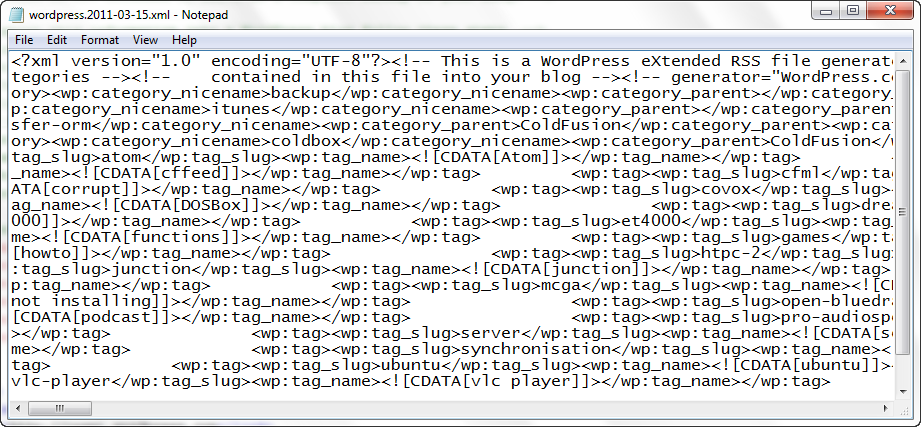
The WordPress Extended RSS (WXR) file is a special type of file. It stores your website’s content. This includes posts, pages, comments, and custom fields. WXR files help in transferring data between WordPress sites. They are like a digital suitcase. You can pack your site’s content in them. Then, move it to another site.
WXR files are in XML format. XML stands for Extensible Markup Language. It helps computers read the files easily. You can use WXR files to backup your site. You can also use them to import data. This file is a key tool for WordPress users. It makes site management simpler.
Credit: devtidbits.com
Structure Of Wxr Files
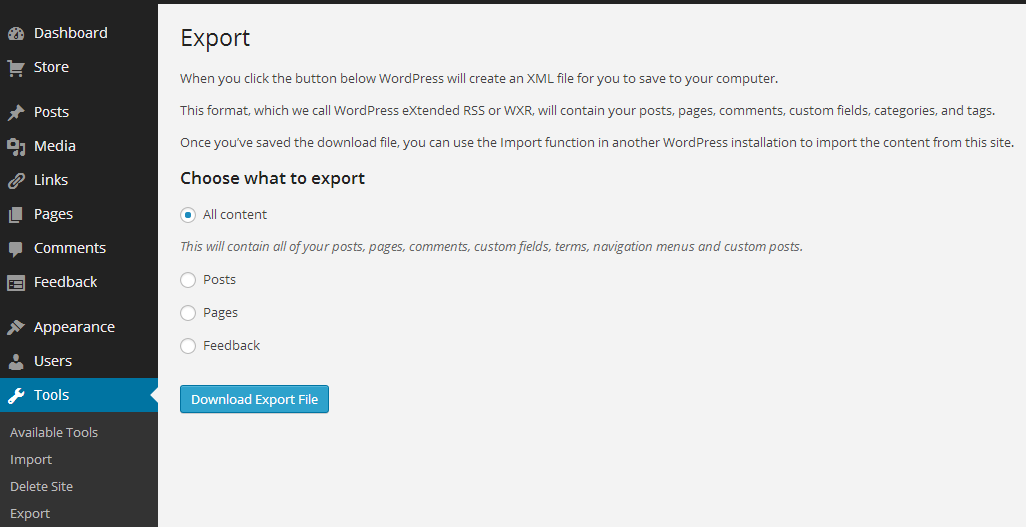
The WXR file uses XML. It stores data in a structured way. This format is clear and readable. XML helps computers understand data. Each piece of data is in a tag. Tags are like labels. They tell what the data means. For example, a post tag holds blog posts. A title tag holds the post title. This keeps data organized.
WXR files have many key components. Tags are the most important. Item tags hold post info. Title tags show post names. Category tags list post topics. Author tags tell who wrote the post. Date tags show when it was written. These tags make finding data easy. They help move data between sites.
Purpose Of Wxr Files
WXR files are used to export and import data in WordPress. They help you move posts, pages, and comments. You can also move custom fields and terms. WXR files keep your website content safe. These files make it easy to share data. You can send data to another WordPress site. This feature saves time and effort.
WXR files are great for backups. They store your website data. If you change your host, you can use WXR files. They help in migrating your site. You won’t lose any important information. WXR files keep everything in order. Your website remains the same after migration. It’s like moving with everything intact.
Credit: support.lexblog.com
Creating A Wxr File
WordPress makes it easy to move your content. Use the export tool to create a WXR file. This file holds your posts, pages, and other data. It’s like a big container for your site’s content.
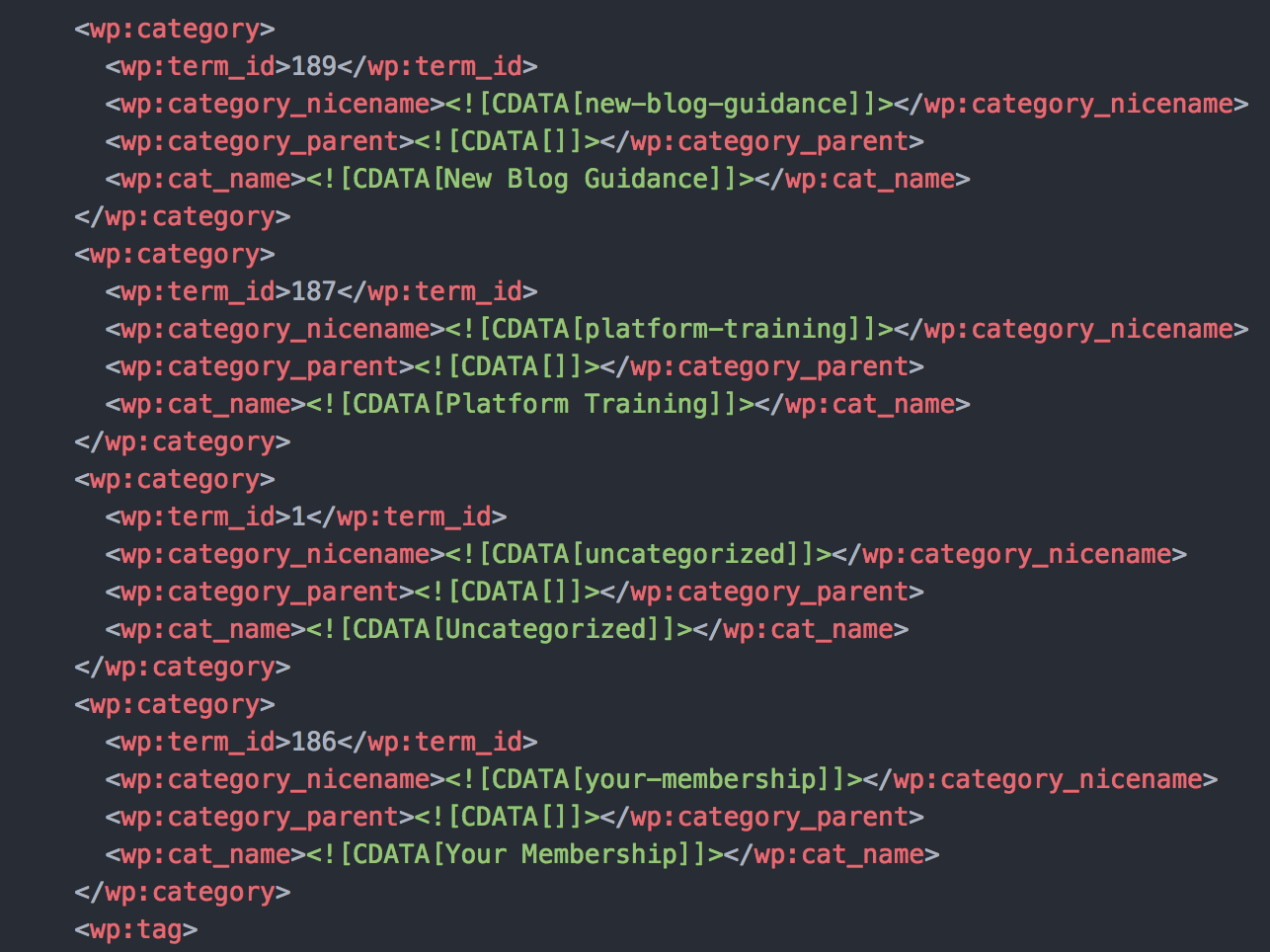
Start by going to your dashboard. Find the tools section and select ‘Export’. Choose what you want to export. It can be all content or specific parts. Then click ‘Download Export File’. Your WXR file will be ready to use.
Many plugins help with WXR files. Some plugins help you import data. Others assist in cleaning up the file. Popular plugins include WP All Import and WP Import Export Lite. These tools make handling WXR files easier. They ensure smooth transfers between sites.
Always check plugin reviews before installing. Ensure they are compatible with your WordPress version. This helps avoid problems.
Using Wxr Files
WordPress Extended RSS (WXR) files help move content. They are like a bridge between sites. You can use them to transfer posts, pages, and more. First, go to your WordPress dashboard. Find the “Tools” menu and click “Import”. Choose the WXR file you want to use. Follow the instructions on the screen. Soon, your content will be on your new site. Easy and quick!
Sometimes, importing WXR files can be tricky. Files might be too large. If this happens, try splitting them. Smaller files work better. Also, check your file format. Make sure it’s correct. Errors can stop the import. If you see an error message, read it carefully. It can give clues. Fix the problem and try again. Remember, patience is key.
Benefits Of Wxr Files
WXR files make content tasks easier. They can import and export posts. Users can save time by using them. Content moves smoothly between sites. This helps keep everything organized.
Moving a website is simple with WXR files. They help transfer data quickly. No need to worry about losing content. Everything stays safe and sound. These files are a reliable tool for website changes.
Limitations Of Wxr Files
WXR files can get very big. This makes them hard to handle. Large files take longer to upload and download. Sometimes, they even fail to load. Handling large files can be slow and annoying. This is a big problem for many users.
Data integrity is very important. Sometimes, WXR files can have errors. These errors mess up the data. Your content might get lost or mixed up. Keeping data safe is a big worry with these files. Always check your files for mistakes.
Frequently Asked Questions
What Is A WordPress Wxr File?
A WordPress WXR file is an XML file format. It contains your WordPress site’s posts, pages, and custom post types. This file is used for exporting and importing data. It helps in transferring content between WordPress sites efficiently and easily.
How Do You Export A Wxr File?
To export a WXR file, go to your WordPress dashboard. Navigate to “Tools,” then “Export. ” Choose “All Content” or specific data types to export. Click “Download Export File,” and the WXR file will be saved to your computer.
Can Wxr Files Be Used For Backups?
Yes, WXR files can be used for backups. They store your WordPress site’s content, including posts and pages. However, they don’t include themes, plugins, or settings. For comprehensive backups, use a dedicated backup plugin alongside WXR files.
How To Import A Wxr File To WordPress?
To import a WXR file, go to your WordPress dashboard. Navigate to “Tools,” then “Import. ” Choose “WordPress” and install the Importer plugin if needed. Upload your WXR file and follow the prompts to import your content.
Conclusion
Understanding the WordPress Extended RSS WXR file is crucial. It helps in data transfer and backup. Easy to manage your website content. You can export posts, pages, and comments. Simple file format for WordPress users. Useful for migrating to a new platform.
Makes the process smooth and efficient. Keeps your website data safe and secure. Learning about WXR files can enhance your website management skills. Use this tool to make WordPress tasks easier. Explore its features to benefit your site. Embrace its simplicity for better control.


