
Have you ever noticed the “Allow Pings” option in your WordPress settings and wondered what it actually does? You’re not alone.
Many WordPress users, from beginners to seasoned bloggers, encounter this feature yet remain unsure of its purpose and potential benefits. Understanding “Allow Pings” can enhance your blog’s connectivity and engagement, potentially boosting your site’s visibility. Imagine having a simple tool that invites interaction and promotes your content across the web.
Are you curious about how this mysterious setting can transform your blogging experience? Stick around as we demystify “Allow Pings” and show you how it can become an asset in your digital toolbox.
WordPress Basics
Pings are like digital postcards. They let other blogs know about a new update. This helps in building a network of blogs. Pings are important for blog visibility. It makes it easier for others to find your content. When a ping is sent, it reaches services that track blogs. This helps them update their lists with your post.
In blogging, pings play an essential role. They keep the blog world connected. It’s like a friendly notification system. If a blog links to you, you might get a pingback. This is a way of saying, “Hey, someone mentioned you!” It can increase your blog’s reach.
Functionality Of Allow Pings
WordPress uses pings to send notifications. These notifications reach other sites. This happens when you link to them. It helps in building connections. Your blog gets noticed by others. They see your links and can visit your site. Pings make your blog more visible.
Trackbacks are like blog comments. They show when someone mentions your blog. Pingbacks are automatic. They notify when your link is used. These tools help with communication. They help bloggers stay connected.
Benefits Of Allowing Pings
WordPress allows pings to notify other sites of new content, boosting visibility and engagement. This feature enhances connectivity, helping blogs gain attention from external sources. Increased interaction with readers and sites can improve SEO and drive traffic.
Boosting Engagement
Allowing pings can help you connect with others. It creates a network of blogs. This network brings more visitors to your site. Visitors can comment and share ideas. This makes your blog lively and interactive. Pings act like a bridge. They link your blog with the world.
Improving Seo
Pings can improve your site’s SEO. They let search engines know about your content. This helps your blog get noticed. More links mean better rank on search results. More people can find you. Search engines love fresh content. Pings show that your blog is active. This is good for your blog’s visibility.
Managing Ping Settings
WordPress allows pings to notify other blogs about new posts. It helps in building backlinks and increases site visibility. Managing ping settings ensures efficient interaction with external sites without overwhelming your server.
Configuring In WordPress
WordPress allows users to manage ping settings easily. Pings notify other blogs when you update your site. This can be useful for sharing content quickly. To configure pings, go to your WordPress dashboard. Click on Settings and then Discussion. Here, you can enable or disable pingbacks. Pingbacks are automated messages sent to other websites.
Sometimes, pings can lead to spam. It’s important to control this. Use plugins to help manage spam pings. Akismet is a popular choice. It filters unwanted messages. Regularly check the pingback section. Delete spam pings to keep your site clean. Always update your plugins. This ensures the best protection. Managing pings helps maintain a healthy site.
Alternatives To Pings
Blogs use different tools to share updates. RSS Feeds help readers get new posts. They are easy to use. Readers get updates without visiting the site. Email Notifications work well too. They send direct messages to users. Many people read emails daily.
Social Media is another option. It spreads news fast. Sites like Twitter and Facebook help. Bloggers post links and updates there. This reaches a big audience quickly.
RSS Feeds are simple and effective. They are good for regular readers. Email notifications are direct. They ensure the message reaches users. Social media has a wide reach. It can attract new readers. Each tool has its strengths. Choose based on your needs.

Credit: wordpress.org
Common Concerns
Spam is annoying. It clutters your site. Pings can lead to spam issues. Spammers use pings to flood comments. Your site gets messy. It affects reader experience. Moderate pings carefully. Use plugins to block spam. Keep your site clean.
Pings affect performance. They use server resources. This can slow down your site. Visitors may leave if pages load slowly. Optimize your site for speed. Check settings regularly. Limit pings to necessary ones. Keep your site efficient.
Best Practices
Allowing pings helps connect your blog with others. Trackbacks are a type of ping. They show when someone mentions your post. This can boost engagement. Bloggers see who links to them. This can build relationships. Always check spammy pings. They can harm your site. Use them wisely. They should add value.
Regular monitoring of pings is important. It helps keep your site safe. Check for spam links often. Spam can slow your site. It can also hurt your site’s reputation. Use plugins to help manage pings. Akismet is a popular choice. It helps block unwanted pings. Keep your WordPress updated. Updates fix bugs. They also improve performance.
Credit: www.wpbeginner.com

Credit: www.youtube.com
Frequently Asked Questions
What Does “allow Pings” Mean In WordPress?
“Allow Pings” in WordPress enables notifications from other websites. When someone links to your post, WordPress sends a pingback. This feature helps track backlinks and enhances engagement. It’s useful for building connections and improving SEO by showing how content is interconnected across the web.
Should I Enable Pings For My WordPress Site?
Enabling pings can benefit your WordPress site by tracking backlinks. It helps in networking and SEO. However, excessive pings may lead to spam. Consider enabling them if you want to monitor link activity and improve SEO, but stay cautious about potential spam issues.
How Do I Manage Pingbacks In WordPress?
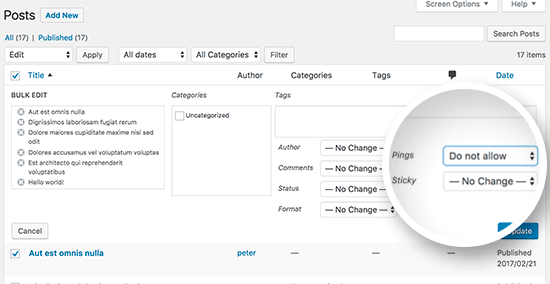
To manage pingbacks in WordPress, go to the discussion settings. Here, you can enable or disable pings globally. For specific posts, you can toggle the “Allow Pings” option in the post editor. Regularly check and moderate incoming pings to prevent spam and maintain site quality.
Can Pings Affect My Site’s Performance?
Pings can slightly affect site performance due to additional server requests. Each ping generates a notification that requires processing. If your site receives numerous pings, it may slow down. Regularly monitor ping activity and consider using plugins to manage or limit the impact on performance.
Conclusion
WordPress Allow Pings can boost engagement. Bloggers connect more effectively. Pings alert others about new content. This feature fosters community interaction. Readers discover related posts easily. It enhances visibility and networking. Simple setup makes it accessible to all users. Using Allow Pings can enrich your blog’s reach.
Make sure settings align with your strategy. Proper use leads to meaningful connections. Keep exploring WordPress features. Your blog can grow with active interaction. Understanding pings strengthens your blogging skills. Start utilizing this feature today. Enjoy a more connected blogging experience.


