
Have you ever wished you could manage multiple websites from a single dashboard? Imagine having the power to streamline your processes, save time, and boost productivity with ease.
This is where WordPress Multisite comes into play. Whether you’re a business owner, a developer, or a blogger, understanding the use of Multisite in WordPress can transform the way you handle your online presence. It’s not just a feature; it’s a game-changer.
Dive into this article to discover how you can harness this powerful tool to enhance your website management skills and elevate your digital strategy. Are you ready to unlock the potential of WordPress Multisite? Let’s get started!

Credit: visualmodo.com
Multisite Basics
WordPress Multisite lets you manage many websites from a single dashboard. This feature is useful for schools, businesses, and blogs. You can create new sites easily. Each site can have its own theme and plugins. Yet, all sites share one WordPress installation. This saves time on updates and maintenance. Users can have different roles and permissions. This ensures that site management is flexible and secure.
Multisite uses a single database to store data for all sites. Each site has its own tables for content and settings. The main site is the network admin. It controls the overall setup. Sub-sites can be added as needed. Each sub-site acts like a regular WordPress site. Yet, they are all connected under the main network. This setup helps in organizing multiple sites efficiently.
Setting Up Multisite
Multisite in WordPress enables managing multiple websites from one dashboard. This feature streamlines administration, updates, and user management across various sites. Perfect for businesses needing separate sites for different departments or projects.
Requirements
To set up a WordPress Multisite, you need a few things. First, ensure you have WordPress version 3.0 or higher. Your hosting must support Apache mod_rewrite, or equivalent. A static IP address is also required. Make sure the memory limit in PHP is at least 128MB. A backup of your site is recommended before starting.
Installation Steps
Begin by installing WordPress as usual. Open the wp-config.php file. Add the line: define('WP_ALLOW_MULTISITE', true); Save the file and refresh your WordPress admin. You will see a new Network Setup option.
Enabling Network Setup
Click on Network Setup. Choose subdomains or subdirectories for your network. Add a title and email address. Click Install to begin setup. Follow the instructions to edit wp-config.php and .htaccess. After finishing, your multisite network is ready.
Managing Multiple Sites
WordPress Multisite lets you manage many sites from one spot. It’s handy for businesses. Each site shares one dashboard. This makes updates easy. No need to log into each site. Save time. Organize better.
The dashboard shows all your sites. You can switch between sites fast. See updates, plugins, and themes. Manage them all from one place. Keep things tidy. Stay informed. Be in control.
Admins set roles for users. Some users edit content. Others manage settings. Control who sees what. Keep sites safe. Limit access to important areas. Set rules. Protect your sites.
Use tools to manage your sites. Install plugins across all sites. Share themes easily. Update everything with one click. Backup sites for safety. Use tools to keep sites smooth. Ensure sites run well.
Customization Options
Multisite lets you handle many themes. Pick a different theme for every site. This way, each site can look unique. Update themes from one place. This makes managing themes easy.
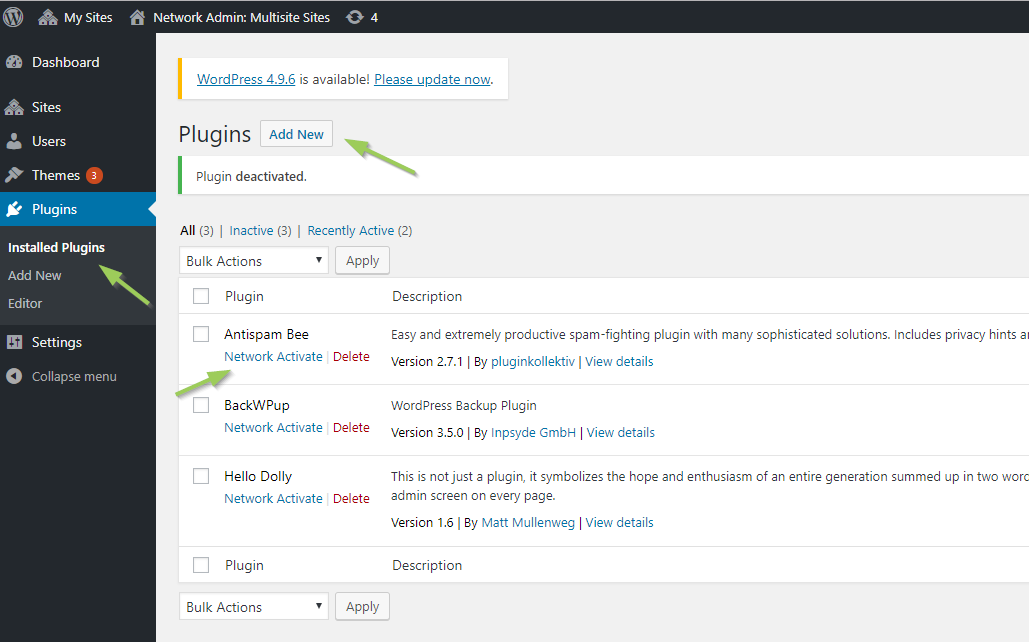
Control plugins across all sites. Activate a plugin for all sites at once. Or, choose which sites use certain plugins. This gives flexibility. Keep sites secure and up-to-date.
Want to add special features? Custom code is the answer. Add code to change how a site works. Make one site different from another. This can make each site special.
Performance And Security
Speed is important for websites. Multisite can help improve it. Use caching to make your site faster. Compress images so they load quickly. Reduce plugins to keep the site light. Enable a content delivery network (CDN) for better reach. Keep themes and plugins updated for best results. Always test changes for speed.
Security keeps your site safe from attacks. Use strong passwords for all users. Update WordPress regularly to fix bugs. Install security plugins to protect your site. Limit login attempts to prevent hacking. Use SSL certificates for encrypted connections. Backup your site often to save data. Educate users about online safety.

Credit: kinsta.com
Common Challenges
Managing multiple sites can be tricky with WordPress Multisite. Challenges include maintaining consistent themes and plugins across all sites. Handling user permissions and updates can also be complex, requiring careful planning and execution.
Troubleshooting Issues
WordPress Multisite can be tricky. Sometimes websites don’t load. This can frustrate users. Plugins can cause conflicts too. They might not work well together. Themes may not display correctly. This can change the look of your site. Updates are important. But they can break things. Always test before updating. Backups help if things go wrong. They save your data. Keep them up-to-date.
Scalability Concerns
Multisite helps manage many sites. But it can slow down if too big. Hosting is key. A good host makes sites faster. Traffic can cause problems. More users mean more load. Plugins affect speed too. Too many can slow things down. Database management is crucial. A big database takes time to load. Keep it clean and efficient.
Use Cases
Schools and colleges use WordPress Multisite. It helps to create websites for each class or department. Each site can have its own theme and plugins. It’s easy to manage from one place. Teachers and students find it helpful. They can share resources and ideas easily.
Big companies need many websites. They use Multisite for better management. Each branch or product can have its own site. Still, the main control is with the central team. It saves time and effort. No need to manage each site separately. Updates happen all at once.
Bloggers love WordPress Multisite. They can create a network of related blogs. Each blog can have a different focus. But, they all connect under one network. It helps grow audiences. Content is diverse yet connected. Managing ads and themes becomes simple too.
Credit: multilingualpress.org
Pros And Cons
WordPress multisite lets you manage many sites with one dashboard. This saves time. You can create new sites easily. Themes and plugins are shared. No need to install them again. Centralized updates make maintenance simple. User roles can be set for all sites. This keeps things organized. One login for all sites. No need to remember many passwords. Good for schools, businesses, and more. Saves server resources. Less strain on your hosting plan.
Multisite can be complex for beginners. Changes affect all sites. So, be careful. Plugins may not support multisite. This limits options. One database for all sites. If one site is hacked, others are at risk. Not all hosting supports multisite. This can be a problem. Migration of individual sites is harder. Backups need special care. New users might find it confusing. Requires good technical skills.
Frequently Asked Questions
How Does WordPress Multisite Work?
WordPress Multisite allows you to create multiple websites within a single WordPress installation. Each site can have its own themes and plugins. This feature is ideal for managing a network of sites from one dashboard, streamlining updates and administration tasks across all sites efficiently.
Can I Use Different Themes For Each Site?
Yes, WordPress Multisite allows each site to have its own theme. You can activate different themes for different sites. This flexibility helps tailor the appearance of each site to specific requirements or branding needs, enhancing user experience across your network of sites.
Is WordPress Multisite Suitable For Large Networks?
WordPress Multisite is ideal for large networks of websites. It simplifies management by centralizing control, making updates and maintenance easier. With Multisite, you can efficiently handle numerous sites, reducing administrative overhead and ensuring consistent settings across your network, which is crucial for large-scale operations.
What Are The Benefits Of WordPress Multisite?
WordPress Multisite offers centralized management of multiple sites. It saves time by allowing updates across all sites from one dashboard. You can share themes and plugins, and streamline administrative tasks. This feature is beneficial for businesses managing multiple websites under one brand or organization.
Conclusion
Multisite in WordPress offers great benefits for managing multiple sites. It simplifies site management and saves time. You can control several sites from one dashboard. This feature is perfect for businesses with many sites. It also helps bloggers with different topics.
No need for separate installations. Security and updates are easier too. You have more control over user access. It’s a powerful tool for efficient site management. Consider using multisite to streamline your WordPress experience. Explore its potential to make site management easier.
Multisite is a smart choice for organizing your digital presence.


