
Are you setting up your WordPress site and stumbled upon the terms “Site Address” and “WordPress Address”? It’s easy to get confused by these similar sounding phrases, yet understanding the difference is crucial for your website’s functionality and SEO.
Imagine optimizing your site visibility and user experience by grasping this simple distinction. You’ll uncover how each address plays a unique role in the life of your website. With this knowledge, you can confidently tweak settings and ensure your site runs smoothly and efficiently.
Let’s dive into demystifying these terms and empower you to make informed decisions for your WordPress site.
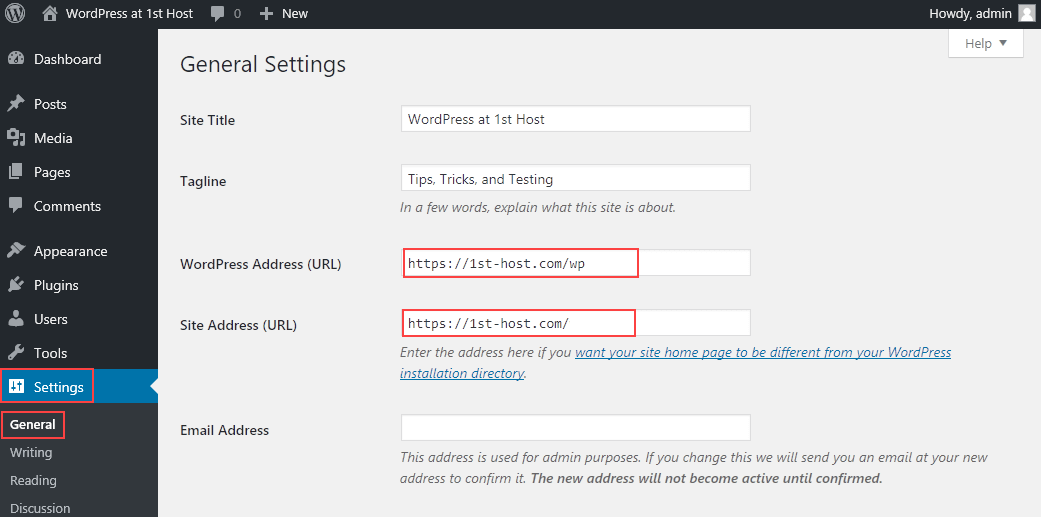
Credit: www.hostpapa.com
Site Address
The site address is the main URL of your website. It is what people type to visit your site. This address shows your homepage first. It is also known as the public address. This URL represents your website’s identity online.
The site address helps people find your website. It is like your site’s home on the internet. Easy to share and remember. It makes your site accessible to everyone. It is important for users to reach your content.
People use the site address to visit your website. They can bookmark it for quick access. It is shared in emails, ads, and social media. Businesses use it on cards and flyers. It is vital for online branding.
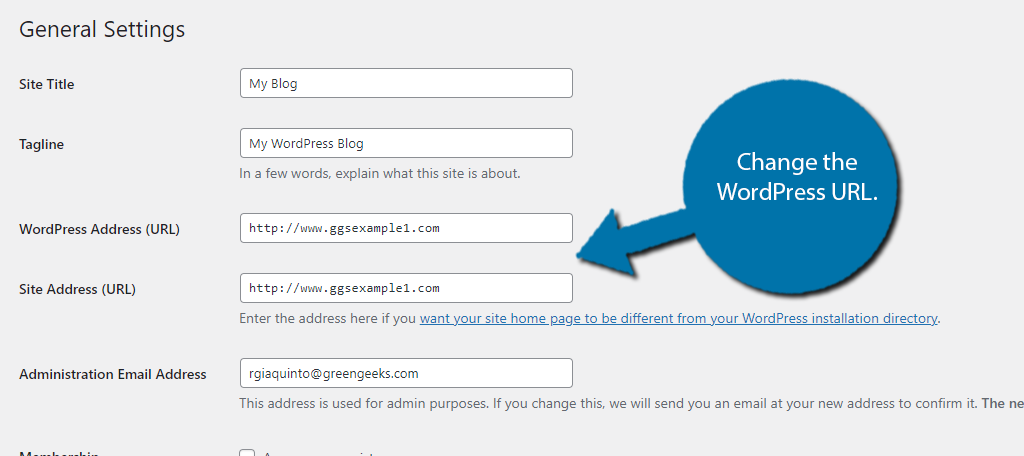
Credit: www.greengeeks.com
WordPress Address
The WordPress Address is the URL where your WordPress files are located. It is where you can access the WordPress admin area. This URL is important for the proper functioning of your website. If you change it, you might break your site.
The main purpose of the WordPress Address is to point to the correct location of your WordPress installation. It helps in loading the WordPress dashboard. It ensures that all themes and plugins work correctly.
WordPress Address is used to access the admin panel. It is also used to find the WordPress files. This address helps in managing the website settings. It is crucial for updates and maintenance.
Key Differences
Site Address and WordPress Address both use URLs. But they are different. Site Address points to your website’s home. WordPress Address shows where WordPress files are stored. Both are important for your site.
Url Structure
Site Address is your main URL. It is what visitors see first. WordPress Address is often longer. It includes folders where WordPress is stored. This helps to find files easily.
Impacts On Site Functionality
Changing the Site Address changes your website’s look. Visitors might not find pages easily. Adjusting the WordPress Address affects site tools. Widgets and plugins might stop working.
Security Implications
Correct URLs protect your site. Wrong URLs can lead to security risks. Hackers might find weaknesses. Keeping URLs accurate is important for safety.

Credit: www.greengeeks.com
When To Change Site Address
Sometimes, changing your site address is necessary. Moving to a new domain is one reason. Renaming your website is another. A broken link may need fixing. Security issues can force changes. Upgrading your host also matters. Each scenario requires careful thinking.
Changing your site address is easy. First, log in to your WordPress. Go to the settings menu. Find general settings there. Enter the new site address. Save your changes after checking them.
When To Change WordPress Address
Understanding when to change your WordPress address is crucial. The WordPress Address URL is where your site’s core files are located. Meanwhile, the Site Address URL is what visitors type in to find your site. Adjust these settings when moving servers or changing domains.
Scenarios Requiring Changes
Sometimes, you need to change your WordPress address. This can happen for many reasons. You might have moved to a new domain. Or your site is moving from HTTP to HTTPS for better security. Another reason could be switching from a subdirectory to the main domain. These changes help keep your site safe and up-to-date.
Steps To Modify
Changing the WordPress address is easy. First, log in to your WordPress dashboard. Click on Settings and then General. You’ll see two fields: WordPress Address (URL) and Site Address (URL). Update these fields with your new address. Make sure to save changes. Now your site should work with the new address.
Common Mistakes
Many people set wrong URLs for their site. This can lead to big problems. The WordPress Address is where your files are. The Site Address is where users go. If these are mixed up, links can break. Visitors may see error pages instead of your site.
Wrong URLs can also hurt your SEO. Search engines get confused. They may not rank your site well. Your site might become invisible to search engines. It is very important to check these settings. Make sure they are correct. A little mistake can have a big impact.
Troubleshooting Issues
Understanding the distinction between site address and WordPress address is crucial for troubleshooting. Site address refers to your website’s URL, while WordPress address indicates where WordPress files are stored. These settings affect how your site displays and functions.
Access Problems
Sometimes, you cannot reach your website. This might be due to wrong site addresses. The WordPress Address is where your WordPress files live. The Site Address is where people visit your site. If these addresses do not match, you may face access problems. Always check these settings in the WordPress dashboard.
Mixed Content Errors
Mixed content errors happen when your site uses both HTTP and HTTPS. This can make your site unsafe. The WordPress Address and Site Address must both use HTTPS. Go to your settings and make sure both addresses use HTTPS. This will help keep your site secure.
Frequently Asked Questions
What Is A Site Address In WordPress?
A site address is the URL that visitors use to access your WordPress site. It’s the web address displayed in browsers. This URL is important for your site’s visibility and accessibility. You can set or change the site address in the general settings of your WordPress dashboard.
How Does WordPress Address Differ From Site Address?
The WordPress address refers to the directory where WordPress core files are stored. It can differ from the site address if WordPress is installed in a subdirectory. This setup allows for better organization and security of your website’s files.
Can I Change My WordPress And Site Addresses?
Yes, you can change both addresses in WordPress settings. Access the general settings from your dashboard to update them. Ensure changes reflect in your database and hosting settings. Changing addresses might affect your site’s functionality, so proceed carefully.
Why Are WordPress And Site Addresses Important?
These addresses are crucial for site accessibility and management. They determine how users and search engines find your site. Correct setup ensures seamless navigation and optimal performance. Misconfigured addresses can lead to broken links and site downtime.
Conclusion
Understanding the difference is crucial for website setup. The WordPress Address sets your site’s core files location. Meanwhile, the Site Address determines how users access your site. Both addresses are important for security and functionality. Choosing the right settings boosts your site’s performance and accessibility.
Always ensure both addresses are correctly configured. This prevents potential issues and keeps your website running smoothly. For beginners, this might seem complex. But with practice, it becomes clearer. Remember, setting these correctly enhances your site’s user experience. Keep learning and experimenting with your WordPress settings.
Your site’s success depends on it.


