
Imagine landing on a website and feeling instantly connected, intrigued, and informed. That’s the power of a well-crafted home page for a WordPress site.
Your home page is not just an entry point; it’s the face of your online presence. It’s where first impressions are made, and as we know, they matter. You want visitors to stick around, explore, and engage, right? Think of your WordPress home page as your digital storefront.
It needs to be inviting, easy to navigate, and packed with the right information. But what exactly should it include? How can it guide users smoothly through your site while reflecting your brand’s personality? Understanding the essence of an effective home page is key to elevating your website. If you’re wondering how to make your WordPress site stand out from the crowd, or if you’re just getting started, this article is for you. We’ll dive into what makes a home page truly effective, and share tips to ensure yours captures attention and keeps visitors coming back for more. Keep reading to transform your home page into a powerful tool for your brand.
Purpose Of A Home Page
A home page is like a book cover. It tells what your website is about. Visitors see it first. It must be clear and simple. Important information should be easy to find. This includes site name and main topics. Pictures can help too.
Links to other pages should be there. Navigation menus make this easy. They guide visitors to other parts of your site. Make sure the home page loads fast. Slow pages can make visitors leave. Use easy words so everyone understands.

Credit: wptavern.com
Key Elements
The navigation menu helps users find pages easily. It usually sits at the top. People use it to find what they need. Clear labels help users understand. It should be simple to use. Always keep it organized.
The header is at the top. It often has the logo. A logo shows your brand. It should be clear and visible. Logos help people remember your site. A well-placed header can attract users.
The main content area shows important information. It should be interesting. Text and images go here. Keep it neat and easy to read. Good content keeps users on your site. Always update it with fresh information.
Call to action buttons guide users. They tell users what to do next. Examples include “Buy Now” or “Learn More.” These buttons should stand out. They should be easy to find. Use bright colors to make them pop.
The footer is at the bottom. It often has links and contact info. You might find social media links there. Users can find terms and policies here too. Keep it tidy and informative.
Design Best Practices
A home page should be easy to use. Visitors should find what they want quickly. Clear menus help with this. Use simple words in menus. Keep important links at the top. Less is more when it comes to text. Too much text can confuse users.
Websites must work well on all devices. Phones, tablets, and computers. Responsive design means the site changes size to fit screens. This keeps users happy. They won’t leave because of a bad view. Use tools like flexible grids and layouts. Images should adjust to different screen sizes too.
Use the same style across the website. Same colors, fonts, and button styles. This is called visual consistency. It helps users feel comfortable. They know they are still on the same site. Logos and icons should match the overall theme.
Seo Considerations
Choose the right keywords for your home page. It helps in getting more visitors. Use keywords in the title, headings, and content. Make sure they are relevant to your site. This way, your site ranks better in search engines.
Meta tags are important for SEO. They tell search engines about your page. Use a clear and short meta description. It should have your main keywords. This helps in showing your site in search results.
Internal links connect pages on your site. They help visitors find information easily. Use links to guide users to important pages. It also helps in spreading link juice across your site. This improves your overall SEO.
Customization Options
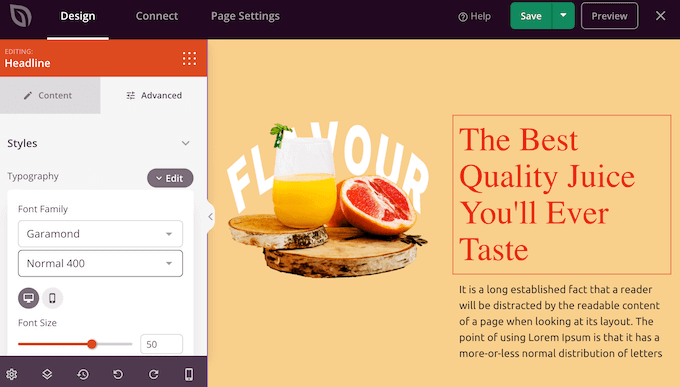
Themes change the look of your site. Each theme has a style. You can pick one you like. Templates help with layouts. They decide where things go on the page. You can choose different templates. Try many until you find one you love.
Widgets add small features. Like clocks, calendars, or search bars. Plugins offer more features. They can add contact forms or galleries. Use widgets and plugins to make your site better.
Change colors to match your style. Use pictures you like. Write texts that sound like you. Personalize to make your site special. It should feel like home.
Credit: www.wpbeginner.com
Common Mistakes
A homepage should not have too much content. It can confuse visitors. Keep the page simple and clear. Focus on the important message. Remove extra words and images. This makes your site easy to navigate.
Many people use phones to browse. Your homepage must work well on mobiles. If it doesn’t, users will leave quickly. Ensure buttons are big enough to click. Text should be easy to read. Mobile-friendly design is a must.
Slow sites are frustrating. Visitors may leave if a page loads slowly. Optimize images and scripts to improve speed. Fast loading keeps users happy. It also helps your site rank better in search engines.
Examples Of Effective Home Pages
A good home page shows important information quickly. It should be simple and clear. Visitors need to understand what your site offers. Use strong images and bold text. They catch the eye. Many sites use a big headline. It tells the main idea in few words.
Some sites have a navigation menu at the top. This helps users find more pages. Testimonials can be useful. They show others like your work. Add a call to action button. It asks visitors to do something, like “Sign Up” or “Learn More”. These elements make a home page effective.
Credit: docs.presscustomizr.com
Frequently Asked Questions
What Defines A Homepage In WordPress?
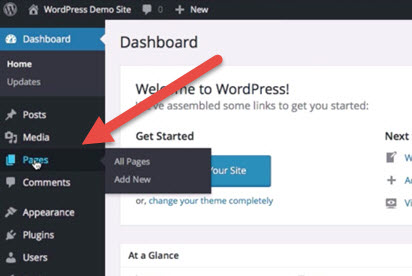
A homepage in WordPress is the main landing page of your site. It showcases your site’s content and navigation. Typically, it displays recent posts or a static page. You can customize it using themes and widgets to best represent your brand or message.
How To Set A Homepage In WordPress?
To set a homepage, navigate to Settings > Reading in your WordPress dashboard. Choose either ‘Your latest posts’ or ‘A static page. ‘ Select your preferred page from the dropdown, then save changes. This configures your homepage.
Can I Customize My WordPress Homepage?
Yes, you can customize your WordPress homepage extensively. Use themes, plugins, and the WordPress Customizer to change layouts, colors, and widgets. This helps create a unique and engaging visitor experience. Consider adding sliders, testimonials, or featured posts.
Why Is My Homepage Not Updating?
Homepage updates may not reflect due to caching issues. Clear your browser and site cache. Ensure all plugins and themes are up-to-date. Sometimes, server-side settings can delay updates. Contact your hosting provider for further assistance if needed.
Conclusion
The home page is the heart of your WordPress site. It welcomes visitors and guides them. Keep it simple and clear. Use engaging content to capture interest. Choose a design that reflects your brand. Make navigation easy for users. This boosts user experience and keeps them on your site.
Remember, a well-designed home page attracts and retains visitors. So, invest time to create a strong first impression. Your home page is your digital handshake. Make it count.


