
Ever wondered how your website visitors seamlessly land on the exact page you want them to see? It all boils down to the magic of a page URL.
If you’re using WordPress, understanding page URLs becomes even more crucial. These seemingly simple strings of text are the digital signposts guiding your audience to the right content. But what exactly is a page URL in WordPress, and why should you care?
By the end of this article, you’ll not only grasp the concept but also uncover how mastering URLs can enhance your site’s visibility and user experience. Get ready to unlock the secrets that can transform the way your visitors interact with your website. Stay with us, and see how a simple URL can make a world of difference!
Page Url Basics
A Page URL is the address of your page on the web. It tells people how to find your page. In WordPress, each page has a unique URL. This helps with SEO and finding your content. A good URL is short and clear. It should match your page topic. Always check your URL before publishing. Make sure it does not have mistakes.
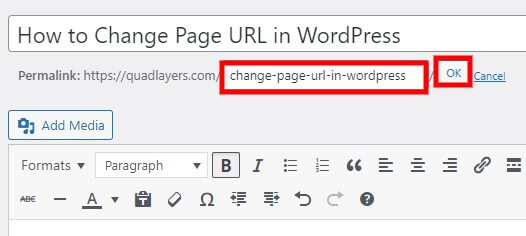
WordPress gives a default URL, but you can change it. Use the permalink settings to make it better. Short and easy-to-read URLs are best. They help search engines and users. Remember, a good URL can improve your site’s traffic.
Credit: quadlayers.com
Structure Of A WordPress Url
A WordPress URL starts with a protocol. This is usually HTTP or HTTPS. HTTPS is secure. The domain comes next. It is the name of the website. This helps users find your site. For example, example.com is a domain. Both parts are important. They guide users to your site.
The path follows the domain. It shows the location of the page. It often looks like /blog/post. The slug is part of the path. It is a short name for the page. This helps with organizing content. A good slug is clear and simple. It tells what the page is about.
Query parameters add extra info. They follow a question mark in the URL. For example, ?id=123. These are small details. They help with sorting or filtering. Not all URLs have them. But they can be useful. They are often used in searches and forms.
Role Of Permalinks
Permalinks play a crucial role in WordPress. They are the permanent URLs for your posts and pages. Default settings in WordPress create URLs based on the post ID. This format is not user-friendly. It does not show content clearly. Users may find these links confusing. Search engines might not rank them well.
Customizing permalinks improves readability and SEO. You can change permalinks to show post titles. This makes URLs clear and easy to understand. Users can know what the page is about by looking at the URL. Search engines prefer descriptive URLs. They help in better ranking and visibility. Easy-to-read URLs make your site more attractive to users.

Credit: help.memberspace.com
Seo Considerations
Keywords help people find your page. Use them wisely. Place them in the URL. This helps search engines understand your page.
Make sure your URL has the main keyword. This makes it easy to read and understand. Avoid using too many words. Too many words can confuse readers.
A short URL is best. It is easy to remember. Long URLs are hard to read. They can confuse people.
Use simple words in your URL. This makes it clear and neat. Avoid using numbers and symbols. They make URLs messy.
Think about your readers. Make URLs simple for them. This helps them find what they want.
Managing Urls In WordPress
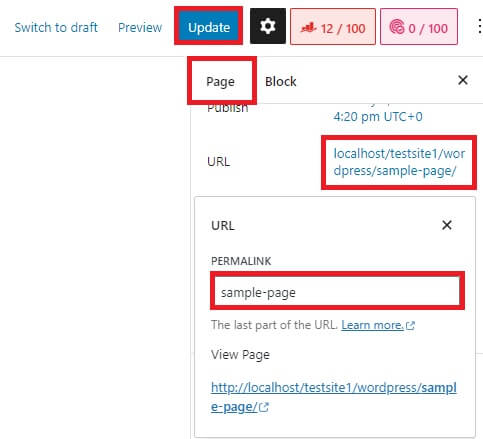
WordPress lets you change your page URLs easily. You can make them custom to fit your needs. This helps users find pages better. Go to the permalink settings in your dashboard. Here, you can set the URL style you like. Choose from plain, day and name, or post name. Custom URLs make your site look neat and professional. They are also important for SEO, helping search engines find your content easily.
Redirects send users from one URL to another. They are useful when you change a page URL. Use redirects to keep users on your site. Broken links can be bad for your site. They confuse users and hurt SEO. Manage your URLs well to avoid this. Plugins can help with redirects. They make the process easy and quick. Monitor your URLs often. Check for broken links and fix them quickly.
Common Url Issues
A page URL in WordPress is the web address used to access a specific page. It often faces issues like being too long, having unnecessary words, or containing special characters, which can affect SEO and user experience.
Broken Links
Broken links are links that don’t work. They lead to nowhere. Visitors get a 404 error. This is bad for your website. It makes users unhappy. It also affects your site’s SEO. Fix broken links quickly. Use tools to find them. Replace or update the links. Ensure every link works.
Duplicate Content
Duplicate content means the same content appears on different URLs. This confuses search engines. It can hurt your site’s ranking. Make sure each page has unique content. Use tools to check for duplicate content. If found, use a 301 redirect. Or, use the rel=”canonical” tag. This helps search engines know the original source. Keep content fresh and unique.
Tools For Url Optimization
WordPress offers many SEO plugins for URL optimization. Yoast SEO is a popular choice. It helps you create SEO-friendly URLs. All in One SEO Pack is another great plugin. It offers easy settings for beginners. Both plugins help improve your site’s search visibility. They also offer keyword suggestions. These tools are user-friendly. They make URL management easy. Many users find them helpful.
Analytics tools help track URL performance. Google Analytics is a common tool. It gives insights into traffic sources. You can see which URLs get the most visits. Google Search Console shows search queries that lead to your site. It helps you understand user behavior. These tools offer valuable data. They help you make informed decisions. Use them to improve your URLs.
Credit: quadlayers.com
Frequently Asked Questions
What Is A Page Url In WordPress?
A Page URL in WordPress is the unique web address assigned to a specific page on your website. It helps users and search engines locate and identify the page. WordPress automatically generates URLs, but you can customize them for better SEO and readability.
How Do I Change A WordPress Page Url?
To change a Page URL in WordPress, navigate to the page editor. Locate the Permalink section below the title. Click “Edit” and type your desired URL slug. Save the changes to update the URL. Ensure the new URL is SEO-friendly and relevant to the page content.
Why Are WordPress Page Urls Important For Seo?
WordPress Page URLs are crucial for SEO because they help search engines understand the page’s content. A clear, descriptive URL can improve search rankings and click-through rates. It also enhances user experience by providing a glimpse of the page’s content before clicking.
Can I Use Keywords In WordPress Page Urls?
Yes, using keywords in WordPress Page URLs is beneficial for SEO. Including relevant keywords can improve search engine rankings and visibility. Ensure the URL remains readable and concise. Avoid keyword stuffing and focus on creating a natural, informative URL structure.
Conclusion
Understanding page URLs in WordPress is crucial for website management. They help organize content and improve navigation. Simple URLs make sites user-friendly, boosting visitor engagement. Correctly structured URLs enhance SEO, drawing more traffic. Users easily find relevant pages, enhancing their experience.
Regular URL checks ensure links remain valid. This prevents broken links, maintaining site credibility. Learning URL basics empowers site owners. It simplifies content updates and ensures a professional web presence. Embrace these practices for a seamless WordPress experience. Stay informed, and your site will thrive!


