
Imagine having the power to customize and control your WordPress website just the way you want, without diving deep into complex coding. Sounds appealing, right?
This is where the concept of “hooks” in WordPress comes in. Hooks are a game-changer for anyone looking to enhance their site’s functionality effortlessly. Whether you’re a seasoned developer or a WordPress newbie, understanding hooks can save you time and energy while unlocking endless customization possibilities.
Curious to know how you can leverage this simple yet powerful tool to transform your website? Keep reading to discover the secrets behind WordPress hooks and how they can make your site stand out in the digital crowd.
Credit: totalwptheme.com
Defining Hooks In WordPress
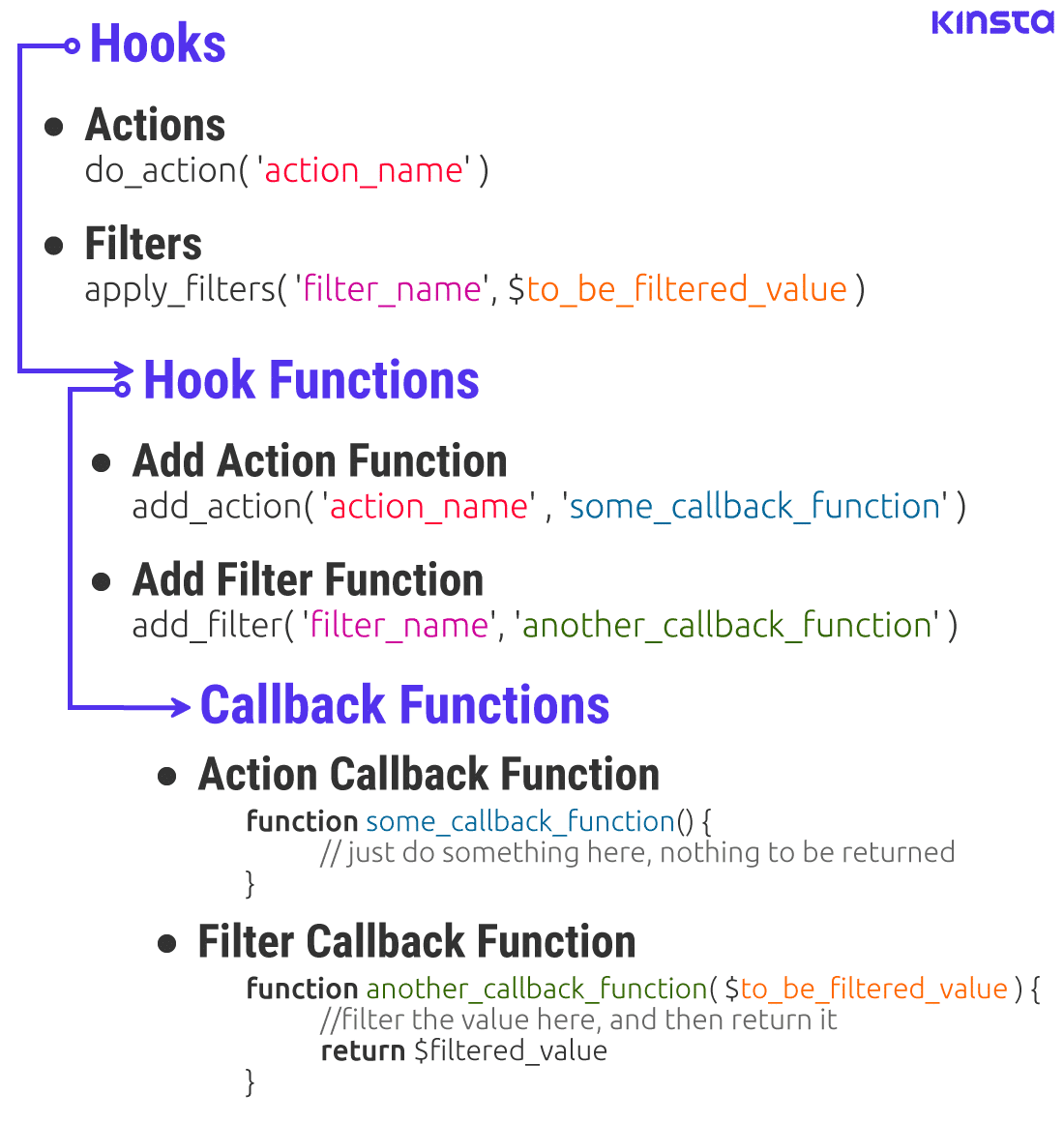
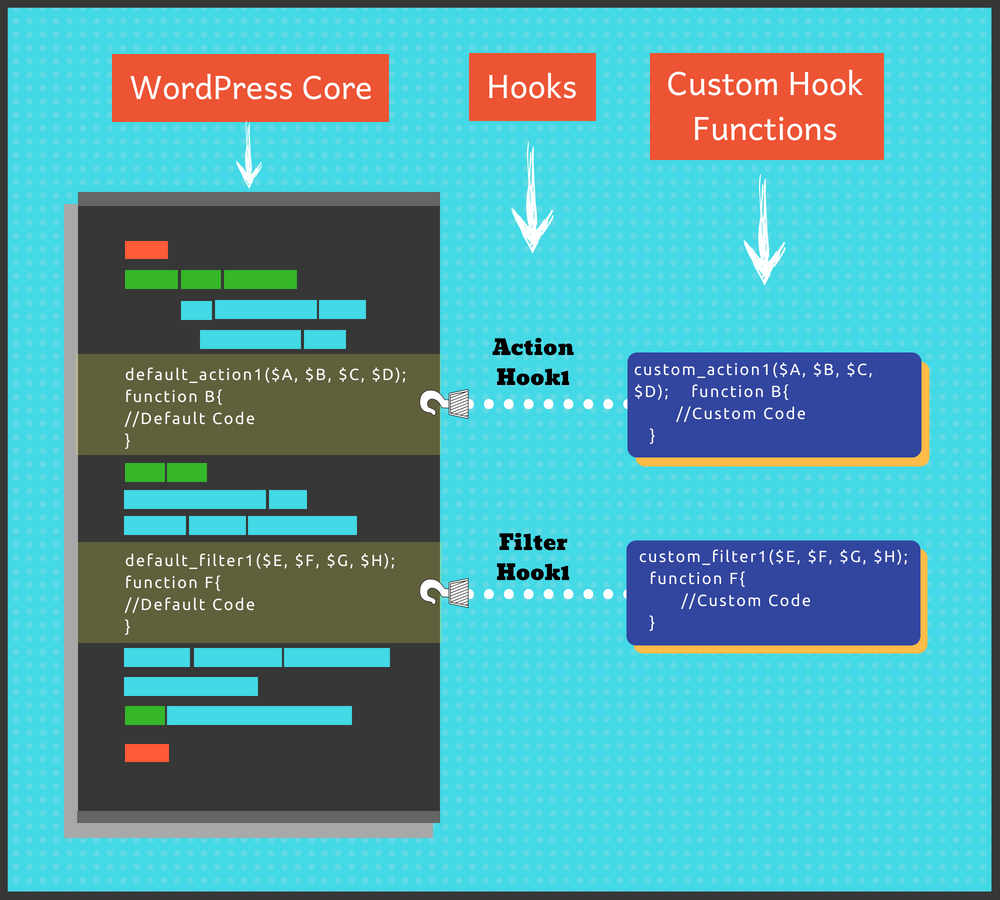
Hooks are special tools in WordPress. They help you change or add to the website. You don’t need to change the core files. There are two types of hooks: actions and filters. Actions let you add new code. Filters let you change existing content. Both work with the WordPress core.
Developers use hooks to make plugins and themes better. They can add new features with them. Hooks make WordPress flexible and powerful. Even beginners can learn to use them. They just need some practice and patience. Understanding hooks is key to mastering WordPress customization.
Credit: kinsta.com
Types Of Hooks
WordPress hooks are tools that let developers add or change functionality without altering core files. There are two main types: actions and filters. Actions let you add custom code, while filters modify existing content.
Action Hooks
Action hooks let you add your own code. They run at specific points. These hooks help change the way your site works. You can add code to run before or after something happens. For example, use them to send an email. Or update a database. Action hooks are easy to use. They make coding fun and flexible. With them, you can do many things without changing core files.
Filter Hooks
Filter hooks change the data before it shows. They let you adjust content. You can change text, images, or links. Use them to modify titles or descriptions. Filters are helpful for personalizing your site. They provide control over what visitors see. These hooks are simple to apply. They make your website unique. Filters help in customizing without altering main code.
How Hooks Work
Hooks in WordPress are like signals. They tell WordPress what to do. Hooks have a special execution process. They run in order, one after the other. Each hook has a priority. Priority decides when a hook runs. A hook with priority 1 runs first. A hook with priority 10 runs later.
Hooks can have arguments. Arguments give extra details. They help WordPress understand what to do. Some hooks need many arguments. Others need none. It’s important to use the right arguments. Without them, hooks might not work well. Hooks make WordPress flexible and powerful.
Credit: learnwoo.com
Creating Custom Hooks
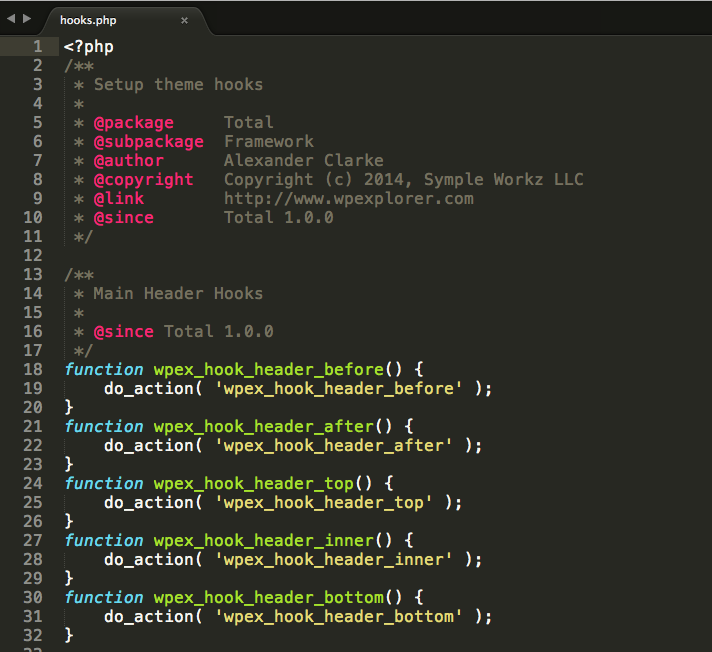
Action hooks let you add new code to WordPress. They run at specific points. You can create your own action hooks. Just use the function do_action(). First, give your hook a name. Next, write the code you want to add. Finally, place the action hook in your theme or plugin. This will tell WordPress to run your code. It’s a simple way to expand your website’s features.
Filter hooks let you change data. Use them to modify content. To create one, use the function apply_filters(). First, set a name for your filter. Then, write the code to change the data. Place the filter hook where needed. This will allow WordPress to apply your changes. Filters are useful for altering text or data before display.
Using Hooks In Themes And Plugins
Hooks help in adding features to themes. They allow changes without touching the core files. Developers use hooks to add custom functions. This keeps the theme code clean. Hooks can be action or filter types. Action hooks run functions at specific times. Filter hooks change data before it is shown. Use hooks to create flexible themes.
Plugins often need hooks to work with WordPress. Hooks let plugins add or change features. Use action hooks to run plugin code at certain times. Filter hooks can modify data for plugins. This makes plugins smart and adaptive. Hooks help plugins fit into WordPress sites easily. They make custom features simple to add.
Commonly Used Hooks
WordPress Core Hooks are essential tools for developers. They let you change how WordPress works. These hooks can be actions or filters. Actions let you add new code. Filters let you change existing code. Core hooks are found in WordPress files. They help in customizing themes and plugins. Some common core hooks are init, wp_head, and wp_footer. Use them to customize your website.
Themes and plugins also have their own hooks. These hooks allow specific changes in themes or plugins. They are unique to each theme or plugin. Developers use them to add or modify features. For instance, a theme might have hooks for header changes. Plugins might have hooks for functionality changes. Knowing these hooks helps in better customization. Examples include woocommerce_before_main_content and bbp_template_before_pagination_loop.
Troubleshooting Hook Issues
WordPress hooks are a crucial part of customizing your site. They allow you to modify or extend WordPress functionality without altering core files. Troubleshooting hook issues often involves checking for correct syntax, ensuring compatibility, and verifying hook priority settings to achieve desired results.
Debugging Techniques
Hooks can be tricky at times. They might not work as expected. First, check your code. Make sure it’s spelled correctly. A small mistake can cause problems. Next, check if the hook is in the right place. Some hooks need to be in a specific spot. Moving them can fix the issue. Also, look for any conflicts. Other plugins might use the same hook. This can create issues. Disable other plugins to see if it helps.
Avoiding Common Pitfalls
Using too many hooks can slow your site. Try to use only what you need. Also, don’t forget to update your plugins. Old plugins can cause hook problems. It’s important to keep them fresh. Lastly, always test your hooks. Make sure they do what you want. Testing helps find mistakes early. This saves time and effort later.
Frequently Asked Questions
What Is A Hook In WordPress?
A hook in WordPress is a mechanism for altering or adding functionality without modifying core files. Hooks allow developers to “hook” their custom code into WordPress at specific points. They are essential for theme and plugin development, enabling customization and extensibility of the WordPress platform.
How Do WordPress Action Hooks Work?
Action hooks in WordPress allow you to execute custom code at specific points during the WordPress lifecycle. By attaching functions to these hooks, you can modify the default behavior. They help in adding features or functionalities without altering the core files, ensuring WordPress updates don’t override custom code.
What Are Filter Hooks In WordPress?
Filter hooks in WordPress let you modify data before it is processed or displayed. They allow you to change content, settings, or options without altering the original data source. By using filter hooks, developers can customize outputs, ensuring that changes integrate seamlessly with existing WordPress functionality.
Why Use Hooks In WordPress Development?
Hooks in WordPress are crucial for customizing and extending functionality without changing core files. They ensure updates don’t erase customizations. Using hooks enhances development flexibility and efficiency, enabling developers to create tailored solutions while maintaining compatibility with future WordPress updates.
Conclusion
Hook WordPress plays a vital role in website customization. It allows for easy tweaks without altering core files. This flexibility ensures a smoother, more efficient site management. Beginners can benefit from its simple integration. Advanced users gain power to create tailored solutions.
Understanding hooks can enhance your WordPress experience. They offer control and adaptability for diverse website needs. Embrace hooks to make your site unique and user-friendly. With practice, using hooks becomes second nature. Explore their potential to transform your WordPress journey.
Happy customizing!


