
Are you looking to enhance your WordPress website with powerful marketing tools? If so, you’re in the right place.
Understanding what HubSpot for WordPress offers could be the game changer your online presence needs. Imagine having the ability to seamlessly integrate your marketing, sales, and customer service efforts all in one place, with minimal effort on your part. Sounds enticing, right?
HubSpot for WordPress is designed to help you do just that, providing tools that can boost your engagement, nurture leads, and convert visitors into customers. Curious to learn how this integration can transform your website into a marketing powerhouse? Keep reading to discover how HubSpot for WordPress can elevate your digital strategy and unlock new possibilities for growth.
Hubspot And WordPress Integration
HubSpot is a tool that helps businesses. It focuses on marketing, sales, and customer service. It makes tasks easier for companies. Users can track customer interactions. They can also organize data better. HubSpot offers tools like email marketing and social media management. These features support business growth. Many companies find it helpful.
WordPress is a popular website builder. It allows users to create websites with ease. No coding skills are required. Many themes and plugins are available. Users can customize their sites. Blogs, stores, and portfolios can be made with WordPress. It is suitable for beginners and experts alike. Millions of websites use WordPress today.
Integrating HubSpot with WordPress is beneficial. Users can access both platforms in one place. This integration simplifies marketing efforts. It helps in tracking website visitors. Businesses can automate many tasks. The integration also improves data management. Users can create better customer experiences. This leads to more sales and growth.
Features Of Hubspot For WordPress
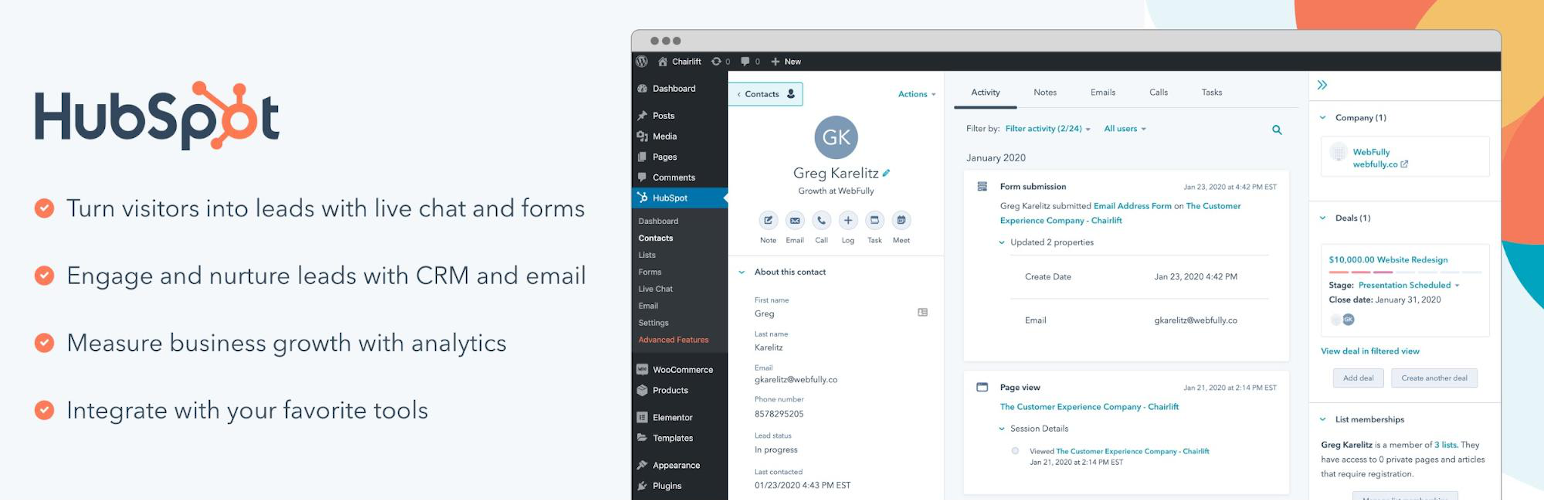
HubSpot offers simple tools to get more leads. Forms collect visitor information easily. Pop-ups grab attention without being annoying. These tools help build connections with visitors. Easy to use and set up.
Track what visitors do on your site. HubSpot shows which pages are popular. It tells you how people find your site. This helps make better choices for your content. Seeing data can improve site performance.
SEO tools improve site visibility. Keywords help attract search engines. HubSpot guides you to optimize your content. Easy tips make your site rank better. Helps reach more people online.
Setting Up Hubspot On WordPress
Start by downloading the HubSpot plugin. Go to your WordPress dashboard. Click on “Plugins” and select “Add New”. Search for “HubSpot”. Click “Install Now”. After installation, activate the plugin. HubSpot will ask for your account details. Enter them to connect.
Once activated, access HubSpot settings. Navigate to the HubSpot tab. Customize the settings as needed. Adjust forms and analytics. Choose what data to track. Set up your marketing tools. Save changes to confirm.
If problems occur, check your internet connection. Ensure HubSpot account details are correct. Update the plugin if needed. Clear browser cache. Disable conflicting plugins. Contact HubSpot support for help. They offer guidance for issues.
Maximizing Hubspot’s Capabilities
HubSpot’s CRM tools help manage customer information. This keeps all data in one place. Contacts, emails, and tasks are easy to track. Businesses can see who they talk to. They can also see what they talked about. This helps in building better customer relations.
Email marketing can save time with HubSpot. It sends emails automatically. Businesses can send welcome emails or newsletters. This helps keep customers informed. They feel valued and connected. Automation makes it easy to reach many people at once.
HubSpot tools help in engaging customers. Businesses can share blogs and social media posts. This keeps customers interested. They feel like part of the brand. Engaging customers builds trust. It helps businesses grow strong relationships.
Best Practices For Using Hubspot With WordPress
Always keep your plugins updated. This ensures smooth functioning. Use lightweight themes for faster loading times. Remove unused plugins regularly. This keeps your site clean and fast. Image compression is key. Smaller images load faster. Use a caching plugin. It speeds up your site.
Strong passwords protect your data. Change them often. Use two-factor authentication. It adds an extra layer of security. Regular backups are important. They save your data from loss. SSL certificates encrypt data. They make online transactions safe. Always update your software. It fixes security gaps.
Check plugin compatibility. It prevents site issues. Use a staging site for testing. It helps find problems early. Theme compatibility matters. It ensures good design. Regular updates keep everything compatible. Responsive design is crucial. It works on all devices. Test your site often. It ensures smooth user experience.
Credit: www.elegantthemes.com
Case Studies And Success Stories
Many small businesses use Hubspot for WordPress to grow. They find it very useful for managing contacts and emails. It helps them keep track of sales. They can also see how well their website is doing. This tool makes it easy to build strong customer relationships. Small businesses have seen their sales increase after using Hubspot.
Large companies benefit from Hubspot too. It helps them with big data. They use it for tracking leads and sales. Hubspot makes it easy to handle complex marketing tasks. Enterprises find it useful for organizing teams. They can manage projects better. Hubspot helps them stay efficient and productive.
Non-profits also use Hubspot successfully. It helps them connect with supporters. They find it easy to manage events. Hubspot helps track donations and volunteers. It makes communication simple. Non-profits can focus on their mission. They use Hubspot to reach more people. This tool helps them make a bigger impact.
Future Trends In Hubspot And WordPress
HubSpot for WordPress integrates marketing tools directly into your site. It helps manage leads and engage visitors easily. This seamless connection enhances website functionality and boosts user interaction.
Emerging Features
HubSpot and WordPress are always growing. New features come often. These features help users. They make tasks easier. More tools mean more choices. Users have more ways to build their sites.
Integration With New Technologies
Both platforms try new techs. This helps users do more. New techs like AI and chatbots are popular. They can help users a lot. Easy tools mean more fun for users. They save time and effort.
Predictions For Growth
More people will use HubSpot and WordPress. They are simple and powerful. More users mean more growth. These platforms will keep getting better. Updates will come often. Many people like these tools. They are easy to learn and use.

Credit: wpengine.com
Credit: wordpress.org
Frequently Asked Questions
What Is Hubspot For WordPress?
HubSpot for WordPress is a plugin that integrates HubSpot’s marketing tools with WordPress websites. It helps manage contacts, track conversions, and automate marketing tasks. This plugin enhances your site’s capabilities with features like forms, pop-ups, live chat, and analytics, offering a seamless experience for improving engagement and tracking performance.
How Does Hubspot Improve My WordPress Site?
HubSpot improves your WordPress site by offering integrated tools for marketing automation and customer relationship management. It enhances user engagement with forms and live chat. You can track visitor behavior, manage leads, and optimize conversions. With its analytics, you gain insights to make informed decisions for better performance.
Is Hubspot Plugin Easy To Install?
Yes, the HubSpot plugin is easy to install on WordPress. You can find it in the WordPress plugin directory. Simply search for HubSpot, click install, and activate it. Follow the setup instructions to connect your HubSpot account. The process is straightforward, allowing you to quickly start using its features.
Can Hubspot Integrate With Other WordPress Plugins?
Yes, HubSpot can integrate with various WordPress plugins to enhance functionality. It works well with popular plugins like WooCommerce, Gravity Forms, and Elementor. These integrations allow you to expand HubSpot’s capabilities and streamline processes. You can manage customer data, automate tasks, and improve user experience effortlessly.
Conclusion
HubSpot for WordPress is a valuable tool for website management. It helps you connect with your audience better. You can track visitor behavior easily. This improves your marketing efforts. Using HubSpot, you enhance user experience on your site. It simplifies complex tasks with its intuitive interface.
This tool is beneficial for businesses of all sizes. It integrates seamlessly with WordPress, offering powerful features. You can manage contacts, track leads, and automate tasks. This saves time and boosts efficiency. Explore its capabilities to grow your online presence effectively.
Start using HubSpot for WordPress today to streamline your operations.


