
Are you looking to simplify the process of hosting your web service on a Windows Service? You’re in the right place.
Hosting a web service in a Windows Service might sound complex, but it’s easier than you think. Imagine having your web service running seamlessly, automatically starting with your system, and without the need for constant manual intervention. This can save you not only time but also the hassle of regular maintenance.
In this guide, we’ll break down the steps you need to take, in straightforward language, to achieve this effortlessly. Keep reading, and you’ll discover a streamlined approach that could revolutionize the way your web services operate, making your life a whole lot easier. Don’t miss out on learning how to optimize your resources effectively—your future self will thank you!
Understanding Windows Services
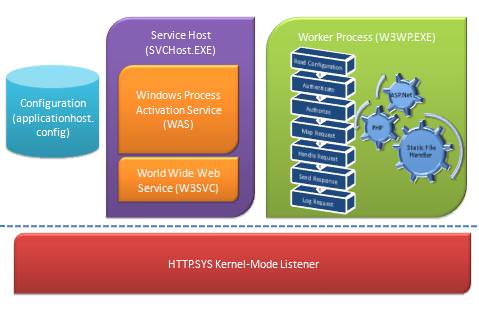
Windows Services are programs that run in the background. They perform tasks without user interaction. These services start at boot time. They continue running until the system shuts down. Their main purpose is to manage long-running processes. This makes them essential for server-side applications.
Windows Services offer automatic startup. They do not need manual intervention to start. This ensures consistent performance. They run even if no user is logged in. Another benefit is their low resource usage. This makes them efficient for system tasks. They also provide easy management through service control tools. These features make Windows Services reliable.
Credit: learn.microsoft.com
Web Service Basics
Web services help computers talk to each other. They share data over the internet. Computers use these services to exchange information. This makes it easier to do many tasks. Web services work like bridges. They connect different applications. These services use special rules and languages. This helps them understand each other. Many companies use web services today. It’s a modern way to connect systems.
Web services follow protocols. Protocols are like rules. They guide data exchange. HTTP is a common protocol. It helps send messages over the internet. Another protocol is SOAP. It stands for Simple Object Access Protocol. SOAP uses XML to send messages. REST is another popular option. REST uses HTTP and is simpler. These protocols make sure messages are clear. They help web services work smoothly.
Setting Up The Environment
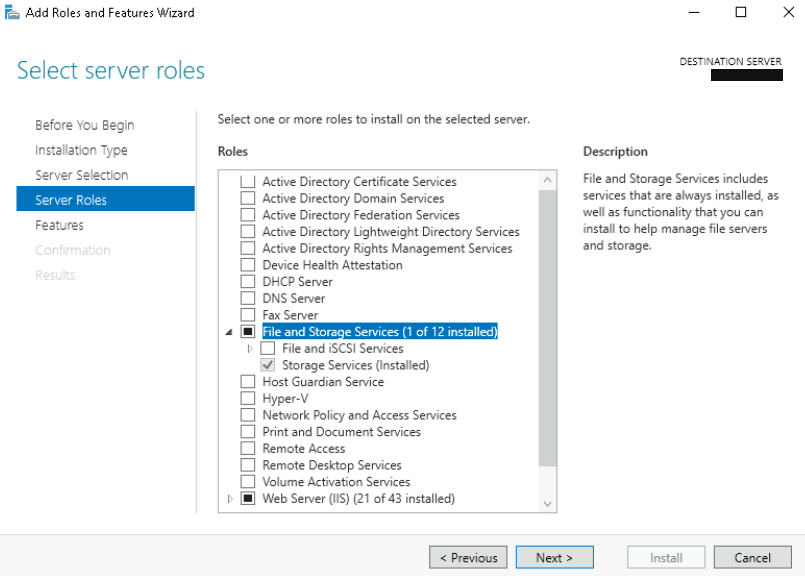
To host a web service, you need some tools. First, install Visual Studio. It helps you write code. Next, get the .NET Framework. This makes your web service run. You also need Internet Information Services (IIS). It helps host your service. Make sure your computer has enough RAM and storage. This ensures everything runs smoothly. Keep your system updated for the best performance.
Start by opening Visual Studio. Create a new project. Choose the WCF Service Application. This is perfect for web services. Set up your solution and project paths. Use easy-to-find locations. Check the .NET Framework version. It should be compatible with your service. Open the web.config file. Configure it to match your needs. Make sure all settings are correct. This avoids future issues.

Credit: www.youtube.com
Creating A Windows Service
Start by creating a new project in Visual Studio. Select Windows Service as the project type. Choose a meaningful name for your project. This helps in easy identification. Next, configure the service properties. Set the startup type to Automatic. This ensures the service starts with Windows. Choose the correct framework version. This is important for compatibility. Always check for updates.
Implement the OnStart method in your code. This method runs when the service starts. Use it to initialize resources. Next, implement the OnStop method. This is for cleanup tasks. Ensure proper error handling in your code. It helps in maintaining stability. Test your service locally. Fix any issues before deployment. Always keep your code organized and easy to read.
Integrating Web Services
Web service libraries help connect different applications. They have specific functions. These functions send and receive data. Libraries are easy to use. They support many languages. Developers find them helpful. They offer a range of tools. Libraries simplify tasks. They make the process faster. They are important in web services.
Web service calls let apps talk to each other. They use requests and responses. Calls are made over the internet. They are simple to set up. Developers use them often. They are essential for data exchange. They ensure smooth communication. They help apps work together. They form the backbone of web services.
Testing And Debugging
Learn how to host a web service in a Windows Service environment. This method ensures your service runs continuously, even after reboots. Debugging and testing become crucial to ensure smooth operation and reliability of your web service.
Running Initial Tests
Start by checking basic functions. See if your web service loads. Verify the data it shows. Confirm the service works as expected. Use simple test inputs. Observe how the service responds. Log any errors you find. Ensure you have all necessary files. Check for missing or broken links. Test with different browsers. Analyze the results carefully. Repeat tests for accuracy.
Troubleshooting Common Issues
Problems might occur. Identify the error messages. Review logs for clues. Search online forums for help. Check network connections. Ensure permissions are correct. Update your software regularly. Remove unnecessary plugins. Verify firewall settings. Reset configurations if needed. Consult with team members. Try different solutions. Document what works.
Deployment Strategies
Creating a web service needs careful planning. Windows Service is a reliable host for it. First, check your code. Make sure it has no errors. Test it well. Next, gather all necessary files. These include configuration files. Have a clear list of them. Once ready, package them. Use a zip file for easy transfer. Choose a stable environment. It should mirror your production settings. This helps avoid surprises later. A checklist is handy. It ensures every step is done correctly.
Deployment to production is crucial. Backup your data first. This avoids loss in case of issues. Start by installing the Windows Service. Follow all instructions carefully. Then, transfer your packaged files. Place them in the right folders. Permissions matter. Set them correctly for security. Finally, start the service. Check if it runs smoothly. Look for errors. Fix them immediately. Confirm all features work. Once satisfied, announce it to users. Keep monitoring for any issues.
Credit: learn.microsoft.com
Monitoring And Maintenance
Hosting a web service in a Windows Service requires regular monitoring and maintenance to ensure smooth operation. This process involves checking performance, updating software, and fixing issues promptly to keep the service reliable and efficient. Proper management helps prevent downtime and enhances user experience.
Performance Monitoring Tools
Tools keep the web service running smoothly. Performance monitoring tools help find issues fast. Task Manager shows CPU and memory use. Event Viewer logs errors and warnings. Resource Monitor tracks network, disk, and CPU. Perfmon gives detailed performance data. These tools help maintain a stable service.
Scheduled Maintenance Tips
Regular checks prevent problems. Set a time for weekly maintenance. Check logs for errors or warnings. Update software to the latest version. Backup data to avoid loss. Clear temporary files to save space. Keep an eye on disk space and memory usage. These actions help keep the service reliable and efficient.
Frequently Asked Questions
How Do I Host A Web Service?
Choose a reliable hosting provider. Install the necessary software. Deploy your web service files. Configure DNS settings. Ensure security measures are in place.
How Do I Host A Web Api In Windows Service?
Host a web API in Windows Service using. NET Framework by creating a WebHostBuilder and configuring it. Implement the API using ASP. NET Core. Deploy the service with proper configurations, ensuring it runs independently. Use Windows Service to manage and start the API automatically on system boot.
How Do I Host A Webserver On Windows?
Install a web server software like XAMPP or WAMP on Windows. Configure settings and start the server. Place website files in the server directory to host your site. Access it via localhost or your IP address. Ensure firewall settings allow external access for public hosting.
How To Host A Service In Windows?
To host a service in Windows, open Services Manager via Control Panel. Click “Create a new service” and configure settings. Use “net start [service name]” to run the service. Ensure the service is set to start automatically for seamless operation.
Follow security protocols to protect your service.
Conclusion
Hosting a web service in a Windows Service is straightforward. Follow the steps carefully. Ensure your service runs smoothly. Test it thoroughly before deployment. Use clear code documentation. This helps future updates. Keep security in mind. Protect sensitive data. Regularly monitor your service for issues.
Adjust configurations as needed. Consistent maintenance ensures reliability. Explore additional resources for learning. This boosts your skills. Engage in community forums. Share experiences and solutions. Hosting web services can be effective. With patience and practice, success is achievable.


