
Have you ever wondered how to enhance your website security without complicating your login process? If you’re using WordPress, you might have come across the term “Application Password.”
But what exactly does it mean, and how can it benefit you? Imagine a tool that allows you to connect various apps to your WordPress site securely, all while keeping your login credentials safe. Sounds intriguing, right? In this blog post, we’ll dive into the concept of Application Passwords in WordPress, showing you how they work and why they’re crucial for maintaining a secure online presence.
By the end of this article, you’ll not only understand the mechanics behind Application Passwords but also feel confident implementing them to protect your site from potential threats. Keep reading to discover how this feature can transform your WordPress experience, making it both safer and more efficient.
Credit: www.nextsoftwaresolutions.com
Understanding Application Passwords
Application passwords are special keys for WordPress. They let apps connect to your site. These passwords do not replace your main login. Instead, they provide a way for external apps to access your site safely. Each application gets its own unique password. This helps keep your site secure.
Traditional passwords are for logging into your account. They are used by people. Application passwords are for apps and tools. They are not for humans. This makes them special. You can change or remove them easily without affecting your main password. This ensures your site stays safe even if an app is removed.
Setting Up Application Passwords
Application Passwords help keep your WordPress site safe. They allow external apps to connect securely. To enable, go to your WordPress dashboard. Click on Users. Select your user profile. Look for Application Passwords section. It is usually at the bottom. Check the box to enable. Now, you can use app passwords.
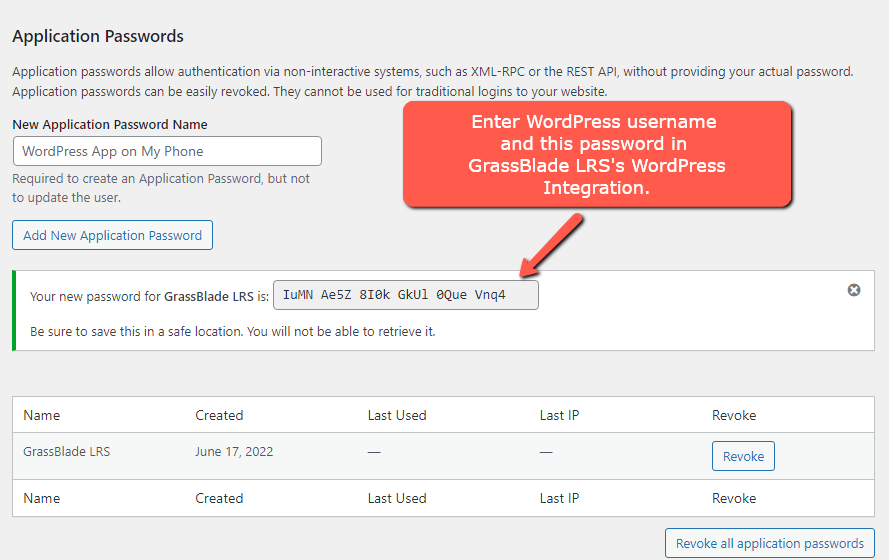
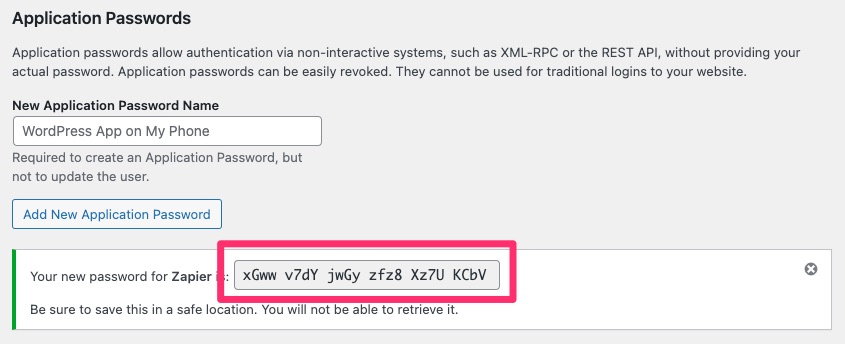
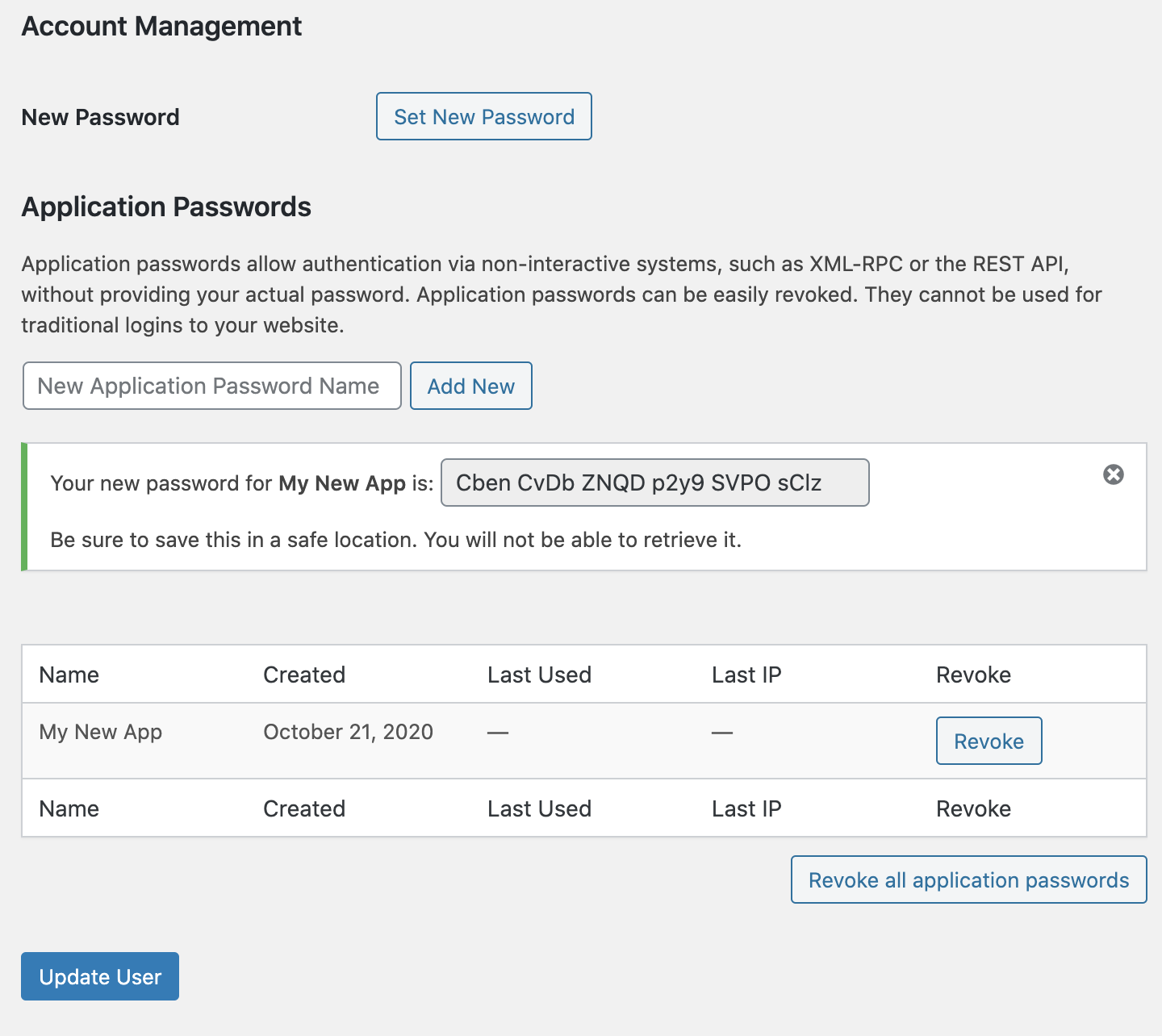
Generating a new password is easy. First, find the Application Passwords section in your profile. Type a name for your password. This name helps you remember it. Click Add New. WordPress will create a strong password for you. Copy this password carefully. Keep it safe. You might need it later. Now, you can use this password for apps.
Managing Application Passwords
Viewing active passwords in WordPress is simple. Go to your profile page. Scroll down to the Application Passwords section. Here you see a list of active passwords. Each password shows the app it belongs to. You can see when each password was last used. This helps you keep track of access. You know which apps use your site.
Revoking access is easy too. Go to your profile page. Find the Application Passwords section. Here, you see a list of passwords. Choose the one you want to remove. Click on the Revoke button. This stops the app from using your site. Always check which apps have access. Revoke passwords you don’t need.
Benefits Of Using Application Passwords
Enhanced Security is key to keeping sites safe. Application passwords help protect sensitive data. They create a special layer of safety. Only trusted apps get access. This stops unauthorized users from entering. Even if a password is stolen, hackers can’t breach the site. This makes sites much safer.
Streamlined Access for Developers simplifies their work. Developers get easy access to needed resources. They don’t have to worry about complex codes. Application passwords make the process quick. Developers can focus on building better features. No time is wasted on solving access problems.
Common Use Cases
Integration with Third-Party Services can be easy with application passwords. Services like social media tools need access. They use these passwords to connect with your site. It keeps your login details safe. No need to share your main password. This method is secure and simple.
Access for Mobile and Desktop Apps is often required. Application passwords help here too. Many apps need to fetch data from WordPress. Instead of sharing your real password, use an application password. This limits access to just what the app needs. It reduces risk. Your main account stays protected. Easy to manage and control access.
Credit: www.paidmembershipspro.com
Best Practices
Change passwords often to keep them safe. Old passwords can be a risk. Hackers might guess them. New passwords should be strong. Use numbers, letters, and symbols. This makes them hard to guess. Never use the same password for different accounts.
Check access logs regularly. Logs show who enters your site. They help find unusual activity. Look for unknown users or times. If something seems odd, take action. You can change passwords or block users. Keeping an eye on logs boosts security. It helps keep your site safe.
Troubleshooting Issues
Invalid password errors often cause frustration. Ensure the password is correct. Check for typing errors. Sometimes caps lock is on without knowing. Try resetting the password if needed. Many people face this problem. It’s a common issue with WordPress.
Connectivity problems occur often. Check your internet connection first. Restart your router if needed. Sometimes, the website might be down. Ensure the server is working properly. Check for any maintenance updates. Contact your hosting provider for help. They can assist in solving connectivity issues.
Credit: make.wordpress.org
Frequently Asked Questions
What Is An Application Password In WordPress?
An application password in WordPress is a secure way to connect external applications to your site. It allows you to authenticate without using your regular login credentials. This feature enhances security by providing unique access tokens for different applications, reducing the risk of unauthorized access to your account.
How To Create An Application Password?
To create an application password, go to your WordPress dashboard. Navigate to Users > Profile. Scroll down to the Application Passwords section. Enter a name for the application and click ‘Add New’. WordPress generates a unique password for use with that application.
Why Use Application Passwords In WordPress?
Application passwords improve security by offering a separate authentication method. They prevent unauthorized access and limit exposure of your main login credentials. They also allow easy integration with external applications without compromising security, enhancing site functionality while maintaining protection.
Are Application Passwords Secure?
Yes, application passwords are secure. They provide a unique access token for each application, minimizing security risks. They don’t expose your main login credentials, reducing vulnerability to attacks. Regularly updating these passwords further enhances security, ensuring your site remains protected from unauthorized access.
Conclusion
Application passwords enhance WordPress security. They safeguard against unauthorized access. Implementing them is simple and effective. Users gain better control over access. This feature ensures peace of mind. Regularly update passwords for optimal security. Remember, strong passwords are crucial. Always prioritize website safety.
Application passwords in WordPress help achieve this. Stay informed about new security measures. Protect your site with informed decisions. Small steps can prevent big problems. Start securing your WordPress today. Your website deserves the best protection.


