
Have you ever wondered how you can host servlets on the web and make your applications more interactive and dynamic? You’re in the right place!
Learning how to host servlets can seem daunting, but it can open up incredible opportunities for your web projects. Imagine having the power to create robust applications that respond to user input, interact with databases, and deliver tailored web experiences.
This guide will walk you through the process step by step, ensuring you gain the knowledge and confidence to host your own servlets effectively. With clear instructions and practical tips, you’ll find that mastering servlets is easier than you think. Dive in to unlock the potential of your web applications and take your development skills to the next level.
Setting Up Your Environment
Apache Tomcat is a popular choice for hosting servlets. It is free and easy to use. Make sure your computer can run it. You need enough memory and disk space. Choose a server that fits your needs. Consider the number of users. Think about the traffic your site will have.
Java Development Kit (JDK) is necessary. Download it from the official site. Choose the right version for your system. Install it by following the instructions. Make sure to set the JAVA_HOME path. This helps your computer find Java. Verify the installation by typing `java -version` in the terminal. You should see the version of Java installed.
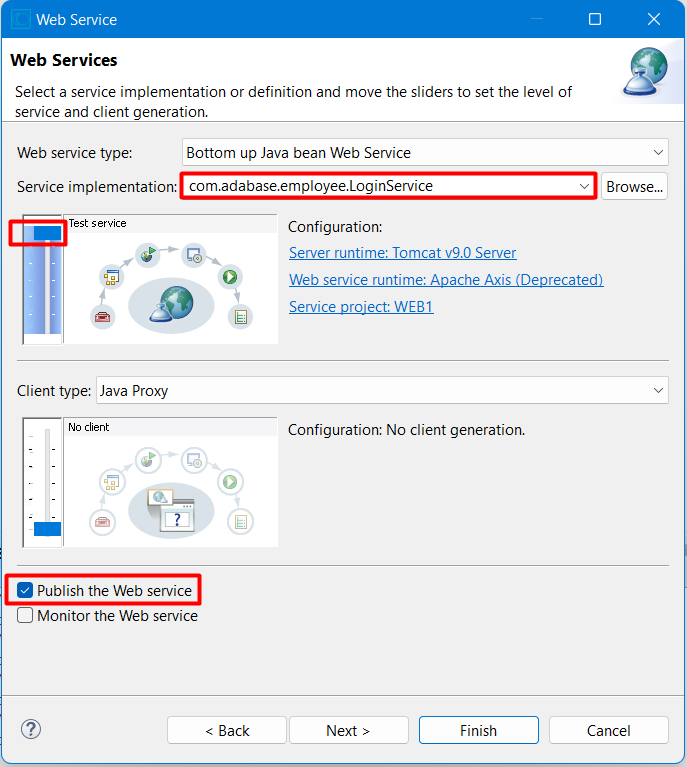
Credit: blog.devgenius.io
Servlet Basics
Servlets are small Java programs. They run on a web server. These programs handle client requests. They send back responses. Web applications often use servlets. They help create dynamic web pages. Servlets are powerful. They can connect to databases. They can process data. They can even interact with other web services.
A servlet has several key parts. First, there is the Servlet Interface. This interface defines essential methods. Every servlet must implement these methods. Next, there’s the ServletConfig object. It provides configuration details. Then, the ServletContext object. This object shares information with other servlets. Finally, HTTPServlet is a special type. It handles HTTP requests. It is commonly used in web applications.
Configuring Web Server For Servlets
Apache Tomcat is a popular choice. It helps host servlets on the web. Install Tomcat on your server. Make sure it matches your operating system. Download the correct version from the official site. Once installed, locate the “webapps” folder. This is where your servlets will live. Place your servlet files here. Restart Tomcat to see your changes. Now, your servlets should be running.
The web.xml file is important. It tells the server about your servlets. You can find this file in the “WEB-INF” folder. Add entries for each servlet. Define a servlet name and its class. Also, add URL patterns. These patterns help in accessing servlets. Save the changes in web.xml. Restart your server once done. Now your servlets will work properly.
Deploying Servlets
First, create a new folder for your servlet files. This folder is called a package. Name it something simple, like myServlets. Inside this folder, add your Java servlet files. Remember, each file should end with .java. This tells the computer it is a Java file. Organize your files well. This helps in finding them easily.
To deploy, copy your servlet package to the server. Ensure the server is running Java. Place your package in the server’s webapps folder. This folder is where the server looks for web applications. Now, restart the server. Your servlets are now live on the web. Access them through a web browser. Use the server’s IP address to find them.
Testing And Debugging
Hosting servlets on the web involves deploying Java programs to a server. Testing ensures the servlet runs smoothly, while debugging fixes errors. This process guarantees efficient and reliable web applications.
Running Test Cases
Test cases help find bugs in your servlets. They ensure that your code works fine. Write tests for each part of your servlet. Check if all parts give the right output. Use tools like JUnit for testing. These tools make testing easier. Run tests often to catch errors early. Fix any issues you find. This keeps your servlet working well.
Troubleshooting Common Issues
Common issues can stop your servlet from running. Sometimes, the server settings are wrong. Check the server logs for errors. Logs show why problems happen. If the servlet is slow, check your code. Slow code can cause delays. Make sure all paths are correct. Wrong paths lead to errors. Restart the server if nothing works. This can solve many issues.
Optimizing Servlet Performance
Caching can make websites faster. It saves data for later use. This means less time waiting. Browsers can store some data. This helps pages load quickly. Servers can cache too. They keep data ready to send. This reduces work for the server. Using cache headers helps control this. They tell browsers what to store. This makes everything run smoothly.
Response time is how fast a website works. Faster is better. Keep servlets simple and clean. Avoid extra tasks during requests. Use efficient algorithms to process data. This helps the server work quickly. Minimize network latency. Place servers close to users. This makes data travel faster. Test your setup often. Find and fix slow parts quickly.
Security Considerations
Protect your servlet from bad things. Always check user input. This helps stop SQL injection and XSS attacks. Use filters to clean input data. Avoid using hardcoded passwords. Instead, store them safely. Regularly update your software. This keeps your servlet safe from new threats.
Use HTTPS for secure communication. It encrypts data between the user and server. This stops bad people from listening. Check SSL certificates are valid. An expired certificate can cause issues. Use strong encryption methods. Keep your encryption keys safe. Always monitor your network for suspicious activity. This keeps your data safe.
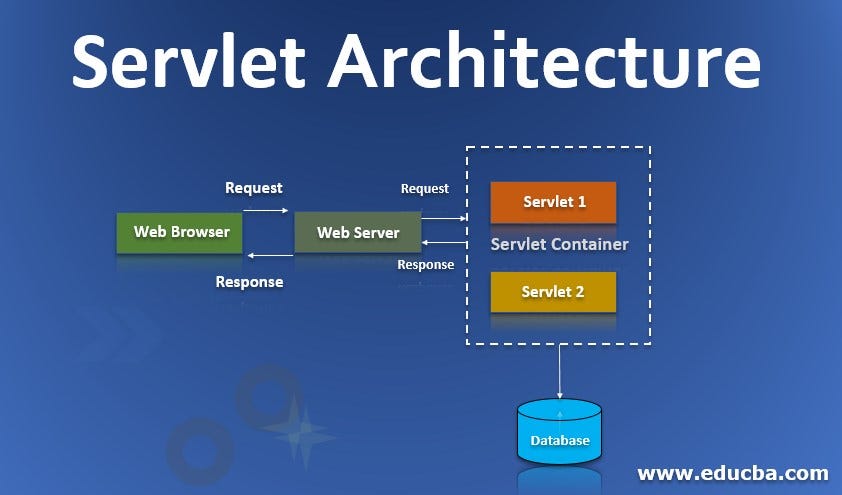
Credit: nikhilsomansahu.medium.com
Advanced Servlet Features
Explore hosting servlets on the web with advanced features like session tracking and asynchronous processing. These tools enhance web application performance, offering dynamic and interactive user experiences. Easy integration with modern web servers makes deployment straightforward for developers.
Session Management
Session management helps keep track of users. It remembers them on the website. Imagine a friend visiting your house. You remember their name and favorite drink. Web servers do the same for users. They use cookies and sessions. Cookies are small files on your computer. They store user information. Sessions work like a special ID card. This card helps the server know who you are. Sessions end when you leave the site.
Servlet Filters
Servlet filters are like gatekeepers. They check requests before reaching the servlet. Filters can block or allow access. They make sites secure and clean. Imagine a guard at a door. They only let in good people. Filters can remove bad data. They can add extra info. Filters help servlets work better. They improve safety and speed. Filters can also log user actions.

Credit: www.youtube.com
Frequently Asked Questions
How To Deploy Servlet In Web Server?
Deploy a servlet by compiling it, then place the class file in the web server’s classpath. Edit the web. xml file to map URL patterns to the servlet. Restart the server to activate the changes. Ensure the server supports servlets and the necessary configurations are in place.
How To Create A Web Servlet?
Create a web servlet by extending the HttpServlet class. Override the doGet() or doPost() methods. Use annotations or web. xml for configuration. Compile the servlet and deploy it in a servlet container like Apache Tomcat. Access the servlet via a web browser using the specified URL pattern.
How Do You Configure A Servlet In A Web Application?
Configure a servlet by defining it in the web. xml file. Specify servlet name, class, and URL mapping. Ensure proper class-path setup. Use annotations for modern configurations. Verify servlet functionality through testing. Follow best practices for performance and security optimization.
Are Servlets Executed By Web Browser?
Web browsers do not execute servlets directly. Servlets run on a server, processing requests and generating responses. The browser receives these responses as HTML, which it can render. Servlets handle backend tasks, while browsers focus on displaying web pages.
Conclusion
Mastering servlet hosting is within your reach. Start with understanding the basics. Choose a reliable server to ensure smooth operations. Follow the setup steps carefully. Test your servlets to confirm functionality. Troubleshoot any issues that arise. Always keep your server updated for security.
With practice, hosting servlets becomes easier. Your web applications will run efficiently. Remember, patience is key. Explore further learning resources when needed. Hosting servlets opens new possibilities. Embrace the learning journey. Your efforts will pay off. Enjoy the process and growth.
Happy coding and successful hosting!


