
Are you looking to make your WordPress website more visually appealing and engaging? Imagine capturing your audience’s attention the moment they land on your page.
That’s where a meta slider can work wonders for you. A meta slider is not just another plugin—it’s a powerful tool designed to enhance your website’s aesthetic appeal and user experience. By showcasing beautiful, high-quality images in a dynamic slideshow, you can keep your visitors hooked and make your content stand out.
Wondering how it can transform your site into a stunning visual experience? Stick around as we delve into what a meta slider is and why it should be your go-to solution for making your WordPress site memorable.
Meta Slider Basics
Meta Slider in WordPress allows users to create beautiful image sliders effortlessly. It offers customizable options for displaying images, videos, and text. Enhance your website’s visual appeal and user engagement with this intuitive tool.
Defining Meta Slider
A Meta Slider is a tool in WordPress. It helps show images. These images slide one after the other. Users can make slideshows easily. It is simple to use.
Core Features
- Easy Setup: It takes minutes to start.
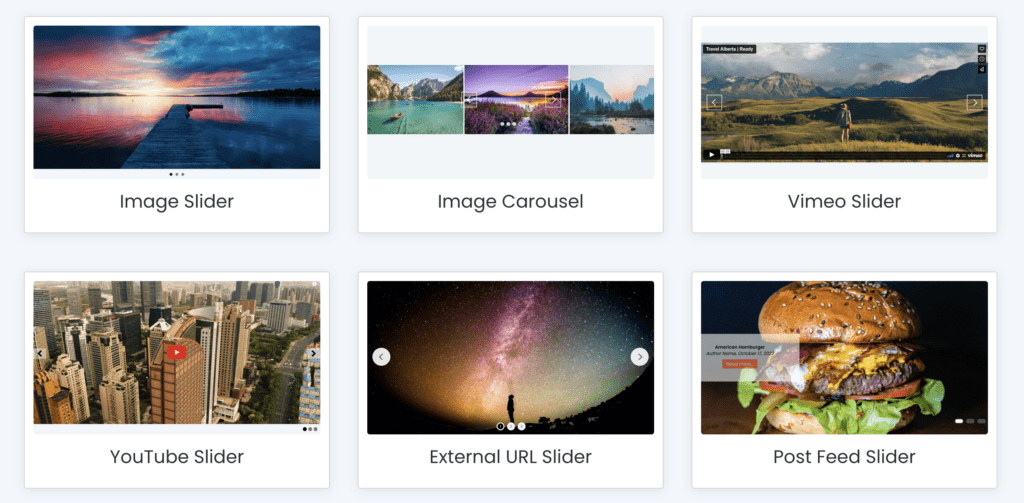
- Multiple Types: Choose from different slide types.
- Responsive Design: Works on all devices.
- SEO Friendly: Improve your site’s visibility.
- Customizable: Change styles and effects.
Credit: www.metaslider.com
Benefits Of Using Meta Slider
Meta Slider adds a beautiful touch to your website. Pictures and slideshows catch the eye. They make your site look more attractive. Visitors like websites that look nice. They stay longer when they see pretty pictures. Meta Slider helps in this way.
Users love to interact with what they see. Slideshows can show many things quickly. People feel involved when they click and see new slides. Meta Slider keeps users busy and happy. This is good for your website.
Meta Slider helps with SEO. Slideshows can include keywords. Search engines like Google notice these keywords. This can help your website get more visitors. Meta Slider can make your site rank better.
Installing Meta Slider
Search for “Meta Slider” in the plugin store. Click on “Install Now” to start. Wait for the installation to finish. Then, click “Activate” to use the plugin. The Meta Slider plugin is now ready on your site.
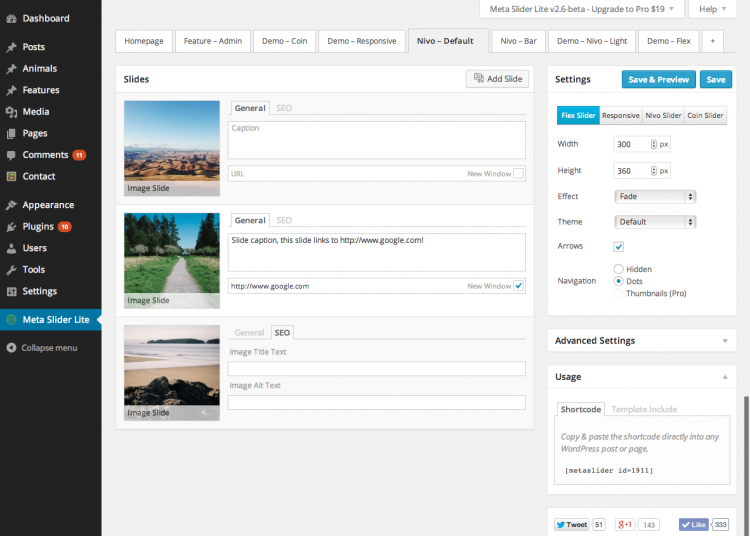
Go to the dashboard and find “Meta Slider.” Click to open it. Choose “Add New” to create a new slider. Upload images from your computer. Arrange them in the order you like. Save your slider when done. Use the shortcode to add it to your pages. Your slider is now live on your site.
Creating Your First Slide
A Meta Slider in WordPress is a tool that helps create beautiful image slideshows. It allows users to easily customize slides by adding images, adjusting settings, and choosing transition effects. Perfect for enhancing website visuals without needing advanced technical skills.
Choosing Images
Select images that are clear and beautiful. Good images make slides look nice. Use pictures that fit the slide size. This helps the slide look neat. Images should be related to your content. Make sure they are not blurry. You want people to enjoy looking at them.
Customizing Settings
Adjust settings to change how the slide appears. You can pick different effects. Choose how fast slides change. Make slides move smoothly. Set the size of the slide. Ensure the slides show right on all screens. Settings help make slides unique. Your slides should be easy to see and read.
Previewing The Slide
Check slides before showing them. Click preview to see how they look. Fix any mistakes you find. Make sure images and text look good together. Preview helps catch errors early. This ensures slides are ready to share. You want slides to impress viewers.
Advanced Features
Meta Slider offers Layer Slides which let users add multiple elements. Text, images, and buttons can be added on top of each other. This creates a more interactive and engaging experience. Each layer can be moved and resized easily. This gives users more control over their slides. Custom animations can be added to layers. This makes slides look lively and fun. Layer Slides are perfect for showing complex information in an easy way.
Users can add videos to their Meta Slider with ease. Videos from YouTube or Vimeo can be used. Just paste the video link to add it. This helps in showing more content in a small space. Videos can autoplay or loop. Users can decide how videos behave. This makes websites more lively and interesting. Adding videos is a great way to grab attention.
Meta Slider can show Dynamic Content from other sources. It can pull information from blog posts or product feeds. This keeps the slider fresh and current. Users do not have to update it manually. Dynamic sliders are a great way to highlight new content. They ensure visitors always see the latest information. This feature saves time and effort for website owners.
Best Practices
Use images with small file sizes. This helps your site load fast. Choose the right format for each image. JPEG is good for photos. PNG is better for graphics. Always use alt text. This helps people understand your images.
Make sure your slider works on all devices. Test it on phones and tablets. Use a design that looks good on small screens. Buttons should be easy to tap. Ensure text is easy to read. No one likes squinting at their screen.
Keep your slider up to date. Update images often. Change them for holidays or events. Check for plugin updates. This keeps your site safe. New features can be added too. Always make backups before updating.
Common Issues And Solutions
Meta Slider in WordPress often faces issues like image distortion or slow loading. Fix these by adjusting image dimensions and using optimized images. Simple plugin updates can also resolve compatibility problems.
Troubleshooting Errors
Meta Slider in WordPress can sometimes show errors. These errors can be fixed. Check if your plugin is up-to-date. An outdated plugin might cause problems. Update it regularly. Check the slider settings. Incorrect settings can lead to errors. Adjust them properly. Deactivate other plugins if needed. Conflicts can occur between plugins. Activate one by one to find the issue. Clear your browser cache. Sometimes the cache holds old data. Refresh the page to see changes.
Compatibility Problems
Compatibility issues can be frustrating. Ensure your WordPress version is current. An old version may not support the slider. Check your theme. Some themes may not work well with the slider. Switch to a default theme to test. Look for JavaScript errors. These can occur in the browser console. Identify and fix them promptly.
Credit: gowp.com
Alternatives To Meta Slider
Meta Slider in WordPress is a popular tool for creating image slideshows. For alternatives, try Smart Slider 3, Soliloquy, or Slider Revolution. These options offer various features to enhance your website’s visual appeal efficiently.
Comparing Other Plugins
There are many plugins like Meta Slider. Each has unique features. Smart Slider 3 is popular. It offers many design options. Slider Revolution has advanced tools. It is good for animations. Soliloquy is easy to use. It works fast and is simple.
Choosing The Right Tool
Think about your needs. Smart Slider 3 is good for creative designs. Slider Revolution is for advanced users. It has many features. Soliloquy is for quick tasks. It is simple and fast. Choose the tool that fits your project best.
Credit: wordpress.org
Frequently Asked Questions
What Is Meta Slider In WordPress?
Meta Slider is a popular plugin for creating responsive slideshows in WordPress. It offers multiple slideshow types and is easy to use. With Meta Slider, you can customize transitions, add captions, and incorporate video content. It enhances website visual appeal and engagement, making it a preferred choice for many WordPress users.
How Do I Install Meta Slider?
To install Meta Slider, log in to your WordPress dashboard. Navigate to Plugins > Add New, and search for “Meta Slider. ” Click “Install Now,” then activate the plugin. Once activated, you can create and customize slideshows directly from your dashboard, enhancing your site’s visual content.
Can Meta Slider Enhance Website Seo?
Yes, Meta Slider can improve your website’s SEO. It allows you to add alt text to images, which helps search engines understand your content. By optimizing slideshows, you can increase engagement and reduce bounce rates. This potentially boosts your site’s SEO ranking and visibility on search engines.
Is Meta Slider Mobile-friendly?
Meta Slider is designed to be responsive and mobile-friendly. It ensures that your slideshows look great on all devices, from desktops to smartphones. With its adaptive design, Meta Slider helps maintain user experience across different screen sizes, enhancing your site’s accessibility and appeal.
Conclusion
Meta Slider in WordPress enhances website visuals. It is easy to use and flexible. You can create stunning slideshows with just a few clicks. This tool offers various design options. It supports images, videos, and text. Customization is simple, allowing unique displays.
Meta Slider benefits beginners and experts alike. It improves user engagement by showcasing content beautifully. A well-designed slider boosts site appeal. Users find navigation smooth and enjoyable. Meta Slider is a valuable addition to any WordPress site. Consider it for better visual impact and user experience.


