
Do you ever find yourself puzzled by the term “Div” in WordPress? You’re not alone.
Understanding the fundamental elements of WordPress can feel like deciphering a new language. Yet, grasping these basics is crucial for building an appealing and functional website. Imagine having the power to customize your site exactly how you envision it, with sections and layouts that captivate your audience.
This is where understanding “Div” comes into play. By the end of this article, you’ll not only know what a “Div” is, but also how it can enhance your website’s design and functionality. Ready to unlock the potential of your WordPress site? Let’s dive in!
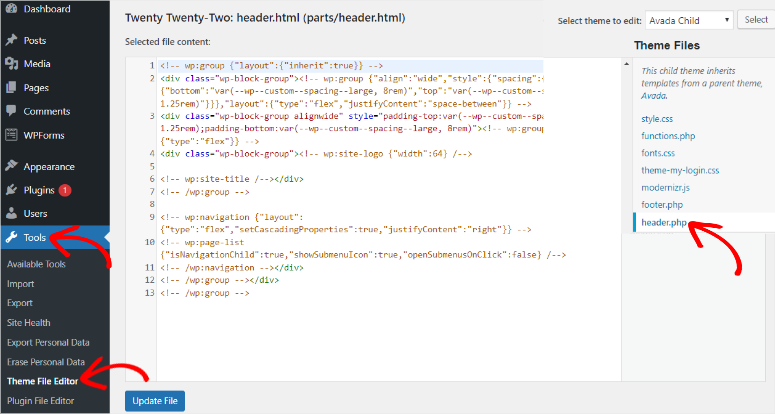
Credit: www.isitwp.com
Div Element In Web Development
The element is a key part of web design. It is like a box that holds things together. It can contain text, images, and more. Developers use it to organize web pages. It helps in making the page look neat and tidy.
Divs can be styled using CSS. This changes their appearance. You can add colors, sizes, and layouts. It makes the website visually appealing. Divs are like building blocks. They create sections on a page.
On WordPress, divs help in customizing themes. They are crucial for page structure. Users can make unique designs with divs. They add personality to websites. Everyone loves a well-organized page. It improves user experience.
Role Of Div In Html
The div tag is very important in HTML. It helps organize the page. It acts as a container. It holds different parts of a webpage. This makes the page look neat and tidy.
Div tags can be styled with CSS. They make design changes easy. You can change colors, sizes, and borders. This creates a unique look. Div tags help in creating a page’s layout. They let you arrange text and images in a special way.
Div tags are used for styling. They help in making the page pretty. They allow designers to apply styles to parts of a webpage. This can include fonts, backgrounds, and spacing.
Using div tags, one can make parts of a page look different. This makes the page more interesting to look at. Div tags work well with CSS for styling. They are a key part of web design.
Div Usage In WordPress
The div tag is like a box. It holds other elements on a page. In WordPress, divs help in theme customization. They let you style parts of a page. Each div can have a unique style. You can add colors, borders, or text changes. This makes pages look different. It helps in making the site special. Divs group content together. This keeps things tidy.
Themes use divs for layout. They help in arranging sections. Each section can have its own design. This helps in keeping things organized.
Page builders use divs a lot. They are tools that let you build pages easily. With divs, you can add blocks of content. Each block can have text, images, or buttons. Divs make it simple to move blocks around. This helps in arranging content the way you like. It’s like building with blocks. Easy and fun! Each builder might use divs differently. But the idea stays the same. Divs help in making pages look good.
Advantages Of Using Div
Divs allow designers to create unique layouts. Each part of a page can be styled differently. This makes every website look special. Divs help in organizing content neatly. It makes the website easy to read. Designers can change colors, fonts, and sizes with ease. This brings out the best in a website’s appearance. Using divs is like having a box of crayons for your site.
Websites need to fit all screens. Divs make this possible. With divs, pages look good on phones and computers. Users get a smooth experience. No need to zoom in or out. Divs adjust the content automatically. They make websites friendly for everyone. This ensures visitors stay longer on a site.
Common Misconceptions
Many think “div” on WordPress is a complex coding term. It’s simply a tool to group content. This helps in organizing sections on a webpage for better design and layout.
Div Vs. Other Html Elements
Many think div is the main HTML element. It’s not. Other elements like header, section, and article are crucial. They give structure to content. Div is flexible. But it doesn’t show the content’s meaning. Use it wisely. Each element has a purpose. Div is good for layout. But it’s not always the best choice. Headers define title areas. Sections break up content. Articles hold main content. Choose elements based on their role. Avoid using divs without reason.
Overuse Of Divs
Many sites use too many divs. This can make code messy. Clean code is important. Excess divs confuse users. They confuse search engines too. Each div should have a role. Use divs for layout needs. Other elements show content meaning. This helps readers understand better. It helps search engines too. Fewer divs mean clearer code. Clear code is easier to manage. It makes updates simple. Divs are good. But don’t use them everywhere.

Credit: stackoverflow.com
Best Practices For Using Div
Div is a simple HTML element. It is used to group content. Semantic HTML means using tags that describe their purpose. Instead of using div for everything, choose tags like header, footer, or article. This helps search engines understand your page better. It also makes your code easier to read.
Accessibility means making websites usable for everyone. It’s important to use semantic HTML for better accessibility. Screen readers can read semantic tags more easily. This helps people who use assistive technology. Proper HTML structure is also important. Users should navigate the site easily. Use div only when no other tag fits. Give each div a role if needed. This can help users understand the content. Accessibility is important for all users.
Tools And Resources
In WordPress, “div” is an HTML tag used to create sections in a webpage. It helps organize content visually by grouping elements together. Understanding “div” helps in customizing layouts and enhancing the design of your site.
WordPress Plugins
WordPress plugins can make your website better. They add new features. Some plugins help with design. Others make your site faster. Plugins like Elementor let you build pages with ease. Yoast SEO helps your site show up on search engines. Always keep your plugins updated. This helps keep your site safe. Be careful not to use too many plugins. Too many can make your site slow. Pick the best plugins for your needs.
Online Tutorials
Online tutorials are a big help. They show you how to use WordPress. Some tutorials are videos. Others are articles. YouTube has many good tutorials. Some are free. Some sites ask you to pay. Choose the ones that fit your needs. Tutorials can teach you new tricks. They make it easy to learn step-by-step. Practice what you learn. This helps you get better.
Credit: www.socialpilot.co
Frequently Asked Questions
What Is A Div In WordPress?
A div in WordPress is an HTML element used for structuring content. It acts as a container that groups elements together, allowing for easier styling and layout control. Divs are crucial for organizing content visually and for applying CSS styles to specific sections on your WordPress site.
How Do Divs Impact WordPress Design?
Divs impact WordPress design by structuring and organizing content effectively. They enable precise control over layout, making it easier to apply CSS styles for visual enhancements. Divs help in creating responsive designs, ensuring that your website looks great on all devices by adjusting content placement and styling.
Can Divs Affect WordPress Seo?
Divs can affect WordPress SEO indirectly through site structure and user experience. Proper use of divs contributes to a clean, organized layout, improving navigation and readability. While divs alone don’t influence SEO, they assist in creating a user-friendly design, which can positively impact search rankings.
How To Add A Div In WordPress?
To add a div in WordPress, use the HTML editor in the post or page section. Simply insert the `
Conclusion
Understanding the “div” element on WordPress boosts your site layout. It helps organize content, making pages cleaner and more functional. Users easily spot key areas, enhancing navigation. Remember, “div” is a tool, not magic. Use it wisely for better design.
Simplify complex layouts with it. This approach improves user experience. Focus on making your site visually appealing and easy to use. Your visitors appreciate clear, structured content. Keep experimenting with “div” to find what works best. The goal is a website that’s both attractive and efficient.
Happy designing!


