
Ever wondered what your visitors are searching for on your WordPress site? Imagine unlocking the secrets of their curiosity and desires, right at your fingertips.
Knowing exactly what your audience is looking for can transform your blog into an engaging, must-visit destination. This insight allows you to tailor your content, boost engagement, and keep readers coming back for more. By understanding the search behavior of your visitors, you can anticipate their needs, answer their questions, and provide them with the content they crave.
This not only helps you build a loyal audience but also strengthens your site’s authority and relevance. Want to know the best part? It’s easier than you think to get started. We’ll dive into simple strategies to uncover what’s being searched on your WordPress site. Get ready to tap into a treasure trove of information that can elevate your content strategy and supercharge your blog’s success. Stay with us, and let’s explore the possibilities together.

Credit: wedevs.com
Importance Of Tracking Searches
Knowing what people search for on your site helps a lot. It lets you understand what visitors want. Tracking searches shows popular topics. This can improve your content. When you know what is searched, you can create better pages. This makes your site more useful.
Tracking searches also helps find missing content. If many search for something and don’t find it, you know there’s a gap. You can fill this gap with new posts. This keeps visitors happy. Happy visitors come back. They might tell friends about your site. This grows your audience.
Credit: www.greengeeks.com
WordPress Plugins For Search Tracking
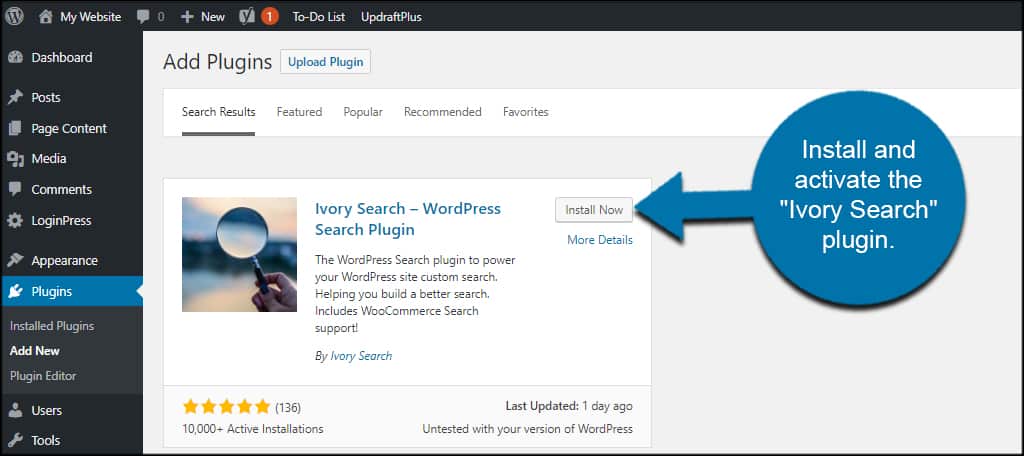
Search tracking plugins help you see what users search on your site. Some plugins are easy to use. Others offer many features. Relevanssi is a popular plugin. It shows the search terms users use. Another plugin is Search Meter. It tracks searches and gives reports. Both plugins are user-friendly.
Good plugins should be easy to install. They should work well with your site’s theme. Plugins must give clear reports. Look for plugins that show top search terms. Some plugins offer search analytics. These help understand user behavior. Plugins must be updated often. They should have good support too.
Setting Up Search Tracking
Find a search tracking plugin on WordPress. Look for plugins with good reviews. Go to your site’s admin panel. Click on “Plugins” then “Add New”. Search for your chosen plugin. Hit “Install Now”. After installation, click “Activate”. Your plugin is now ready. Check the plugin’s documentation for setup.
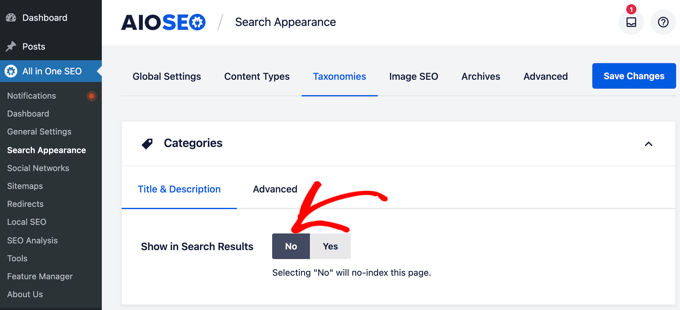
Go to the plugin’s settings page. Find the tracking options. Enable search tracking. Adjust the settings as needed. Choose what data to track. Save changes to apply settings. Check if the plugin works. Visit your site and use the search. Ensure searches appear in the plugin’s logs. Review the data regularly. Look for popular search terms. Use these insights for your content.
Credit: aioseo.com
Analyzing Search Data
Search data reveals what visitors want. Popular words appear often. These words show interest areas. Patterns emerge with frequent searches. Trends tell us more about users. They help improve content. Daily searches can change often. Monthly trends show bigger patterns. Analyzing trends helps site growth.
Popular content attracts more visitors. It often includes trendy topics. Understanding these topics helps in content creation. High search volume indicates interest. This data guides future posts. Analyze what people search most. Make content around these searches. Adjust content based on visitor interest. Offer valuable information. Keep content fresh and updated. This keeps users engaged.
Improving Site Content With Search Data
People search for things they need. This creates a path. Understanding these searches helps fill gaps. If many users search, but find nothing, there’s a gap. Filling this gap can make your site better. New posts or pages can help. Add information where it’s missing. This makes the site more helpful.
Happy users stay longer. They enjoy finding what they seek. Search data shows what users want. Improve the site layout for easy navigation. Make information easy to find. Use clear and simple words. This keeps users engaged. A good experience makes them return.
Privacy Considerations
Protecting user data is very important. You must keep it safe. Always use strong passwords. Encryption helps in keeping data secure. Never share user information without permission. Keep your site updated. This helps protect against threats.
Follow all laws related to data. GDPR is a key regulation in Europe. CCPA is important in the USA. Always inform users about data collection. Make sure you get their consent. Update privacy policies regularly. This builds trust with users.
Frequently Asked Questions
How Can I Track Search Queries On WordPress?
To track search queries, install a plugin like Search Meter or Search Analytics. These plugins provide detailed insights into user searches. They display search terms, frequency, and user engagement. This data helps improve content strategy and enhance user experience.
Why Is Monitoring Search Important For My Site?
Monitoring search queries helps understand user intent and content gaps. By analyzing search data, you can optimize content and improve user experience. It also aids in identifying popular topics and trends. This can enhance engagement and increase site traffic.
Which Plugins Help In Tracking WordPress Searches?
Popular plugins for tracking searches include Search Meter, Search Analytics, and Relevanssi. These plugins offer detailed search data analysis. They help identify search patterns, popular terms, and user behavior. This information is essential for content optimization and strategic planning.
Can I Improve Seo Using Search Query Data?
Yes, search query data can boost SEO efforts. By analyzing search terms, you can optimize content for user intent. This improves rankings and visibility. Addressing content gaps and trends from search data enhances site relevance and user engagement.
Conclusion
Exploring search data on your WordPress site offers valuable insights. You learn what your visitors are curious about. This helps improve your content strategy. Tailor your posts to meet their needs. Boost engagement and keep your audience interested. Analyzing search trends can enhance user experience.
It supports better SEO practices. Remember, understanding your audience is key. Make adjustments based on their interests. Stay relevant and grow your site traffic. Regularly check your search data. Use it to guide content creation. This way, your site remains a useful resource for visitors.


