
Have you ever found yourself lost in a sea of data on your WordPress site, wishing for a more organized way to present information to your readers? Tables could be your solution.
They are powerful tools that can transform chaotic data into clear, digestible content. Imagine being able to present comparisons, data sets, or lists in a way that’s not only visually appealing but also easy for your audience to understand. With WordPress tables, you can do just that.
Whether you’re managing a blog, an online store, or a business site, integrating tables can enhance your content’s readability and engagement. Dive into this article to discover how WordPress tables can elevate your site and captivate your readers.
WordPress Tables Basics
WordPress tables help organize data neatly. They make content easy to read. Tables can show numbers, text, or links. Users often need them for large data sets. Using tables improves website presentation. They help visitors find information quickly. Tables are often used in posts or pages. Many plugins can add tables to WordPress. These plugins are simple to use. Some plugins let you style tables. You can change colors and fonts. Tables are important for responsive design. Responsive tables fit all screens. They look good on phones and computers.
Credit: www.elegantthemes.com
Benefits Of Using Tables
Enhanced Data Organization: Tables keep data neat. Rows and columns help. Information stays clear and tidy. No mess.
Improved Readability: Data in tables is easy to read. Eyes follow lines naturally. Quick understanding of information.
Versatile Formatting Options: Tables offer many styles. Customize borders and colors. Fit any design. Make data look good.
Creating Tables In WordPress
The WordPress Block Editor helps to create tables easily. Use the Table Block to start. First, choose the number of rows and columns. Add text to each cell. It’s simple and quick. The Block Editor makes it look neat. You can change the style too. Pick colors and borders. Adjust the size of the table. Make it fit your page.
WordPress has many table plugins. These plugins offer more features. Some plugins allow sorting and searching. They make tables interactive. Popular plugins include TablePress and WP Table Builder. They are easy to use. Install the plugin to begin. Follow the steps to add a table. Customize it to match your needs. Plugins are great for advanced tables.
Credit: wordpress.org
Popular Table Plugins
TablePress is a free plugin for WordPress. It helps users create tables easily. The plugin has a simple interface. Users can insert tables in posts, pages, or widgets. It supports importing and exporting tables. You can use Excel, CSV, or Google Sheets. TablePress is responsive and works well on all devices.
Ninja Tables is known for its drag-and-drop feature. This makes creating tables fast. Users can add colors and custom designs. It supports multimedia content like images and videos. Ninja Tables is responsive. Tables look good on phones and tablets. It integrates with WooCommerce for product tables.
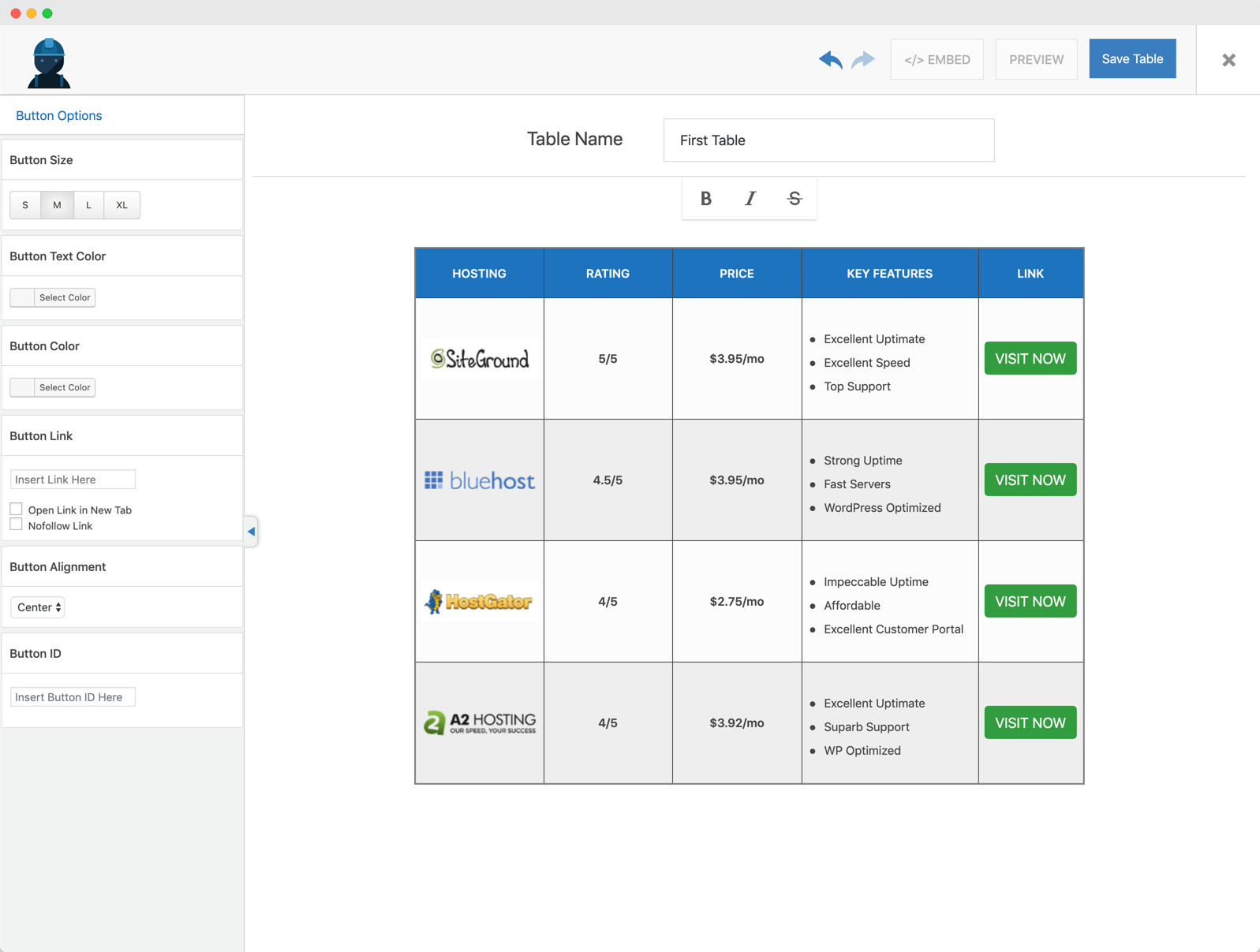
WP Table Builder is a visual table editor. It uses a drag-and-drop builder. Users can add text, images, and buttons. The plugin is great for pricing tables. It offers pre-built templates. You can customize these templates easily. WP Table Builder is user-friendly and flexible.
Customization Options
WordPress tables let you change their style easily. You can choose colors and fonts that match your website. This makes your table look good. You can also add borders to separate the information. It helps make things clear.
Adding background colors can highlight important parts. This draws attention to special data. You can also adjust the size of columns and rows. This makes sure everything fits well.
Responsive tables work on all devices. They look good on big and small screens. This helps users read the data easily. Columns can stack on smaller screens. This keeps the table neat.
Using media queries helps in making tables responsive. This way, you can change the table layout based on screen size. Mobile users will have a smooth experience. Responsive tables make sure no data is lost.
Seo Benefits Of Tables
Structured data implementation helps search engines understand content. Tables provide clear and organized data. This makes indexing easier. Search engines love structured information. It boosts visibility on search results. Using tables is a smart way to enhance SEO.
Improving user experience is vital for any website. Tables offer clear and concise information. They make data easy to read. Users find tables helpful. They spend more time on pages with tables. Happy users lead to better site rankings. Tables help keep visitors engaged.
Common Challenges
WordPress tables often face compatibility issues with different themes. Themes can affect how tables look. Some themes may not support tables well. Plugins may also conflict with tables. This can cause display problems. Updates can break table compatibility. This is frustrating for users.
Large tables can slow down websites. This affects loading speed. Slow sites can annoy visitors. Tables with many rows and columns are heavy. They use more resources. This can lead to poor performance. Optimizing tables is crucial. Compression and caching help speed things up.
Credit: wp-staging.com
Best Practices For Table Usage
WordPress tables organize data neatly, making information clear and easy to read. They enhance user experience by presenting content in structured formats. Use tables wisely to improve readability and engagement on your website.
Data Prioritization
Tables should focus on key data. Important information comes first. This makes it easy to read. People find what they need quickly. Use simple headings for clarity. Avoid clutter. Keep it neat. Use columns wisely. Make sure each column serves a purpose. This keeps the table useful. Avoid too many columns. This can confuse the reader. Use rows to show changes or trends. Highlight important rows. This helps people see the key points.
Mobile Optimization
Tables must work well on mobile. Many users browse on phones. Make tables responsive. They should adjust to screen size. Avoid small text. Use easy-to-read fonts. Ensure columns fit the screen. Avoid horizontal scrolling. This keeps users happy. They find information fast. Use tools like plugins. These help with mobile views. Test tables on different devices. Make sure they look good everywhere. Keep mobile users in mind always.
Frequently Asked Questions
How Do I Create Tables In WordPress?
Creating tables in WordPress can be done using plugins like TablePress. These plugins offer user-friendly interfaces to design and manage tables easily. You can insert, delete, and customize table cells without coding. Simply install the plugin, create a table, and embed it using shortcodes.
Can I Customize WordPress Table Designs?
Yes, WordPress tables can be customized extensively. Plugins like TablePress provide options to change colors, fonts, and borders. You can also add images and links within cells. CSS styling is supported for advanced customization. This allows you to create tables that fit your website’s design perfectly.
Are WordPress Table Plugins Free?
Many WordPress table plugins are free and offer robust features. TablePress is a popular free option with extensive capabilities. Premium versions often provide additional features like responsive design and advanced styling. Choose a plugin based on your requirements and budget.
How To Make WordPress Tables Responsive?
Responsive WordPress tables can be achieved using plugins like TablePress with responsive options. These plugins ensure tables adjust to different screen sizes. Custom CSS can also be applied to enhance responsiveness. This feature is crucial for mobile-friendly websites.
Conclusion
WordPress tables can transform data presentation on your site. They make information clearer and more digestible. You have many plugins and options to choose from. Each offers unique features. Customizing tables is simple and quick. This empowers you to meet your site’s needs effectively.
Whether for text, numbers, or images, tables enhance readability. Understanding their use can elevate your site’s quality. Visitors enjoy better navigation and access to information. Start integrating tables into your WordPress site today. See the difference in user engagement and satisfaction.


