
Ever wonder how WordPress makes it so easy to customize your website without messing up the core code? The secret lies in something called “hooks.”
If you’re managing a WordPress site, understanding hooks can be your ticket to creating a unique and functional online space. Imagine being able to tweak or add features to your website, seamlessly integrating plugins or themes, all without touching the main WordPress files.
Sounds empowering, right? This is exactly what hooks allow you to do. You’ll discover what hooks are, how they work, and why they are essential for any WordPress user. Keep reading to unlock the magic behind WordPress customization and make your website work exactly how you want it to.
Hooks Overview
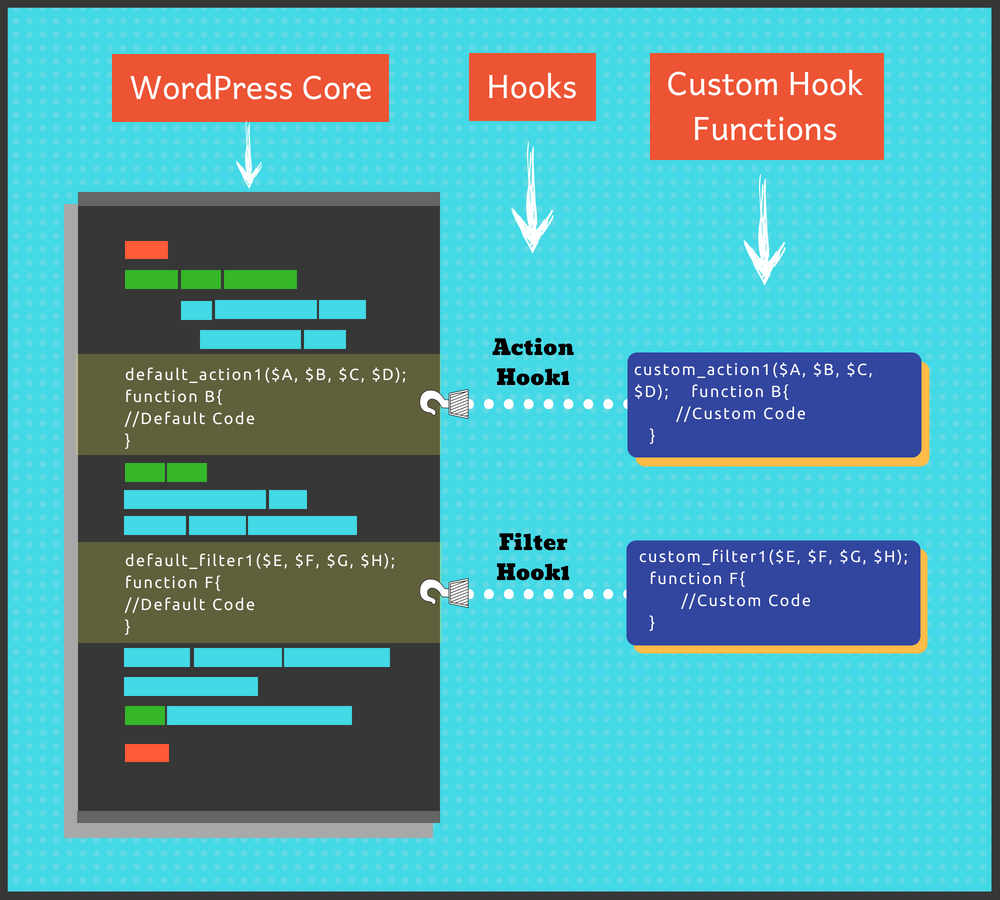
Hooks in WordPress help developers add or change features. They let you attach functions to specific events. This way, custom changes can be made easily. There are two main types: actions and filters.
Actions allow you to execute code at a certain time. For example, when a post is published, an action can send an email. These are helpful for adding new tasks.
Filters change data as it passes through WordPress. If you want to alter text before it shows up, use a filter. They are perfect for modifying content.
To use hooks, you need to know their names. Each hook has a specific name. You write a function and attach it to the hook. This makes your code run at the right time.
Types Of Hooks
Action hooks let you add code at specific points in WordPress. They are like signals. They tell WordPress to do something. You can use them to insert extra code. This happens during WordPress events. For example, when a post is published. Action hooks help customize your site. They are easy to use. Simply add your function to the action hook. Then, WordPress will run your code.
Filter hooks change data before it is shown. They act like a sieve. They catch data and let you change it. You can modify content, titles, or even comments. This is done before the data is displayed. Filter hooks help make your site unique. They are very flexible. You can adjust almost anything. Just add your filter to the hook. Then, WordPress will apply your changes.
How Hooks Work
Hooks are like signals. They tell WordPress to do tasks at set times. A hook can be added or removed easily. It helps change how WordPress behaves. Hooks run at key moments. They can start when a page loads or when a post saves. This is hook execution. It lets developers add extra features without changing core files.
Hook priority decides the order hooks run. Each hook gets a number. Lower numbers run first. Higher numbers run later. This helps control which tasks come first. Default priority is 10. Changing priority affects how hooks work together.
Hooks can pass data using arguments. Arguments are pieces of information. They tell hooks what to do. Some hooks need many arguments. Others need just one. Arguments help customize tasks. They make hooks flexible.
Credit: learnwoo.com
Creating Custom Hooks
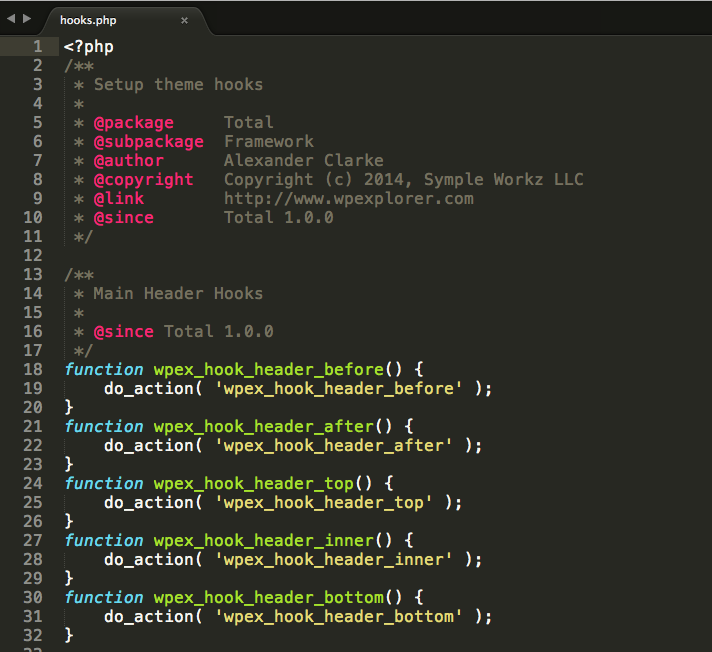
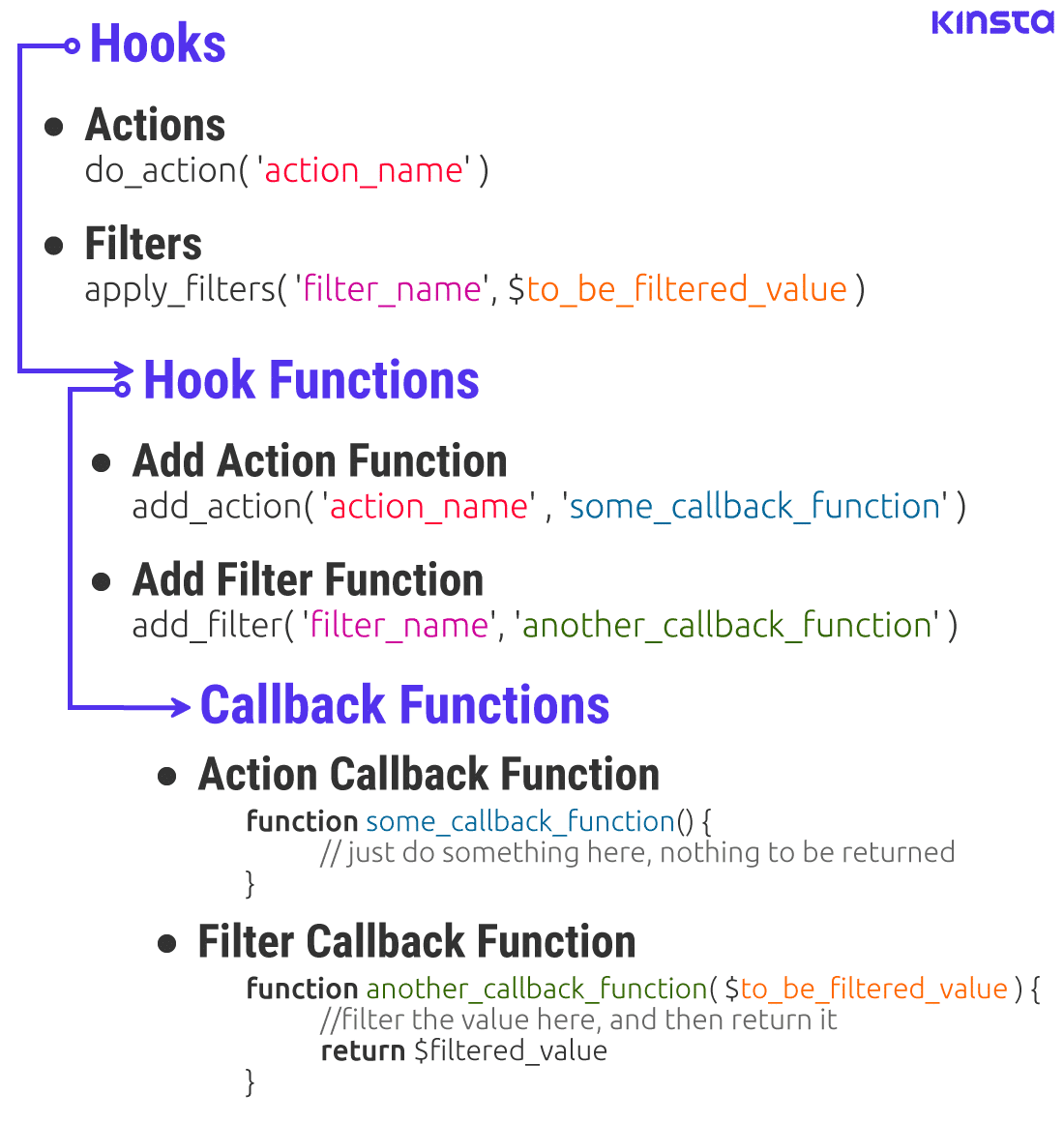
Custom hooks in WordPress are special tools. They help you add your own code. You can create actions and filters. Actions run at specific times. Filters change data. To make a custom hook, you use the do_action or apply_filters functions. These functions let you add or change code. It’s like telling WordPress, “Do this now.” So, you can add features to your site. It’s fun and easy.
Implementing custom hooks is not hard. First, you define your hook. Then, you add it to your theme or plugin. Use the add_action or add_filter functions. These functions connect your code to the hook. Now, your code runs at the right time. This makes your site work better. You can share your custom hooks with others. This helps everyone.
Common Use Cases
Hooks help in making themes flexible. Action hooks allow adding extra features. Filter hooks change how data displays. Developers can add custom styles and scripts. This makes themes look unique. Code stays clean and organized. Hooks are essential for theme changes.
Plugins extend website functions. Hooks let plugins interact with WordPress easily. Action hooks execute functions at specific times. Filter hooks modify data before saving. Developers use hooks for adding new features. They also help in enhancing existing ones. Hooks keep plugins efficient and easy to update.
Hooks are vital for site adjustments. They allow custom code without changing core files. Action hooks and filter hooks help in adding new elements. Users can change layouts and styles. This keeps websites fresh and engaging. Customization becomes simple with hooks. They ensure websites remain functional and attractive.
Credit: totalwptheme.com
Best Practices
Hooks in WordPress are essential for developers to modify website functionality. They allow the addition of custom code without altering core files. Two types, actions and filters, offer flexibility in customizing themes and plugins.
Avoiding Conflicts
Hooks in WordPress are like magic spells. They let you change things easily. But too many hooks can cause problems. Conflicts happen when two hooks fight. It’s like two kids pulling one toy. To stop this, always use unique names for your hooks. Check other plugins for similar names. This helps keep things smooth.
Performance Considerations
Hooks can slow your site if used wrong. They add extra tasks for the website. Try to use only the hooks you need. Remove any unused hooks. This keeps your site fast. Imagine hooks as extra weight. Too much weight slows you down. Keep your site light and quick.
Troubleshooting Hooks
Debugging helps find problems with hooks. Use simple tools to check code. Error logs show where mistakes happen. They give clues to fix them. Try deactivating plugins one by one. See if the problem goes away. Also, check themes for issues. Sometimes themes cause problems too.
Use debugging plugins to watch hooks. They show what hooks do. This helps in finding where things go wrong.
Conflicts happen when two hooks clash. Plugins can fight for the same spot. Themes might want to do the same task. To fix this, change hook priority. Set one hook to run before or after another.
Sometimes, renaming hooks helps. Give them unique names. This stops them from clashing. Always test changes on a backup site first.
Credit: kinsta.com
Frequently Asked Questions
What Are Hooks In WordPress?
Hooks in WordPress are custom functions. They allow developers to modify WordPress behavior without altering core files. There are two types: actions and filters. Actions execute functions at specific points, while filters modify data before it’s displayed. Understanding hooks is essential for customizing themes and plugins effectively.
How Do WordPress Hooks Work?
WordPress hooks work by attaching custom functions. Developers use actions to run functions at specific times. Filters modify data before saving or displaying it. Hooks provide flexibility and customization without changing core code. They are essential for developers to tailor WordPress functionality to specific needs and requirements.
What Is The Difference Between Actions And Filters?
Actions and filters are two types of hooks. Actions allow running custom code at specific points. Filters enable modifying data before it’s processed. Actions perform tasks, while filters change data. Together, they offer powerful customization options in WordPress, helping developers enhance functionality without altering core files.
Why Use Hooks In WordPress Development?
Hooks provide flexibility and customization. They enable developers to change WordPress behavior without altering core files. This ensures updates don’t overwrite changes. Hooks facilitate adding features, modifying functionalities, and integrating third-party services. They are essential for creating tailored WordPress themes and plugins efficiently and effectively.
Conclusion
Understanding hooks in WordPress is essential for customization. They let you modify features without altering core files. Use actions for executing functions. Filters help change data before it displays. Both enhance flexibility in development. Mastering hooks empowers better site management.
With practice, you can tailor WordPress to fit specific needs. Explore, experiment, and learn through doing. Hooks simplify complex tasks. They offer creative control for developers. Dive in and make your WordPress site unique. Remember, every hook opens a door to possibility.
Start small, grow big, and see your site evolve.


