
Have you ever wondered how to make your WordPress site look just right with the perfect colors? You might have tried adding a splash of color here and there, but it didn’t quite turn out as expected.
It’s time to uncover the secret behind getting those colors exactly as you imagine. Color codes in WordPress are your key to unlocking a visually stunning website, making your content pop and keeping your visitors engaged. Imagine capturing your audience’s attention with just the right shade that resonates with your brand and message.
Dive into this guide to discover how to effortlessly choose and use color codes in WordPress, transforming your site into a vibrant and inviting digital space. Your journey to a more colorful website starts here.
Color Code Basics
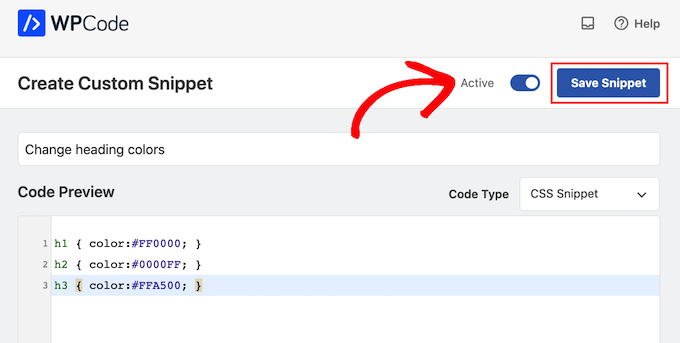
Hexadecimal colors are common in design. They start with a # symbol. Then, they have six numbers or letters. Each pair shows a color: red, green, or blue. For example, #FF5733 is a bright red-orange. It’s easy to use in WordPress. Just copy and paste the code. Colors are easy to change with this format.
RGB stands for Red, Green, Blue. It uses numbers from 0 to 255. Each number shows how much of each color to mix. For example, rgb(255, 0, 0) is pure red. This format is helpful in WordPress themes. Adjusting colors with RGB is simple. Just change the numbers for different shades.
HSL stands for Hue, Saturation, Lightness. Hue means the color type. Saturation shows color strength. Lightness tells how bright or dark it is. For example, hsl(120, 100%, 50%) is bright green. HSL makes it simple to create soft colors. It is perfect for WordPress designs needing a gentle touch.
Credit: www.wpbeginner.com
Role Of Color Codes In Design
Color codes make websites look the same. This helps keep visual consistency. Users feel more at home when colors match. Matching colors make pages look clean. This is important for a good design.
Colors tell a story about a brand. Certain colors remind people of a brand. They think of Coca-Cola when they see red. This is brand identity. Color codes help keep this identity strong. Brands use the same colors everywhere.
Bright colors can help users find what they need. Soft colors can make a website feel calm. Color codes guide users easily. This makes the user experience better. A good experience keeps people happy on a site.
Using Color Codes In WordPress
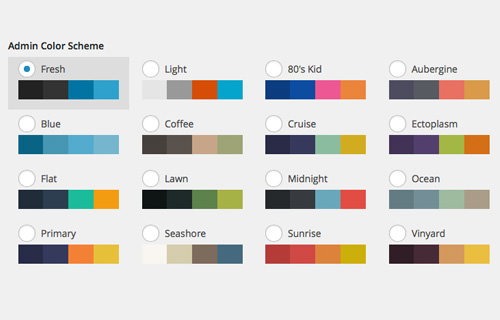
Color codes help customize themes. They make your site look unique. You can change the background color. You can adjust text color. This makes reading easy. Use the right color code for buttons. This helps users click quickly. Color codes make your site more attractive. Your site will stand out.
CSS uses color codes to change website look. You can modify font colors. You can change border colors. This helps make the site look better. You can highlight important text with colors. Colors make the website more interesting. Use CSS for better design.
Plugins use color codes for extra features. They help make your site look cool. Plugins can change header colors. They can adjust footer colors. Colors can make buttons pop. This helps users find them easily. Plugins add fun to your site. Integrate colors for a better look.
Credit: www.hongkiat.com
Tools For Color Selection
Color pickers help you find the right shade. Adobe Color is a popular tool. It lets you explore many shades. You can create your own color themes. Coolors is another fun tool. It generates color palettes with ease. You can lock colors and adjust them. Both tools are easy for beginners.
Online generators are helpful for quick color choices. Paletton is a well-liked option. It offers different color schemes. You can see how colors match together. Color Hunt offers beautiful palettes. The collections are made by users. These tools are both fun and easy to use.
Browser extensions make color picking simple. ColorZilla is a top choice. You can pick colors from any web page. It also offers a palette view. Eye Dropper works well with Chrome. It helps you get colors from web pages. Both extensions save time and effort.
Tips For Effective Color Usage
Understanding color codes in WordPress enhances your site’s visual appeal. Use hex codes for precise color matching. Experiment with RGB and HSL for more flexibility.
Accessibility Considerations
Colors must be easy for all users. Some people can’t see certain colors. Ensure your colors are clear and distinct. Use tools to test color contrast. Proper contrast helps everyone see content better. Use color with care for text and background. Good practice is using high contrast.
Color Psychology
Colors affect how people feel. Blue feels calm and trustworthy. Red feels bold and exciting. Green feels fresh and natural. Choose colors that match your message. Think about your site’s purpose. Pick colors that support it. Use colors to guide users’ feelings.
Contrast And Readability
High contrast makes text readable. Dark text on a light background works well. Light text on a dark background is also good. Avoid similar colors for text and background. Users find it hard to read if contrast is low. Test your site for readability. Adjust colors for clear text.

Credit: www.interserver.net
Troubleshooting Color Issues
Incorrect color codes can mess up your design. Check your CSS files for mistakes. Ensure the color codes have the correct format. Hex codes start with a hash symbol (#). RGB codes should have three numbers in brackets. A small error can change the whole look.
Different browsers can show colors differently. This happens because each browser reads color codes in its own way. Test your site on popular browsers. Chrome, Firefox, and Safari. See how your colors look. Adjust if needed. Keep colors looking the same everywhere.
Some themes might not support all color changes. Themes come with default settings. These can override your color choices. Check theme documentation for color settings. Use a child theme if needed. This helps keep your changes safe.
Frequently Asked Questions
What Are WordPress Color Codes?
WordPress color codes are hexadecimal values used to define colors on your site. They help maintain a consistent design. You can use these codes in themes, custom CSS, and plugins to personalize your site’s appearance. Knowing color codes enhances your site’s branding and visual appeal.
How Do I Change Color Codes In WordPress?
To change color codes in WordPress, go to your theme customizer. Navigate to Appearance > Customize, then select Colors. Here, you can input new hexadecimal values. Some themes also allow you to alter colors directly through their settings panel. Always preview changes before saving them.
Where Can I Find WordPress Color Codes?
You can find WordPress color codes in your theme settings or style. css file. Using browser developer tools, you can inspect your site and view the color codes. Online resources and color pickers also provide hexadecimal values for desired colors.
This helps in customizing your site efficiently.
Why Use Hexadecimal Codes In WordPress?
Hexadecimal codes offer precise color customization in WordPress. They provide a wide range of colors using a six-digit combination of numbers and letters. This ensures your site’s design is unique and visually appealing. Hex codes are widely supported and recognized, making them a reliable choice.
Conclusion
Understanding WordPress color codes simplifies design tasks. Colors convey emotions and meanings. Choosing the right shades enhances your website’s appeal. Experiment with different combinations for unique looks. Remember, consistency is key for a professional appearance. Use the tools and features WordPress offers.
They make color management easier. Regular updates ensure your site stays fresh and engaging. Practice and explore to gain confidence with colors. Soon, selecting and applying color codes will become second nature. Enjoy the creative process and see your website flourish with vibrant designs.


