
Are you ready to make your data come alive? Hosting a web front end for your database can transform a static collection of information into a dynamic, interactive experience for users.
Imagine having the power to access, manipulate, and display your data with just a few clicks. Whether you’re building a personal project or developing a professional application, knowing how to effectively host a web front end is crucial. In this guide, you’ll learn the essential steps to seamlessly integrate your database with a user-friendly interface.
Get ready to unlock the potential of your data and capture the attention of your audience. Let’s dive in and explore how you can create an engaging and efficient web front end for your database.
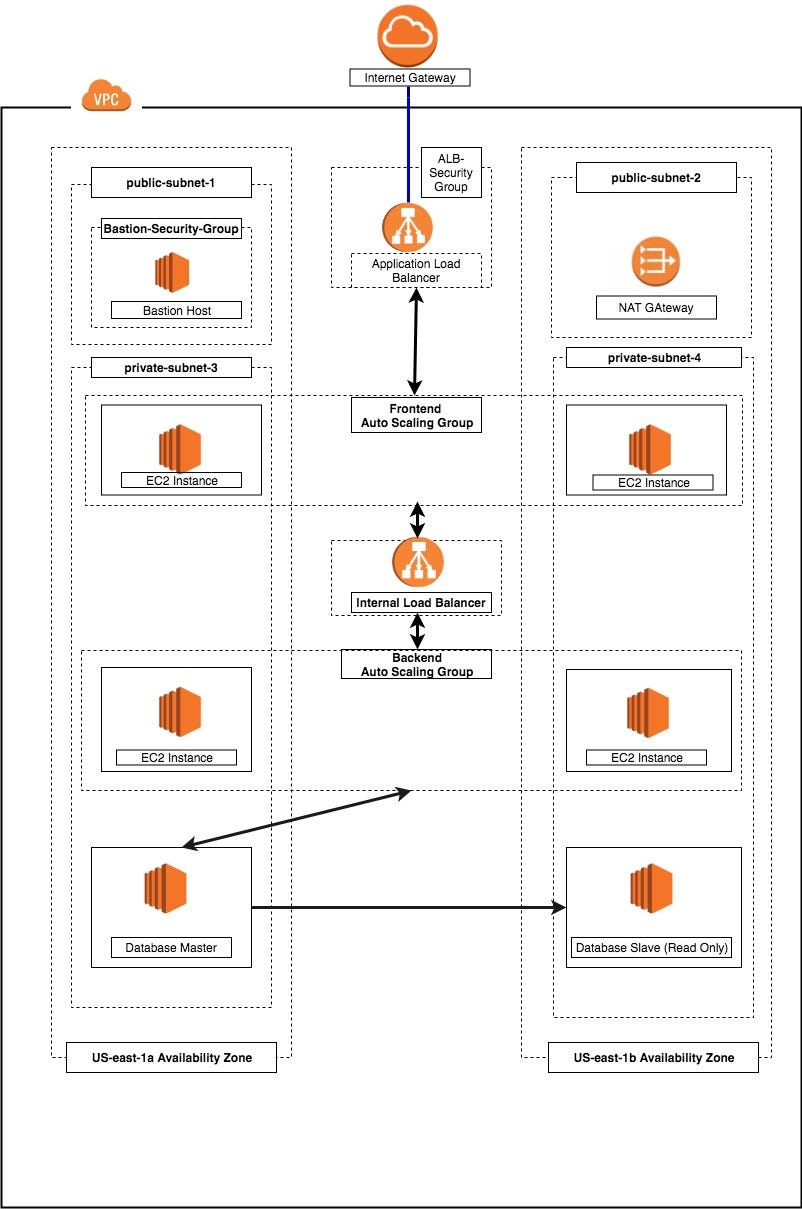
Credit: medium.com
Choosing The Right Hosting Platform
Cloud hosting is very popular today. It offers flexibility and easy access. You can manage your web app from anywhere. On-premises hosting is different. It means your servers are at your location. This gives control but needs more maintenance. For small projects, cloud might be best. For large control needs, on-premises is better.
Scalability means your system can grow easily. Cloud hosting is good here. It can handle more users without much trouble. On-premises might struggle if you grow fast. Performance also matters. Both options can be fast. But cloud often has more resources. It can offer better speed. Choose based on your needs.
Costs are important when choosing. Cloud hosting usually has monthly fees. You pay for what you use. On-premises has upfront costs. You buy and set up servers. Over time, cloud can be cheaper. But for big, long projects, on-premises may save money. Consider your budget and project length.
Setting Up The Server Environment
Begin with installing the Operating System of your choice. Linux is popular for servers. Next, install a web server like Apache or Nginx. They help deliver web pages. Then, add database software like MySQL or PostgreSQL. This is where data is stored. Lastly, install languages like PHP or Python. These help create dynamic web pages.
Web servers need a little setup. Set the document root where files are kept. Enable modules for extra features. Adjust settings for performance. Make sure the server listens on the correct port. Usually, this is port 80 for HTTP and 443 for HTTPS.
Security is very important. Always use firewalls to block bad traffic. Secure connections with SSL certificates. This keeps data safe. Regularly update software to fix security holes. Use strong passwords for all accounts. Never share them.
Connecting To The Database
There are different types of databases. Some are SQL-based like MySQL and PostgreSQL. Others are NoSQL like MongoDB and Cassandra. Each type has its own use. Choose the one that fits your needs. Check if your web front end supports it. Compatibility is key. It ensures smooth data flow.
Security is very important. Use SSL/TLS for secure connections. It protects data in transit. Change default passwords. Use strong, unique passwords. Regularly update your database software. This helps to fix vulnerabilities. Always monitor for suspicious activities.
Fast data retrieval is crucial. Use indexes to speed up search. They make data access quicker. Keep your queries simple. Complex queries take more time. Cache frequent queries. This reduces load on the database. Regularly clean up old data. It improves performance.

Credit: www.researchgate.net
Designing The Web Front End
A good website should be easy to use. Buttons and links should be clear. Users like it when they can find things fast. Colors and fonts should be simple. Too many colors can confuse. Simple designs are often the best. Make sure text is easy to read. This helps everyone.
Websites should work on all devices. Phones, tablets, and computers are popular. Make sure your site looks good on each one. Responsive design changes the site to fit the screen. This makes it user-friendly. Images should resize automatically. No one likes to zoom in or out.
Frameworks help build websites faster. Bootstrap and React are popular choices. They come with ready-made elements. This saves time and effort. Beginners can learn them easily. They make websites look modern. Choose a framework that fits your needs. It should also be easy to update.
Implementing Data Interaction Features
CRUD stands for Create, Read, Update, and Delete. These are basic actions for data. Users can add new data. They can view existing data. They can change data. They can also remove data. CRUD is like the alphabet of databases. It’s very important for data interaction.
Users need to find data quickly. Filtering helps them. It shows only what they need. Sorting arranges data in order. It can be by date or name. This makes data easy to read. Filtering and sorting make data useful.
Real-time updates keep data fresh. No need to refresh the page. Changes appear instantly. This is like magic for users. It makes data live. Real-time updates are key for many apps. They help users stay informed.
Testing And Debugging
Bugs can be tricky. They hide in code. Syntax errors often cause them. Check for missing semicolons or brackets. Sometimes, logic is wrong. A loop might not end. Or a variable is not updated. Debugging tools help find them. They show where errors happen. Use them often. Fixing bugs makes the app work well.
Speed is important for web apps. Test if the app is fast. Use tools to measure load times. A slow app can frustrate users. Check if the server responds quickly. Look for bottlenecks in code. Optimize images and scripts. This helps the app run smoothly. Good performance keeps users happy.
Users are important. They give good feedback. Ask them to test the app. They find problems you might miss. Listen to their suggestions. They can help improve the app. Make changes based on their feedback. This makes the app better for everyone. Happy users come back. They also tell others about the app.
Deployment And Maintenance
Deploying a web front end for a database involves selecting a reliable hosting platform. Regular maintenance ensures optimal performance and security. Understanding basic server configurations helps keep the system running smoothly.
Deploying The Web Application
To deploy your web application, choose a reliable hosting provider. Make sure it supports the technologies you use. Upload your web files to the server. Configure the database connection settings carefully. Test the application to ensure it’s working. Fix any bugs promptly. User experience matters. Keep your application secure with regular updates.
Monitoring And Analytics
Implement monitoring tools to track your app’s performance. Use analytics to understand user behavior. Check for error logs regularly. Watch for traffic spikes. Analyze data to make informed decisions. Adjust your resources based on user demand. Monitoring helps improve user experience. It also aids in identifying potential issues early.
Regular Updates And Backups
Perform regular updates to keep your app secure. Fix vulnerabilities promptly. Add new features based on user feedback. Always backup your data before updating. Use automated backup solutions if possible. Store backups in multiple locations for safety. Regular updates enhance functionality and security. Protect your data with consistent backups.
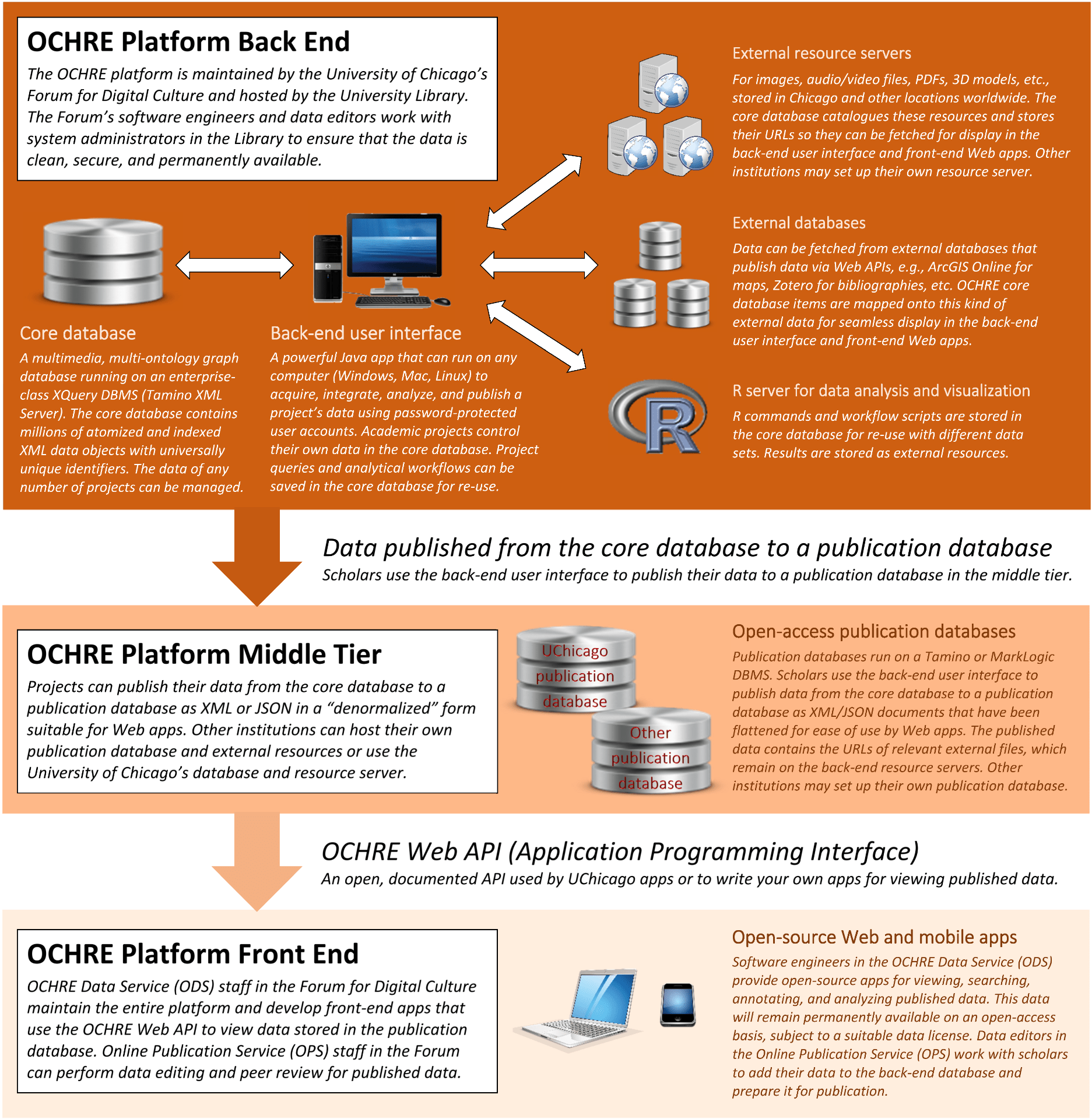
Credit: digitalculture.uchicago.edu
Frequently Asked Questions
How Do I Connect My Frontend With A Database?
Connect your frontend with a database by using an API. Implement AJAX calls to interact with the database. Use libraries like Axios or Fetch for HTTP requests. Ensure proper authentication and error handling for secure and efficient communication. Use frameworks like React or Angular for easier integration.
How To Create A Front End For Sql Database?
To create a front end for an SQL database, use languages like HTML, CSS, and JavaScript. Connect it with server-side languages such as PHP or Python. Utilize frameworks like React or Angular for enhanced functionality. Ensure data interaction using AJAX or Fetch API for seamless user experience.
How To Integrate A Database With A Website?
Integrate a database by using server-side scripting languages like PHP or Python. Connect via a database management system (DBMS) such as MySQL. Employ APIs for seamless interaction. Ensure secure connection and validate inputs to prevent SQL injection. Regularly update and backup your database for optimal performance.
How Much Does It Cost To Host A Website With A Database?
Hosting a website with a database typically costs between $5 to $50 per month. Prices vary based on hosting provider, server type, and additional features like security and support. Shared hosting is cheaper, while dedicated servers are more expensive. Always consider your website’s specific needs when choosing a hosting plan.
Conclusion
Creating a web front end for a database is manageable. Start with clear goals. Choose the right tools for your project. Simplify the design for better user experience. Ensure your database is secure and efficient. Test thoroughly before launching. Regular updates keep your system running smoothly.
Troubleshoot issues promptly to avoid downtime. Remember, simplicity is key. Users appreciate easy navigation and quick access. Stay informed about new technologies. Adapt to changes in web development. Your front end can be a powerful tool. Make it user-friendly and reliable.
Keep learning, keep improving.


