
Ever stumbled upon a WordPress site and thought, “Wow, I want mine to look just like this!”? You’re not alone.
Figuring out what WordPress template a site is using can feel like trying to crack a secret code. Yet, it’s a question that intrigues many of us, especially if you’re looking to give your site that perfect mix of style and functionality.
Imagine being able to uncover this mystery with ease and confidence, enhancing your own website’s appeal without breaking a sweat. You’ll discover the tools and techniques to identify any WordPress template quickly. Stick around, and you’ll soon have the know-how to transform your website vision into reality.
Identifying WordPress Themes
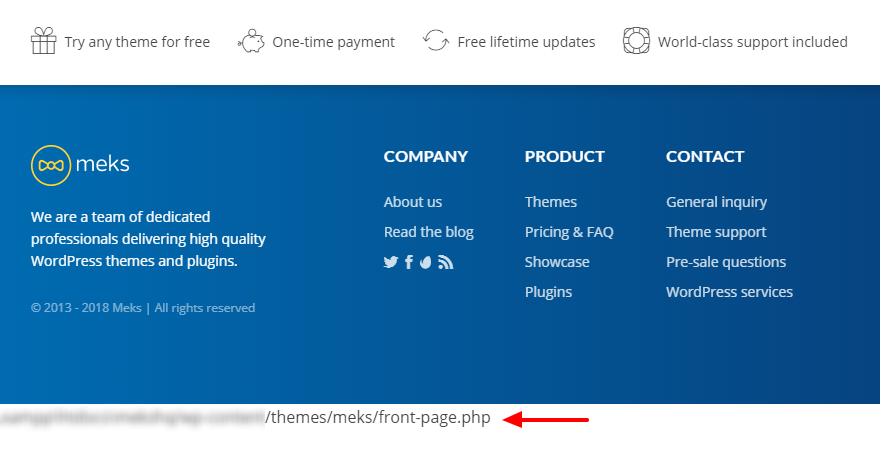
Finding the right WordPress theme can be tricky. One way is to check the website’s page source. Right-click on the page and select “View Page Source.” Look for the word “theme” in the code. It might show the theme’s name. Another method is using online tools. They scan websites and tell you which theme is used.
Many plugins help to find the theme name. “What WordPress Theme Is That” is a popular tool. Install it and run a scan on the website. It shows both the theme and plugins used. Another tool is “Theme Sniffer.” It works similarly. These tools make finding themes easy and fast.
Credit: mekshq.com
Visual Clues
Discovering what WordPress template a site uses can be intriguing. Visual clues like unique layouts or specific design elements often reveal hints. These clues help identify the template’s style and functionality.
Recognizing Default Themes
Many WordPress websites use default themes. These themes have specific designs. The most common is Twenty Twenty-One. It has a simple, clean look. Often, there are pastel colors. These themes are easy to spot. Look for distinctive fonts and layout. They usually have standard navigation menus. Default themes often feature the WordPress logo. This can be a key clue.
Custom Design Indicators
Custom designs often have unique elements. They may have special fonts and colors. Look for personalized logos and graphics. Custom designs often have customized navigation menus. These websites may use plugins for special features. Custom designs rarely look like default themes. They are made to be different. Sometimes, they have animations or special effects. These are clues to a custom design.
Using Online Theme Detectors
Online theme detectors help find what WordPress template a site uses. They scan the site for theme files and information. These tools look for style.css files and other theme details. After scanning, they show the theme name and author. They are easy to use. Just enter the site’s URL and click “detect”. Results come quickly.
Several tools are available online. Some of the most popular ones include:
- WhatTheme: Simple and free to use.
- WP Theme Detector: Offers detailed info.
- IsItWP: Easy and fast.
Each tool has its strengths. Users can choose based on their needs. All these tools help uncover theme details easily.
Inspecting Website Code
To check a website’s code, right-click on the page. Select “View Page Source.” A new tab will open. This shows the website’s HTML code. You can also use Ctrl + U as a shortcut. This works in most browsers. The source code gives important website details. You will find many tags and links in this code. But finding the theme name is the goal. You need to look for specific clues.
In the source code, search for “wp-content/themes/”. This part shows the theme folder. The name after this is usually the theme name. For example, “wp-content/themes/twentytwenty”. This means the theme is Twenty Twenty. Sometimes, theme names are not clear. But most have recognizable names. If you cannot find it, try using a theme detector tool.
Contacting Website Owners
Writing to website owners? Keep it simple. Use polite words. Respect their time. Explain why you are asking. Be honest and clear. Mention the template you want to know. Let them know how you found their site. Offer thanks for their help. Always use your real name. Show genuine interest. It helps build trust.
Privacy is important. Never ask for personal details. Keep your request about the template. Avoid sharing private information. Respect their space. Understand they might not reply. Respect their decision. Always be polite. Thank them even if they say no.
Limitations And Challenges
Custom themes in WordPress can be tricky. They require special skills. Not everyone can make them. You need to know coding. HTML, CSS, and PHP are important. Without these, creating custom themes is hard. Also, it takes time. Making a theme is not quick.
Obfuscated code is another challenge. This code is hard to read. It hides what the code does. Developers use it to protect their work. But it makes changes hard. To edit, you need to understand the code. This can be tough for beginners. So, it limits what you can do.
Ethical Considerations
Templates are designed by talented people. Creators work hard to make them. Always give credit to them. Never claim their work as your own. Show respect for their skills. Support creators by buying their templates. Using free ones? Check licenses and rules. Follow them closely. Avoid stealing ideas or designs.
Using templates without permission is wrong. Sharing copies without paying is bad. Avoid hacking to get paid templates. Pay for what you use. It’s fair to do so. Help others by being honest. Teach friends the right way. Good choices make the web better. Be a part of it.

Credit: mekshq.com
Credit: thrivewp.com
Frequently Asked Questions
How To Identify A WordPress Template?
To identify a WordPress template, inspect the website’s source code using your browser’s developer tools. Look for the theme name within the CSS or HTML files. You can also use online tools like “What WordPress Theme Is That” to detect the theme and plugins used.
Can I Find Out A Site’s WordPress Theme?
Yes, you can find a site’s WordPress theme by viewing the page source. Search for “wp-content/themes” in the HTML code. This will reveal the theme’s directory name, which often matches the theme name. Alternatively, use a WordPress theme detector tool online.
What Tools Detect WordPress Themes?
Several tools can detect WordPress themes, including “What WordPress Theme Is That” and “WPThemeDetector. ” These tools analyze website code to identify the active theme and plugins. Simply enter the website URL, and the tool will provide detailed information about the theme used.
Why Know Which WordPress Theme Is Used?
Knowing the WordPress theme helps you understand a site’s design framework and functionality. It can inspire your own website design and reveal useful features or plugins. Additionally, recognizing popular themes can guide your theme selection for optimal performance and aesthetics.
Conclusion
Choosing the right WordPress template can be crucial. It affects your site’s look and function. A template should fit your style and needs. Explore different options to find what works best. Consider factors like speed and customization. Responsive design is key for mobile users.
Popular templates often have strong support and updates. Remember to test before finalizing. A well-chosen template enhances your site’s effectiveness. It can improve user experience and engagement. Take your time to choose wisely. Your site deserves the best fit. Happy designing!


