
Are you struggling to figure out the perfect size for images on your WordPress blog? You’re not alone.
Many bloggers find themselves puzzled by this seemingly simple task. But here’s the good news: getting your photo sizes right can elevate your blog’s appearance and performance dramatically. Imagine your readers scrolling through your blog, captivated by crisp, clear images that load in a flash.
The right photo size not only enhances the visual appeal but also boosts your site’s speed and SEO ranking. Ready to transform your blog’s look and efficiency with perfectly sized images? Let’s dive in and uncover the secrets to mastering photo sizes on WordPress.
Optimal Photo Dimensions
Choosing the right photo size is important. It makes your blog look good. Common photo sizes are used by many bloggers. A popular size is 1200×628 pixels. It works well for blog posts. Another size is 1024×512 pixels. It is good for larger images. Both sizes help in keeping the blog neat.
Square photos like 1080×1080 pixels are used too. They are good for thumbnails. Make sure your photos are not too big. This keeps your blog fast and smooth.
Large photos can slow down your blog. This is bad for readers. They might leave if the page is slow. Smaller photos load faster. This keeps readers happy. Use tools to compress photos. This helps make them smaller in size. But the quality stays good.
Fast loading pages are important. They improve the reader’s experience. They also help with search rankings. Always check photo sizes before uploading. This ensures your blog stays quick and efficient.

Credit: fooplugins.com
Image Formats
JPEG is great for photos. It compresses images well. Small file size. PNG works best for graphics. It keeps quality high. No loss of detail. Use PNG for logos. Use JPEG for photographs. JPEG files load faster. PNG files are larger. Choose wisely for your blog.
WebP is newer. It compresses images better. Smaller file sizes. Maintains quality. Perfect for web images. WebP loads quickly. WebP supports transparency. It works like PNG. Use WebP for faster sites. Some browsers may not support WebP. Check compatibility first. WebP is a smart choice.
Responsive Design Considerations
Photos must fit different devices. A photo on a phone looks different on a computer. Responsive design helps your photos adapt to screens. Small screens need smaller photos. Large screens need bigger photos. This keeps photos clear.
Adapting To Different Devices
Phones, tablets, and computers are different sizes. Photos should change size to fit each device. This makes your blog look good everywhere. No one likes blurry photos. Clear photos make your blog better.
Using Media Queries
Media queries help photos fit. They check the device size. Then, they change photo size. This keeps photos looking nice. Use media queries to make your blog responsive. This helps all readers see great images.
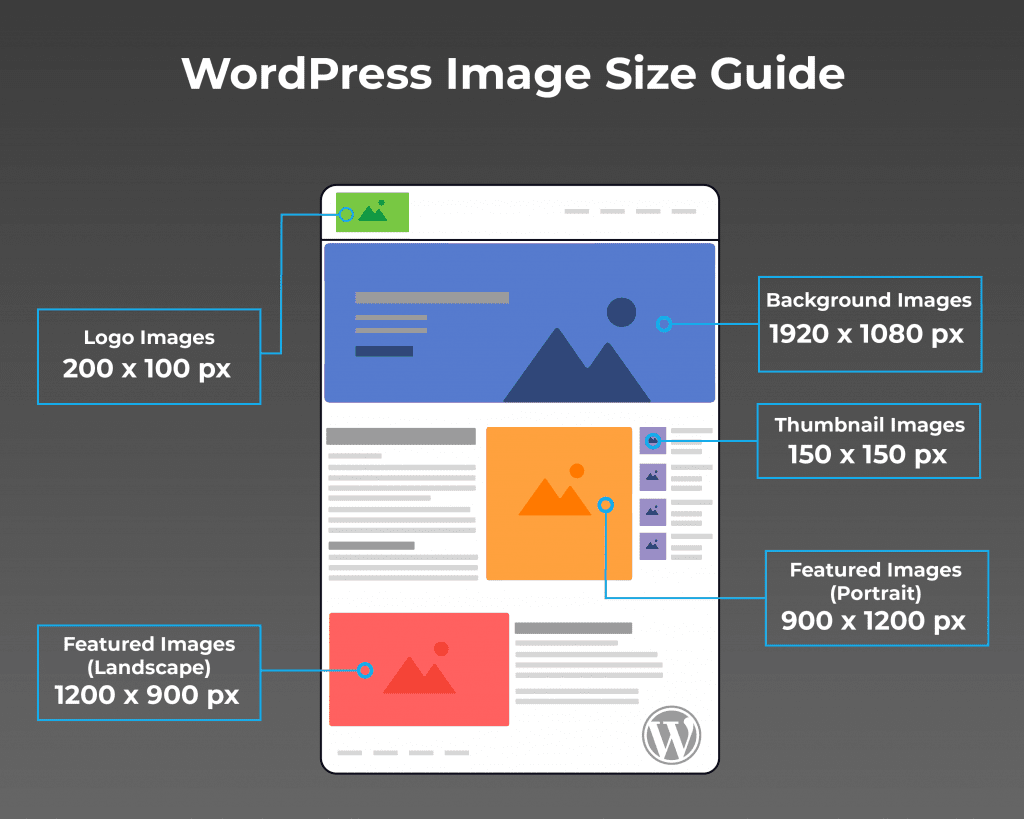
Credit: enginescout.com.au
Image Compression Techniques
Keeping image sizes small is crucial. Many tools help with this. TinyPNG is one popular choice. It makes images smaller without losing quality. JPEGmini is another good option. It can compress JPEG files very effectively. Compress JPEG works online. It’s easy to use and free.
Smaller images load faster. But they can look bad if too compressed. It’s important to keep quality high. A small image should still look clear. Finding the right balance is key. Use tools that compress without losing much detail.
Seo Benefits Of Proper Image Sizing
Optimizing image size for WordPress enhances load speed and user experience. Images should generally be 1200 pixels wide for blogs. Proper sizing boosts SEO by reducing page load times, making content more accessible and engaging.
Improving Page Load Speed
Images should be small for fast loading. Slow pages make visitors leave. This affects SEO. Google ranks faster sites higher. Compress images for speed. Use tools like TinyPNG. Keep images under 100KB if possible. Use JPEG or PNG formats. These are best for quality and size.
Alt Text And File Naming
Use clear names for image files. Names should say what the image shows. This helps search engines understand your content. Use alt text for images. Alt text describes the image. It helps visually impaired users. It also helps SEO. Keep alt text short and clear. Use keywords where possible. This improves search ranking.
Credit: www.elegantthemes.com
Plugins For Image Management
Choosing the right photo size for your WordPress blog enhances both speed and aesthetics. Opt for images that are 1200 pixels wide for optimal display. This ensures photos load quickly without compromising quality.
Popular WordPress Plugins
Many plugins help manage images on WordPress. Smush is a popular choice. It helps to compress images. This saves space and loads faster. Another great plugin is EWWW Image Optimizer. It optimizes images right after upload. Users love its speed and efficiency.
Automating Image Optimization
Automating image tasks saves time. ShortPixel automatically compresses images. It keeps quality intact. Images load faster, improving site performance. Imagify is another option. It can bulk optimize images. This means less manual work for you.
Frequently Asked Questions
What Is The Best Image Size For WordPress?
The best image size for WordPress is typically 1200 x 628 pixels. This size ensures optimal display across various devices and platforms. It maintains quality without significantly impacting load times. Always optimize images to balance quality and performance.
How Can I Optimize Images For WordPress?
To optimize images for WordPress, use plugins like Smush or ShortPixel. These tools compress images without losing quality. You can also manually resize images before uploading. Ensure images are in the right format like JPEG or PNG for best results.
Does Image Size Affect WordPress Performance?
Yes, image size significantly affects WordPress performance. Large images can slow down site load times. This can negatively impact user experience and SEO rankings. Always optimize and compress images to improve site speed and performance.
What Image Format Is Best For WordPress?
JPEG is best for photos due to its balance of quality and file size. PNG is suitable for images with transparency or text. Choose WebP for modern browsers as it offers superior compression and quality. Always consider your site’s needs when selecting a format.
Conclusion
Choosing the right photo size is crucial for your WordPress blog. It keeps your site fast and attractive. A faster site improves user experience. It also boosts your search engine ranking. Large images can slow down your site. This can frustrate visitors.
Use the recommended sizes for best results. Resize your images before uploading. This saves space and improves speed. Keep your images clear and relevant. This engages your readers and keeps them coming back. Stay mindful of size and quality. Your blog will thank you.


