
Have you ever wanted more control over what appears in your WordPress post excerpts? Imagine having the power to shape the first impression your readers get, enticing them to dive deeper into your content.
By customizing what shows in your post excerpts, you can create intrigue and captivate your audience right from the start. This simple tweak can significantly enhance your website’s engagement and boost your readers’ curiosity. You’ll discover how to effortlessly change the text that appears in your WordPress post excerpts, giving you the tools to make your content stand out and keep your audience hooked.
Ready to transform your posts into irresistible reads? Let’s get started.
Customizing Post Excerpts
Make your post excerpts more engaging by customizing them. Post excerpts are short summaries of your blog posts. They help readers decide if they want to read more. You can change what shows in these excerpts. WordPress offers options for this. Use these options to show important points. You can also add your own text to excerpts. This makes them unique. Adding keywords in the excerpt can improve SEO. Keep your excerpts short and clear. Use simple words. They should be easy to read. Avoid using complex sentences. A good excerpt catches attention. It makes readers curious about your post. Use excerpts wisely to attract more visitors to your blog.
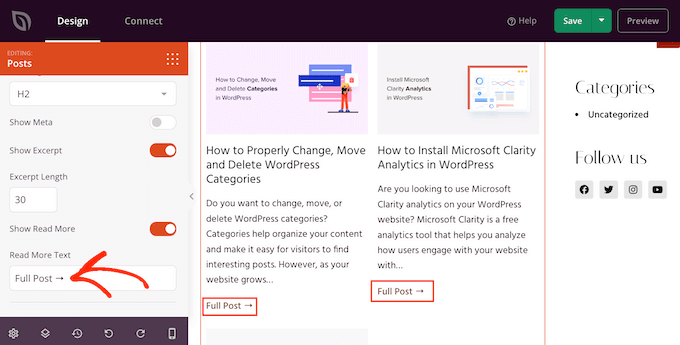
Credit: www.wpbeginner.com
Using WordPress Settings
WordPress offers settings to change post excerpts. First, find the “Reading” settings in your dashboard. Here, you can set the number of words for the excerpt. It helps in making your posts look neat.
Another way to edit excerpts is using the Excerpt field. This field is found when you edit a post. You can write what you want there. This is useful for giving readers a quick view of your post.
Plugins can also help customize excerpts. Some plugins let you adjust length and style. This adds more control over how your posts appear.
Try different settings to see what works best. Keep it simple and clear. Your readers will appreciate it.
Editing The Theme Code
Editing the theme code allows you to customize post excerpts in WordPress. You can adjust the length and content to better fit your site’s style. This enhances user experience by providing clearer, more engaging summaries.
Accessing Theme Files
Start by opening your WordPress dashboard. Look for the Appearance tab on the left side. Click it, then find the Theme Editor option. This will take you to your theme files. Be careful. Changes here affect your site’s look and feel.
Always back up your files first. You can use plugins or do it manually. This way, if something breaks, you can fix it easily. Select the right theme from the dropdown. Ensure it’s the active theme on your site.
Modifying Functions.php
Look for the functions.php file in the list. It controls many aspects of your theme. Click on it to open. To change the excerpt, add a small code. Find this line: add_filter( 'excerpt_length', 'your_custom_excerpt_length' );. Replace your_custom_excerpt_length with a number. This number sets how many words your excerpt shows.
Save your changes. Visit your site to see the new excerpt length. If something looks wrong, restore your backup. This keeps your site safe and sound. Now, enjoy your customized post excerpts!

Credit: passwordprotectwp.com
Plugins For Excerpt Customization
Many plugins help change the post excerpt in WordPress. Some popular ones are Advanced Excerpt, Ultimate Shortcodes, and WP Excerpt Generator. Each plugin offers unique features. You can choose based on your needs.
Installing a plugin is easy. First, go to your WordPress dashboard. Click on the Plugins tab. Then, select Add New. Search for the plugin you want. Click Install Now and then Activate.
After activation, configure the plugin. Go to its settings. Adjust the excerpt length or style. Save your changes. Now, your excerpts will look different. Enjoy the new look!
Custom Excerpt Length
WordPress lets you change the excerpt length. Use the the_excerpt() function. This function helps to show a small part of your post. You can make this part longer or shorter. Adjusting the word count is easy.
First, find the excerpt function in your theme files. Then change the number inside the function. This number is the word count. You choose how many words you want. A short excerpt is good for quick reading. A long excerpt gives more details.
Think about your audience. Do they like reading a lot? Or do they prefer a quick read? Adjusting the word count helps you fit their needs. This way, your blog looks better and is easy to read.
Adding Custom Content
Shortcodes can change how post excerpts look. They are small bits of code. These codes add special features to your post. You can add images, buttons, or links. It’s simple and easy. Just paste the shortcode in the editor. Your post will now have extra content. Shortcodes are like magic words. They make posts more interesting. Many plugins offer shortcodes. You can find them in the plugin settings. Explore different options for the best look.
HTML tags help format your excerpts. Tags can make text bold or italic. Use them to add lists or links. They are easy to use. Just wrap your text with tags. For example, use `` for bold text. HTML makes your posts stand out. It adds style and structure. Anyone can learn these tags. Practice makes it easier. Your post will look better with HTML.
Troubleshooting Common Issues
WordPress themes sometimes cause problems with post excerpts. Themes can change how excerpts look. They might cut off important parts. It’s vital to check theme settings. Many themes have options to adjust excerpts. Exploring these options can fix many issues. If problems persist, consider changing the theme. Choosing a theme that suits your needs is crucial.
Plugins can affect how WordPress shows post excerpts. Some plugins might conflict with themes. Compatibility is key to smooth operation. Always check plugin descriptions before installing. Look for compatibility notes. If excerpts look odd, try disabling plugins one by one. Identifying the problematic plugin can save time. Update plugins regularly to avoid issues. Using plugins that are regularly updated helps maintain compatibility.
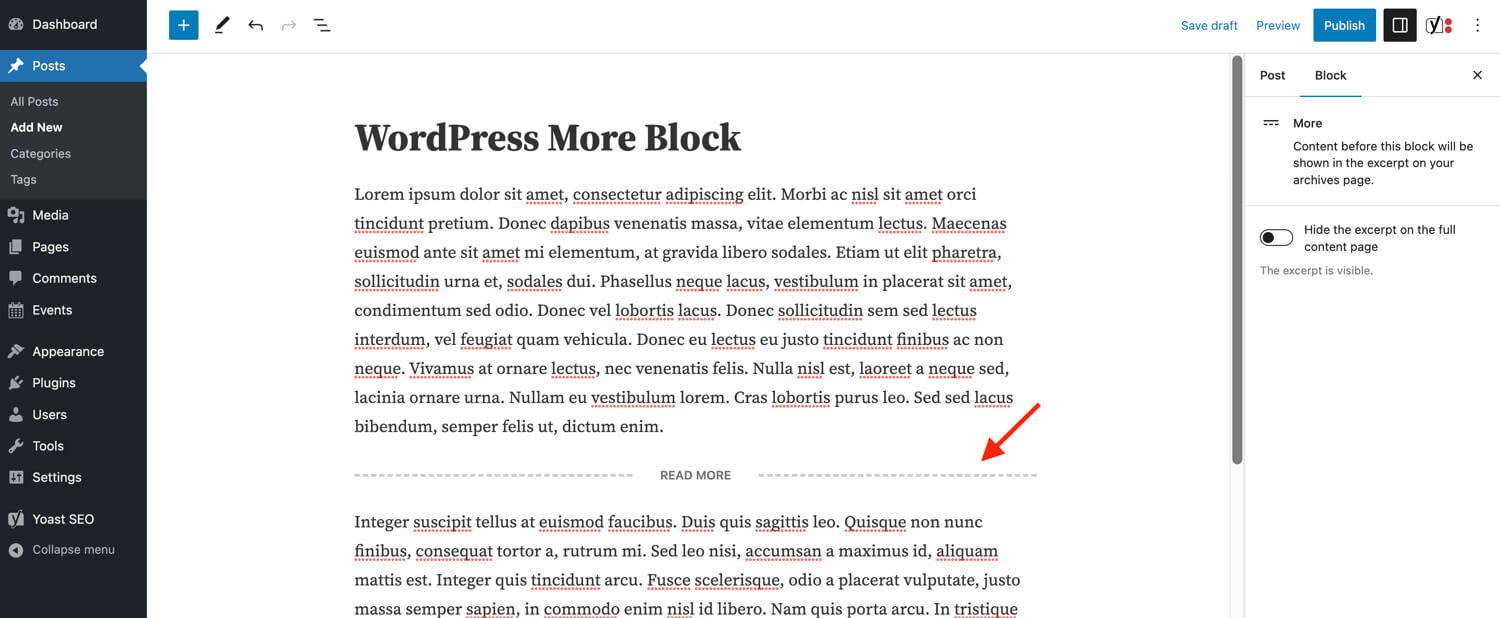
Credit: www.wpexplorer.com
Best Practices
Consistency makes your blog look neat and tidy. Readers love it. Keep the length of each excerpt about the same. This helps readers know what to expect. Use the same style for every post. It helps your blog look organized. Consistency builds trust with your readers. They find it easier to follow your posts.
A good user experience keeps readers happy. Use clear and simple language in excerpts. This helps readers understand quickly. Include important keywords near the start. This grabs attention fast. Make sure your excerpts are relevant to the post. This keeps readers interested. A good excerpt invites readers to click and read more.
Frequently Asked Questions
How To Customize Post Excerpts In WordPress?
To customize post excerpts, use the “Excerpt” field in the post editor. You can manually enter your desired text here. Alternatively, you can use plugins like “Advanced Excerpt” to gain more control over excerpt length and style.
Can I Change Excerpt Length In WordPress?
Yes, you can change excerpt length using functions. php. Add the `excerpt_length` filter to set a custom number of words. Plugins like “Advanced Excerpt” also provide settings for adjusting excerpt length without coding.
What Plugins Help With Excerpt Customization?
Plugins like “Advanced Excerpt” and “WP Custom Excerpts” help customize excerpts. They offer features to control length, HTML tags, and more, giving you greater flexibility over your post snippets.
Why Are Post Excerpts Important?
Post excerpts provide a preview of your content, encouraging clicks and engagement. They improve user experience by summarizing content and helping visitors quickly assess its relevance to their interests.
Conclusion
Customizing post excerpts in WordPress enhances your blog’s readability. Readers get a quick glimpse of your content. This helps them decide what to read. You can easily adjust settings in WordPress. Choose what fits your style best. Make sure your excerpts are engaging.
This keeps your audience interested. With these tips, your blog becomes more attractive. More user-friendly too. Consistent efforts yield better results. So, start tweaking those excerpts now. Enjoy the improved reader engagement. Your blog deserves it.


