
Have you ever wondered how to make your WordPress site more dynamic and user-friendly? Or perhaps you’ve stumbled across the term “widget” while tinkering with your site and wondered, “What exactly is a widget in WordPress?” You’re not alone.
Many WordPress users, both new and experienced, find themselves puzzled by this seemingly simple feature. Yet, understanding widgets can be a game-changer for your website. Imagine being able to effortlessly add useful features to your site without needing to write a single line of code.
Widgets allow you to do just that. They can transform your website’s sidebar, footer, or any widget-ready area into a space that’s not only functional but also engaging for your visitors. But how do they work? And more importantly, how can you use them to benefit your site? Keep reading to discover the ins and outs of WordPress widgets and unlock the potential to enhance your website like never before.
WordPress Widgets Basics
WordPress widgets are simple tools. They add extra features to your site. Widgets can be a calendar, search bar, or recent posts. They help make your site more useful and fun. You can find them in the WordPress dashboard. Just drag and drop them where you want. It is easy to use and setup.
Widgets are found in the Appearance section. They let you customize sidebars and other areas. No coding is needed. Some themes have special widgets. These can give your site a unique look. Remember to always save changes after adding a widget. This will make sure your site shows the new features.

Credit: wpmarmite.com
Types Of Widgets
WordPress comes with many default widgets. They are useful for basic tasks. Examples include the Calendar and Search bar. The Calendar widget shows dates. The Search bar helps find content. These widgets make websites more interactive. They are easy to use and set up.
Many plugins offer third-party widgets. These widgets extend functionality. Popular examples are social media feeds and contact forms. They integrate with external services. This helps in adding new features to your site. They are often customizable. These widgets enhance user experience.
Custom widgets are unique. They are made to fit specific needs. Developers design them for special tasks. Custom widgets add personal touch to websites. They require coding skills. These widgets can improve site uniqueness. Owners can tailor them to their brand.
Adding Widgets To Your Site
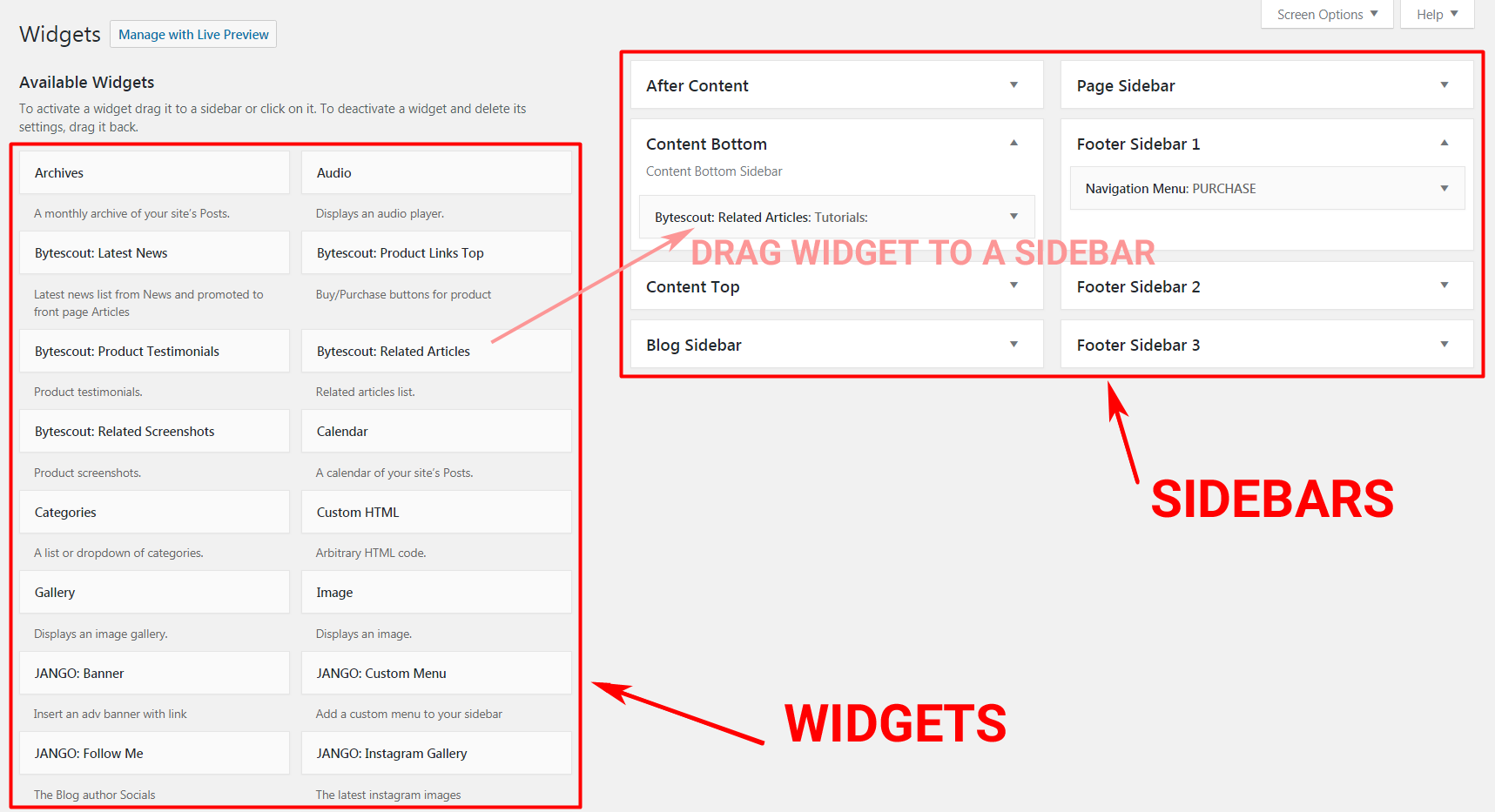
The widget area is a special space in WordPress. It holds all your widgets. You can find it in the admin panel. Here, you can add new widgets. Also, you can remove old ones. It is easy to use. Just click and choose what you need. Widgets add useful features to your site. They help make it better.
Widgets fit into themes in different ways. Each theme has its own spots for widgets. Some themes have many spots. Others have only a few. You can place widgets in sidebars. Or in footers. Or even in headers. Choose the best spot for each widget. This helps your site look neat.
Drag and drop makes moving widgets easy. Just click on a widget. Then drag it to a new spot. Drop it there. It is that simple. You do not need to know coding. Anyone can do it. It saves time. And helps you set up your site fast.
Credit: bytescout.com
Popular Widget Uses
Widgets help users find their way on a site. Navigation widgets can show menus or a search bar. This makes finding content easy. Users click and reach their favorite pages fast.
Displaying the latest posts keeps content fresh. A Recent Posts widget shows new stories. Readers can see the newest posts at a glance. It helps keep visitors engaged.
Social media widgets link websites to social platforms. Visitors can see recent tweets or posts. They can share content too. This helps grow the site’s audience. Social widgets connect the web with the world.
Customizing Widgets
Widgets in WordPress are small tools. They add features to your site. You can adjust their settings. This helps them fit your needs. Go to your WordPress dashboard. Find the “Appearance” section. Click on “Widgets”. You can see many options. Each widget has its own settings. You can change them easily. Try it and see the difference.
CSS helps style your widgets. It makes them look unique. You can change colors. You can change fonts. You can change sizes too. Add custom CSS in your theme. Open the “Appearance” tab. Click “Customize”. Find “Additional CSS”. Add your style code there. Your widgets will look better.
Plugins add more power to widgets. They offer extra features. Find plugins in the WordPress store. Search for widget plugins. Install them on your site. They help customize widgets. Some plugins are free. Some are paid. They make widgets work better. Explore the options.
Managing Widgets Effectively
Widgets help make your website look good. Put them in the right place. Keep them neat and tidy. This helps visitors find what they need. A clean widget area makes your site easier to use. Choose widgets that match your site’s theme. Arrange them in a way that makes sense.
Unused widgets can slow down your website. Remove widgets that you don’t need. This will make your site run faster. Fewer widgets mean less clutter. A clean site keeps visitors happy. Check widgets regularly. Remove ones that are not useful.
Fast widgets make your site better. Check widget settings for speed. Update widgets when needed. This helps them work well. Use lightweight widgets. They load faster. Slow widgets can annoy visitors. Keep performance high for a great user experience.
Troubleshooting Widget Issues
Widgets in WordPress are small blocks that add functionality to websites. They can display images, text, or links in sidebars or footers. Troubleshooting widget issues involves checking compatibility with themes and plugins, ensuring updates are applied, and verifying correct settings to restore proper function.
Common Widget Problems
Widgets can sometimes misbehave. They might not appear on your site. Or they might not function as expected. This can be frustrating. The most common issues include missing widgets or widgets not updating properly. It is important to check if the widget is compatible with your WordPress theme. A theme update can sometimes cause problems.
Resolving Conflicts With Plugins
Plugins can often conflict with widgets. This can cause widgets to stop working. Try disabling plugins one by one. This helps identify the conflicting plugin. Keeping both themes and plugins updated is important. Updates often fix bugs and improve compatibility.
Seeking Support And Resources
WordPress has a large community. Many resources are available online. Forums and support pages provide valuable help. You can ask questions or search for similar problems. WordPress documentation is also a good place to check. It provides step-by-step guides and solutions.

Credit: wordpress.org
Frequently Asked Questions
What Is A WordPress Widget?
A WordPress widget is a small block that performs a specific function. Widgets allow you to add content and features to your sidebars. They can include things like search bars, calendars, and categories. Widgets make your site more interactive and user-friendly without needing to code.
How Do I Add Widgets In WordPress?
To add widgets in WordPress, go to Appearance > Widgets in your dashboard. From there, you can drag and drop available widgets into your site’s widget areas. These areas are usually your sidebars or footers. Simply customize and save the widget settings to see changes on your site.
Why Are Widgets Important For WordPress Sites?
Widgets are important because they enhance site functionality and user experience. They allow you to add interactive elements without coding. Widgets can help in organizing content, improving navigation, and boosting engagement. They make it easy to add features like search bars, social media links, and recent posts.
Can I Customize WordPress Widgets?
Yes, you can customize WordPress widgets easily. Each widget has its settings that you can adjust. You can change titles, display options, and styles. Some themes and plugins offer additional customization options. This allows you to match widgets with your site’s design and functionality.
Conclusion
Widgets make WordPress sites unique and functional. They add features like calendars or search bars. Easy to use, even for beginners. Drag and drop to customize. No coding needed. Enhance your site with just a few clicks. Widgets help manage content efficiently.
Perfect for bloggers and small businesses. They improve user experience by organizing information. Widgets simplify website management. Keep your site engaging and user-friendly. Explore different widgets today. Make your WordPress site stand out.


