
Have you ever wondered how to make your WordPress site truly stand out? Imagine if you could guide your visitors exactly where you want them to go, with just a simple click.
That’s the magic of custom links in WordPress. They aren’t just any links; they are your secret weapon to enhancing user experience and boosting your site’s navigation. By tailoring your links, you can direct traffic, highlight important content, and even improve your SEO.
Intrigued? Dive deeper to discover how custom links can transform your WordPress site and keep your visitors engaged longer than ever before.
Custom Links In WordPress
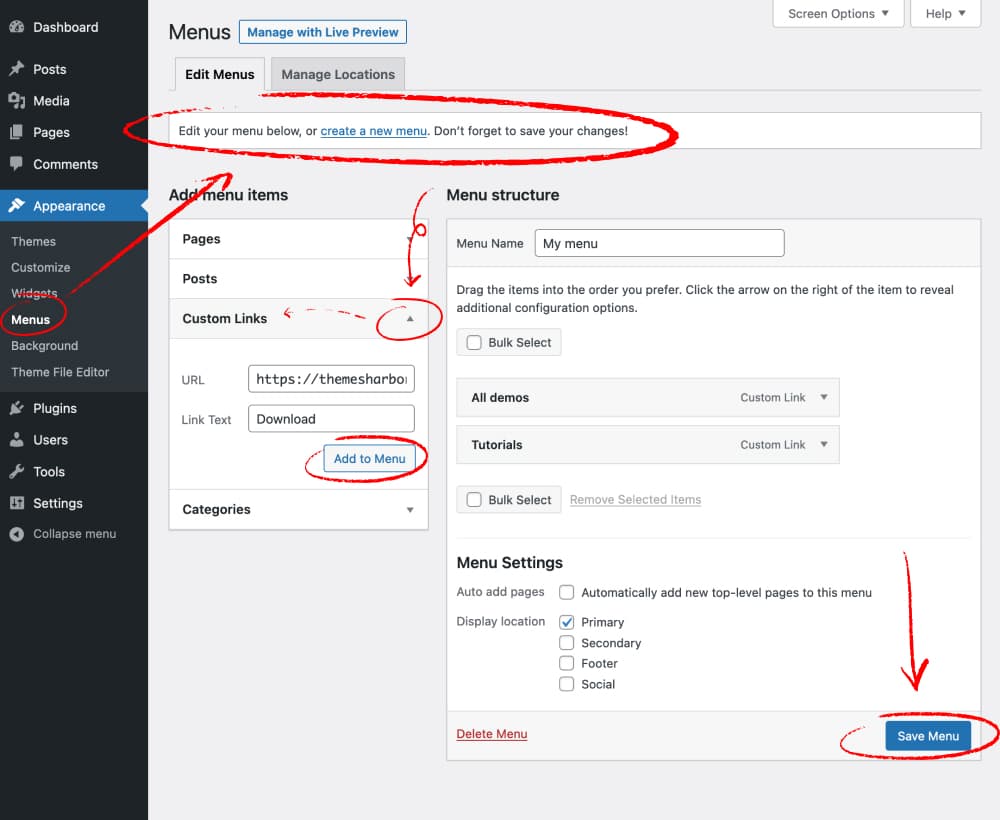
Custom links help you create special paths on your website. They connect different parts of your site. You can use them to link to outside websites too. This makes your site more useful. People can find what they need faster. Custom links are easy to set up. You can find them in your WordPress menu settings. Just click “Custom Links” and type the URL. Give it a name and click “Add to Menu”. Now, it’s part of your site menu. This helps users move through your site with ease.
Purpose Of Custom Links
Custom links in WordPress help you navigate your website better. They allow you to link to any URL you want. This can be an external website or a specific page on your site. Custom links are flexible and easy to use. They improve the user’s experience by providing direct access to important pages.
Using custom links, you can also include links in menus. This lets you organize your content in a user-friendly way. Visitors find what they need faster. This boosts your site’s engagement. Custom links are essential for good website navigation.
Creating Custom Links
First, go to your WordPress dashboard. Click on Appearance. Then, select Menus. This opens the menu editor. Here you can change your website’s links.
In the menu editor, find the Custom Links section. Click on it. A small form appears. Enter the URL you want in the URL box. Type a name for the link in the Label box. Make sure it’s easy to understand.
Choose a URL that visitors will recognize. Use simple words. Labels should be clear and direct. Avoid long or confusing phrases. Click Add to Menu when done. This saves your new custom link.

Credit: wordpress.org
Custom Links For Navigation Menus
Enhancing User Experience is important in website design. Custom links in WordPress help with this. They guide users to important pages. This makes it easy for users to find what they need. Custom links make navigation smoother. They create a more friendly and efficient website.
Linking to External Websites is simple with WordPress. You can add external links to your menu. This helps users access more information. It connects them to other useful sites. Adding external links broadens the scope of your content.
Linking to Specific Sections on a page is useful. Custom links can direct users to particular parts of your website. This saves time and improves navigation. Users can jump directly to sections they want. It makes browsing faster and easier.
Custom Links For Seo
Custom links help organize a website. They make it easy for users to find pages. A good site structure is like a map. It guides users smoothly from one page to another. Organizing links helps search engines understand your site better. This can lead to higher rankings.
Strong links can also boost page authority. Each link acts like a vote. It tells search engines your content is trustworthy. More links can lead to better visibility. This makes your site more popular. Popular sites attract more visitors. More visitors mean more success.

Credit: docs.presscustomizr.com
Managing Custom Links
Custom links are easy to change. Find the link you want to edit. Click on it. A small box will open. You can change the URL or the text. Remember to save your changes. This keeps your link updated. Changes help users find the right page. Always check your links after editing.
Old or unwanted links can be removed. Go to your menu settings. Look for the link you want to remove. Click the delete button. This will remove the link from your site. Always ensure your site is clean. Fewer links make it easy to navigate. Clean sites are user-friendly.
Best Practices
Custom links should look the same everywhere. They help users know where they are going. Use the same style, color, and font. Consistent links build trust. Users can find what they need quickly.
Each link must be important. Relevant links make websites better. Avoid linking to bad or unrelated pages. Good links improve user experience. Users stay longer if links are helpful.
Links should be checked often. Update links if pages change. Broken links confuse users. They also harm website ranking. Fresh links keep websites healthy. Users find the latest info.
Common Mistakes
Creating custom links in WordPress often leads to errors like broken URLs or incorrect link formats. Many users overlook the importance of correct path settings, causing navigation issues. It’s crucial to ensure links are properly configured to enhance website functionality and user experience.
Broken Links
Broken links can confuse visitors. They click and find nothing. This frustrates users. It also affects your site’s trust. Search engines dislike broken links too. They lower your site’s ranking. Fixing broken links is important. Use tools to find and repair them. Regular checks prevent problems. It helps keep your site healthy.
Overloading Menus
Menus should be easy to use. Too many items make them hard to navigate. Users feel lost with overloaded menus. It affects user experience. Simple menus are best. Group items logically. Prioritize important links. Ensure menus are clear and concise. This helps users find what they need quickly.
Credit: themesharbor.com
Frequently Asked Questions
How To Add A Custom Link In WordPress?
To add a custom link in WordPress, navigate to the menu section. Click on ‘Custom Links’ and enter the URL. Add a label for the link and click ‘Add to Menu’. This allows you to easily incorporate external URLs or specific pages into your site’s navigation menu.
What Is The Purpose Of Custom Links?
Custom links in WordPress enhance navigation by allowing users to add external URLs or specific pages to menus. They provide flexibility, enabling site owners to direct visitors to important resources, external sites, or promotional pages. This improves user experience and ensures important content is easily accessible.
Can Custom Links Improve Website Seo?
Custom links can potentially improve SEO by enhancing user navigation and directing traffic to key content. They help maintain visitor engagement and reduce bounce rates. By strategically linking to valuable resources, you can improve the site’s authority and relevance, which may positively impact your search engine rankings.
Are Custom Links Easy To Manage In WordPress?
Managing custom links in WordPress is straightforward. The menu editor allows you to add, remove, or edit links easily. You can organize them according to your preferences. This user-friendly feature ensures that your site’s navigation remains intuitive and adaptable to changing content needs.
Conclusion
Custom links in WordPress provide flexibility. They enhance your site’s navigation. Easy to create and manage. They cater to unique needs. Perfect for directing users to specific pages. Custom links boost user experience. They also improve site structure. Understanding their use is vital.
It helps in creating a tailored website. Experiment with custom links today. See the difference in your website’s flow. A small change, but impactful. Keep exploring WordPress features. Your site visitors will appreciate it.


