
Have you ever wondered how to make your WordPress site more efficient and user-friendly? You might have heard the term “snippet” buzzing around in the WordPress community.
But what exactly is a snippet, and why should it matter to you? Imagine snippets as little magic wands that can transform your website without requiring you to become a coding wizard. They are small chunks of code that can enhance your site’s functionality, improve its appearance, and even boost its performance.
By mastering snippets, you can take control of your website like never before. Intrigued? Stick around to find out how these powerful tools can revolutionize your WordPress experience and help you achieve your online goals effortlessly.
Snippet Basics
Snippets are small pieces of code. They add extra features to your site. WordPress allows easy use of these. They are like short commands. Each snippet performs a task. This makes websites more powerful.
Snippets work in many places. They can be used in themes or plugins. They are handy for customizing a website. Some snippets change a site’s look. Others add new functions. Developers often use them for quick changes.
They save time. No need to write long codes. Snippets are simple and easy. They help in making quick tweaks. They also help in troubleshooting issues. Many find them useful for testing new ideas. Using snippets is a smart way to manage a site.
Types Of Snippets
Code snippets are small pieces of programming code. They add or change functionality in WordPress. Users can place them in the theme’s functions.php file. They also work in a custom plugin. These snippets help create features without a full plugin.
For example, a code snippet can add custom widgets to a sidebar. It can also change the footer text on a website. Users must be careful with code snippets. Wrong code can break the site. Always backup your site before using new code.
Content snippets are small pieces of text or media. They are used across a website. These snippets help keep content consistent. Content snippets can include quotes or statistics often repeated.
Users can update these snippets in one place. The changes then show everywhere on the site. This saves time and reduces errors. Content snippets make managing a website easier and more efficient.
Benefits Of Using Snippets
Snippets can make tasks fast. You can save time on repeat tasks. They help you avoid writing the same code again. This makes work quick and easy. Less typing means fewer mistakes.
Using snippets keeps your code uniform. All parts of your site look the same. Mistakes are less likely. This is good for site quality. Your users will notice too.
Snippets let you change things as you like. You can add your own style and features. This makes your site unique. It’s easy to adjust snippets for new needs.
Credit: www.wpbeginner.com
Creating Snippets
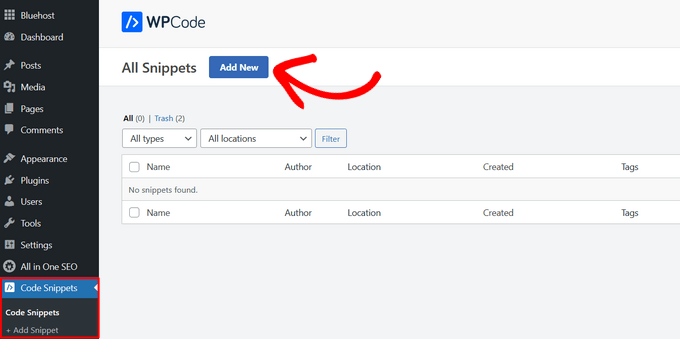
Plugins help create snippets easily. They offer simple interfaces. You can add code without errors. There are many popular plugins for snippets. Some are free. Others need payment. These plugins save time. They also help manage code. You can activate or deactivate snippets. This is done with one click. Many users prefer plugins. They are easy to use. You don’t need coding skills. Just install and follow the steps. This keeps your site safe. It ensures code runs smoothly.
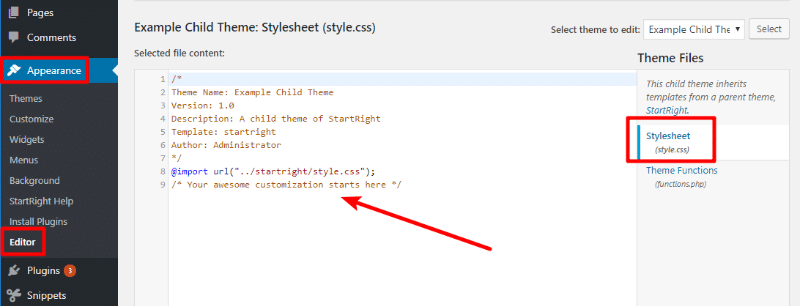
Manual coding is another way to create snippets. It requires basic coding skills. You must know PHP. This method is more flexible. You can customize code fully. It is good for developers. You need to be careful. Errors can break the site. Always test code first. Use a child theme. This helps prevent issues. Back up your site regularly. This keeps data safe. Manual coding gives more control. It is perfect for those who love coding.
Managing Snippets
Organizing snippets is very important in WordPress. Group them by categories or tags. This helps you find them easily later. Use clear names for your snippets. Short names are best. This saves time and keeps things neat.
Backup and Security are crucial. Always save your snippets in a safe place. Use a plugin for backup. This protects your work from loss. Security plugins keep your site safe. They prevent bad people from causing harm. Regular backups are smart. They give peace of mind.
Credit: createandcode.com
Best Practices
Testing snippets is important in WordPress. Always test in a safe environment first. Use a staging site or a local server. This prevents errors on your live site. Make sure you backup your website before testing. Test one snippet at a time. This helps you identify problems easily. If the snippet causes issues, remove it quickly.
Documentation is your friend. Good documentation helps you understand snippets. Check for comments in the code. Comments explain what the code does. Look for trusted sources. Some snippets come from experts. Read instructions carefully. Follow step-by-step guides. This ensures you use snippets correctly. Keep a record of changes. Write down what each snippet does. This helps you remember later.
Common Snippet Use Cases
WordPress snippets can help with SEO improvements. Many use snippets for meta tags and description management. Others use them to add structured data for better search visibility. These small code pieces enhance search engine rankings. They are easy to add and customize.
Snippets can boost site speed. They remove unnecessary elements and scripts. This makes the site load faster. Faster sites rank better in search engines. Snippets can also minimize CSS and JavaScript. This leads to quicker page loads. Better performance means happier users.
WordPress snippets add unique features. They can create custom widgets and shortcodes. Users can add special functions without plugins. Snippets are simple to use and change. They offer creative ways to extend site capabilities. Custom functions make sites stand out.
Troubleshooting Snippets
A snippet in WordPress is a small piece of code that enhances website functionality. Users can add snippets to customize features without altering core files. These code blocks simplify tasks and improve website performance.
Error Detection
Finding errors in snippets can be tricky. Start by checking for missing or extra characters. These can cause the snippet to break. Look for missing semicolons or brackets. Errors often hide there. Make sure each line is complete.
Use a WordPress error log to help. It shows where the error is. This can save time. Look for error messages. They give clues about the problem. Always backup your site before changes. This keeps your work safe.
Debugging Techniques
Debugging helps fix problems. Begin by deactivating plugins. Sometimes, they cause issues. Activate them one by one. This shows which one has the error. Check your snippet code carefully. Look for typos or wrong commands.
Use a debugging tool like Query Monitor. It helps find problems fast. Try a different browser or device. See if the problem repeats. This helps find the error’s source. Be patient and keep testing. This leads to solutions.
Credit: wordpress.org
Frequently Asked Questions
What Is A WordPress Snippet?
A WordPress snippet is a small code block used to add functionality to your site. It’s often placed in the theme’s functions. php file. Snippets can improve site performance, customize features, or fix common issues without needing full plugins. They’re an efficient way to enhance your WordPress site.
How Do I Add Snippets In WordPress?
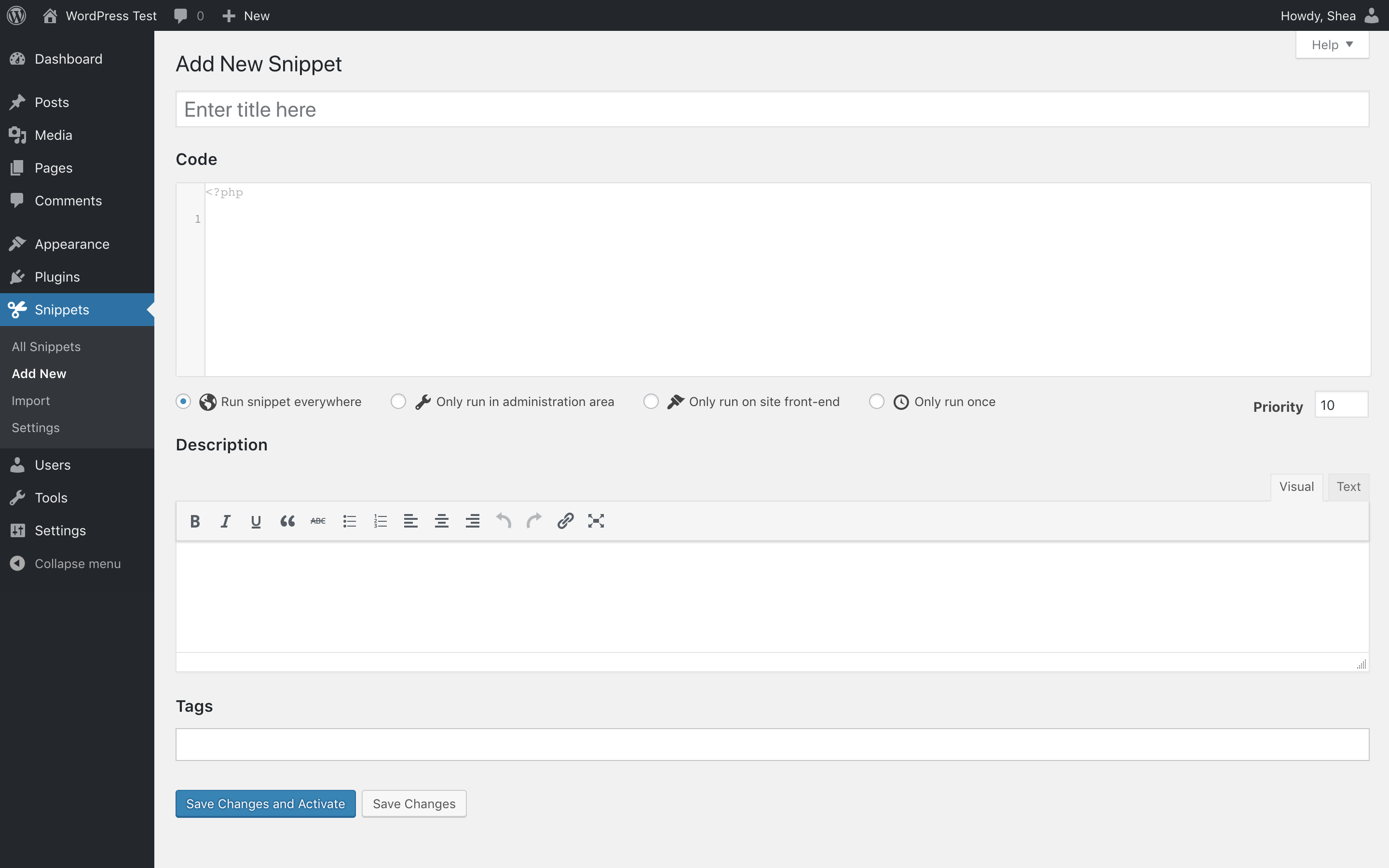
You can add snippets by editing your theme’s functions. php file. Use a code editor to ensure accuracy. Alternatively, use a plugin like Code Snippets for a safer approach. This method allows easy snippet management without directly altering core files, reducing risks of errors and site crashes.
Are Snippets Safe To Use In WordPress?
Snippets are generally safe when implemented correctly. Ensure your code is error-free and compatible with your theme. Always back up your site before adding new snippets. Using plugins like Code Snippets can help manage and test code safely, reducing the risk of affecting your site’s functionality.
Can Snippets Replace WordPress Plugins?
Snippets can replace plugins for minor functionalities, reducing site load and complexity. They offer a lightweight solution for specific tasks. However, for complex features or extensive functions, plugins are more suitable. Evaluate your site’s needs and choose snippets or plugins accordingly for optimal performance.
Conclusion
Snippets in WordPress simplify coding tasks for users. They offer a quick way to enhance features without complex coding skills. Easy to add and manage. Perfect for customizing sites efficiently. Users can save time by using ready-made snippets. No need to start from scratch.
Great for beginners and pros alike. Helps improve site functionality with minimal effort. Always ensure snippets are from trusted sources. Protect your site from potential errors. Explore, experiment, and learn with snippets. They can enrich your WordPress experience. Understanding snippets can make site management smoother.
A valuable tool for every WordPress user.


