
Have you ever visited a website and felt overwhelmed by its complex navigation? Or perhaps you’ve struggled to find information buried under countless menu tabs?
If you’ve ever faced these challenges, then a Mega Menu in WordPress might just be the solution you’ve been searching for. Imagine a clean, organized layout that not only simplifies your site’s navigation but also enhances your visitors’ experience. With a Mega Menu, you can create a visually appealing, user-friendly interface that guides your audience effortlessly through your content.
Curious about how this can transform your website? Let’s dive in and uncover the magic of Mega Menus in WordPress.
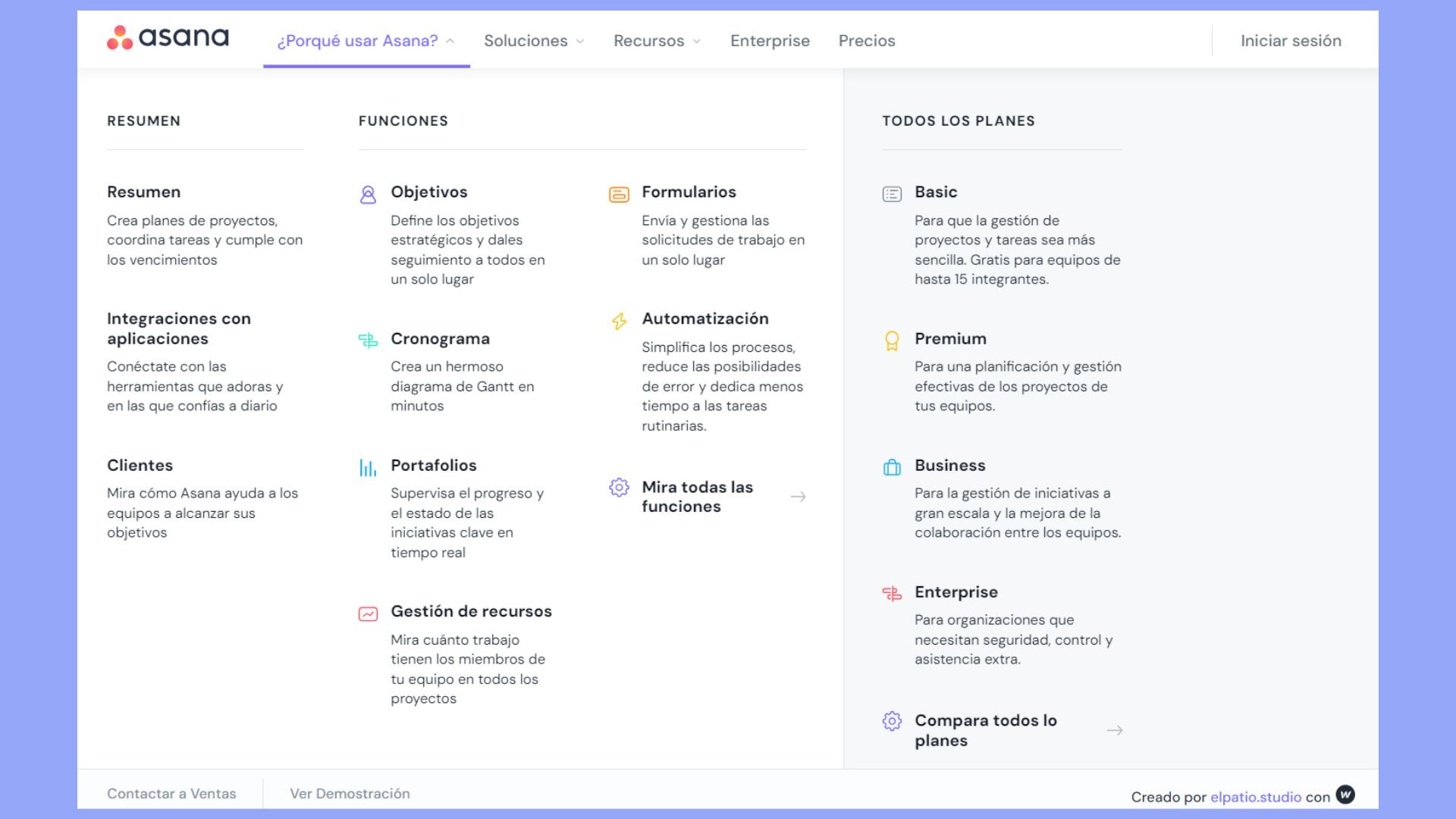
Credit: 10web.io
Mega Menu Basics
A mega menu is a special kind of menu. It shows a lot of links. These links are inside a big box. This box is on a website. It helps users find things fast. It is different from a normal menu. Normal menus are small. Mega menus are big. They show more choices.
Mega menus are very important. They make websites easy to use. Users can see many choices at once. This saves time. It also looks nice. A well-designed mega menu makes visitors happy. They can find what they need. This keeps them on the site longer. Happy users come back again.
Features Of Mega Menus
Mega menus offer flexible layouts
These menus include interactive elements
Benefits For WordPress Sites
Mega menus make websites easy to use. Users find what they want fast. The design is simple and clear. This helps people stay on the site longer. A happy user is more likely to return. This boosts website success.
A mega menu organizes content neatly. All important links are in one place. Users do not get lost. They move from page to page with ease. This makes the website more friendly. Visitors feel more comfortable.
Mega menus can help search engines. They make links easy to find. This is good for SEO. More links can be indexed. Search engines understand your site better. This could mean more visitors. More visitors are good for business.
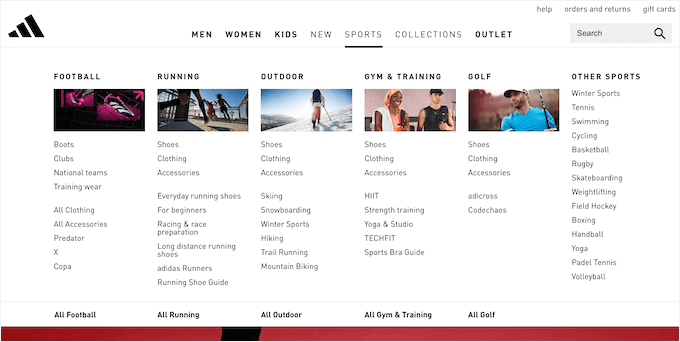
Credit: www.wpbeginner.com
Creating A Mega Menu In WordPress
Plugins make mega menus easy. Some plugins are free. Others cost money. Important features include drag and drop. Also, support for responsive design. Check for updates and support. Popular plugins include Max Mega Menu and UberMenu. Choose one that fits your needs. Read reviews before downloading.
First, install the plugin. Next, activate it. After that, go to the menu settings. Find the mega menu option. Click to customize. Add menu items. Use categories if needed. Save changes when done. Check your site to see the menu. Adjust if necessary.
Use the plugin settings to change colors. Adjust font sizes. Add images if needed. Make sure the menu matches your site’s look. Test on mobile devices too. Ensure it looks good everywhere. Keep it simple. Avoid clutter. A clean design is user-friendly. It helps visitors find what they need.
Popular Mega Menu Plugins
Max Mega Menu is a great plugin for WordPress. It helps to create beautiful menus. It offers drag-and-drop features. Users can design without coding. Customization is easy with Max Mega Menu. Styles can be changed quickly.
UberMenu offers many menu options. It supports images and videos in menus. Users enjoy its responsive design. Mobile devices show menus well. UberMenu integrates smoothly with WordPress themes. It offers advanced customization options.
WP Mega Menu is user-friendly. It provides easy menu building. Users can add icons and widgets. Its design tools are simple. WP Mega Menu supports color changes. The plugin helps with responsive design. Menus look great on all devices.
Common Challenges
Maintaining design consistency is tough. Different themes have different styles. It’s hard to match them all. Mega menus need uniform looks. Users notice if things don’t look right. Consistency builds trust. It creates a smoother experience. Designers must work hard to keep it all consistent.
Best Practices
A mega menu should be clear and easy to use. It helps users find information quickly. Too many links can confuse users. Limit choices to the most important items. Group similar links together. This makes navigation easier. Users will appreciate a clean design.
Place the most important links at the top. Users often look for these first. Highlight key pages or sections. Make them stand out visually. Ensure users can find popular content easily. Prioritizing helps users feel guided. They can reach their goals faster.
Menus need regular checks and updates. Ensure links are current and working. Remove outdated content. Add new pages or features. Users trust sites that maintain their menus. Keeping it fresh shows care. Update menus as your site grows.

Credit: wordpress.org
Future Trends
Mega Menu WordPress feature organizes complex site structures into simple, user-friendly menus. It enhances navigation by offering multiple categories and subcategories in a visually appealing dropdown format. This trend supports better user experience and efficient site management.
Integration With Ai
Mega menus in WordPress will soon use AI for smart navigation. AI can understand what users want. This helps show the right menu items. Users find what they need faster. Site owners can make menus better. AI will suggest changes based on user actions. This makes menus more useful and easy.
Advanced Customization Options
New tools let users change mega menus easily. Users can choose colors and fonts. This makes menus look unique. Layouts can be changed too. Users can add images and icons. This helps menus stand out. Options are growing fast. Users have more ways to make menus special. Everyone can create menus that fit their style.
Frequently Asked Questions
What Is A Mega Menu In WordPress?
A mega menu in WordPress is a large, dropdown menu. It displays multiple options in a structured layout. Mega menus enhance website navigation and user experience. They provide quick access to various categories and subcategories. Mega menus are ideal for websites with extensive content.
How Do I Create A Mega Menu In WordPress?
To create a mega menu, use a WordPress plugin. Popular options include Max Mega Menu and WP Mega Menu. These plugins allow you to customize your menu’s appearance. You can add icons, images, and columns. Follow the plugin’s instructions to set up and manage your mega menu.
Why Use Mega Menus On WordPress Sites?
Mega menus improve user experience by simplifying navigation. They help users find content quickly and easily. Mega menus also enhance website aesthetics. They display organized categories and subcategories. This is particularly beneficial for content-rich websites. Mega menus can also improve SEO by highlighting important links.
Can Mega Menus Affect Website Performance?
Yes, mega menus can impact performance if not optimized. Large menus can slow down site loading times. To avoid this, use lightweight plugins. Optimize images and minimize the use of animations. Regularly test your website’s speed to ensure smooth performance.
Efficient mega menu design is crucial for maintaining site speed.
Conclusion
Mega menus in WordPress simplify navigation. They present information clearly. Users find it easy to explore websites. Businesses enhance user experience with organized content. Mega menus improve engagement and retention. Visitors access desired sections quickly. Customizable options suit diverse needs.
They are visually appealing and functional. Perfect for complex sites with many pages. Mega menus streamline browsing, aiding user satisfaction. They are essential for modern web design. A valuable tool for enhancing website usability. Consider them for your WordPress site today.


