
Are you considering building a website with WordPress but unsure about the costs involved? You’re not alone.
Many people find themselves asking, “What is the cost of a WordPress website? ” Understanding the potential expenses is crucial to making informed decisions and planning your budget effectively. From hosting and domain registration to themes and plugins, each component contributes to the overall cost.
But don’t worry, we’ve got you covered. We’ll break down the different aspects of WordPress pricing, helping you discover how to get the best value for your money. Stay with us, and you’ll be equipped with the knowledge to launch your site without breaking the bank.
Factors Influencing WordPress Costs
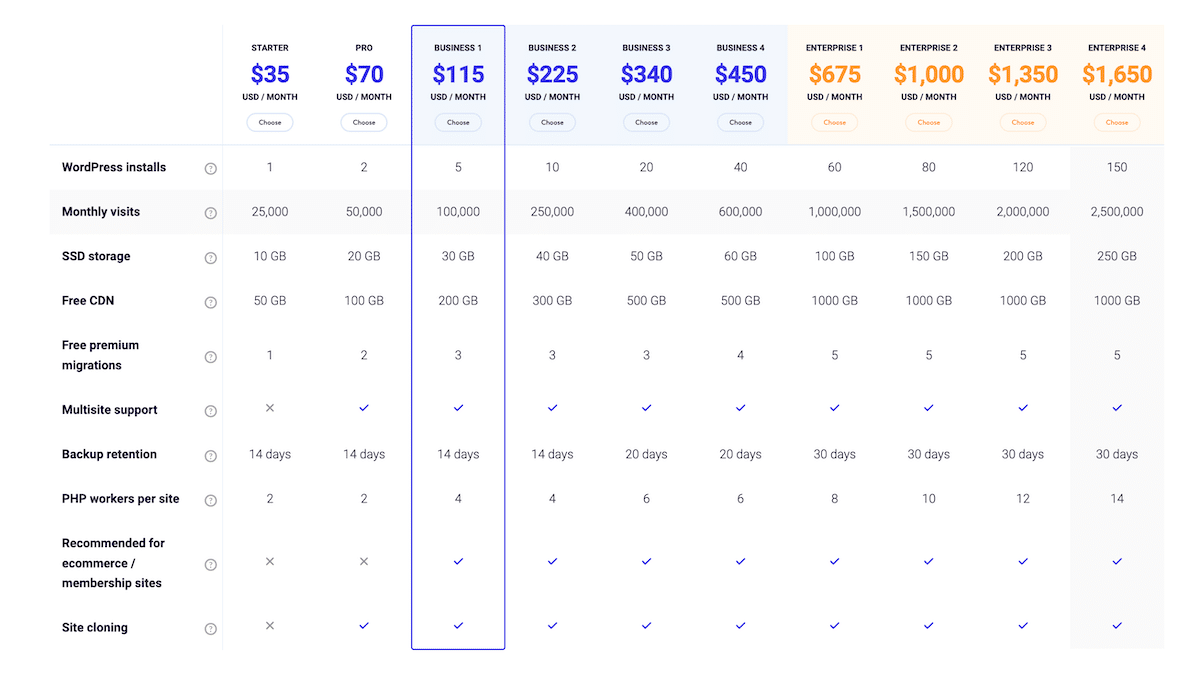
A domain name is like your address on the web. It usually costs between $10 and $15 per year. Hosting is where your website lives. Hosting services can cost around $3 to $30 a month. The cost depends on the type of hosting. Shared hosting is cheaper. Dedicated hosting is more expensive. Always choose reliable hosting for better website speed.
WordPress offers many free themes. But, premium themes might cost $30 to $100. Premium themes give more options. They help in making the website look unique. Themes can affect the overall look of your site. Choose a theme that suits your brand. A well-chosen theme can save on design costs.
Plugins add features to your website. Some are free, but premium plugins can cost $15 to $200. Plugins can improve site functions like SEO, security, and design. Too many plugins can slow down your site. Choose only the necessary ones. Always keep them updated for better performance.
Custom development makes your site unique. It involves hiring developers. The cost can be $500 to several thousand dollars. This depends on the complexity. Custom features make your website stand out. They also provide specific functions for your needs. Custom development can be a good investment for business sites.
Credit: kinsta.com
Types Of WordPress Websites
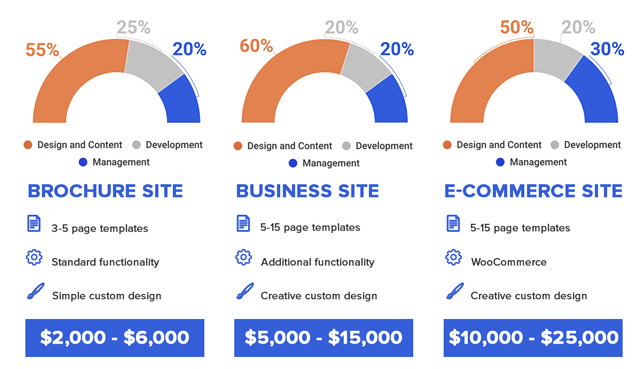
Personal blogs on WordPress are simple. They let people share stories and ideas. Many choose WordPress for its easy setup. There are free themes available. But some prefer paid themes for unique designs. Hosting is a cost. Prices vary based on features. Many bloggers start small, then grow their sites. Plugins add more functions. These can be free or paid. Overall, personal blogs are budget-friendly.
Business websites need more features. Professional design is key for businesses. WordPress offers many business themes. Some are free, others are paid. Hosting costs differ. Businesses often need premium hosting for speed. Plugins help with tasks. Many plugins are free, but some are paid. Security is important for business sites. Some plugins enhance security. The investment is often higher than personal blogs.
E-commerce sites use WordPress for selling products. WooCommerce is a popular plugin. It helps manage sales easily. Themes for e-commerce are often paid. They offer special features. Hosting is crucial. Fast hosting ensures quick shopping. Plugins boost site functions. Many are free, but paid ones add more tools. Security and payment systems are vital. Costs can be higher for e-commerce sites.
Budgeting For A WordPress Site
Starting with a WordPress website requires some basic costs. The first is the domain name. This is your website’s address, like “www.example.com.” Usually, it costs about $10 to $15 per year. Next is web hosting. This is where your site lives on the internet. Hosting costs can range from $3 to $10 per month.
Then comes the WordPress theme. Free themes are available, but premium ones cost $20 to $100. Themes make your site look pretty. Finally, you might need some plugins. These are tools that add features to your site. Many are free, but premium plugins can cost $15 to $50.
Some optional add-ons can enhance your site. You might want a custom design. This can cost a few hundred dollars. An SSL certificate keeps your site safe. Many hosts offer this free, but some charge $10 to $100 per year.
Another add-on is SEO tools. These help your site appear in search results. Basic tools are free, but advanced ones might cost $30 monthly. Lastly, consider backup services. These keep your site data safe. They often cost around $2 to $10 monthly.
Comparing Free And Paid Options
Free options can save money. They are good for beginners. WordPress offers many free themes. You can start without cost. Free plugins add extra features. They help improve your site. You don’t need much tech skill.
Premium solutions offer more features. They have better support. Paid themes look professional. They can improve your brand. Support teams fix problems quickly. This saves time. Premium plugins are often more secure. They help keep your site safe.
Hidden Costs To Consider
Maintenance and Updates are crucial for your WordPress site. These can cost you time and money. Regular updates keep your site running smoothly. You may need a developer for some updates. This can increase your expenses. Plugins need updates too. These can sometimes break your site. Fixing them can be costly.
Security Enhancements protect your site from hackers. Basic security is free, but advanced security tools cost money. You might need a security expert. Their services can be expensive. Strong security keeps your data safe. It also protects your users’ information.
Backup and Recovery save your site from unexpected issues. Regular backups are essential. They prevent data loss. Free plugins offer basic backups. Paid services provide better options. These services can restore your site quickly. Fast recovery is crucial for business continuity.
Credit: kinsta.com
Cost-saving Tips
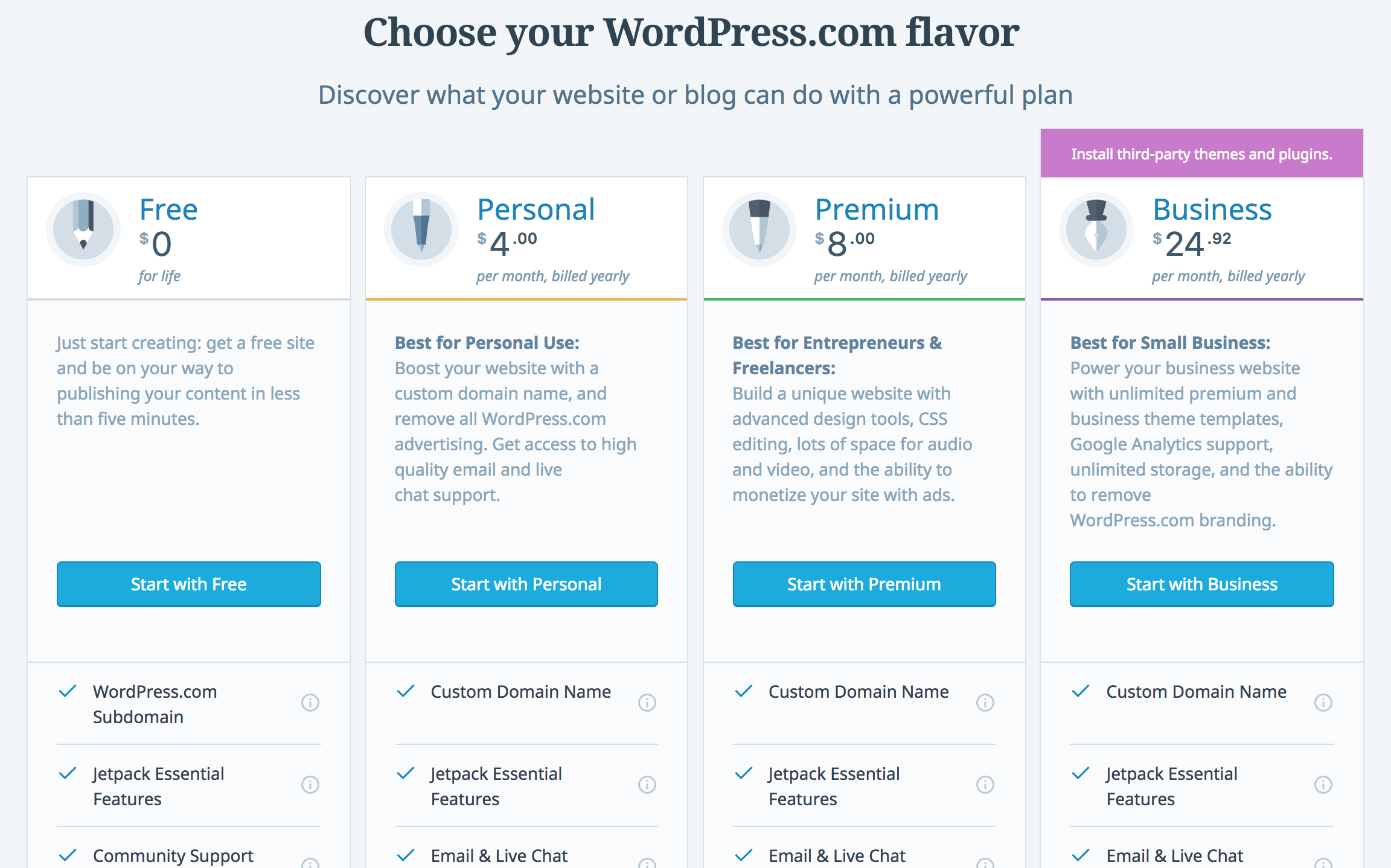
Picking a plan can save money. Free plans are available. They come with limits. Paid plans offer more. Look at your needs first. A basic plan might work. Don’t pay for extras you won’t use. Compare prices and features. Choose wisely for best value.
Discounts can cut costs. Look for sales and special deals. Many hosting sites offer deals. Sign up for newsletters. They might send discount codes. Join forums and groups. People share offers there. Use these to spend less.
Doing it yourself saves cash. It’s good for small sites. Many guides help beginners. Professional help costs more. They bring expertise. They handle big projects well. Decide based on site needs. DIY is fun and cost-effective. Professionals offer support and quality.
Credit: thewhitelabelagency.com
Frequently Asked Questions
How Much Does A WordPress Website Cost?
The cost of a WordPress website varies. It ranges from $100 for basic sites to $5,000 for complex ones. Factors like themes, plugins, and hosting impact the cost. Custom designs and premium features increase expenses. Budgeting carefully helps manage these costs effectively.
What Are WordPress Hosting Costs?
WordPress hosting costs depend on the provider and plan. Shared hosting starts around $3/month, while VPS hosting can cost $20/month. Managed WordPress hosting often ranges from $25 to $100/month. Choosing the right hosting is crucial for your website’s performance and security.
Are WordPress Plugins Expensive?
WordPress plugins range from free to premium versions costing $20 to $100 or more. Premium plugins offer advanced features and support. Free plugins are suitable for basic functionalities. Choosing plugins wisely ensures functionality without overspending.
How Much For A WordPress Theme?
WordPress themes vary in price. Free themes are available, while premium ones range from $20 to $200. Premium themes offer advanced customization and support. Selecting the right theme impacts the website’s appearance and functionality.
Conclusion
Creating a WordPress website involves various costs. Hosting fees are essential. Themes range from free to premium. Plugins may require purchases. Domain names add to expenses. Consider customization costs for unique designs. Maintenance needs ongoing investment. Budget wisely to avoid surprises.
Plan according to your needs and resources. Compare options before decisions. Choose services that fit your budget. Understand your financial limits. Make informed choices to achieve your goals. WordPress offers flexibility with different pricing. Evaluate all aspects to find the best value.
Start with a clear budget for best results.


