
Have you ever wondered what makes your WordPress website tick behind the scenes? Imagine having a secret weapon that enhances your site’s visibility and user experience without you even realizing it.
That secret weapon is metadata in WordPress. Understanding metadata is like unlocking a treasure chest of information that can elevate your website’s performance and search engine ranking. But what exactly is metadata, and why should you care about it? You’ll discover the ins and outs of WordPress metadata, how it impacts your site, and why it’s crucial for every website owner to understand its potential.
Get ready to uncover how you can use metadata to your advantage and turn your website into a well-oiled machine.

Credit: seahawkmedia.com
Metadata Basics
Metadata is like a label for your content. It helps search engines understand your webpage. In WordPress, metadata includes details like title, description, and keywords. These details are important for SEO. They help your website rank better.
You can find metadata in the HTML of your page. It is not visible to users. But it is important for search engines. The title tag tells what the page is about. The description gives a short summary. Keywords are important words for your content.
Adding metadata to your WordPress site is easy. Use plugins to help you. These plugins make adding metadata simple. They guide you through the process. Just fill in the blanks. This will help your site perform better on search engines.
Types Of Metadata
Post metadata offers details about your blog posts. It includes the post author, date, categories, and tags. This data helps in organizing and finding content. Readers can easily know who wrote the post. They see when it was published. Categories and tags help in sorting posts. This makes the site user-friendly and easier to navigate.
User metadata stores information about users. It includes user roles, names, and contact details. This data defines what users can do on the site. Admins can assign roles like editor or subscriber. User metadata helps manage user access. It keeps track of user preferences and settings. This makes personalized experiences possible.
Comment metadata contains info about comments. It includes the commenter’s name, email, and the comment date. This data helps track conversations on posts. It shows who commented and when. Comment metadata ensures comments are linked to posts. It helps site owners manage and moderate discussions.
Term metadata involves categories and tags. It includes term descriptions and slugs. This helps in organizing site content. Term metadata makes searching easier. It defines relationships between terms. This enhances content organization. Users find related posts quickly.
Importance Of Metadata
Metadata is like a label for your content. It tells search engines about your page. This helps your page show up in searches. It includes titles, descriptions, and keywords.
Good metadata makes your site more visible. Search engines use it to understand your content. This means more people can find your site. It’s like a guide for visitors.
Users see metadata in search results. It helps them know what your page is about. Clear metadata can make users click your link. This increases your site’s traffic.
- Use clear titles and descriptions.
- Include important keywords.
- Keep it short and to the point.
How Metadata Works In WordPress
WordPress keeps metadata in a special place. This place is called the database. Each piece of metadata has a key and a value. The key is like a name. The value holds the information. Metadata helps organize and find things easily. It makes your site work better. You can add metadata to posts or pages. Plugins can also use metadata. This helps them run smoothly. Metadata is very important in WordPress.
Getting metadata from WordPress is easy. You use functions to do this. Functions ask the database for the metadata. Then, the metadata is shown on your site. You can show it in different places. Like on the post or page. Plugins can also show metadata. This helps users see important information. Metadata is used in many ways. It makes your site useful and smart.
Managing Metadata
WordPress allows easy access to metadata. In the admin panel, you can see metadata options. Use them to edit titles, descriptions, and keywords. These elements help search engines understand your content. Good metadata improves site visibility.
Make your titles clear and descriptive. Choose keywords wisely. Descriptions should be brief but informative. Admin tools simplify these tasks. A few clicks can make a big difference. Update your metadata regularly for best results.
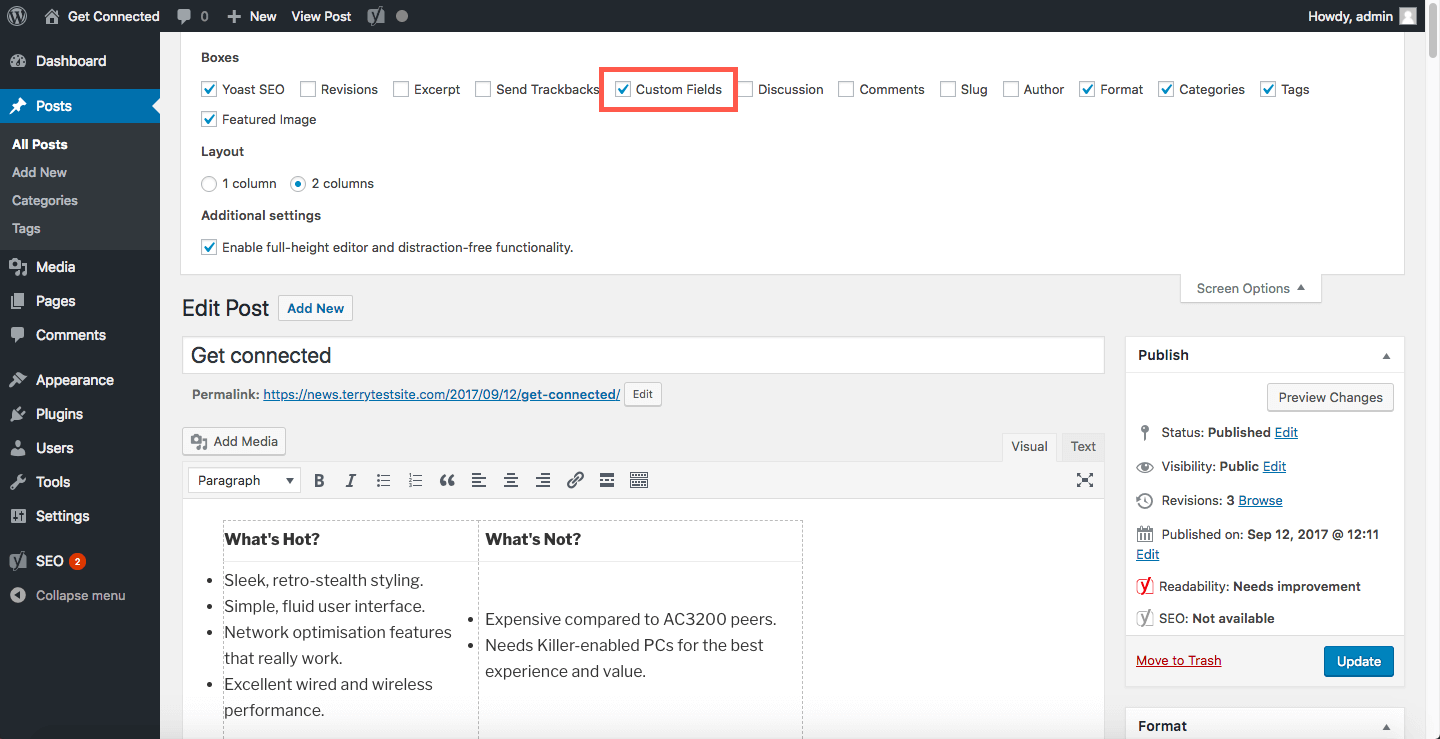
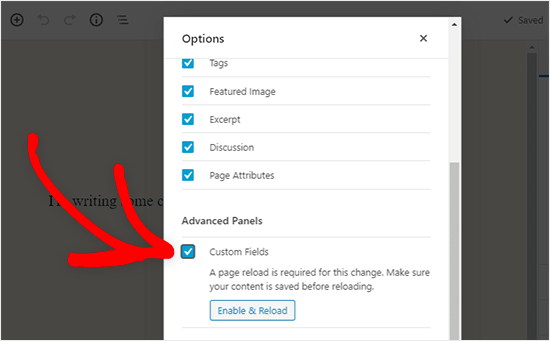
Custom metadata provides flexibility. Use plugins for advanced options. Plugins help add unique metadata fields. Tailor content to specific needs. Custom fields enhance user experience. They also improve data organization.
Custom metadata is crucial for complex sites. Organize content with ease. Make data retrieval simple. Use custom fields to stand out. Plugins are easy to install and use. They offer great customization options. Choose the right plugin for your site.
Plugins For Metadata
WordPress plugins help with metadata tasks. They make it easy to manage SEO. Yoast SEO is a popular choice. It guides users to optimize meta titles and descriptions. Another plugin, All in One SEO Pack, offers similar features. It helps in creating XML sitemaps. Rank Math is another tool that supports metadata management. It includes advanced SEO settings. Users can add custom fields to posts. This enhances the ability to provide more information. Simple tools like SEO Plugin by Squirrly focus on content analysis. They ensure the right keywords are used. Using plugins saves time. They improve content visibility. They make websites search engine-friendly.
Best Practices
Metadata in WordPress enhances the visibility of content. It includes information like titles, descriptions, and keywords. This data helps search engines understand and index your site better, improving search results.
Optimizing Metadata
Metadata helps search engines understand your site. Keep it clear and descriptive. Use keywords that match your content. This boosts your site’s visibility. Make sure your title and description reflect your main message. This attracts the right visitors. Avoid stuffing keywords. That can hurt your ranking. Keep sentences short and direct. Readers will find it easier to understand. Use alt text for images. This helps visually impaired users. It also assists search engines.
Securing Metadata
Security is crucial for your site’s metadata. Protect it from hackers. Use plugins that offer security features. Update these regularly. Use strong passwords and change them often. Avoid sharing them with others. Backup your data to prevent loss. Ensure your server is secure. Use HTTPS for safer connections. This keeps your metadata safe. Regularly check for malware and remove it promptly. Keep your WordPress version up to date. This guards against vulnerabilities.
Credit: www.hostpapa.com
Common Challenges
Metadata in WordPress can be confusing for beginners. It includes data like author details, publication date, and categories. Managing metadata efficiently poses challenges, especially with plugins and themes that affect SEO.
Metadata Conflicts
Sometimes, two plugins want to use the same metadata. This can cause errors on your site. Your site might not show correctly. It can also slow down your site. Fixing this means finding the conflicting plugins. You might need to disable one of them. Changing plugin settings can help too.
Performance Issues
Too much metadata can make your site slow. Each piece of metadata adds extra load to your server. This can lead to longer load times. Visitors don’t like waiting. They might leave your site. To improve speed, check metadata size. Remove unnecessary metadata. Use caching plugins to help. Caching stores data for faster access. It helps your site run better.
Credit: www.wpbeginner.com
Frequently Asked Questions
What Is Metadata In WordPress?
Metadata in WordPress refers to data that describes other data on your site. It includes details like author, date, categories, and tags. Metadata helps organize content, improve SEO, and enhance user navigation. It’s essential for search engines to index and rank your site effectively.
How Does Metadata Affect Seo In WordPress?
Metadata significantly impacts SEO by providing search engines with vital information about your content. Properly optimized metadata, like title tags and meta descriptions, improves visibility in search results. It enhances click-through rates by making your content more appealing and relevant to users searching for specific topics.
Where Is Metadata Stored In WordPress?
In WordPress, metadata is stored in the database, specifically in the wp_postmeta table. This table holds information about posts, pages, and custom post types. Metadata can be accessed and modified using WordPress functions. Proper management ensures your site runs smoothly and efficiently.
Can I Edit Metadata In WordPress?
Yes, you can edit metadata in WordPress using plugins or custom code. Popular SEO plugins like Yoast SEO allow easy editing of meta titles and descriptions. Custom fields in WordPress also provide flexibility to add and manage metadata. This ensures your content remains relevant and optimized.
Conclusion
Metadata plays a crucial role in WordPress. It helps organize and enhance your site’s content. With metadata, search engines better understand your pages. This can improve your search ranking. Also, metadata aids in user navigation, making your site user-friendly. Remember to optimize your metadata regularly.
This ensures it stays relevant and effective. Simple updates can make a big difference. So, keep your WordPress metadata in check. It’s an easy way to boost your site’s performance. Try it, and watch your site grow. Your audience will thank you.


