
Are you considering WordPress for your next website project? While WordPress is a popular platform, it’s crucial to weigh the downsides before diving in.
You might be drawn to its flexibility and user-friendly interface, but there are some disadvantages that could impact your decision. Imagine spending hours on your website only to encounter unexpected issues that could have been avoided. Curious about what these potential pitfalls are?
Understanding them now can save you time, money, and frustration later. Stick around as we delve into the disadvantages of WordPress, so you can make a well-informed choice for your online presence.
Credit: stewartgauld.com
Security Concerns
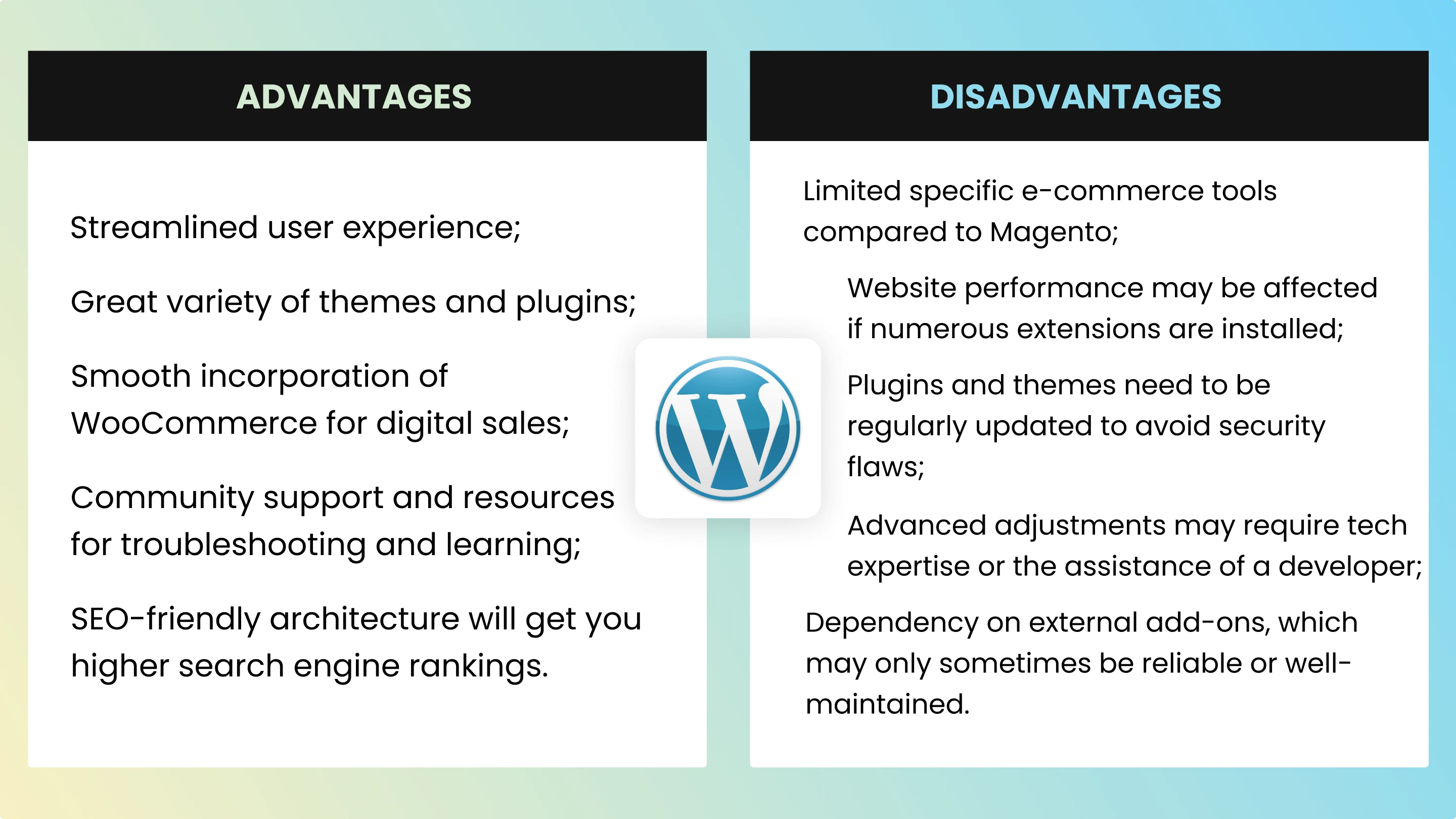
WordPress is very popular. This makes it a target for hackers. They want to find weak spots. Many plugins are not secure. These can open doors for attacks. A lot of themes are also at risk. Always update your plugins. Use strong passwords. This helps keep your site safe. But it is not enough. You must be careful.
WordPress needs updates often. Themes and plugins need updates too. Keeping everything updated is hard. Updates can break your site. This is a big problem. You must check your site after updates. Always have a backup. This keeps your data safe.
Performance Issues
WordPress can be slow. Many sites take long to load. This frustrates users. Slow websites lose visitors. Many factors cause this. Heavy themes are one reason. They have many features. Too many features slow a site. Large images also slow sites. Compress them for speed. Choose themes wisely.
Some plugins need a lot of resources. They can slow your site. Complex plugins are the main culprits. They use more memory. They need more power. This can crash your site. Use fewer plugins. Select lightweight ones. Test plugins first. Make sure they work well.
Customization Limitations
WordPress themes can be a bit limiting. Many themes have fixed layouts and designs. Changing them is not always easy. Some themes are not very flexible. You may want to add or remove elements but can’t. This can be frustrating. Especially if you want a unique site. Many themes look very similar. Your site might not stand out. New themes can be costly. Free themes often have fewer options. This limits your creativity.
Custom code makes WordPress sites special. But it can be hard to use. Not everyone knows how to code. Even small changes can be tricky. Mistakes in code can break your site. Fixing them needs skill. Hiring a developer can be expensive. Custom code needs regular updates. Outdated code can slow your site. Sometimes it can cause errors. Using too much custom code can be risky.
Credit: mirasvit.com
Seo Challenges
Plugins help improve WordPress sites. Many plugins are needed for SEO optimization. Each plugin serves a different purpose. This can make sites slow. Slow sites can hurt search rankings. Also, too many plugins can cause errors. Errors can break a site. Broken sites are hard to find on search engines.
Duplicate content confuses search engines. They don’t know which page to show. This can lower a site’s rank. WordPress can create duplicate pages. This happens by accident. Themes and plugins might make copies. Always check for duplicate content. Fixing it is important for good SEO.
Maintenance Demands
WordPress sites need regular backups. Data loss can happen anytime. Backing up helps recover lost data. Many tools can help with backups. Each tool has different features. Choose one that fits your needs.
Plugins and themes need constant updates. Updates keep your site secure. Old plugins can have bugs. Bugs can break your site. Choose plugins wisely. Only use trusted themes. Manage updates regularly to avoid issues.
Credit: stewartgauld.com
Scalability Concerns
WordPress might struggle with high traffic sites. Large sites need special care. Servers must be strong. Plugins slow down performance. Extra code can be a problem. Websites can crash. Site speed matters for users. Hosting providers may ask for more money. High traffic needs more resources.
Handling High Traffic
Traffic spikes can cause issues. Websites can become slow. Visitors leave when sites lag. WordPress sites need help for high traffic. Extra plugins can help, but too many hurt speed. Cache plugins assist with this. Web developers often fine-tune settings.
Database Limitations
WordPress uses a database for content storage. Big databases can slow down sites. Data retrieval can be slow. The database can grow too large. Backups take more time. Updates can be challenging. Optimization is crucial for speed. Large sites need expert help.
Cost Implications
WordPress has many free themes and plugins. But the best ones often cost money. Premium themes and plugins can be expensive. These costs add up quickly. A new theme might cost $50 to $100. Plugins can be $20 to $200 each. These are only starting prices. Some themes and plugins need monthly or yearly fees. This can be costly over time.
Hosting is not always cheap. Basic hosting plans may not be enough. As your site grows, you need more power. More power means more money. Hidden hosting costs can surprise you. Extra security features may cost more. Better speed might need an upgrade. Backups are not always free. All these can increase your bill.
Frequently Asked Questions
Is WordPress Difficult To Customize?
Customizing WordPress can be challenging without technical skills. While plugins and themes offer flexibility, advanced customizations often require coding knowledge. Users unfamiliar with HTML, CSS, or PHP might find it hard to make specific changes. Hiring a developer can help, but it increases costs.
Does WordPress Have Security Vulnerabilities?
Yes, WordPress can have security vulnerabilities. Being popular, it attracts hackers. Regular updates and using secure plugins help mitigate risks. Additionally, weak passwords and outdated themes can increase vulnerabilities. Using a security plugin can enhance protection.
Is WordPress Slow Compared To Other Platforms?
WordPress can be slow if not optimized. Heavy themes, excessive plugins, and large images can affect speed. Regular maintenance, like caching and image optimization, improves performance. A fast hosting provider also enhances site speed, ensuring a better user experience.
Is WordPress Costly In The Long Run?
WordPress can become costly over time. Initial costs are low, but premium themes, plugins, and hosting add up. Maintenance, security, and potential developer fees increase expenses. Careful planning helps manage costs effectively.
Conclusion
WordPress has some limitations that users should consider. It may require constant updates. This can lead to compatibility issues. Security can be a concern without proper measures. Plugins might slow down your site. Customization can sometimes be costly. Beginners might find the platform challenging.
Learning curve can be steep initially. High traffic sites may need more resources. Understanding these drawbacks helps make informed choices. Weigh the pros and cons carefully. Choose the right platform for your needs. Always plan for potential challenges ahead. Make sure WordPress fits your requirements.
Then proceed with confidence in your decision.


