
Are you curious about the engine that powers your WordPress site? Understanding what database WordPress uses is crucial if you’re looking to optimize your website’s performance, manage your data efficiently, or simply satisfy your curiosity.
Imagine having the power to tap into the very core of your website, streamlining processes and ensuring that everything runs smoothly. By the end of this article, you’ll not only know which database WordPress relies on, but you’ll also understand why it’s a vital component of your site’s architecture.
Dive in and empower yourself with the knowledge to take your WordPress site to the next level.
Credit: kinsta.com
WordPress And Databases
WordPress uses a special type of database. It is called MySQL. This database helps store all your website data. Data like posts, pages, and user info. MySQL is open-source. This means anyone can use it for free. Many websites use MySQL for its speed and reliability.
MySQL works well with WordPress because they are compatible. They talk to each other easily. This makes your website run smoothly. It also helps keep your data safe. MySQL stores data in tables. Each table has rows and columns. This helps organize the information.
WordPress connects to MySQL using a special file. This file is called wp-config.php. It holds the database name and password. Keeping this file safe is important. It protects your website from hackers.
Mysql: The Heart Of WordPress
WordPress depends on MySQL for its data storage. It’s an open-source database. MySQL keeps everything safe. Posts, pages, and user info are stored here. It’s like a giant library. You can search and find data quickly. WordPress and MySQL work together. They make websites run smoothly.
MySQL’s speed helps WordPress. It can handle lots of visitors. Many websites trust it. MySQL’s reliability is key. It keeps data organized. No mess, only order. Developers love MySQL. Easy to use and understand. It’s a strong choice for WordPress.
Database Structure
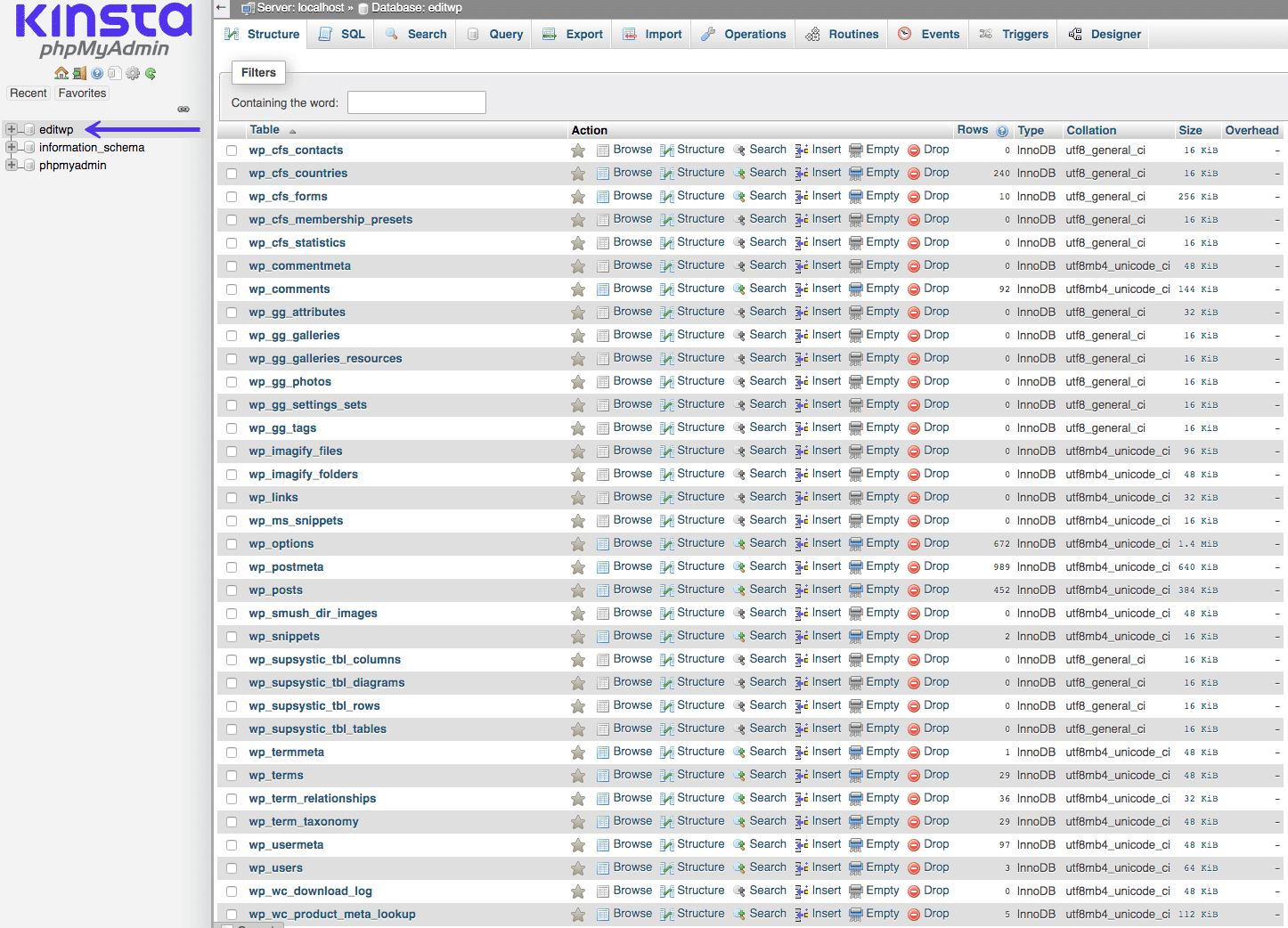
WordPress uses MySQL as its database. This database holds all the site data. It has several core tables. These tables store different types of information. Posts and pages go into the wp_posts table. Comments are stored in the wp_comments table. Users’ data is kept in the wp_users table. There is also a table for settings. This is the wp_options table. Each table has a special job. They work together to run the website.
Sometimes, you may need more tables. These are called custom tables. They hold extra data. Plugins often use them. For example, a shop plugin might need a table for orders. These tables can be made by developers. They help store special information. Custom tables are not part of the core. But they are important for special tasks.
Managing WordPress Database
WordPress uses a MySQL database to store data. You can access it using tools like phpMyAdmin. This tool helps manage the database easily. Be careful while making changes. Wrong changes can break your site. Always back up the database first. Backups are very important.
Keeping the database clean is key for speed. Remove unused plugins and themes. They take up space and slow down your site. Use tools to optimize database tables. This makes the site faster. Regular cleaning keeps everything running smoothly. You can also limit post revisions. This reduces data bloat.
WordPress Plugins For Database Management
WordPress utilizes MySQL as its database system, storing vital site data like user information and post content. Plugins simplify database management by offering user-friendly interfaces for tasks like optimization, backups, and cleanup, ensuring smooth performance. These tools are essential for maintaining efficient site operations without complex coding.
Popular Plugins
WP-DBManager is a favorite plugin. It helps manage databases easily. Users can optimize and repair tables with it. Backups are simple too.
Advanced Database Cleaner removes old data. It keeps databases tidy. Performance improves without extra junk.
UpdraftPlus offers backups. It stores them in cloud services. People love this feature. Restoring is easy if needed.
Benefits Of Using Plugins
Plugins simplify database management. They save time and effort. Users find them handy for backup tasks. Optimizing tables becomes quick and easy.
They keep databases clean and efficient. No technical skills are needed. Even beginners can use them. This makes the process stress-free.
Plugins enhance WordPress performance. Sites run faster without clutter. Owners enjoy better site speed.
Credit: gracethemes.com
Security Considerations
WordPress relies on MySQL as its database, demanding attention to security. Protecting data involves using strong passwords and regular updates. Secure connections and user permissions can safeguard against unauthorized access, ensuring your WordPress site remains safe and reliable.
Protecting Data
Keeping your WordPress data safe is important. Use strong passwords for access. Change them often to keep hackers out. Back up your data regularly. This helps if you lose it by accident. Use plugins for extra security. They can block harmful attacks. Always update WordPress, themes, and plugins. This fixes any security holes.
Common Vulnerabilities
WordPress can have some weak spots. Hackers look for outdated software. This makes sites easy to attack. Some plugins have weak code. They can let hackers in. Be careful with user permissions. Only give access when needed. Watch out for SQL injection attacks. They can steal your data. Protect your site with good practices.
Alternatives To Mysql
WordPress can use other databases besides MySQL. One option is PostgreSQL. It is known for its strong data integrity. But, setting it up might be hard for beginners. Another choice is SQLite. This one is good for small sites. It is lightweight and easy to use. Yet, it may not handle large traffic well.
| Database | Pros | Cons |
|---|---|---|
| PostgreSQL | Strong data integrity, Open-source | Complex setup, Resource heavy |
| SQLite | Lightweight, Easy to use | Not for large sites, Limited scaling |
Credit: www.sapphiresolutions.net
Frequently Asked Questions
What Database Does WordPress Use?
WordPress primarily uses MySQL as its database management system. MySQL is open-source, reliable, and widely supported. It efficiently stores and retrieves all site data, including posts, user info, and settings. Some WordPress installations can also use MariaDB, a MySQL fork, offering similar functionality and compatibility.
Is WordPress Compatible With Other Databases?
Yes, WordPress is compatible with other databases like MariaDB. However, MySQL is the default choice. Alternatives like PostgreSQL or SQLite require custom development and plugins. MySQL’s widespread use ensures better compatibility, support, and performance for most users.
How Does WordPress Store Its Data?
WordPress stores its data in a structured database format. It uses tables to organize data like posts, user information, and settings. The MySQL database system helps efficiently manage these tables. This structure ensures quick retrieval and storage, making WordPress sites responsive and reliable.
Can I Change WordPress’s Default Database?
Yes, you can change WordPress’s default database, but it requires technical expertise. Migrating to another database like MariaDB is possible. However, this process involves careful planning and execution. Ensure all data is correctly transferred to maintain site functionality and performance.
Conclusion
WordPress uses the MySQL database. It stores posts, pages, and comments. User data and settings are kept here too. MySQL is reliable and fast. It handles large amounts of data efficiently. This makes WordPress perform well. Easy access to information is key.
MySQL helps make this possible. Understanding your database is crucial. It supports your site’s functionality. Choose hosting that supports MySQL. This ensures smooth operation. Your site can grow without issues. With MySQL, your data stays organized. Enjoy a powerful, flexible website experience.
WordPress and MySQL work hand in hand. Reliable, effective, ready for your needs.


