
Have you ever wondered what keeps your WordPress website running smoothly? It all boils down to the WordPress core files.
These essential components are the backbone of your site, ensuring it functions correctly and efficiently. By understanding these files, you can manage your website better and keep it secure. Imagine having the ability to fix issues faster and even enhance your site’s performance.
Intrigued? Stick around as we unravel the mystery of WordPress core files and why they matter to you. You’ll gain valuable insights that could transform how you interact with your WordPress site.

Credit: themeisle.com
WordPress Core Files Overview
WordPress runs on a set of core files. These files are essential. They make the website work. Core files include PHP scripts. These scripts manage the site’s functions. They also include CSS files. CSS files help with the site’s design. JavaScript files are part of the core too. They add interactive features.
Core files live in the WordPress installation folder. This folder is on your web server. Do not edit these files. Changes can break your website. Always update your WordPress core. Updates fix bugs and improve security. Keep a backup before updating. Use plugins to extend site features. But, be careful. Too many plugins can slow down your site.

Credit: melapress.com
Importance Of Core Files
WordPress core files are vital for your website. They keep everything running smoothly. Core files include the main software parts. They are crucial for website functions. Without them, your site cannot work. They offer security and performance. Core files are updated regularly. Updates fix bugs and add features. Ignoring them can cause problems. Always ensure core files are updated. This keeps your site safe and efficient. Core files are like the engine of a car. They power your site and make it reliable. Protect these files carefully. Your site’s health depends on them.
Types Of WordPress Core Files
PHP files help WordPress run smoothly. They handle the website’s logic. These files are the heart of WordPress. They make the website work.
JavaScript files add interactive elements. They make buttons work. They help with animations. JavaScript makes the site feel alive.
CSS files style the website. They control colors and layouts. These files make the site look good. CSS is like the clothes for the site.
Image files show pictures on the site. They make the content visually appealing. These files include photos and graphics. Images catch the eye of visitors.
Key Core Files In WordPress
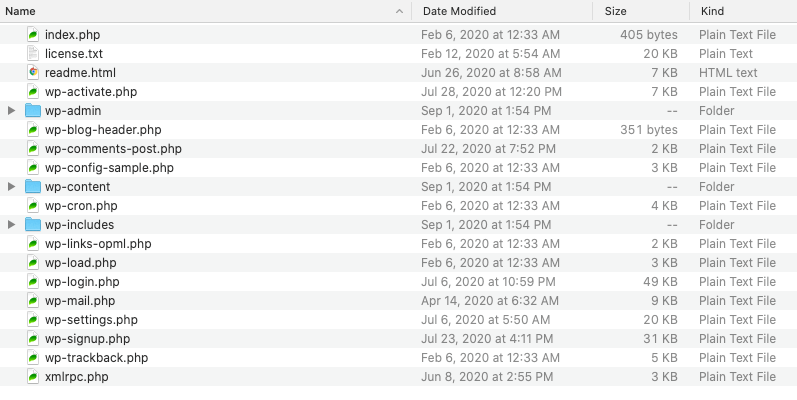
The wp-config.php file is like a key to your website’s lock. It has important information. It connects your website to the database. This file tells WordPress how to behave. Without it, the site won’t work well.
functions.php is like a toolbox. It lets you add new features to your theme. You can add custom codes here. This file helps in personalizing your website.
The wp-content folder stores all your media files. This includes images, videos, and audio. It also has plugins and themes. It’s like a big storage box for your site.
wp-admin is the control room of your website. It lets you manage posts, pages, and comments. This folder gives you tools to control your site.
The wp-includes folder has many important codes. These codes help WordPress run. It is the engine of your WordPress site. Without it, the site will not work.
Role Of Core Files In Website Functionality
WordPress core files are the heart of your website. They make everything work smoothly. These files control the site’s main functions. Without them, your site won’t work right. They help manage content, themes, and plugins. Core files include PHP scripts and CSS styles. They are essential for site design and features. These files handle user data and security. They keep your site safe from hackers. Regular updates ensure your site runs well. They fix bugs and improve security. Core files are like the engine of a car. They make your site run fast and smooth.
Credit: solidwp.com
Updating Core Files
Always keep your WordPress core files updated. Updates often include important fixes. These fixes protect your site from problems. Updates can also bring new features. New features make your site better.
To update, go to the dashboard. Click on the update button. It’s that simple. Make sure you back up your site first. Backups keep your data safe. If something goes wrong, you can restore it.
Remember, updates keep your site secure and functioning well. So, don’t skip them. Keep everything up to date. Your website will thank you.
Common Issues With Core Files
Core files may clash with plugins or themes. This can make websites act strange. Updates to WordPress can cause these issues. Developers must check compatibility. This helps keep everything working smoothly. Always backup your site before updating. This prevents losing important data. Regular checks for compatibility are important. They ensure plugins and themes work well together.
Security risks can come from outdated core files. Hackers look for these weaknesses. Regular updates fix these security gaps. Keeping core files up-to-date is crucial. It helps protect your site from threats. Weak passwords add to security issues. Use strong passwords to keep sites safe. Always monitor security alerts. This helps in identifying potential threats early.
Best Practices For Managing Core Files
Managing WordPress core files helps keep your site safe. Always make a backup before changes. Updates are important. They fix bugs and add new features. Use a trusted source for themes and plugins. This avoids harmful files.
File permissions control access. Set them right to keep files secure. Keep your admin username strong. Avoid easy names like “admin”. Use a strong password. Mix letters, numbers, and symbols. Regularly check for unwanted files. Delete them quickly.
Organize files well. Make folders and name them clearly. This helps in finding files fast. Security plugins can protect files. They alert you about changes. They also block bad users. Following these tips keeps your WordPress safe and running well.
Frequently Asked Questions
What Are WordPress Core Files?
WordPress core files are essential components of the WordPress software. They include the basic code that powers your website. These files handle the site’s functionality, appearance, and security. Core files are updated regularly by WordPress for improved performance and security.
Why Are Core Files Important In WordPress?
Core files are crucial for your site’s operation and security. They ensure your website functions correctly and stays updated with the latest features. Regular updates to these files help protect your site from vulnerabilities and maintain optimal performance.
How To Identify WordPress Core Files?
WordPress core files are located in the root directory of your website. They include folders like wp-admin, wp-includes, and wp-content. These files should not be modified directly to avoid potential issues during updates.
Can I Modify WordPress Core Files?
Modifying WordPress core files is not recommended. Altering these files can lead to functionality issues and security risks. Changes might be overwritten during updates. Instead, use themes or plugins to customize your site without affecting core files.
Conclusion
Understanding WordPress core files is crucial for website success. These files form the backbone of your site. They ensure smooth operation and security. Knowing them helps in troubleshooting and customization. Always keep these files updated. Updates bring new features and fix vulnerabilities.
Backup your site regularly to avoid data loss. A strong grasp of core files boosts your confidence. It empowers you to handle technical challenges. Remember, a well-maintained site keeps visitors happy. It also improves your site’s performance. Stay informed and keep learning about WordPress.
This knowledge will serve you well in the long run.


