
Imagine you’re running a well-oiled website on WordPress, but suddenly you need to change the URL of one of your pages. You might wonder, what happens to your visitors and your hard-earned SEO rankings if they try to access the old link?
This is where understanding a 301 redirect becomes crucial. A 301 redirect is like a helpful guide, ensuring visitors and search engines seamlessly find their way to your new page without getting lost in the digital wilderness. Curious about how this impacts your site and why it’s essential for maintaining your online presence?
Stick around, because by the end of this article, you’ll know exactly how to use 301 redirects to your advantage and keep your website running smoothly.
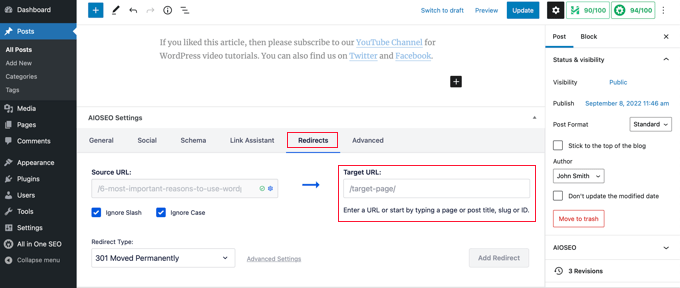
Credit: www.wpbeginner.com
301 Redirect Basics
A 301 redirect is a way to send users to a new page. It tells search engines the page has moved. The old page is no longer available. The new page is the right one. This helps keep site visitors happy. They find the content they seek. Search engines also see the change.
Using a 301 redirect keeps your site healthy. It helps keep your search ranking. Old links still work. Your site keeps its power. This is called link juice. Search engines see the new page as important. Your content stays easy to find. Users stay happy. They find what they need quickly.

Credit: wordpress.org
Setting Up 301 Redirects In WordPress
Plugins make 301 redirects easy. Many free plugins are available. They help manage redirects without code. Redirection is a popular choice. It offers a user-friendly interface. You can set up redirects with a few clicks. This saves time and effort. SEO improves when using plugins. They ensure old links point to new pages. Visitors find what they need. No broken links. Improved user experience.
.htaccess is a file on your server. You can use it for redirects. This method requires some coding skills. Access your server through FTP. Find the .htaccess file in your root directory. Edit the file carefully. Add lines for 301 redirects. Example: Redirect 301 /old-page /new-page. Save changes and upload the file. Check if redirects work. Always back up your file first. Mistakes can break your site.
Common Use Cases
Websites often change their URLs to improve structure. This can help with SEO. A 301 redirect makes sure users find the new page. It also tells search engines the page has moved. This way, users and search engines won’t see an error. It also keeps the site’s ranking intact.
Links sometimes stop working. This can frustrate users. A 301 redirect fixes broken links. It sends users to the correct page. This keeps visitors on your site. It helps search engines too. They see a working link, not a broken one.
Pages get deleted from time to time. This happens for many reasons. A 301 redirect helps here too. It points users to a relevant page. They won’t see a 404 error. Search engines understand the page is gone. But they find another page instead.
Best Practices
A 301 redirect in WordPress guides visitors from an old URL to a new one. It helps maintain SEO rankings by passing the link’s value to the new address. Implementing this ensures a seamless user experience and keeps your site’s search engine visibility intact.
Avoiding Redirect Chains
Redirect chains can confuse users. They also slow down websites. Always aim for a direct path. Avoid linking one redirect to another. Use a single 301 redirect to the final destination. This keeps your site fast and user-friendly.
Monitoring And Testing Redirects
Always test your redirects. Make sure they work correctly. Use tools to check if links go to the right place. This helps in catching errors early. Fixing problems keeps your site healthy. Regular checks ensure everything runs smoothly.
Troubleshooting Issues
A 301 redirect in WordPress is a permanent URL change, guiding visitors to a new web address. This helps maintain search engine rankings by transferring link equity from the old page to the new one. Properly setting up 301 redirects ensures seamless user experience and supports effective website management.
Common Problems
301 redirects can cause confusion if not set up right. A common issue is broken links. Links might not go where they should. Users may see error pages. This can frustrate them. Another problem is redirect loops. Pages may keep redirecting without stopping. This can make a site slow or unusable. Duplicate content is also a concern. It can happen if redirects aren’t correct. Search engines may think there’s more than one version of a page.
Solutions And Tips
Check all redirect links carefully. Make sure they go to the right page. Use tools to find errors. Fix any broken links quickly. Look for redirect loops. Stop them from happening. You can ask for help if you’re stuck. Make sure redirects do not create duplicate pages. This helps with search engine rankings. Always test after setting up a redirect. Ensure everything works smoothly.
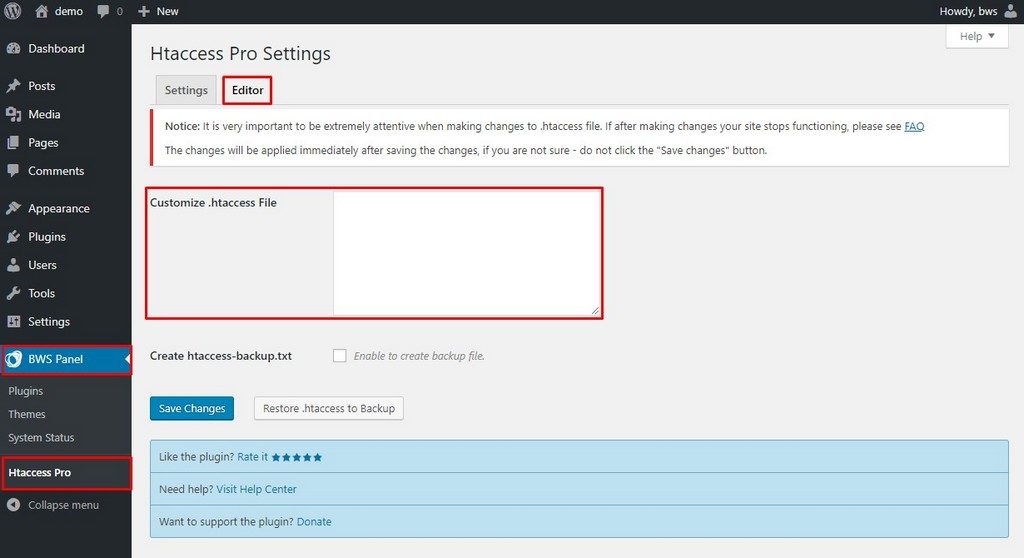
Credit: bestwebsoft.com
Frequently Asked Questions
What Is A 301 Redirect In WordPress?
A 301 redirect in WordPress is a permanent URL redirection. It informs search engines that a page has moved permanently. This helps maintain SEO rankings and provides a seamless user experience. Implementing 301 redirects ensures that visitors and search engines are directed to the new page location.
Why Use 301 Redirects In WordPress?
301 redirects are crucial for maintaining SEO rankings after URL changes. They ensure visitors are directed to the correct page, enhancing user experience. By signaling permanent changes to search engines, 301 redirects prevent broken links and lost traffic, preserving your site’s authority and search engine rankings.
How To Set Up A 301 Redirect In WordPress?
To set up a 301 redirect in WordPress, use a plugin or edit the. htaccess file. Plugins like Redirection simplify the process for beginners. For manual setup, add redirect rules to the. htaccess file. Ensure you test redirects to confirm they work correctly and redirect traffic as intended.
Do 301 Redirects Affect Seo In WordPress?
Yes, 301 redirects impact SEO positively by preserving link equity. They signal search engines to update their index with the new URL. This prevents loss of rankings and ensures users find the right content. Properly implemented 301 redirects maintain your site’s search visibility and user engagement.
Conclusion
Understanding 301 redirects in WordPress is important. They guide users and search engines to new URLs. This improves site navigation and maintains your SEO rankings. Implementing these redirects can prevent broken links. They ensure a seamless experience for your visitors.
Always check your links after setting them up. This helps confirm they work correctly. Use plugins or manual coding for redirects. It depends on your comfort level with WordPress. Regularly monitor your site’s health. This keeps your site functioning optimally.
Proper redirects contribute to a better user experience. They also protect your site’s search engine visibility.


