
Ever felt overwhelmed by the clutter of content on your WordPress site? You’re not alone.
Imagine walking into a library where books are stacked randomly, making it impossible to find what you need. That’s what your website feels like without proper organization. Enter tags—your secret weapon for transforming chaos into order. Tags not only help you categorize your posts but also enhance your site’s navigation, making it a breeze for your readers to find what they’re looking for.
But what exactly is a tag in WordPress, and how can it benefit your website? Stick around, and you’ll discover how this simple tool can elevate your content strategy and keep your audience coming back for more.
WordPress Tags Basics
Tags in WordPress help organize posts. They are like keywords. Tags describe specific topics in a post. This helps readers find content easily. Each post can have many tags. Tags help with search on your site. They make it easier for visitors to find related posts. Tags are different from categories. Categories are broader. Tags are more specific. For example, a post about WordPress can have tags like plugins, themes, and SEO. Using tags makes your site user-friendly. They also help with SEO. Organizing content with tags improves user experience. This makes your site more useful. Always use relevant tags for your posts. Keep them simple and clear. This helps your site stand out.
Purpose Of Tags
Tags help organize your content. They make it easy to find. Users can click on a tag to see related posts. This improves the user experience. Your site looks well-organized. Search engines like organized sites. This might help with SEO.
Tags should be specific. They describe key topics. For example, a food blog might use tags like “pasta” or “dessert”. Use tags that make sense. Do not use too many tags. This can confuse readers. Keep it simple and neat.
Tags Vs Categories
Tags and categories help organize your WordPress site. They make it easy to find content. Tags are specific words. They describe details about a post. Think of them as labels. Categories are broad groups. They cover general topics.
Imagine a library. Tags are like book labels. Categories are like sections. Both help you find what you need. Tags are optional, but useful. They can relate different posts.
Categories are like a big folder. You must choose at least one category. Tags and categories work together. They make your site user-friendly. Easy to navigate.
Credit: make.wordpress.org
Creating Tags
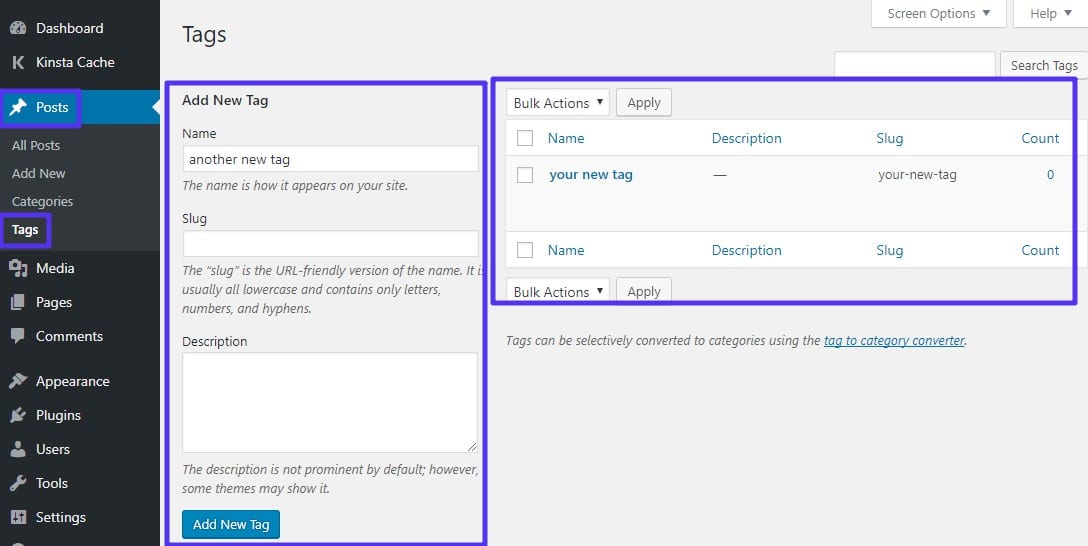
Tags help to organize posts. They are simple to create. First, go to the WordPress dashboard. Then, click on Posts. Next, select Tags. Add a name for your tag. Choose words that describe your post. Tags are like keywords. They make posts easier to find. You can add many tags. But use tags wisely. Too many tags can confuse readers. Tags help with search. They make content easy to locate. Always think before adding a tag. Is it necessary? Does it help the reader? Good tags improve the site.
Managing Tags
Tags help organize your content. They make finding related posts easy. Tags are like labels. You can add many tags to one post. This improves search results. People find your content faster. Always use relevant tags. Avoid tags that do not match the post.
Editing tags is simple. Go to the WordPress dashboard. Click on ‘Posts’ and then ‘Tags’. You see a list of all tags. You can add, edit, or delete tags here. Keep tags short and clear. Long tags confuse readers. Use words that describe the post well.
Tags are different from categories. Categories group posts broadly. Tags give more detail. They show specific topics. Both help in organizing content. Tags are more flexible. Use them wisely to improve your site.

Credit: blog.hubspot.com
Best Practices For Tags
Tags help organize content on your WordPress site. Always use specific tags. Avoid using too many tags. This keeps your site tidy. Use tags that match your post. This makes it easy for readers to find related posts. Always check existing tags before adding new ones. Reusing tags helps with consistency. Never use tags that are not relevant. Irrelevant tags confuse readers. This can also hurt your site’s search ranking. Aim to use a few well-thought-out tags for each post.
Tags should be simple and clear. No long phrases. Short tags are easier to read. They help in better navigation. Always update tags if needed. As your site grows, you might need new tags. Keep your tag list fresh and relevant. This improves user experience. It helps readers find what they want.
Seo Benefits Of Tags
Tags help people find content easily. They act like labels. These labels group similar posts together. This way, users can navigate a website better. For SEO, tags are important. They make a website more organized. Search engines like organized sites. Organized sites rank higher. Higher ranks mean more visibility. Tags also increase user engagement. Users spend more time on sites with tags. This boosts SEO further. Tags are simple but powerful. They improve both user experience and SEO.
Common Mistakes With Tags
People sometimes use too many tags for a single post. This can make the site look cluttered. It’s best to keep tags simple and clear. Tags should relate to the content. Some folks mix categories with tags. Remember, categories are broader. Tags are more specific. Using tags that are too broad is also a mistake. Tags should be more focused. People often forget to update tags. It’s important to keep tags fresh. Outdated tags can confuse readers. Another mistake is not using tags at all. Tags help people find similar content. They improve site navigation. This makes the site user-friendly.
Plugins For Tag Management
Tags help organize content. Plugins make managing tags easy. Tag Manager is one useful plugin. It helps edit and delete tags. Simple Tags offers more features. It suggests tags for your posts. Another tool is WP Tag Manager. It helps you see tag usage. Each plugin has unique features. Choosing the right one is key. Try them and see what works best for you.
Plugins can also help with tag clouds. Tag clouds show popular tags. They help users find content faster. It’s important to keep tags relevant. Too many tags can confuse users. Use plugins to keep tags organized. This helps in improving the site’s structure.
Credit: kinsta.com
Frequently Asked Questions
What Is A Tag In WordPress?
A tag in WordPress is a keyword or term used to categorize posts. Tags help organize content and improve searchability. They are different from categories, offering more specific classifications. Using tags effectively enhances user experience and SEO by making it easier for readers to find related content.
How Do Tags Differ From Categories?
Tags differ from categories in specificity and hierarchy. Categories are broader and hierarchical, organizing posts into general topics. Tags are more specific, offering detailed classifications without hierarchy. Tags complement categories by providing additional context, enhancing content organization and SEO effectiveness, and improving user navigation within the site.
Can Tags Improve Seo On WordPress?
Tags can improve SEO by enhancing content organization and searchability. They help search engines understand the context and relevance of posts. Using relevant tags can boost visibility and user engagement. However, over-tagging can harm SEO, so it’s important to use tags strategically and sparingly for optimal results.
How To Add Tags In WordPress?
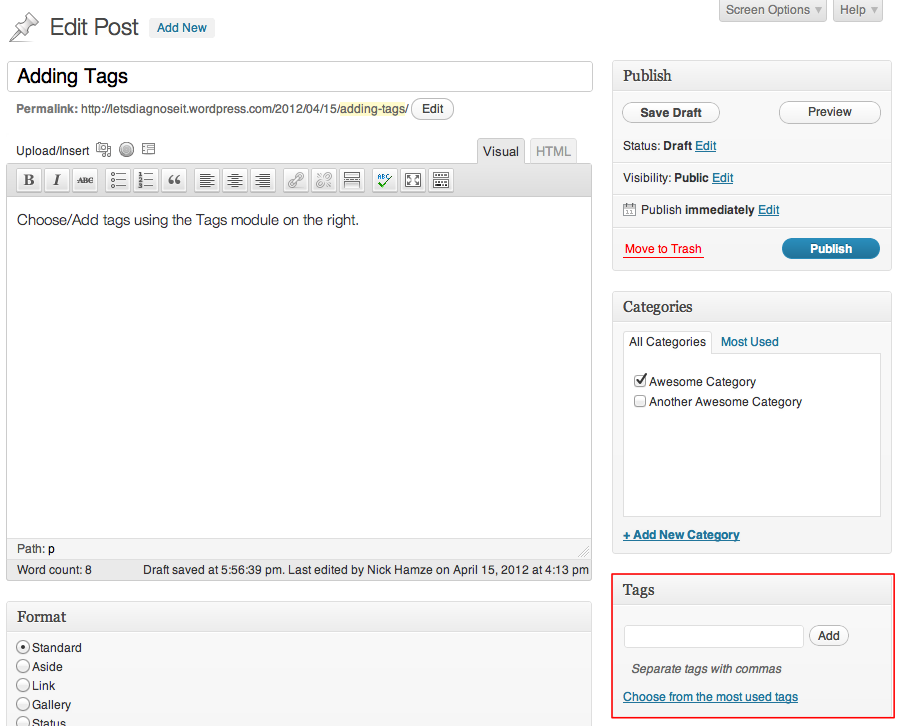
To add tags in WordPress, go to the post editor. On the right, find the ‘Tags’ box. Enter desired tags, separating them with commas. Click ‘Add’ to apply them to the post. Tags can also be added when creating or editing a post, enhancing its organization and searchability.
Conclusion
Tags play a crucial role in WordPress. They help organize your content. Readers find related posts easily. This improves user experience on your site. Tags also aid in SEO. Search engines understand your content better. Choose relevant tags for each post.
Avoid using too many. Keep them specific and clear. This ensures your content stays tidy. Tags, when used wisely, boost engagement. They make navigation smoother for visitors. Start incorporating tags today. See the difference they make. Your WordPress site will benefit greatly.
Happy tagging!


