
Have you ever found yourself overwhelmed by the chaos of blog posts on your WordPress site? Imagine having an organized digital library where every piece of content is neatly categorized, making it easier for your readers to find exactly what they’re looking for.
That’s where WordPress categories come into play. Think of categories as the virtual shelves that help organize your site’s content. They allow you to group related posts together, creating a seamless experience for both you and your audience. When used effectively, categories not only streamline navigation but also enhance user engagement and satisfaction.
But how do you harness the power of categories to their fullest potential? And how can you ensure they’re set up to drive traffic, boost SEO, and keep your readers coming back for more? Dive into this article, and you’ll discover all the secrets to mastering categories in WordPress, transforming your website into a well-organized hub of information that captivates and retains your audience.
Basics Of WordPress Categories
WordPress uses categories to organize posts. They help readers find related content easily. A category is a label for a topic. You can add multiple categories to a post. This makes it easier for users to find what they want. Always think about the main topic of your post. Choose categories that fit well. This helps your site look neat and tidy.
Categories are part of a site’s structure. They help search engines understand your content. Proper use of categories can improve your site’s ranking. This helps more people find your site. Use clear and simple names for categories. This helps users understand them quickly. Avoid making too many categories. This can confuse users.
Importance Of Using Categories
Categories help organize your blog. They group similar posts together. This makes it easy to find related content. Readers love a well-organized site.
Categories improve navigation. With clear labels, users can find what they need faster. This boosts user experience. Happy readers return often.
Categories boost SEO. Search engines like organized sites. They rank them higher. More visibility means more visitors. A good category system can drive traffic.
Categories create focus. Writers stay on topic. This makes the content better. Focused posts attract loyal readers.
Categories allow easy updates. Need to update a post? Find it quickly using categories. Saves time and effort.
Categories make blogs better. They are simple and useful.
Creating A New Category
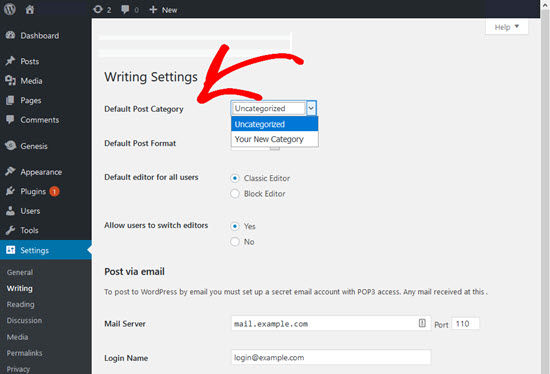
To start, open your WordPress dashboard. Look on the left side of the screen. Find the Posts section. Click on it. A drop-down menu will appear. Select Categories from this menu. The Categories page will now show up. This is where all your categories live. You can see their names and descriptions. This is also where you can add more categories.
On the Categories page, find the Add New Category section. It is usually on the left side. First, type the name of your new category. Use simple words that show what your posts are about. Next, add a slug. This is a short version of your category name. It helps with website links. You can also add a parent category. This makes it a sub-category. Finally, click the Add New Category button. Your new category is now ready.
Credit: www.wpbeginner.com
Managing Existing Categories
Categories in WordPress help organize content by grouping similar posts together. Managing existing categories involves editing, deleting, or renaming them to maintain clarity. This enhances website navigation and improves user experience by making it easier for visitors to find related topics.
Editing Categories
Categories help organize content. You can change a category’s name. Click on ‘Categories’ in the dashboard. Find the category you want. Click ‘Edit’ under the category name. You can change the name, slug, or description. This helps keep your site organized. Save your changes when done. Editing is easy and quick. It improves site navigation. Users find content easily. Ensure categories match your site’s theme.
Deleting Categories
Sometimes categories are not needed. You can delete them easily. Go to ‘Categories’ in the dashboard. Find the category you want to delete. Click ‘Delete’ under the category name. Confirm your choice. Deleted categories can’t be restored. Make sure you want to remove them. Posts in deleted categories move to ‘Uncategorized’. Check your posts after deleting. Keep your site tidy and organized.
Organizing Content With Categories
WordPress uses categories to organize content. They help users find related posts easily. Imagine a library with shelves. Each shelf has books of a similar type. In WordPress, categories work like these shelves. They group posts that share a common theme.
Categories can have subcategories. These are like smaller shelves under a big shelf. For instance, a “Food” category might have subcategories like “Recipes,” “Nutrition,” and “Restaurants.” This creates a hierarchical structure. It helps organize content in levels. Users can navigate from broad topics to specific ones. This makes finding information easier.
Using subcategories is simple. Assign posts to a main category. Then, add them to a subcategory if needed. This helps in organizing content effectively. It creates a clear path for users. They can explore topics in depth.
Best Practices For Category Usage
Organizing content in WordPress involves using categories to group similar posts together. Categories help readers find related topics easily, improving navigation. Implementing best practices ensures your site remains user-friendly and efficient.
Choosing Relevant Categories
Choosing the right categories helps users find content fast. Each category should be clear. Use words that describe the topic well. This helps with search engine rankings. Avoid using too many words for one category. Short and clear names work best. Each post should fit into one main category. This keeps your site organized and easy to use. Users will thank you for it!
Limiting The Number Of Categories
Too many categories can confuse visitors. Keep the list short and simple. Aim for five to ten categories at most. This makes navigation easier for users. It also helps search engines understand your site better. Each category should have many posts. Empty categories are not useful. Consider merging similar categories. This will make your site cleaner and more effective.
Categories Vs Tags
Categories organize your posts broadly. They act like a table of contents. Use them to group related posts. Think of them as the main topics. Tags are more specific. They describe details of a post. Tags are like keywords. They help readers find exact content. Categories are for broad grouping. Tags are for specific details.
Use categories to group posts under main topics. For example, use categories for recipes or travel. Use tags to highlight key points. Tags help readers find specific posts. They add extra info to your posts. Tags are for details like ingredients or destinations. Categories are for main sections.

Credit: wordpress.com
Seo Benefits Of Categories
Categories in WordPress organize content, enhancing user experience and boosting site visibility. They help search engines understand your content better, improving SEO rankings. Properly categorized posts make it easier for users to find relevant information, increasing engagement and reducing bounce rates.
Improving Site Navigation
Categories help users find content quickly. They organize posts into groups. This makes your site easy to browse. Users spend more time on sites with good navigation. More time on site can improve SEO. Search engines value user experience. Easy navigation shows site value. It’s good for SEO.
Enhancing User Experience
Categories improve user experience. They guide users to what they want. Users enjoy sites that are easy to use. Happy users return often. Returning users boost your site’s reputation. Search engines notice this. Good user experience is key for SEO. Users love simple, clear category labels. They click more links when labels are easy to understand. This boosts site activity. More activity can improve your site’s rank.
Common Mistakes To Avoid
Too many categories can confuse readers. It also makes your site look cluttered. Each post should fit into a single category. This keeps your site tidy. It helps users find content easily. Keep categories simple and clear. Use them like book chapters. Less is more. Always aim for clarity over complexity.
Descriptions help users understand what a category is about. They give context. Without them, users might get lost. Always fill in your category descriptions. Use simple words. Make them short and clear. This helps with search engines too. It tells Google what your site is about. Descriptions are a small step with a big impact.
Credit: www.wpbeginner.com
Frequently Asked Questions
What Is A Category In WordPress?
A category in WordPress is a method to group related posts. It helps organize content to improve user navigation. Categories make it easier for visitors to find related topics. They can also enhance SEO by structuring the site content logically.
How Do I Create A Category In WordPress?
To create a category, navigate to the WordPress dashboard. Go to “Posts” and then “Categories. ” Enter your desired category name and slug. Click “Add New Category” to create it. You can now assign this category to your posts.
Why Are Categories Important For Seo?
Categories help search engines understand your site’s content structure. They improve user experience by making navigation intuitive. A well-organized site can lead to better indexing and higher rankings. This ultimately enhances your site’s SEO performance.
Can I Assign Multiple Categories To A Post?
Yes, you can assign multiple categories to a single post. This allows for greater flexibility in content organization. Assigning multiple categories helps users find related content easily. However, ensure categories are relevant to avoid confusion.
Conclusion
Understanding categories in WordPress can simplify your website management. They help organize content for easy navigation. Visitors find related posts quickly, enhancing user experience. Proper categorization improves SEO, boosting search rankings. It’s essential for creating a logical website structure. Think about your audience when choosing categories.
Keep them broad yet specific enough to cover your topics. Avoid too many categories to prevent confusion. Regularly review and update them as your content grows. Effective use of categories supports a seamless, user-friendly website. Start categorizing today for a more organized and efficient WordPress site.


